Best AI Workflow Tools for Law Firms (2026)


The legal industry is developing faster than ever. AI workflow for legal professionals is no longer just a trend—it’s a necessity. Law firms are using AI to streamline operations, automate repetitive tasks, enhance legal research, and improve client outcomes. From document review to case management and contract analysis, AI tools are reshaping how attorneys work.
In this guide, we’ll explore the 7 best AI workflow tools for law firms in 2026, their features, pros and cons, and how to choose the right tool for your firm. As AI adoption grows across industries, many firms are also exploring broader AI workflow automation tools for businesses to streamline operations beyond legal tasks.
Table of Contents
Why Law Firms Need AI Workflow Tools
Legal professionals face intense workloads. Drafting contracts, reviewing documents, and conducting case research can take hours—or even days. AI-powered legal software automates these tasks, allowing attorneys to focus on strategic decision-making.
Benefits of using AI workflow tools in law firms include:
- Faster legal research: AI scans thousands of cases in minutes, saving time.
- Document automation: Draft contracts, agreements, and pleadings faster with AI.
- Task management: Track deadlines, tasks, and client communication in one place.
- Risk mitigation: AI flags inconsistencies, risks, and compliance issues.
- Client insights: Predictive analytics for case outcomes and billing efficiency.
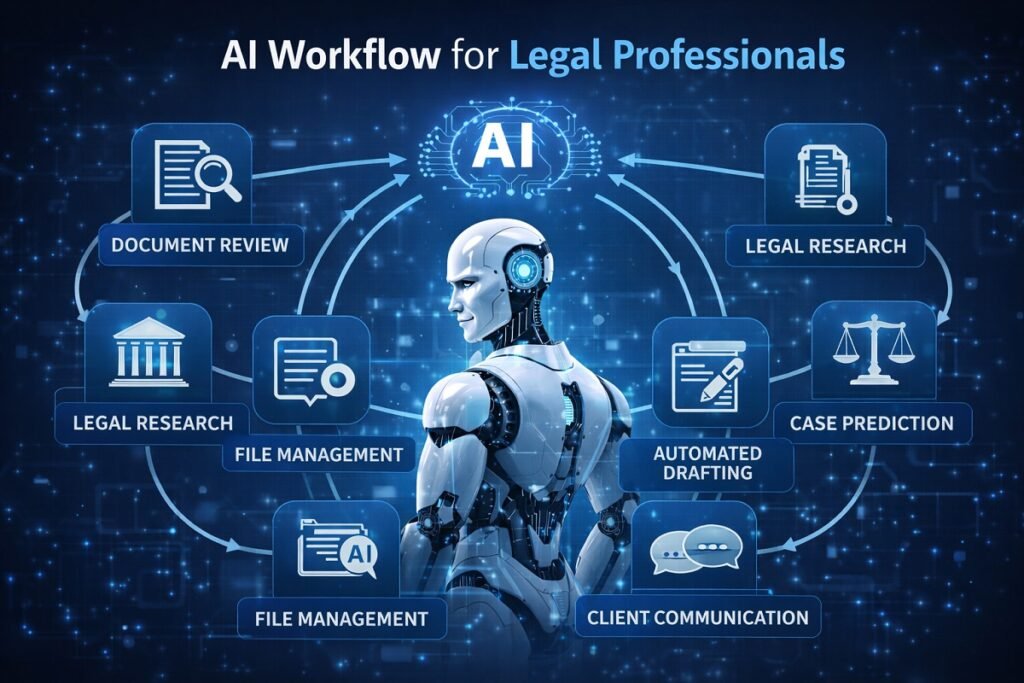
AI Workflow Automation for Law Firms: Common Use Cases
Modern legal practices are moving beyond standalone AI research tools and adopting AI workflow automation for law firms that connects research, document drafting, contract management, billing, and client communication into one streamlined process. Instead of automating a single task, these solutions help firms build repeatable legal workflow automation systems that reduce manual work, improve consistency, and free attorneys to focus on higher-value legal strategy.
Whether you’re a solo attorney or part of a large corporate legal department, the right workflow management software for law firms can automate everyday operations while improving accuracy, compliance, and client service.
Contract Review Workflow
Contract review is one of the most time-consuming legal processes. AI-powered legal document workflow platforms can automatically scan contracts, extract key clauses, identify missing provisions, and highlight potential legal risks before an attorney begins the review.
A typical AI-powered contract review workflow includes:
- Importing contracts from document management systems or cloud storage
- Automatically extracting clauses, obligations, renewal dates, and key terms
- Flagging unusual language or compliance risks
- Comparing contracts against approved templates or company policies
- Routing documents to the appropriate attorney for final review and approval
Automating contract review helps legal teams reduce manual work, standardize review processes, and speed up approvals while keeping attorneys in control of final legal decisions.
Legal Research Workflow
Legal research often requires reviewing thousands of cases, statutes, and legal opinions. AI dramatically shortens this process by understanding natural language questions and surfacing the most relevant authorities within seconds.
A streamlined legal research workflow typically includes:
- Searching legal databases using conversational language
- Generating AI summaries of relevant cases
- Recommending supporting precedents and citations
- Organizing research into case folders
- Exporting findings directly into legal briefs
This type of legal workflow automation helps attorneys spend less time searching for information and more time developing stronger legal arguments.
Client Intake Automation
Client intake is another repetitive process that benefits significantly from automation. Rather than collecting information manually through emails and phone calls, firms can use AI to guide potential clients through structured digital questionnaires.
An automated intake workflow may include:
- AI chatbots answering common legal questions
- Online intake forms that collect case details
- Automatic conflict checks
- Appointment scheduling
- Client document requests
- CRM updates and matter creation
Automating these early-stage administrative tasks improves response times while creating a smoother experience for prospective clients.
Firms that handle a high volume of consultations can combine automated intake with AI SDR services to qualify potential clients, schedule meetings, and reduce manual follow-up before an attorney becomes involved. Connecting intake forms with a best no-code CRM also allows legal teams to automatically organize leads, track communications, and streamline client management without complex software development.
Billing & Invoicing Workflow
Administrative work can consume valuable attorney time. Modern legal automation software helps firms automate billing by tracking work performed throughout the day and generating invoices with minimal manual effort.
AI-assisted billing workflows can:
- Capture billable time automatically
- Categorize legal activities
- Generate invoices based on firm billing rules
- Send payment reminders
- Track outstanding balances
- Produce financial reports for firm management
Reducing manual billing errors helps improve cash flow while allowing attorneys to focus on client work rather than administrative tasks. Although designed for sales organizations, many sales workflow templates include approval, follow-up, and billing processes that can be adapted for legal operations and client management.
Compliance & Risk Management Workflow
Maintaining compliance across thousands of legal documents can be difficult without automation. AI continuously reviews contracts, policies, and internal documents to identify potential compliance issues before they become legal problems.
Typical compliance workflows include:
- Continuous contract monitoring
- Regulatory change alerts
- Automated policy verification
- Risk scoring for legal documents
- Approval routing for high-risk contracts
- Audit-ready reporting
These capabilities make legal operations automation especially valuable for enterprise legal teams managing complex regulatory requirements.
Litigation Workflow Automation
AI can automate routine litigation tasks such as organizing case files, managing discovery documents, tracking court deadlines, and improving access to legal materials. By reducing repetitive administrative work, attorneys can spend more time on legal analysis, client communication, and case strategy.
Why AI Workflow Automation Matters for Modern Law Firms
Implementing AI workflow automation for law firms isn’t about replacing attorneys—it’s about eliminating repetitive administrative work that slows legal teams down. From contract review and legal research to billing, compliance, and litigation support, modern workflow management software for law firms allows legal professionals to build standardized processes that improve productivity, reduce operational costs, and deliver faster service to clients.
As AI capabilities continue to evolve, firms that invest in integrated legal workflow automation will be better positioned to scale operations, improve client satisfaction, and maintain a competitive advantage in an increasingly technology-driven legal industry.
AI Workflow Tools Comparison Table
| Tool | Best For | AI Features | Integration | Budget |
| Luminance | Contract review | Clause extraction, risk detection | Doc mgmt systems | $$$ |
| ROSS Intelligence | Legal research | NLP search, case summaries | Legal DBs | $$ |
| Casetext | Brief drafting | CARA AI, citation checks | Doc mgmt | $$ |
| Kira Systems | Due diligence | Clause extraction, risk analysis | Doc mgmt | $$$ |
| LawGeex | Standard contracts | Policy compliance, workflow | Cloud storage | $$ |
| Evisort | Contract lifecycle | Analytics, risk detection | CRM, Doc mgmt | $$$ |
| DoNotPay | Client tasks | Automated letters, chatbot | Web | $ |
Many enterprise legal platforms such as Evisort and Kira Systems are increasingly integrating advanced analytics capabilities. These trends align closely with broader enterprise systems using AI predictive analytics for B2B decision-making, helping firms forecast contract risks, case outcomes, and operational efficiency.
“If you’re still deciding which platform fits your firm’s needs, our guide to the AI workflow tools we recommend compares popular automation platforms based on ease of use, integrations, scalability, and real-world business workflows.”
Best Workflow Automation Software for Legal Departments
Every legal department has different priorities. Some firms spend most of their time reviewing contracts, while others focus on litigation, compliance, or legal research. Rather than choosing the platform with the most features, it’s better to select software that aligns with your firm’s primary workflow.
Quick Tool Recommendation by Workflow
Workflow | Best Tool |
Contract Review | Luminance |
Contract Analytics | Evisort |
Litigation | Casetext |
Legal Research | ROSS Intelligence |
Due Diligence | Kira Systems |
Client Intake | DoNotPay |
Enterprise Workflow | Evisort |
Compliance | LawGeex |
The table above provides a quick starting point. The right choice depends on your firm’s practice area, workload, and operational priorities.
Best for Enterprise Legal Departments
Large legal teams often manage thousands of contracts, multiple stakeholders, and complex approval processes. Enterprise-focused platforms should provide centralized document management, scalable workflow automation, analytics, and integrations with existing business systems.
Best for Contract Management
Firms that regularly manage commercial agreements, vendor contracts, or procurement workflows should prioritize platforms built for contract lifecycle management rather than standalone document review. The best choice depends on contract volume, collaboration requirements, and long-term operational goals.
Best for Legal Research
Research-intensive firms should prioritize AI tools that help attorneys locate relevant case law, analyze citations, organize research, and improve drafting efficiency.
Best for Compliance
Law firms working in regulated industries should look for platforms that support policy enforcement, audit readiness, approval workflows, and regulatory compliance.
Best Value for Growing Firms
Small and mid-sized firms often achieve the best return on investment by selecting software that balances automation, ease of use, scalability, and affordable pricing rather than enterprise-level complexity.
What to Consider Before Choosing
Before investing in any AI workflow platform, evaluate:
- Your firm’s primary legal workflows
- Team size and expected growth
- Integration with existing legal software
- Data security and compliance requirements
- Ease of implementation
- Vendor support and onboarding
- Overall return on investment
Selecting software that fits your firm’s daily operations will generally deliver better long-term value than simply choosing the platform with the largest feature set.
Best AI Contract Analytics Software for Legal Teams
Contract review helps attorneys evaluate individual agreements before they are signed. AI contract analytics software takes this a step further by helping legal teams analyze, organize, and monitor entire contract portfolios throughout the contract lifecycle.
Instead of manually searching through hundreds or thousands of agreements, AI enables legal professionals to quickly locate important information, identify trends, and gain greater visibility into contractual obligations. This is particularly valuable for organizations managing high contract volumes across multiple departments or business units.
What Is AI Contract Analytics?
AI contract analytics uses machine learning and natural language processing (NLP) to transform unstructured legal documents into searchable, structured information. Rather than reviewing one agreement at a time, legal teams can analyze an entire contract database to improve operational efficiency and support better decision-making.
Contract analytics is commonly used to:
- Search large contract repositories instantly
- Monitor active agreements throughout their lifecycle
- Improve visibility into contractual obligations
- Support compliance and audit preparation
- Generate reports for legal operations and business stakeholders
The goal is not to replace legal review, but to make contract data easier to manage and use across the organization.
Contract Review vs. Contract Analytics
Although these terms are often used together, they serve different purposes.
Contract Review | Contract Analytics |
Evaluates individual agreements before approval | Analyzes large collections of contracts after execution |
Supports drafting and negotiation | Supports contract management and legal operations |
Focuses on legal accuracy and revisions | Focuses on visibility, reporting, and portfolio management |
Primarily used by attorneys | Used by legal, procurement, compliance, and operations teams |
Many organizations begin with AI-assisted contract review and later expand into contract analytics as their contract volume and operational complexity increase.
Who Benefits Most from Contract Analytics?
AI contract analytics delivers the greatest value for organizations that manage large numbers of agreements or operate in highly regulated industries.
It is particularly beneficial for:
- Corporate legal departments
- Enterprise legal operations teams
- Mergers and acquisitions (M&A)
- Procurement and vendor management
- Commercial contract management
- Compliance and governance teams
- Financial services and healthcare organizations
Smaller firms with limited contract volumes may only need AI-assisted contract review, while enterprise legal teams often benefit from continuous contract analytics and lifecycle visibility.
Leading AI Platforms for Contract Analytics
Platform | Best Use Case |
Evisort | Enterprise contract lifecycle management and portfolio visibility |
Kira Systems | Due diligence and large-scale contract intelligence |
Luminance | High-volume contract review and document intelligence |
Each platform approaches contract analytics differently. The right choice depends on whether your priority is enterprise contract management, transaction support, or improving visibility across large contract portfolios.
Is Contract Analytics Right for Your Firm?
If your legal team spends significant time searching for contracts, tracking obligations, preparing for audits, or managing thousands of agreements, AI contract analytics can improve efficiency and provide greater visibility across your contract portfolio.
For firms with lower contract volumes, AI-assisted contract review may be sufficient. As organizations grow, contract analytics becomes increasingly valuable for improving legal operations, reducing administrative effort, and supporting faster business decisions.
Best AI Workflow Tools for Different Types of Law Firms
Different law firms have very different operational needs. A corporate legal department does not use AI the same way a small litigation firm does. Below is a practical breakdown to help match the right tools to the right environment.
🏢 Large Corporate Law Firms
These firms deal with high-volume contracts, compliance, and enterprise clients.
Best Tools:
- Evisort – for full contract lifecycle management
- Kira Systems – for large-scale due diligence
- Luminance – for enterprise contract analysis
Why: They require scalability, compliance tracking, and deep document intelligence across thousands of files.
⚖️ Litigation-Focused Law Firms
These firms depend heavily on legal research, case law, and argument building.
Best Tools:
- Casetext – AI-assisted brief drafting and citation analysis
- ROSS Intelligence – natural language legal research
Why: Speed and accuracy in case law discovery directly impact litigation outcomes.
📄 Contract-Heavy Legal Practices
These include firms handling NDAs, vendor agreements, and employment contracts.
Best Tools:
- LawGeex – automated contract approval
- Luminance – clause detection and risk analysis
Why: Their workflow is repetitive, rule-based, and highly automatable.
👨💼 Solo Lawyers & Small Law Firms
These firms need cost-effective automation without complex setup.
Best Tools:
- DoNotPay – client automation and legal assistance
- Casetext – affordable research and drafting support
Why: They prioritize affordability, simplicity, and time savings over enterprise features.
Best AI Workflow Tools for High-Volume Litigation
Litigation generates enormous amounts of information. A single case can involve thousands of pages of pleadings, discovery documents, witness statements, emails, contracts, and court filings. As caseloads increase, manually managing this information becomes one of the biggest productivity challenges for litigation teams.
Modern AI workflow tools for high-volume litigation help organize complex legal data, automate repetitive tasks, and make critical case information easier to locate. Rather than replacing attorneys, these tools reduce administrative work so legal teams can focus on case strategy, negotiations, and courtroom preparation.
Streamlining Discovery Workflows
Electronic discovery (eDiscovery) is often one of the most resource-intensive phases of litigation. AI can rapidly process large collections of documents by identifying relevant materials, removing duplicates, and prioritizing files that require attorney review.
Instead of manually sorting thousands of records, legal teams can focus on reviewing the documents most likely to impact the case, reducing both review time and litigation costs.
Faster Document Review
Document review remains essential in complex litigation, but AI significantly improves efficiency by organizing files based on subject matter, legal relevance, and document type.
Common examples include:
- Contracts and agreements
- Email correspondence
- Internal policies
- Financial records
- Court filings
- Expert reports
By automatically organizing large document collections, attorneys can spend less time searching for information and more time analyzing legal issues.
Better Evidence Organization
Managing evidence from multiple sources can quickly become overwhelming during lengthy litigation. AI-powered workflow platforms help legal teams create a centralized repository where evidence is categorized, searchable, and linked to specific matters.
This improves collaboration by allowing attorneys, paralegals, and litigation support staff to access the same organized case materials without relying on manual filing systems.
AI-Assisted Deposition Summaries
Depositions often produce hundreds of pages of testimony that must be reviewed before hearings, negotiations, or trial preparation.
AI can assist by generating concise summaries that highlight:
- Key witness statements
- Frequently discussed topics
- Important dates and events
- Potential inconsistencies
- Action items for follow-up
These summaries help legal teams quickly revisit lengthy testimony while preserving the context needed for strategic decision-making.
Accelerating Litigation Research
Successful litigation depends on timely access to relevant legal authorities. AI-powered research workflows help attorneys locate supporting cases, statutes, and legal commentary more efficiently by analyzing the context of legal questions instead of relying solely on keyword searches.
This enables litigation teams to spend more time developing legal arguments and less time navigating extensive legal databases.
Which AI Tools Support Litigation Workflows?
Different platforms contribute to litigation workflows in different ways.
Tool | Best Litigation Use Case |
Casetext | AI-assisted legal research, brief analysis, and citation recommendations. |
ROSS Intelligence | Natural language case law research and precedent discovery. |
Luminance | Reviewing large volumes of contracts and evidence during complex disputes. |
Kira Systems | Analyzing legal documents during investigations, due diligence, and document-intensive litigation. |
The right platform depends on the nature of your litigation practice. Firms handling commercial disputes, regulatory investigations, or large-scale discovery projects often benefit from combining research-focused tools with AI-powered document analysis to create a more efficient litigation workflow.
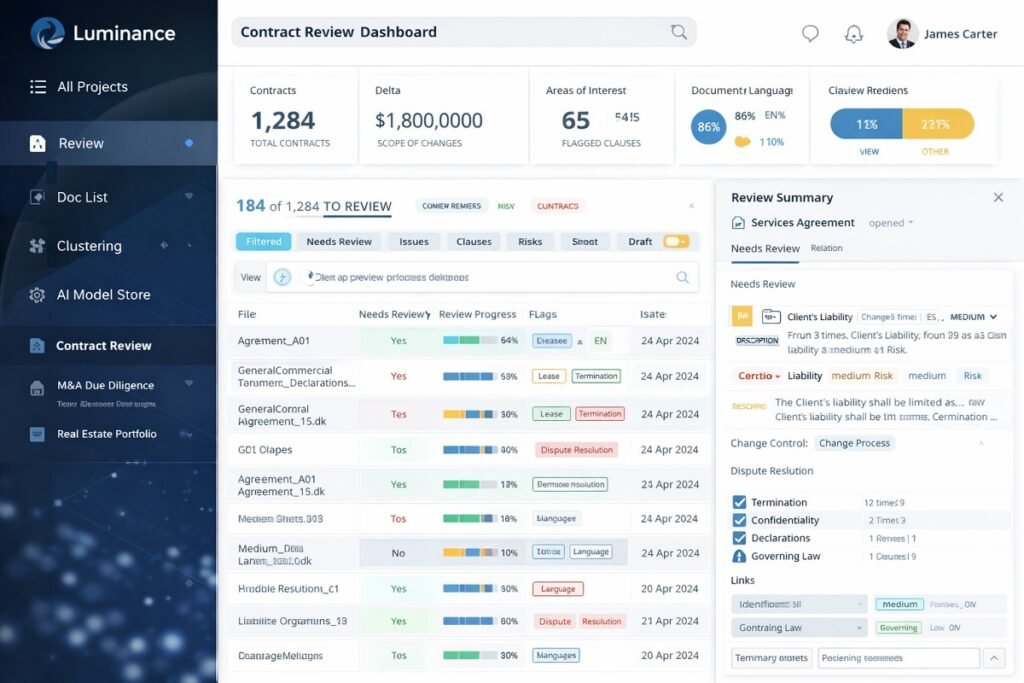
1. Luminance – AI-Powered Contract Analysis (Best for Contract Review Automation)
Luminance is a powerful AI tool designed to automate contract analysis and review. It uses machine learning to scan, understand, and categorize documents, highlighting anomalies and potential risks. For law firms handling large volumes of contracts, Luminance significantly reduces manual workload.
The platform’s AI can learn a firm’s review style, adapting over time to provide more accurate insights. Beyond contract review, Luminance also provides dashboards to track progress, identify bottlenecks, and measure risk exposure. Law firms report that they can review hundreds of documents in a fraction of the time it would take manually.
These capabilities align closely with modern PIM software for AI workflow automation, which helps firms manage structured data and documents more efficiently.
Key Features:
- AI-driven contract analysis for large document sets
- Automated risk detection and clause categorization
- Summarization of key clauses
- Integration with document management systems
- Multilingual document support
Pros:
- Reduces time for large-scale contract reviews
- Minimizes human error
- Highly customizable AI models
Cons:
- High subscription cost
- Requires onboarding and training for optimal use

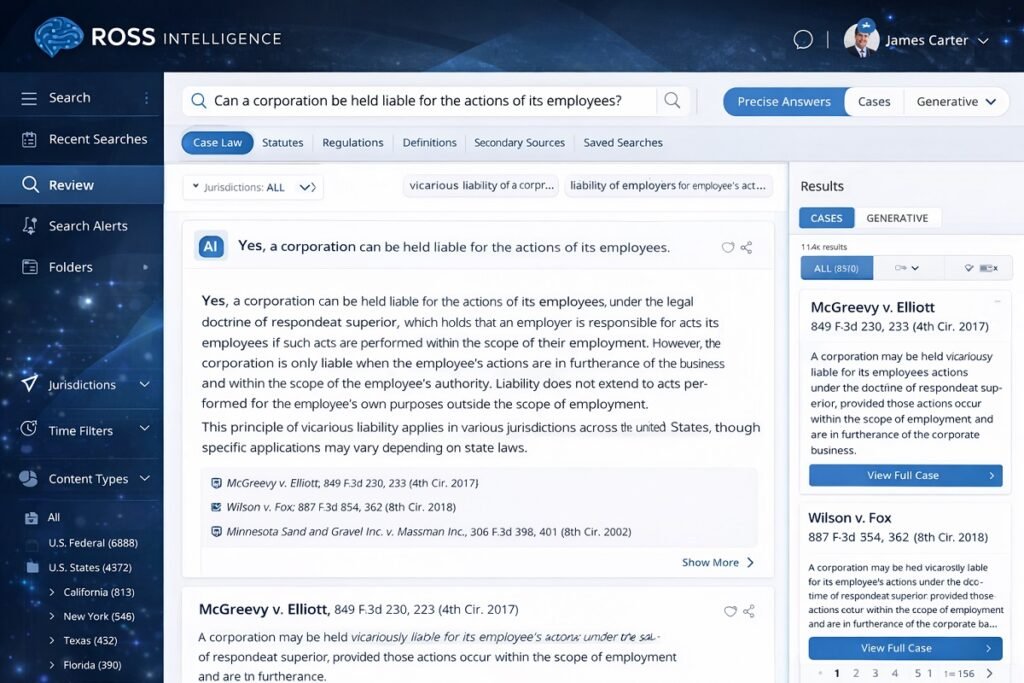
2. ROSS Intelligence – AI Legal Research (Best for Case Law Research)
ROSS Intelligence is built for law firms that need fast, accurate legal research. Using natural language processing, attorneys can ask complex questions and get relevant case law, statutes, and legal commentary in seconds.
What sets ROSS apart is its ability to provide context-aware suggestions, helping attorneys identify precedents and citations more efficiently. It also integrates with case management tools, making research workflows seamless. Law firms with large litigation practices find ROSS particularly valuable for reducing research hours while improving the quality of legal briefs.
Key Features:
- Natural language search for case law and statutes
- AI-generated summaries of relevant cases
- Citation tracking and analysis
- Workflow automation for research tasks
- Integration with legal databases
Pros:
- Accelerates legal research
- Improves case accuracy and argument strength
- Saves attorney time
Cons:
- Limited coverage in some jurisdictions
- Subscription cost can be high for small firms
3. Casetext – AI for Litigation and Brief Analysis (Best for Legal Brief Drafting)
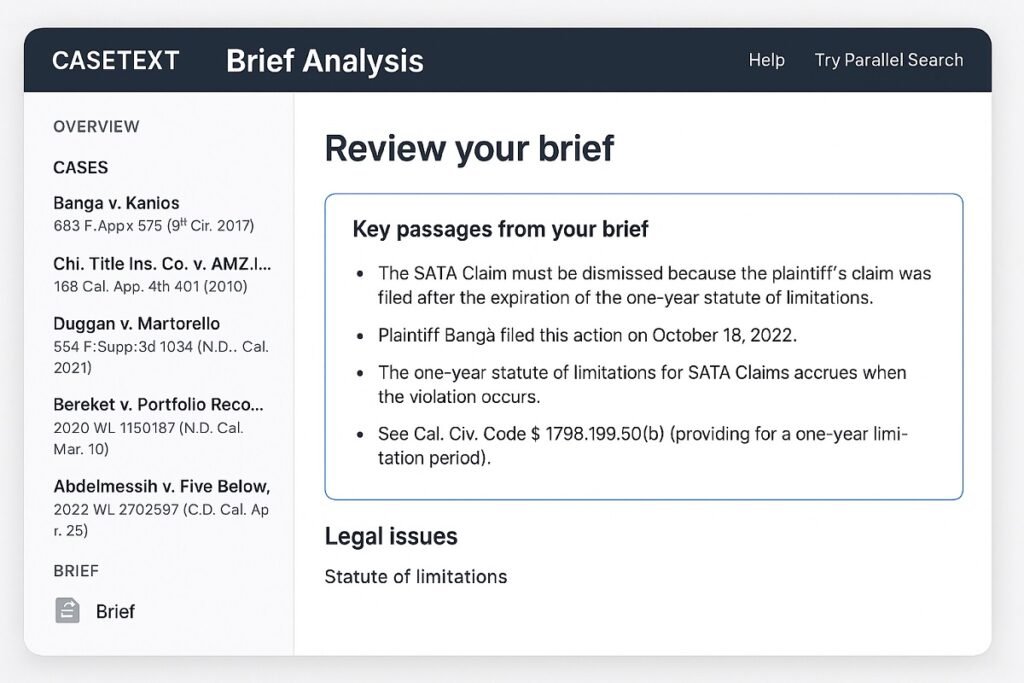
Casetext helps law firms with litigation support, brief drafting, and legal research. Its AI-powered CARA system analyzes legal briefs and recommends supporting cases, improving argument quality.
Casetext also performs citation verification, ensuring your briefs meet professional standards. Collaboration features allow multiple attorneys to work on briefs simultaneously, streamlining team workflows. With Casetext, law firms can reduce research time, avoid missed citations, and focus on strategy rather than manual tasks.
Key Features:
- CARA AI for brief analysis and argument recommendations
- Automated citation checks
- AI-based case prediction
- Collaboration tools for legal teams
- Integration with document management systems
Pros:
- Speeds up brief drafting and research
- Ensures citation accuracy
- Supports collaborative legal workflows
Cons:
- Learning curve for new users
- Limited offline capabilities
Best Casetext Alternatives for Law Firms
Casetext is a well-known platform for AI-assisted legal research and brief analysis, but it isn’t the ideal solution for every law firm. Some organizations require enterprise contract management, while others prioritize international legal research, compliance, or large-scale document analysis.
If your firm’s needs extend beyond litigation research, the following alternatives may be a better fit depending on your workflow and practice area.
| Tool | Better For | Ideal Users |
|---|---|---|
| Luminance | Contract review and document intelligence | Corporate law firms, M&A teams, due diligence |
| Harvey AI | Enterprise legal workflows and generative AI | Large firms and in-house legal departments |
| CoCounsel | AI-assisted legal research and task automation | Litigation teams and legal professionals |
| vLex | Global legal research | Firms working across multiple jurisdictions |
| Lexis+ AI | Enterprise legal research and drafting | Large firms handling complex legal matters |
When Should You Consider a Casetext Alternative?
Choosing a different platform makes sense when your legal team requires capabilities that extend beyond AI-assisted brief drafting and case law research.
You may benefit from an alternative if your firm needs:
Enterprise-scale contract management
AI-powered document analysis
Multi-jurisdiction legal research
Advanced compliance workflows
Integrated legal operations across multiple departments
Generative AI for drafting and knowledge management
The best platform depends on the type of legal work your firm performs most frequently rather than simply selecting the software with the largest feature list.
Which Alternative Fits Your Practice?
Different legal practices have different priorities.
Choose Luminance if…
Your team spends significant time reviewing commercial contracts, conducting due diligence, or identifying legal risks across large document collections.
Choose Harvey AI if…
Your organization is adopting generative AI across multiple legal workflows, including drafting, knowledge retrieval, and enterprise legal operations.
Choose CoCounsel if…
You want AI assistance with legal research, document review, and routine legal tasks while maintaining attorney oversight.
Choose vLex if…
Your practice regularly handles international matters and requires access to legal authorities from multiple jurisdictions.
Choose Lexis+ AI if…
Your firm relies heavily on comprehensive legal research, drafting assistance, and enterprise-grade legal intelligence for complex matters.
Selecting the Right Platform
Rather than searching for a direct replacement, evaluate which platform aligns best with your firm’s workflow, client base, and long-term technology strategy.
Consider factors such as:
Primary legal practice area
Research versus contract-heavy workloads
Integration with existing legal software
Security and compliance requirements
Team size and expected growth
Ease of implementation and user adoption
For many firms, the best Casetext alternative is simply the platform that removes the most manual work while fitting naturally into existing legal workflows.
4. Kira Systems – AI Contract & Document Review (Best for Due Diligence)
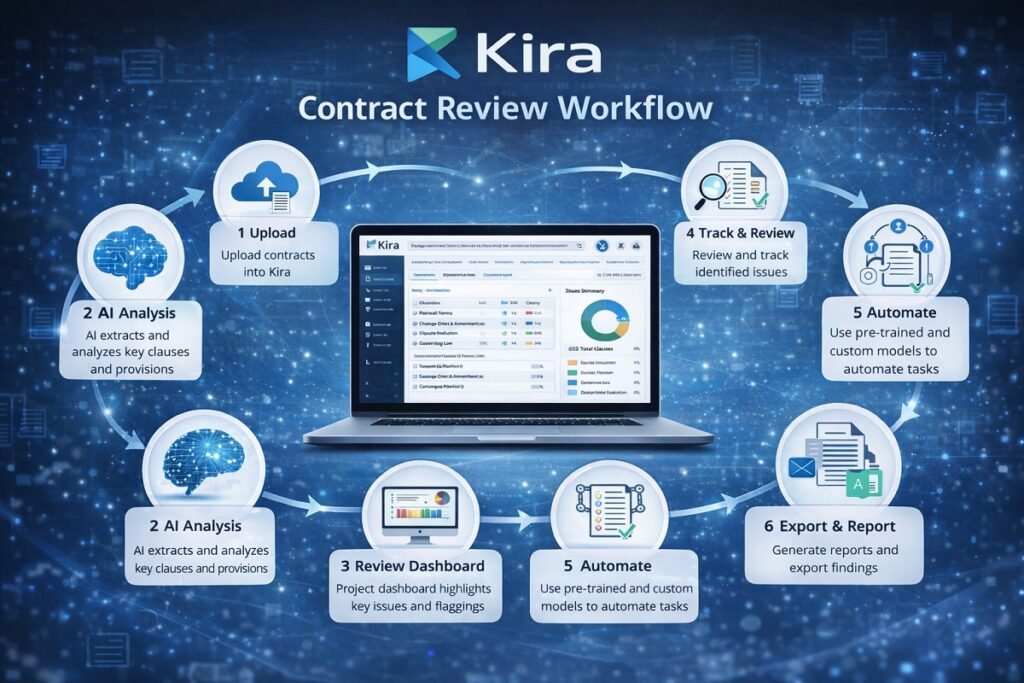
Kira Systems specializes in AI-assisted contract review and due diligence. Its platform identifies, extracts, and categorizes critical clauses from large volumes of documents. This makes it ideal for law firms managing mergers, acquisitions, or compliance audits.
Kira’s AI can be trained on firm-specific document patterns, improving accuracy over time. Advanced analytics dashboards allow attorneys to track review progress, detect bottlenecks, and make data-driven decisions. Many large firms report that Kira reduces contract review times by over 50%.
Key Features:
- Machine learning-based document review
- Clause extraction and categorization
- Risk and compliance detection
- Collaboration tools for legal teams
- Analytics dashboards
Pros:
- Highly accurate AI for complex contracts
- Saves hours on due diligence
- Reduces human error
Cons:
- High costs for small firms
- Requires training for optimal performance
5. LawGeex – AI Contract Review & Approval (Best for Automation of Standard Contracts)
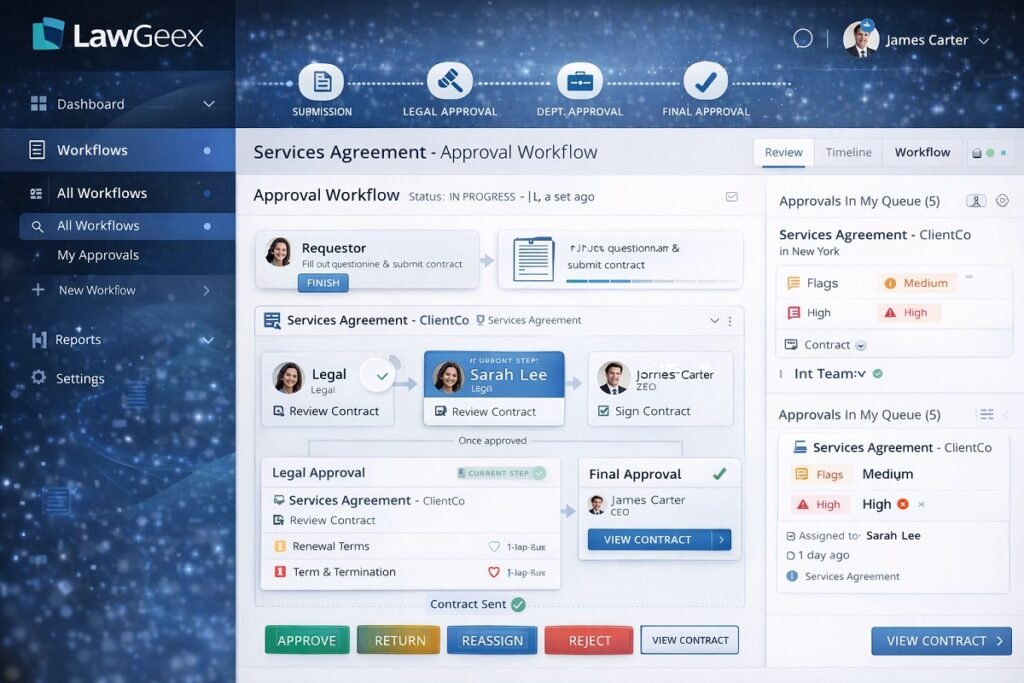
LawGeex automates standard contract review and approval, allowing attorneys to focus on higher-value tasks. Its AI compares contracts against predefined legal policies, flagging deviations and ensuring compliance.
LawGeex works well for firms handling repetitive contract types, such as NDAs, vendor agreements, or employment contracts. Its intuitive interface allows non-technical staff to manage approvals efficiently to reduce bottlenecks in legal workflows.
Key Features:
- AI-powered contract review and approval
- Policy compliance checks
- Workflow automation
- Cloud integration
- Customizable AI rules
Pros:
- Speeds up routine contract tasks
- Ensures policy compliance
- Easy to use for non-technical staff
Cons:
- Limited to standard contracts
- Customization setup may require assistance
6. Evisort – AI Contract Lifecycle Management (Best for Enterprise Legal Teams)
Evisort focuses on contract lifecycle management, automating creation, review, and renewal processes. Its AI provides clause extraction, risk detection, and actionable analytics, which gives law firms insights into contracts and obligations.
Evisort’s dashboards help legal teams track contracts from draft to execution, improving operational efficiency. Integration with CRM and document management systems allows smooth data flow. Large firms use Evisort to reduce administrative overhead and improve visibility into contract obligations.
Similar automation strategies are also being adopted in other industries, such as AI automation for real estate, where contract lifecycle management plays a critical role.
Key Features:
- Contract creation, tracking, and renewal automation
- AI-powered clause extraction and risk detection
- Analytics dashboards for insights
- CRM and document system integration
- Collaboration tools
Pros:
- Simplifies contract lifecycle management
- Reduces administrative burden
- Provides actionable insights
Cons:
- Higher subscription costs
- Complex implementation for smaller firms
7. DoNotPay – AI Legal Assistant (Best for Client-Facing Automation)
DoNotPay acts as an AI legal assistant for clients, automating tasks like drafting letters, filing small claims, and managing consumer rights. Although it doesn’t replace professional legal advice, it can handle repetitive tasks efficiently.
Law firms can use DoNotPay to enhance client services, reduce low-value tasks, and improve accessibility. Its AI chatbot interface allows clients to complete routine legal tasks without attorney intervention, saving time for both parties.
Key Features:
- Automated legal documents
- AI chatbot for client queries
- Payment dispute automation
- Subscription and billing management
- Guided legal assistance
Pros:
- Improves client experience
- Reduces attorney workload for simple tasks
- Low-cost automation option
Cons:
- Limited to simple legal tasks
- Jurisdiction coverage may vary
Best AI Workflow Tools for High-Volume Litigation
Large litigation matters can involve millions of pages of emails, contracts, court filings, witness statements, and other case documents. Reviewing and organizing this information manually is time-consuming and increases the risk of overlooking critical evidence. Modern AI workflow tools help litigation teams manage these complex cases more efficiently by automating document-intensive tasks while keeping attorneys in control of legal strategy and decision-making.
Streamlining eDiscovery
Electronic discovery (eDiscovery) is one of the most demanding stages of litigation. AI dramatically reduces the time required to review large datasets by automatically identifying documents that are likely to be relevant to a case.
Modern AI-assisted eDiscovery can help legal teams:
- Filter millions of documents in a fraction of the time required for manual review
- Detect duplicate or near-duplicate files
- Rank documents by relevance
- Assist with privilege review by identifying potentially confidential communications
- Support early case assessment by highlighting important evidence sooner
Instead of reviewing every document individually, attorneys can prioritize the materials that have the greatest impact on the case.
Organizing Evidence & Large Document Collections
As litigation progresses, legal teams must manage evidence from numerous sources, including emails, contracts, PDFs, spreadsheets, images, and court filings. AI improves organization by automatically classifying documents and making them easier to search and retrieve.
Common capabilities include:
- Creating centralized evidence repositories
- AI-powered document tagging and categorization
- Linking related exhibits and supporting documents
- Building searchable timelines of case events
- Optical character recognition (OCR) for scanned documents
- Version tracking across multiple document revisions
These capabilities reduce administrative work while making case files easier for the entire legal team to navigate.
AI-Assisted Deposition Summaries
Depositions often produce hundreds of pages of testimony that must be reviewed before hearings, negotiations, or trial. AI helps attorneys quickly understand lengthy transcripts without replacing the need for detailed legal analysis.
AI-generated deposition summaries can:
- Highlight key witness testimony
- Create chronological witness timelines
- Identify inconsistent statements
- Extract important facts and legal issues
- Generate follow-up action items for the legal team
This allows attorneys to revisit critical testimony more efficiently during case preparation.
Accelerating Litigation Research
Legal research remains one of the most important aspects of litigation, but AI can significantly improve its speed and efficiency. Rather than relying solely on keyword searches, modern legal AI understands the context of legal questions and surfaces more relevant authorities.
AI-assisted litigation research can help attorneys:
- Locate relevant case law faster
- Discover supporting precedents
- Verify legal citations
- Organize research by issue or claim
- Assist with drafting briefs and legal memoranda
Attorneys remain responsible for validating legal authorities, but AI reduces the time required to locate and organize supporting research.
Which AI Tools Support Litigation Workflows?
Different AI platforms contribute to litigation in different ways depending on the firm’s workflow and practice area.
Tool | Best Litigation Use Case |
Casetext | AI-assisted legal research, brief analysis, and citation recommendations for litigation teams. |
ROSS Intelligence | Natural language legal research and rapid case law discovery. |
Luminance | Reviewing large collections of contracts and evidence during commercial disputes and investigations. |
Kira Systems | Clause extraction, document analysis, and due diligence for document-intensive litigation and regulatory matters. |
The best solution depends on the type of litigation your firm handles. Research-focused practices may prioritize AI-powered legal research, while firms managing complex commercial disputes often benefit from advanced document analysis and evidence organization capabilities.
How to Choose an AI Workflow Tool for Your Law Firm
With dozens of AI platforms available, choosing the right solution isn’t simply about finding the one with the most features. The best AI workflow tool is the one that fits your firm’s daily processes, practice areas, and long-term growth plans. Evaluating your requirements before investing can help avoid unnecessary costs and improve user adoption across your legal team.
Consider Your Firm Size
The size of your practice has a significant impact on the type of AI platform you’ll benefit from.
- Solo attorneys and small firms often prioritize affordability, ease of use, and quick implementation.
- Mid-sized firms typically need tools that improve collaboration, document management, and workflow consistency.
- Large law firms and enterprise legal departments usually require advanced automation, centralized contract management, analytics, and role-based access controls.
Choosing software designed for your organization’s scale helps ensure it remains effective as your workload grows.
Match the Tool to Your Practice Area
Different legal specialties have different workflow requirements. A litigation-focused firm won’t necessarily need the same capabilities as a corporate legal department.
For example:
- Corporate law often benefits from contract lifecycle management and due diligence automation.
- Litigation practices usually prioritize legal research, document organization, and case preparation.
- Employment law firms may focus on policy management and compliance.
- Real estate practices often require efficient document review and transaction workflows.
Selecting software that supports your firm’s primary legal services typically delivers greater value than choosing a general-purpose platform.
Evaluate Your Budget
The most expensive solution isn’t always the best investment.
When comparing platforms, consider the overall value rather than subscription price alone, including:
- Implementation costs
- User licensing
- Staff training
- Future scalability
- Time saved through automation
- Potential reduction in manual administrative work
A platform that improves productivity across the entire legal team may provide a stronger return on investment than one with a lower initial cost.
Check Integration Capabilities
AI tools work best when they fit naturally into your existing technology stack.
Before making a decision, verify compatibility with systems such as:
- Document management software
- Case management platforms
- Microsoft 365 or Google Workspace
- CRM systems
- Cloud storage services
- E-signature platforms
Strong integrations reduce duplicate work and allow legal teams to automate processes without changing their established workflows.
Prioritize Security and Data Protection
Law firms routinely manage confidential client information, making data security one of the most important evaluation criteria.
Look for platforms that provide:
- Data encryption
- Role-based access controls
- Secure cloud infrastructure
- Audit logs
- Compliance with applicable privacy regulations
- Transparent data handling policies
Reviewing a vendor’s security practices before implementation helps protect sensitive legal information and maintain client trust.
Assess AI Accuracy
AI should improve legal workflows—not replace professional judgment.
When evaluating a platform, consider whether it:
- Produces consistent results
- Explains or cites its outputs when appropriate
- Allows attorneys to review and validate recommendations
- Continues to improve through updates and model enhancements
Human oversight remains essential, particularly for legal research, contract review, and compliance-related decisions.
Review Vendor Support
Successful implementation depends not only on the software itself but also on the quality of vendor assistance.
Useful services may include:
- Onboarding programs
- Product documentation
- Live customer support
- Training resources
- Regular software updates
- Dedicated account management for larger firms
Reliable support can reduce implementation time and improve adoption across your legal team.
Verify Compliance Requirements
Legal technology should align with your firm’s professional and regulatory obligations.
Before adopting any AI platform, determine whether it supports your compliance requirements for:
- Client confidentiality
- Data retention
- Document governance
- Industry-specific regulations
- Internal legal policies
- Audit readiness
Compliance should remain a core consideration throughout the software selection process, particularly for firms handling highly sensitive client matters.
Final Checklist Before Choosing
Before making your final decision, ask these questions:
- Does this platform solve our biggest workflow bottleneck?
- Will it integrate with our current legal software?
- Can it scale as our firm grows?
- Is client data adequately protected?
- Will attorneys actually use it in their daily work?
- Does the expected productivity gain justify the investment?
By evaluating AI workflow tools against your firm’s operational needs—not just feature lists—you’ll be better positioned to choose a platform that improves efficiency while supporting long-term growth.
Risks and Limitations of AI in Legal Workflow Automation
Security remains one of the most critical concerns in legal AI adoption. While AI is transforming the legal industry, it is not without limitations. Law firms must understand these risks to use AI responsibly and effectively.
1. Risk of Inaccurate or Hallucinated Outputs
AI systems can occasionally generate incorrect legal interpretations or incomplete summaries. In legal contexts, even small inaccuracies can have serious consequences.
2. Data Privacy and Confidentiality Concerns
Law firms handle highly sensitive client data, making security critical.
Potential risks include:
- Unauthorized data access
- Cloud storage vulnerabilities
- Improper data retention policies
3. Jurisdictional Limitations
Legal systems vary widely between countries and regions. Many AI tools are optimized for specific jurisdictions (often US or EU law), limiting global applicability.
4. Over-Reliance on Automation
Excessive reliance on AI may lead to:
- Reduced critical legal analysis
- Overconfidence in automated outputs
- Missed nuanced legal arguments
5. Ethical and Regulatory Challenges
Law firms must ensure AI usage aligns with:
- Bar association regulations
- Professional responsibility rules
- Client confidentiality obligations
Key Insight
Law firms must implement strict protocols aligned with AI workflow security best practices, including encryption standards, access control, and compliance monitoring to protect sensitive client data. AI should be treated as a decision-support system, not a decision-maker. Legal judgment must always remain human-led.
FAQs About AI Workflow Tools for Law Firms
Are AI workflow tools secure for sensitive legal data?
Yes—top AI tools use enterprise-grade encryption, secure cloud systems, and strict access controls to protect legal data. Many also comply with standards like GDPR and SOC 2. That said, always verify compliance with your local regulations before adopting any tool.
Can small law firms benefit from AI workflow tools?
Definitely. AI tools help small firms automate tasks like document review, client intake, and scheduling—saving time and reducing overhead. Options like LawGeex and DoNotPay make it easy to get started without a large budget.
Do these tools replace lawyers?
No. AI handles repetitive work, not legal judgment. Lawyers still lead on strategy, client advice, and complex decisions—AI simply frees up their time to focus on what matters most.
How difficult is it to implement AI tools in a law firm?
It depends on the tool. Some platforms can be set up in a few hours, while others may take weeks if integrations and training are required. Most vendors offer onboarding support to make the transition smooth.
Can AI improve client satisfaction?
Yes. Faster responses, fewer errors, and more consistent communication all lead to a better client experience. AI helps firms deliver quicker, more reliable service—something clients immediately notice.
Can AI summarize legal PDFs?
Yes. Many AI workflow tools can analyze lengthy legal PDFs, extract key clauses, summarize important sections, and identify deadlines or obligations. This helps attorneys review contracts, case files, and discovery documents more efficiently while reducing manual reading time. Human review is still essential before relying on AI-generated summaries.
Which legal AI integrates with Microsoft 365?
Several enterprise legal AI platforms integrate with Microsoft 365 to streamline document management and collaboration. These integrations allow legal teams to access contracts, emails, and shared files directly from familiar applications while improving workflow efficiency and reducing manual data transfers.
Always verify available integrations before selecting a platform, as they may vary by vendor and subscription plan.
Can AI replace legal research?
No. AI is designed to assist—not replace—legal research. It can quickly identify relevant cases, summarize legal authorities, and organize research materials, but attorneys remain responsible for verifying sources, interpreting legal precedent, and applying professional judgment. AI works best as a productivity tool that accelerates research rather than making legal decisions.

Future of AI Workflow in the Legal Industry (2026–2030)
The next phase of AI in legal work is not just automation—it is full workflow intelligence. Law firms are evolving toward hybrid systems where AI and attorneys operate as integrated teams.
1. Predictive Legal Outcomes
AI will increasingly forecast:
- Case success probabilities
- Settlement value ranges
- Litigation risk levels
2. Fully Automated Contract Lifecycle Systems
Contracts will be:
- Generated automatically from templates
- Negotiated with AI assistance
- Monitored in real time for compliance
3. AI Legal Copilots for Attorneys
Future legal AI will function like copilots that:
- Suggest arguments during case preparation
- Auto-draft legal filings in real time
- Provide instant precedent recommendations
As AI systems become more conversational, legal research and case queries are also shifting toward voice-based interaction. This aligns with emerging trends in AI voice search SEO, where professionals increasingly use natural language queries to retrieve legal data faster and more efficiently. Furthermore, Notion AI vs. Jasper can help determine which platform best fits different legal productivity workflows.
4. Courtroom & Hearing Support Systems
AI will assist in:
- Evidence organization
- Real-time transcription and analysis
- Argument strength comparison
5. Cross-Industry Legal Automation
Legal AI will expand into:
- Real estate transactions
- Healthcare compliance
- Financial contract governance
Key Trend
Law firms that adopt integrated AI workflows early will gain a significant competitive advantage in speed, cost efficiency, and case accuracy.
Conclusion
AI workflow tools are revolutionizing the legal industry. From automated contract review to streamlined legal research, law firms can save time, reduce errors, and focus on high-value tasks. Selecting the right AI tool depends on your firm’s size, workflow, and budget, but the benefits are clear: smarter, faster, and more efficient legal practice in 2026.
Many law firms are also experimenting with general-purpose AI models for drafting and research tasks. Comparisons such as ChatGPT vs Claude help firms understand which models perform better for legal reasoning, summarization, and document drafting workflows.