
AI Automation for Agencies: Proven Workflows to Scale Without Hiring


“The Agency Growth Trap: Why More Clients Shouldn’t Mean More Hiring“
Winning new clients is one of the most exciting parts of running an agency—but it also creates a challenge. As your client list grows, so do the repetitive tasks that come with it: responding to leads, onboarding new clients, creating content, managing projects, sending reports, and handling ongoing communication. Before long, a small team can become overwhelmed, and growth starts to slow.
For many agencies, the first instinct is to hire more employees. While expanding your team can help, it also increases payroll costs, training time, management overhead, and operational complexity. In many cases, every new hire reduces profit margins before they contribute meaningful value.
Today, there’s a different way to scale. AI automation for agencies allows small teams to automate repetitive workflows, streamline operations, and deliver consistent client experiences without constantly adding headcount. Businesses that need a faster implementation can also explore professional AI automation agency services to design and deploy custom AI workflows tailored to their operations.
By combining AI tools with workflow automation, agencies can spend less time on manual processes and more time on strategy, creativity, and client success.
This guide explores how a 3-person agency scaled to 100 active clients without hiring additional staff by building AI-powered systems instead of relying on manual work. You’ll discover the automation workflows, AI tools, and practical strategies that helped transform day-to-day operations into a scalable business model—and how you can apply the same approach to your own agency.
What You’ll Learn
- How AI automation helps agencies scale without increasing team size
- The AI tool stack used to automate content, onboarding, reporting, and client management
- A step-by-step workflow for capturing leads, onboarding clients, and delivering projects
- The biggest automation mistakes agencies should avoid
- A beginner-friendly roadmap to implementing AI systems in your own business
Who This Guide Is For
Whether you’re running a solo business or managing a growing agency, this guide is designed for professionals who want to increase capacity without continually expanding their team. You’ll find practical AI automation strategies that can be adapted to different business models and service offerings.
This guide is especially valuable for:
- Digital marketing agencies looking to automate lead generation, client onboarding, campaign reporting, and recurring marketing tasks.
- SEO agencies that want to streamline content workflows, keyword reporting, client updates, and project management.
- Web design and development agencies seeking to automate proposals, project intake, task assignments, and client communication.
- Content marketing and copywriting agencies aiming to accelerate content production while maintaining quality through AI-assisted workflows.
- Business consultants and coaches who want to automate scheduling, follow-ups, document creation, and client onboarding.
- Freelancers and solopreneurs looking to serve more clients, reduce administrative work, and grow their business without hiring additional staff.
If your business relies on repeatable processes, recurring client work, or manual administrative tasks, the AI automation strategies in this guide can help you save time, improve operational efficiency, and scale more sustainably.
The Problem: Why Most Agencies Fail to Scale
Before diving into the solution, it’s important to understand why scaling is so difficult.

1. Time Doesn’t Scale
Each new client requires:
- Onboarding
- Communication
- Deliverables
- Reporting
More clients = more time. Eventually, your team hits a hard limit.
2. Hiring Reduces Profit
Let’s say you hire:
- 1 content writer
- 1 project manager
- 1 support rep
Your costs instantly skyrocket, often cutting margins by 30–50%.
3. Repetitive Work Kills Productivity
Most agency tasks are repetitive:
- Emails
- Reports
- Content drafts
- Client updates
These are perfect for automation—but most agencies still do them manually.
The Breakthrough: AI as a Team Multiplier
Instead of hiring, this agency adopted a simple philosophy:
“Don’t add people. Build systems.”
They replaced:
- Manual writing → AI content tools
- Repetitive tasks → automation workflows
- Client communication → AI-assisted systems
The result?
A 3-person team performing like a 15–20 person agency.
The Exact AI Stack They Used
Choosing the right software stack is just as important as building the workflow itself. However, here’s the backbone of their system (this is where your monetization comes in).
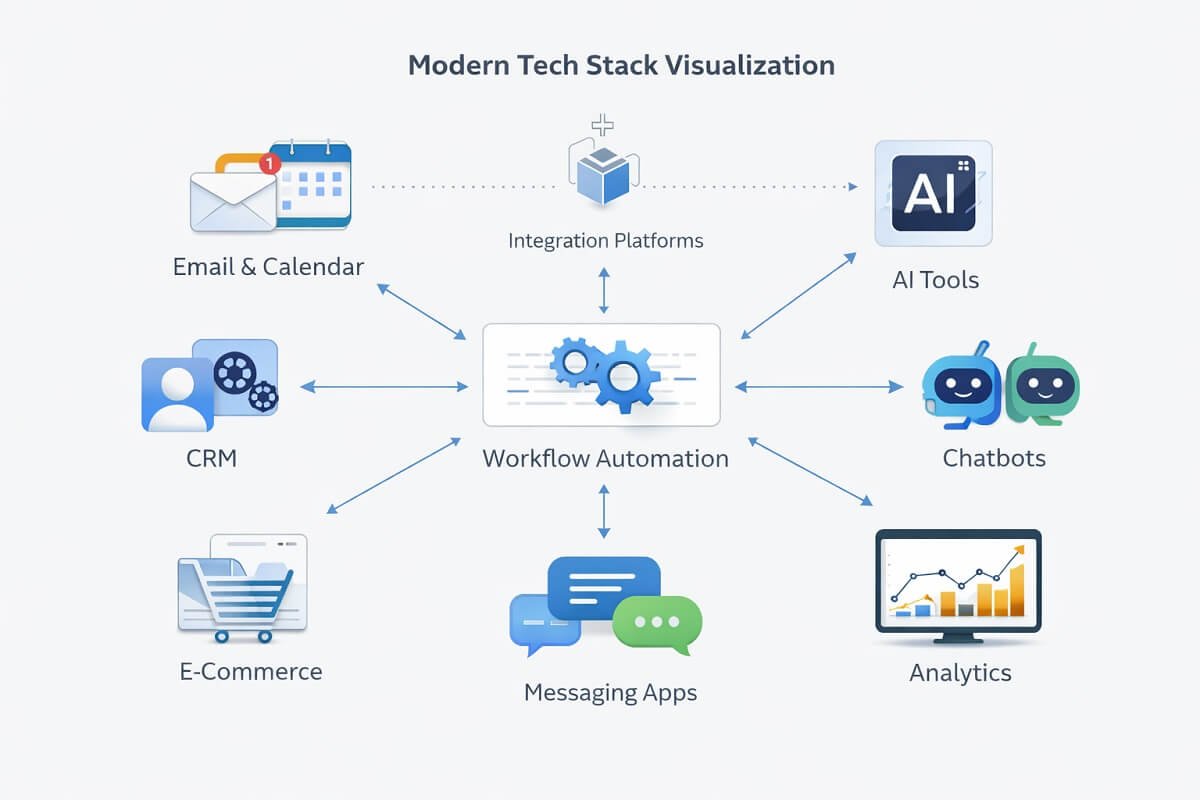
🔹 1. AI Content Creation Tools
Purpose: Create blog posts, emails, ad copy, and reports in minutes.
What they automated:
- Blog drafts
- Client content
- Social media posts
- Email campaigns
“We use Grammarly, Notion AI, and AdCreative AI tools to generate client-ready content in minutes—try it here.”
🔹 2. Workflow Automation Tools
Purpose: Connect apps and automate repetitive tasks.
What they automated:
- Lead capture → CRM
- Form submissions → task creation
- Email sequences
- Notifications
“Automate your entire workflow with no coding—start with Make Automation Tools.”
🔹 3. AI-Powered CRM Systems
Purpose: Manage clients without manual tracking.
What they automated:
- Client onboarding
- Follow-ups
- Pipeline tracking
- Task assignments
Start automating your sales today—set up your CRM in minutes and never miss a lead again. If you’re looking for proven automation ideas, these CRM workflow templates provide ready-to-use workflows for client onboarding, follow-ups, lead management, and sales pipeline automation.
🔹 4. AI Chatbots & Support Systems
Purpose: Handle client queries 24/7.
What they automated:
- FAQs
- Basic support
- Lead qualification
This alone reduced support workload by 70%.
AI Automation for Agencies Workflow
Before implementing AI, most agencies rely on disconnected tools and manual handoffs between team members. Every new lead, client request, or project update requires someone to perform repetitive tasks, slowing down growth as the client base expands.
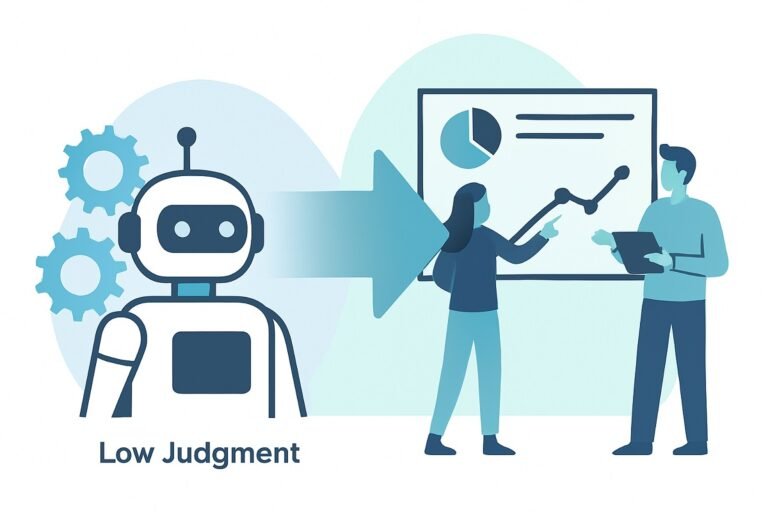
A well-designed AI automation workflow connects every stage of the client lifecycle into a single, streamlined system. Rather than replacing your team, it removes repetitive administrative work so they can focus on strategy, creative execution, and client relationships.
Website Visitor
│
▼
Lead Capture Form
│
▼
AI Lead Qualification & Scoring
│
▼
CRM & Client Database
│
▼
Automated Client Onboarding
│
▼
Project & Task Creation
│
▼
AI-Assisted Content & Deliverables
│
▼
Quality Review & Approval
│
▼
Automated Reports & Client Updates
│
▼
Ongoing Optimization & Follow-Ups
Why This Workflow Matters
Each stage automatically triggers the next, eliminating manual handoffs and reducing delays. Instead of repeatedly copying data between applications or sending routine emails, your systems work together behind the scenes to keep projects moving.
The result is a faster, more consistent client experience, fewer operational bottlenecks, and a workflow that can support significantly more clients without requiring a proportional increase in staff.
The Workflow System (Step-by-Step)
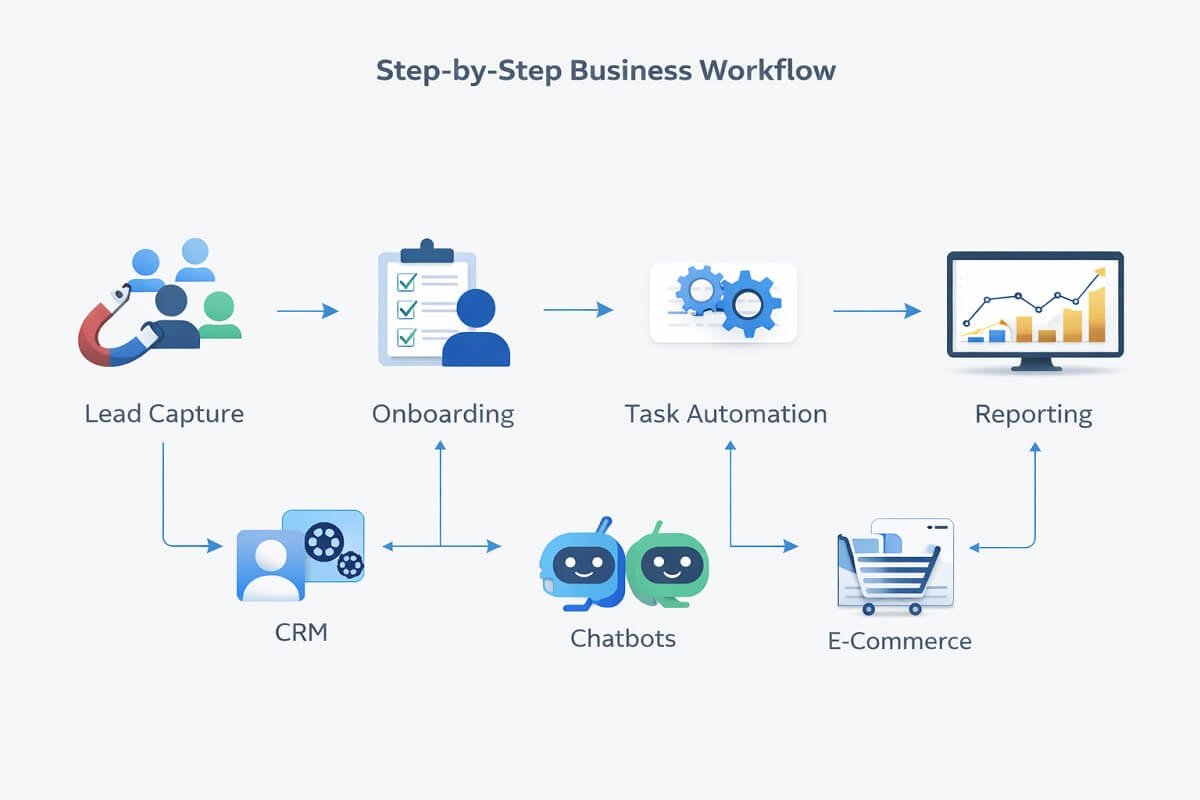
This is where the real transformation happens. Instead of relying on manual effort, this agency built a fully automated workflow system that handles everything from lead capture to reporting—allowing a 3-person team to operate like a much larger company.
Let’s break it down step by step.
Step 1: Automated Lead Capture (Turning Visitors into Qualified Leads)
Most agencies lose leads because they rely on manual follow-ups.
This system eliminates that completely.
How it works:
- Website forms automatically capture lead information
- Data is instantly sent to a CRM system
- AI analyzes and scores each lead based on quality and intent
- High-value leads are prioritized automatically
What this replaces:
- Manual email replies
- Spreadsheet tracking
- Delayed follow-ups
👉 Result: Every lead is captured, organized, and prioritized in real time—without human input.
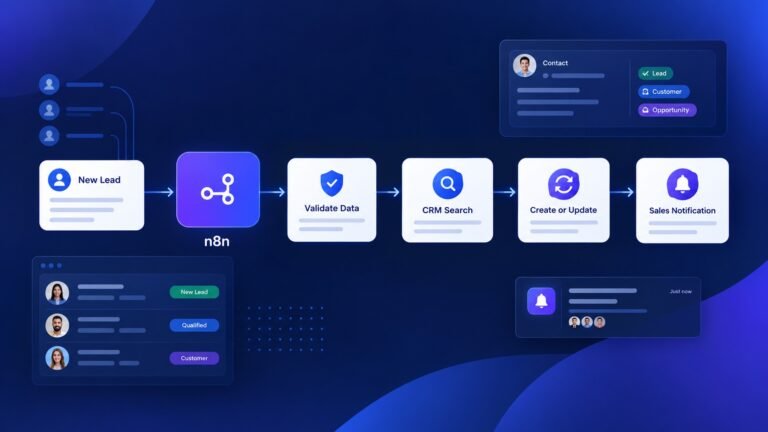
Many agencies combine lead scoring with proven sales workflow templates to automatically route qualified prospects, trigger follow-up sequences, assign sales representatives, and move opportunities through the pipeline without manual intervention.
Example: When a new lead submits a website form, Make automatically creates a HubSpot contact, assigns the sales owner, sends a personalized welcome email, creates a ClickUp task, and notifies the team in Slack. This entire process takes less than a minute and requires no manual intervention.
💡 Pro Tip: Integrate your forms with automation tools to trigger instant responses and avoid losing hot leads.
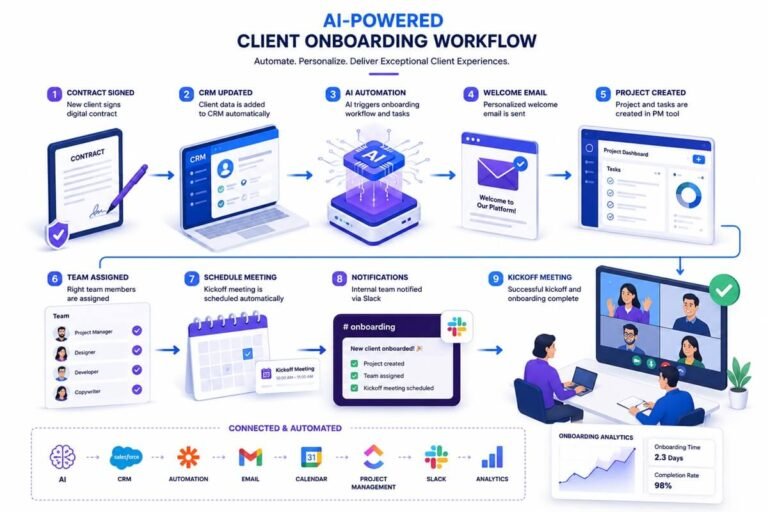
Step 2: Instant Client Onboarding (Zero-Touch Setup)
Onboarding is one of the most time-consuming parts of running an agency.
This system turns it into a fully automated experience.
What happens after a client signs up:
- A personalized welcome email is automatically sent
- An onboarding questionnaire is triggered instantly
- Client data is stored and organized in the CRM
- Tasks are automatically created and assigned to team members
- Project timelines are generated without manual planning
Advanced automation:
- AI customizes onboarding responses based on client type
- Conditional workflows adapt based on answers
👉 Result: Clients are onboarded in minutes instead of hours—without back-and-forth emails.
Want to streamline your entire process? Check out our complete guide to automating client onboarding from start to finish.
Step 3: AI-Powered Task Execution (Done-for-You Workflows)
This is where AI delivers the biggest time savings. Instead of starting every task from scratch, the system prepares 70–80% of the work automatically.
How it works:
- AI generates first drafts for content, emails, and deliverables
- Pre-built templates standardize output and formatting
- Automation tools assign tasks based on workflow triggers
- Notifications keep the team updated without manual coordination
Examples:
- Blog content generated in minutes
- Social media posts auto-created from templates
- Email campaigns drafted instantly
Human role:
- Review
- Edit
- Optimize
👉 The team focuses only on high-value tasks—not repetitive work. Result: Massive productivity increase without increasing workload.
💡 Pro Tip: Combine AI content tools with automation platforms to create a fully hands-off production system.
Step 4: Automated Reporting (Hands-Free Client Updates)
Reporting is one of the biggest time drains for agencies. This system removes it almost entirely.
Before automation:
- Data collected manually
- Reports created in spreadsheets
- Hours spent formatting and sending updates
After automation:
- Data is pulled automatically from multiple sources
- Reports are generated in real time
- Dashboards update continuously
- Clients receive scheduled reports automatically
Advanced features:
- AI-generated insights and summaries
- Visual dashboards for easy understanding
- Scheduled email delivery
👉 Result: Clients stay informed without requiring manual reporting—saving hours every week.
Want real-time insights without manual work? Explore our complete guide to automated reporting tools.
🔄 How This System Works Together
Individually, each step saves time. But together, they create a fully automated agency engine:
- Leads enter the system automatically
- Clients are onboarded instantly
- Work is generated and assigned by AI
- Reports are delivered without effort
👉 The entire business runs on systems, not manual labor
How Each System Works Together
A successful AI-powered agency isn’t built around a single tool—it’s built around connected systems. Each platform has a specific role, while automation ensures information flows seamlessly between them. This eliminates duplicate work, reduces manual errors, and creates a scalable operation.
| System | Primary Role | Connected To |
| Lead Capture | Collect inquiries from your website or landing pages | CRM |
| CRM | Store client information and manage the sales pipeline | Automation platform, Email |
| Automation Platform | Move data between applications and trigger workflows | CRM, Project Management, AI Tools |
| AI Assistant | Generate drafts, summaries, and repetitive content | Project Management, Team |
| Project Management | Organize tasks, deadlines, and deliverables | Automation Platform |
| Reporting Dashboard | Collect performance data and generate client reports | CRM, Analytics Tools |
When these systems are connected, information flows automatically from one stage to the next. Instead of manually updating multiple applications, your team only reviews and approves work, allowing the business to scale without increasing administrative overhead.
⚡ Why This Workflow Scales So Fast
This system works because it removes the biggest bottlenecks:
- No delays in lead response
- No onboarding friction
- No repetitive task overload
- No time-consuming reporting
That’s how a small team can handle 100+ clients efficiently.
Key Automation Triggers That Keep Agencies Running
Successful AI-powered agencies don’t automate every task—they automate the moments that trigger the next action. By connecting these trigger points, repetitive work happens automatically while your team focuses on client strategy and delivery.
| Trigger | Automated Action | Business Benefit |
| New lead submits a form | Creates a CRM contact and notifies the sales team | Faster response time and fewer missed opportunities |
| Proposal is accepted | Launches the onboarding workflow and creates project tasks | Reduces administrative work and speeds up project kickoff |
| Content brief is approved | Generates writing tasks and assigns them automatically | Keeps production moving without manual coordination |
| Project status changes | Updates stakeholders and schedules the next workflow | Improves visibility across the team |
| Reporting date arrives | Generates and delivers performance reports automatically | Saves hours of recurring manual reporting |
| Client sends a support request | Routes the request to the appropriate team member or AI assistant | Faster response times and improved customer experience |
Rather than relying on employees to remember every step, automation ensures each action triggers the next stage of the workflow. This creates a predictable, repeatable operating system that supports growth without increasing operational complexity.
🚀 How You Can Implement This System
You don’t need to build everything at once. Start with this simple plan:
- Automate lead capture
- Set up onboarding workflows
- Add AI for task execution
- Implement automated reporting
Build one system at a time—and scale gradually.
👉 Next Step: Once your workflow is set, explore the best AI tools to power each stage of this system.
Results: What Changed?

Here’s what happened after implementing AI systems:
- Client Capacity: 3 → 100 clients
- Time Saved: 60–80% reduction in manual work
- Hiring Needs: Reduced to near zero
- Profit Margins: Increased significantly
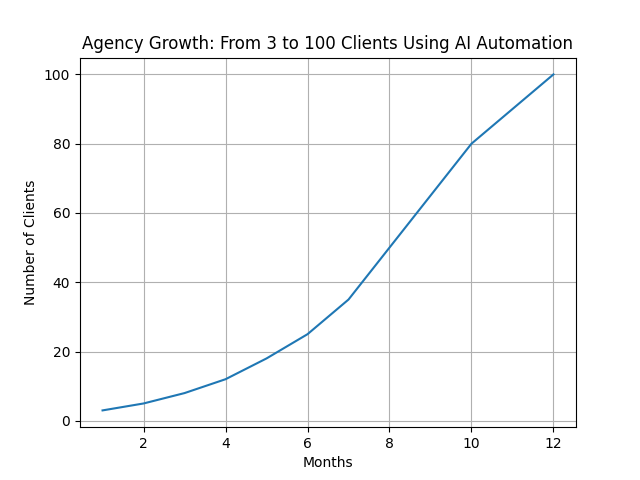
Most importantly, the team avoided burnout completely.
Before vs After AI Automation
| Aspect | Before AI | After AI Automation |
|---|---|---|
| Team Size | Growing with each client | Fixed (3 people) |
| Client Capacity | Limited (10–20 clients) | Scalable (100+ clients) |
| Onboarding Time | Hours per client | Minutes (automated) |
| Content Creation | Manual, time-consuming | AI-assisted, fast |
| Reporting | Manual spreadsheets | Automated dashboards |
| Operational Cost | High (hiring required) | Low (tool-based) |
| Profit Margins | Decreasing | Increasing |
Key Lessons You Can Apply
Scaling an agency with AI isn’t just about tools—it’s about adopting the right mindset and strategy. These are the core lessons that made the biggest difference.
1. Systems Beat People (Every Time at Scale)
People are essential—but systems are what make growth sustainable. Most agencies try to solve growth problems by hiring more staff. But this creates new challenges:
- Higher costs
- More management overhead
- Increased complexity
Systems, on the other hand:
- Work 24/7 without fatigue
- Deliver consistent results
- Scale instantly without additional cost
👉 The goal isn’t to replace people—it’s to free them from repetitive work so they can focus on strategy and creativity.
💡 Takeaway: Build processes first, then let tools and people operate within those systems.
2. Automate Repetitive Tasks First (Fastest ROI)
Not all automation is equal.
If you try to automate everything at once, you’ll get overwhelmed. Instead, focus on tasks that are:
- Repetitive
- Time-consuming
- Low-value
Best tasks to automate first:
- Email responses and follow-ups
- Client reporting and data collection
- Lead capture and CRM updates
- Content drafting and formatting
These tasks often consume 50–70% of your time—making them the highest ROI opportunities.
👉 By automating just these, you can free up hours every day. If a task is done more than 3 times a week, it’s a strong candidate for automation.
3. AI Is Not Replacement—It’s Leverage
One of the biggest misconceptions is that AI replaces humans. In reality, AI works best as a productivity multiplier.
Instead of:
- Writing content → AI drafts it
- Creating reports → AI compiles them
- Managing tasks → AI organizes them
Your role shifts from:
❌ Doing the work
✅ Managing, reviewing, and optimizing the system
💡 Key Insight: This allows a small team to produce output at scale without burnout. The most successful agencies don’t use AI to replace people—they use it to amplify their capabilities.
Common Mistakes to Avoid
Even with the right tools, many agencies fail because of poor implementation. Avoid these common pitfalls.

❌ 1. Over-Automation (Losing the Human Touch)
Automation is powerful—but too much of it can hurt your business.
Never fully automate:
- High-touch client communication
- Strategy calls and consultations
- Relationship-building interactions
Clients still value human connection. If everything feels robotic, trust and retention will drop.
👉 The best approach is hybrid:
- Automate processes
- Personalize interactions
💡 Rule: Automate the process, not the relationship.
❌ 2. Using Too Many Tools (Tool Overload)
It’s tempting to try every new AI tool—but this creates chaos.
Problems with too many tools:
- Integration issues
- Higher costs
- Steep learning curves
- Broken workflows
Instead, keep your stack simple:
- 1 automation platform
- 1 CRM system
- 1–2 core AI tools
💡 Pro Tip: A simple, well-integrated system always outperforms a complex one. Choose tools that integrate easily rather than the ones with the most features.
❌ 3. No Workflow Planning (Biggest Mistake)
Tools don’t fix broken processes. If your workflow is messy, automation will just make it faster—not better.
Before using any tool:
- Map out your current process
- Identify bottlenecks
- Remove unnecessary steps
- Then automate what remains
💡 Key Insight: Think of automation as a multiplier—it amplifies both good and bad systems. Optimize first, automate second.
How to Start (Beginner-Friendly Plan)
You don’t need to build a complex system overnight. Start simple and scale gradually.
Step 1: Identify Repetitive Tasks
Start by auditing your daily workflow.
Ask yourself:
- What tasks do I repeat every day?
- What takes the most time?
- What doesn’t require creative thinking?
Write everything down.
👉 This becomes your automation roadmap.
Step 2: Automate One Process First
Don’t try to automate everything at once. Start with one high-impact process, such as:
- Email automation (welcome sequences, follow-ups)
- Lead capture and CRM integration
- Content drafting using AI tools
Test it, refine it, and make sure it works smoothly. Small wins build momentum and confidence.
Step 3: Scale Gradually (System by System)
Once your first automation is working:
- Add another workflow
- Connect systems together
- Optimize performance
Over time, you’ll build a fully automated ecosystem. This is how small teams scale into high-capacity agencies.
🚀 Final Takeaway
Scaling with AI isn’t about doing more work—it’s about doing less manual work with better systems.
- Build systems first
- Automate strategically
- Keep human oversight
Do this right, and you won’t just grow—you’ll scale efficiently without increasing your workload.
Recommended AI Stack
Here’s a simple starter stack you can promote:
- AI Writing Tool → for content creators
- Automation Tool → for workflows
- CRM → for client management
- Chatbot → for support
Recommended AI Tools for Agencies
| Tool Type | What It Does | Best For |
|---|---|---|
| AI Writing Tool | Generates content, emails, and reports | Content creation |
| Automation Tool | Connects apps and automates workflows | Task automation |
| CRM System | Manages clients and pipelines | Client management |
| AI Chatbot | Handles support and FAQs | Customer service |
FAQs: Scaling an Agency with AI Automation
Can AI really replace employees in an agency?
AI doesn’t fully replace employees—but it significantly reduces the need for large teams. It can handle repetitive tasks like content drafting, reporting, scheduling, and basic client communication. Instead of hiring more staff, agencies can use AI as a force multiplier, allowing a small team to manage a much larger client base efficiently.
Is it realistic for a 3-person agency to handle 100 clients?
Yes, but only with strong systems in place. Without automation, it’s nearly impossible. With AI workflows, automated onboarding, and streamlined processes, a small team can handle high client volume by minimizing manual work and focusing only on high-value tasks.
What are the best AI tools for scaling an agency?
The most effective AI stack usually includes:
- AI writing tools for content creation
- Workflow automation tools for task management
- CRM systems for client tracking
- AI chatbots for customer support
The key is integration—these tools should work together as one system rather than separately.
How do you automate client onboarding with AI?
Client onboarding can be automated using forms, email sequences, and CRM workflows. When a client signs up, the system can automatically send welcome emails, collect necessary information, assign tasks, and schedule follow-ups—without manual intervention.
How much does it cost to set up AI automation for an agency?
Costs vary depending on tools, but most agencies can get started for $50–$300 per month. Compared to hiring even one employee, this is significantly more cost-effective and scalable.
Do you need technical skills to use AI automation tools?
No, most modern tools are no-code or low-code. Platforms are designed for non-technical users, with drag-and-drop interfaces and pre-built templates that make setup easy—even for beginners.
What tasks should you automate first in an agency?
Start with repetitive and time-consuming tasks:
- Email responses
- Lead capture and follow-ups
- Content drafting
- Reporting and analytics
These tasks provide the fastest return on investment when automated.
Can AI handle client communication effectively?
AI can handle basic communication like FAQs, updates, and scheduling. However, high-value conversations—such as strategy discussions—should still be handled by humans to maintain strong client relationships.
What are the biggest risks of using AI in an agency?
The main risks include:
- Over-automation leading to poor client experience
- Using too many disconnected tools
- Relying on AI without human oversight
To avoid these, agencies should balance automation with personalization and regularly review their systems.
How long does it take to set up AI systems?
A basic system can be set up in a few days. More advanced workflows may take a few weeks to fully optimize. However, even small automation improvements can deliver immediate time savings.
Can freelancers or solopreneurs use this strategy?
Absolutely. In fact, freelancers benefit the most from AI automation because it allows them to take on more clients without increasing workload or burnout.
What industries benefit most from AI-powered agency systems?
Almost any service-based business can benefit, including:
- Digital marketing agencies
- Content creation agencies
- Web design and development
- Social media management
- Consulting services
Will AI reduce the quality of work?
Not if used correctly. AI should assist, not replace, human expertise. The best approach is to use AI for first drafts and repetitive tasks, then refine and personalize the output.
How do you ensure data security when using AI tools?
Choose reputable tools with strong security policies, use secure integrations, and avoid sharing sensitive client data unnecessarily. Regular audits of your workflows can also help prevent data leaks.
What is the biggest advantage of scaling with AI instead of hiring?
The biggest advantage is efficiency. AI allows you to scale operations quickly without increasing overhead costs, making your agency more profitable and easier to manage.
How can beginners start scaling with AI today?
Start simple:
- Choose one task to automate
- Use a beginner-friendly tool
- Test and refine the workflow
Once you see results, expand automation gradually across your business.
Final Thoughts
Scaling an agency doesn’t require a big team anymore. With the right systems:
- You can handle more clients
- Deliver faster results
- Increase profit margins
The real shift is this: Stop thinking like a worker. Start thinking like a system builder.
Official Resources:
For deeper guidance on AI automation and implementation, explore these resources:
- OpenAI Documentation – AI models, APIs, and implementation guides.
- Anthropic Documentation – Claude API documentation and best practices.
- HubSpot Knowledge Base – CRM, marketing automation, and sales workflow tutorials.
- n8n Documentation – Learn how to create AI-powered and workflow automation systems.



One Comment