Best No-Code CRM for 2026: The Simpler Alternative to Overbuilt CRMs

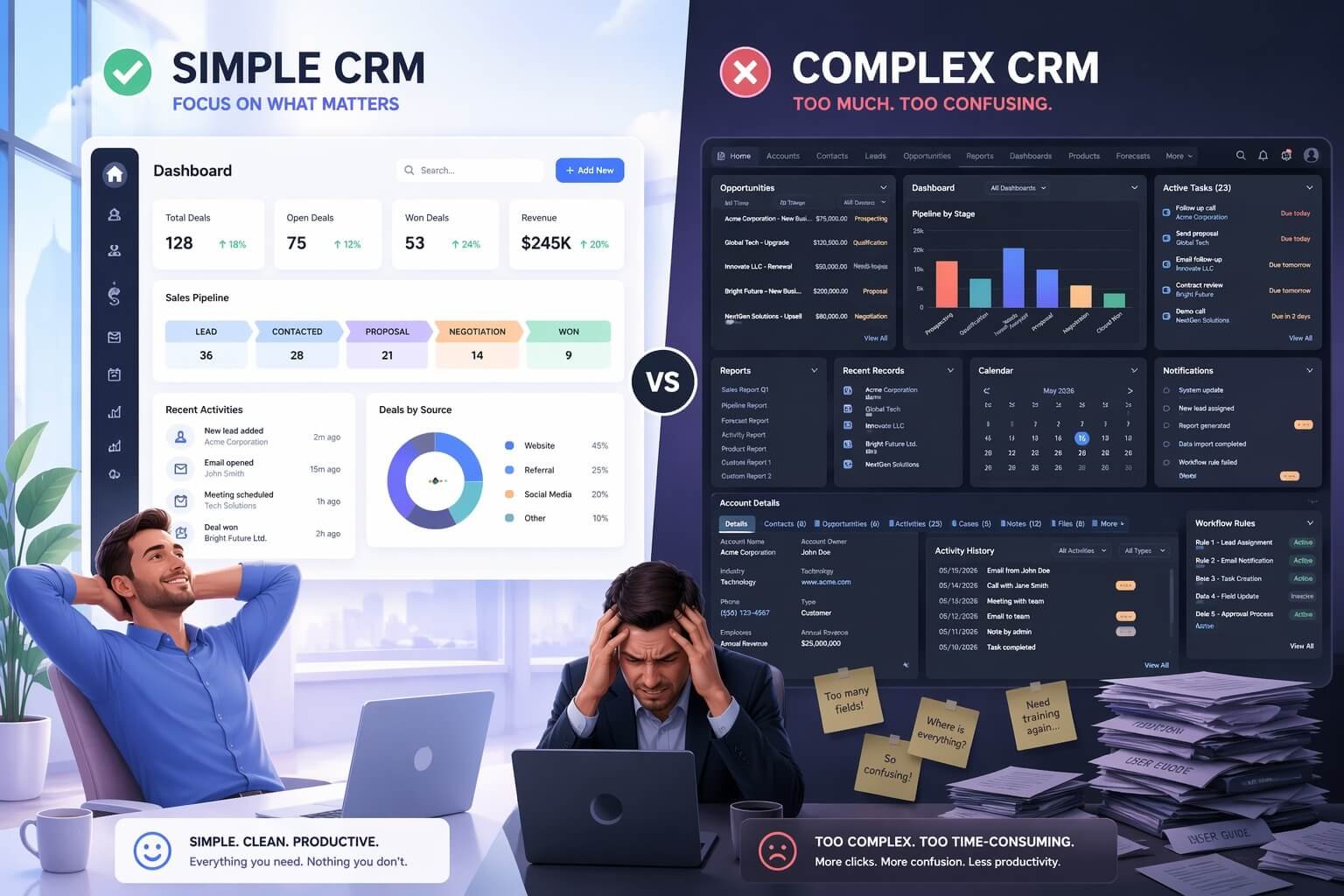
Introduction: The End of Overcomplicated CRMs
For years, businesses were told that powerful CRM systems had to be complex. The more features, the better. The more integrations, the smarter. The more customization, the stronger your business would become.
But in 2026, that mindset is collapsing.
Teams are overwhelmed. Founders are frustrated. Sales reps are stuck updating fields instead of closing deals. And expensive, enterprise-grade CRM platforms are often underutilized—or worse, abandoned.
That’s why no-code CRMs are exploding in popularity.
They offer something most traditional tools failed to deliver:
👉 Speed, simplicity, and actual usability
If you’re a startup founder, agency owner, freelancer, or small team leader, this guide will help you:
- Understand what a no-code CRM really is
- See why complex CRMs are losing ground
- Discover the best no-code CRM tools for 2026
- Choose the right one for your workflow
- Avoid common mistakes most teams make
Table of Contents
What Is a No-Code CRM?
A no-code CRM (Customer Relationship Management) system is a platform that lets you:
- Track leads and customers
- Manage pipelines
- Automate workflows
- Build dashboards
…without writing a single line of code.
Unlike traditional CRMs, which often require developers or long onboarding processes, no-code CRMs are designed for non-technical users. If you’re exploring automation beyond CRM, check out our guide on AI workflows for businesses.
Key Characteristics:
- Drag-and-drop interfaces
- Visual automation builders
- Customizable pipelines
- Simple integrations
- Fast setup (often within hours)
👉 In short: You can build your entire sales system without engineers.
Why Complex CRMs Are Failing in 2026
Let’s be honest—most businesses don’t need a monster CRM.

Platforms such as Salesforce are powerful and can support sophisticated enterprise operations. The problem is that smaller teams can end up paying for a level of complexity they don’t actually need.When a CRM becomes harder to implement, maintain, or use than the workflow it is supposed to manage, the software can become a bottleneck instead of a productivity tool.
1. Long Setup Times
Complex CRM systems often require extensive configuration before they properly match a company’s sales process. Teams that need to define pipelines, fields, permissions, automations, reports, integrations, and user roles before everyone can work comfortably inside the system.
For a large organization, that investment may be justified. For a small or growing team, spending significant time configuring the CRM can delay the benefits the software was supposed to provide.
2. Total Costs Can Go Beyond the Subscription
The advertised CRM price is only one part of the total cost. Businesses may also spend money on:
- Implementation
- Consultants
- Additional user licenses
- Custom development
- Integrations
- Training
- Ongoing administration
As requirements become more complicated, these additional costs can make a powerful CRM difficult to justify for a smaller organization.
3. Complexity Can Reduce User Adoption
A CRM is only valuable when employees consistently use it. If sales representatives have to navigate complicated screens, enter excessive information, or follow cumbersome processes just to update an opportunity, they may start avoiding the system.
That can lead to incomplete records, outdated customer information, and unreliable reports. In other words, a feature-rich CRM is not useful if the team doesn’t want to use it.
4. Over-Engineering Creates Unnecessary Work
More functionality doesn’t automatically mean a better CRM. A business may only need a straightforward process for managing contacts, opportunities, follow-ups, and customer activity. Introducing multiple layers of configuration can make simple tasks harder to manage.
The real problem is not having advanced features. It’s having more system complexity than the business workflow requires.
5. Changes Can Become Slower
Business processes change. A company may introduce a new service, change its sales stages, modify its lead qualification process, or reorganize its teams.
When routine CRM changes require specialized technical knowledge, even relatively small adjustments can take longer to implement. This can make the CRM less responsive to the business it is supposed to support.
The Real Problem Isn’t Complexity—It’s Unnecessary Complexity
Complex CRM platforms still have an important role. Large organizations genuinely need advanced permissions, sophisticated reporting, extensive integrations, and complex workflow management.
The issue is choosing that level of complexity when the business doesn’t require it. For smaller teams, the better approach is often to choose a CRM that provides the capabilities they need while keeping implementation, administration, and everyday use manageable.
That’s one reason simpler and no-code CRM platforms have become increasingly attractive: they can reduce the technical barriers between the business process and the software managing it.
What Makes a CRM “Simple” but Powerful?
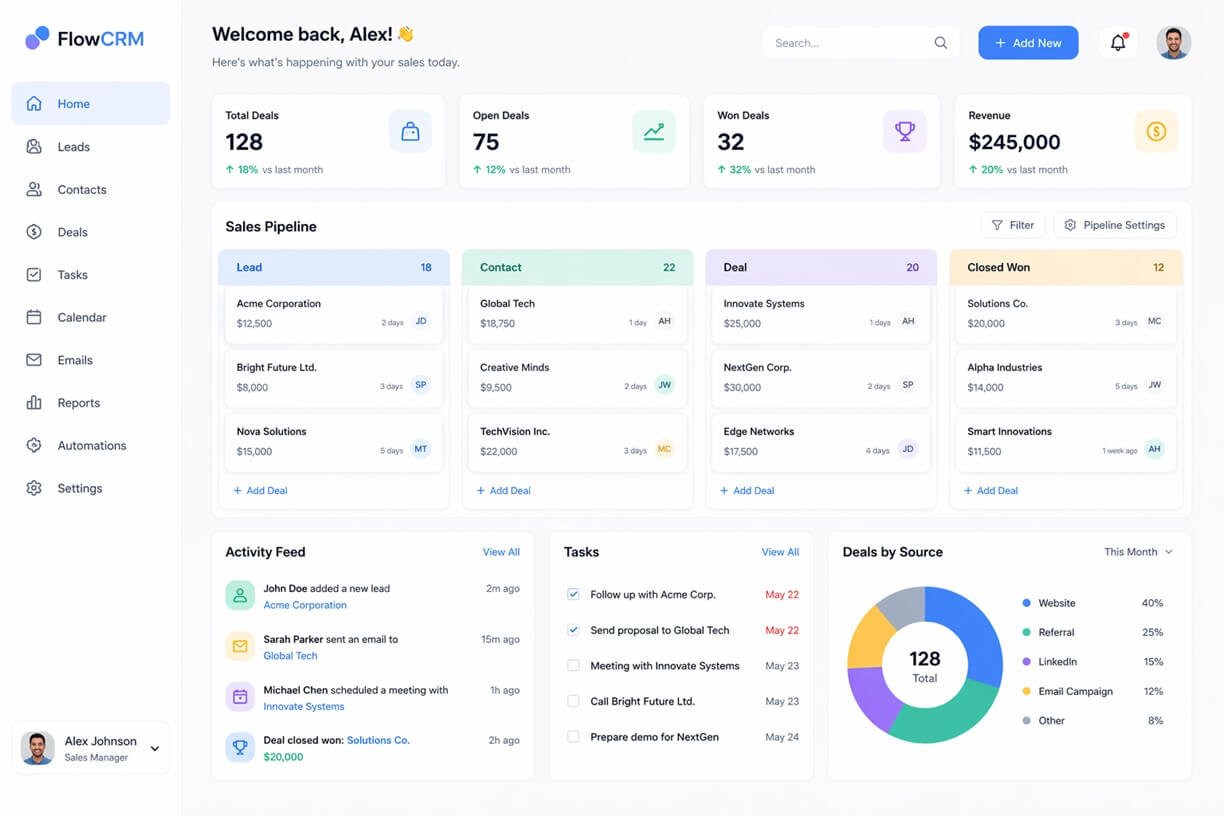
Simplicity doesn’t mean a CRM has to be basic. A useful CRM should make everyday tasks easy while still providing enough capability to support a growing business. The key is reducing unnecessary complexity without removing the functions teams actually depend on.
1. Visual Pipelines
A visual pipeline lets users understand the status of opportunities at a glance.
Instead of searching through records or complicated reports, team members can see where deals are in the sales process and move them between stages as they progress.
For example:
New Lead → Qualified → Proposal → Negotiation → Won
This type of visual workflow can make the CRM easier to understand for users who don’t have technical CRM experience.
2. Automation Without Code
A simple CRM should handle repetitive tasks without requiring developers to create custom scripts.
For example:
When a new lead is added → assign it to a salesperson.
Or:
When a deal moves to “Proposal” → create a follow-up task.
These small automations can reduce manual administration while keeping the workflow understandable to the people using it.
3. Custom Fields and Views
A CRM should accommodate the information a business actually needs to track. For example, a company might want fields for:
- Lead source
- Customer type
- Deal value
- Industry
- Renewal date
Custom views can then show different information to different users without forcing everyone to work from the same screen. The objective isn’t unlimited customization. It’s having enough control to make the CRM fit the workflow without turning configuration into a project of its own.
4. Useful Integrations
A CRM rarely operates by itself. Teams may already rely on email, calendars, marketing platforms, payment tools, customer-support software, or automation services.
Useful integrations allow information to move between these systems instead of requiring employees to repeatedly copy and paste data. However, the number of integrations isn’t the only consideration. The important question is whether the CRM connects reliably with the tools your team actually uses.
5. Clear Reporting and Dashboards
Reporting should help users understand what is happening without requiring them to become data analysts. A practical CRM dashboard might show:
- Open opportunities
- Pipeline value
- Deals by stage
- Conversion trends
- Sales activity
- Follow-up tasks
The best dashboards turn CRM data into information that teams can act on.
6. A Short Learning Curve
A powerful CRM still needs to be understandable. New users should be able to learn the basic workflow without extensive technical training. Adding contacts, updating opportunities, creating tasks, and finding customer information should feel straightforward.
A shorter learning curve can also improve adoption because employees spend less time figuring out the software and more time using it.
7. Easy Everyday Maintenance
Simplicity also applies after the initial setup. A CRM becomes difficult when routine tasks—such as updating a pipeline, changing a field, creating a view, or adjusting a simple workflow—require technical assistance.
A business-friendly CRM should allow authorized users to handle ordinary changes without turning every small adjustment into a development request.
The Balance to Look For
The goal isn’t to find the CRM with the fewest features. It is to find a system where the important functions are easy to use and unnecessary complexity stays out of the way.
A CRM can therefore be simple without being limited. The strongest platforms combine an approachable interface with enough automation, reporting, integrations, and configuration options to support the way a business actually operates.
Best No-Code CRM Tools for 2026
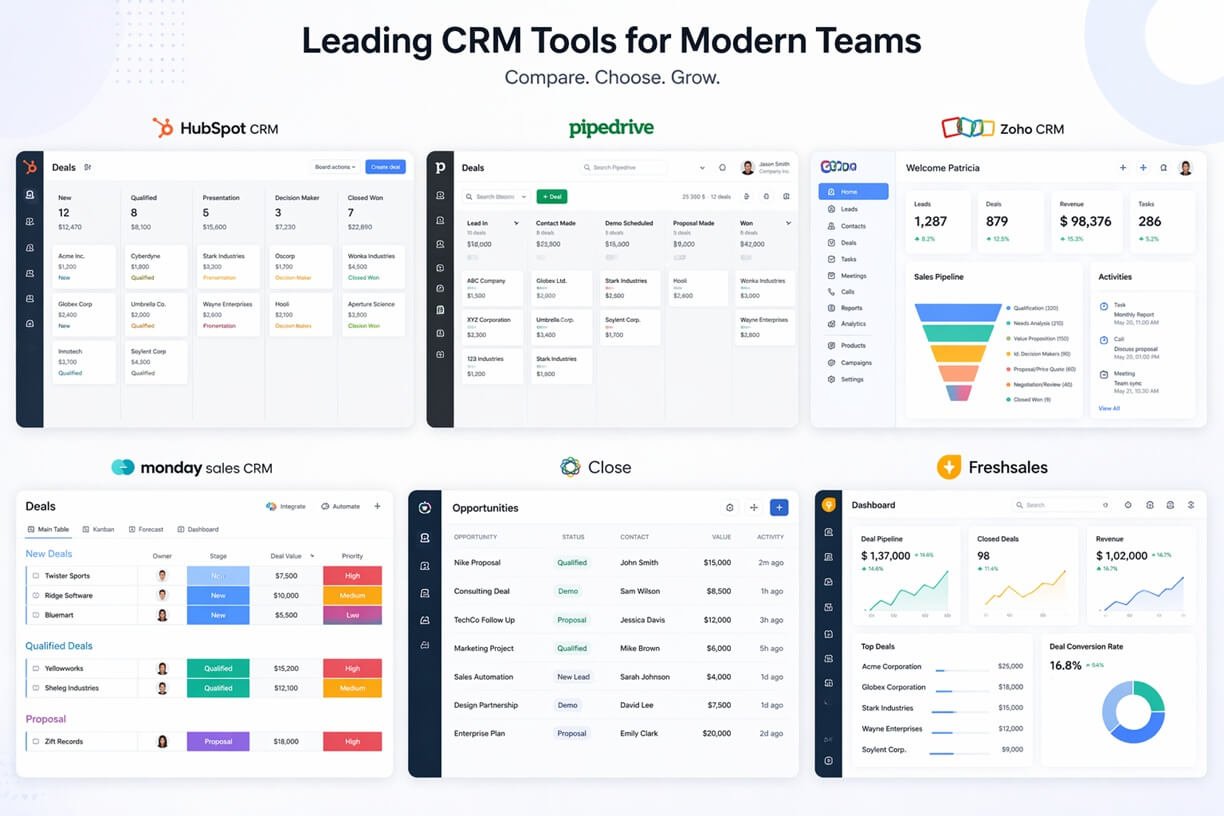
Here are the top no-code CRM platforms that combine simplicity with real power.
1. HubSpot CRM
Best for: Beginners and growing teams
Why it stands out:
- Free plan with strong features
- Easy-to-use interface
- Built-in marketing tools
Pros:
- Excellent onboarding
- Clean UI
- Strong ecosystem
Cons:
- Gets expensive as you scale
- Advanced features locked behind paid tiers
2. Airtable
Best for: Custom workflows and flexibility
Why it stands out:
- Spreadsheet + database hybrid
- Extremely customizable
- Great for agencies and operations
Pros:
- Flexible structure
- Visual views (grid, Kanban, calendar)
- Strong integrations
Cons:
- Can feel complex for beginners
- Not a traditional CRM out of the box
3. Notion CRM Setup
Best for: Solo founders and content-driven teams
Why it stands out:
- All-in-one workspace
- Highly customizable templates
Pros:
- Cheap or free
- Extremely flexible
- Combines CRM + content + docs
Cons:
- Limited automation
- Requires setup effort
4. Pipedrive
Best for: Sales-focused teams
Why it stands out:
- Built specifically for pipelines
- Simple, visual deal tracking
Pros:
- Easy to use
- Strong sales features
- Great pipeline UI
Cons:
- Limited marketing tools
- Less flexible than no-code builders
5. Zoho CRM
Best for: Budget-conscious businesses
Why it stands out:
- Affordable pricing
- Wide feature set
Pros:
- Good value
- Scalable
- Strong integrations
Cons:
- UI can feel outdated
- Slight learning curve
6. Monday.com CRM
Best for: Teams already using project management tools
Why it stands out:
- Visual workflows
- Easy automation
Pros:
- Intuitive interface
- Flexible use cases
- Good collaboration tools
Cons:
- Can get expensive
- Not CRM-first
7. Close
Best for: Sales teams focused on calls & outreach
Pros:
- Built-in calling
- Email automation
- Clean workflow
Cons:
- Less flexible
- Higher pricing
Comparison Table (Quick Decision Guide)
| Tool | Best For | Ease of Use | Flexibility | Pricing |
| HubSpot | Beginners | ⭐⭐⭐⭐⭐ | ⭐⭐⭐⭐ | Free → Paid |
| Airtable | Custom workflows | ⭐⭐⭐ | ⭐⭐⭐⭐⭐ | Paid |
| Notion | Solo founders | ⭐⭐⭐ | ⭐⭐⭐⭐⭐ | Free |
| Pipedrive | Sales teams | ⭐⭐⭐⭐⭐ | ⭐⭐⭐ | Paid |
| Zoho CRM | Budget users | ⭐⭐⭐ | ⭐⭐⭐⭐ | Low-cost |
| Monday.com | Teams & collaboration | ⭐⭐⭐⭐⭐ | ⭐⭐⭐⭐ | Paid |
| Close | Outreach-heavy sales | ⭐⭐⭐⭐ | ⭐⭐⭐ | Premium |
If you’re also comparing lightweight tools, check our guide on best AI tools for small businesses.
Best No-Code CRM by Use Case
There is no single no-code CRM that is the best fit for every business. The right choice depends on the type of team using it and the kind of CRM environment they need.
Best No-Code CRM for Marketing Teams
HubSpot CRM is a strong choice for marketing teams that want CRM and marketing activities connected within one platform. It is particularly suitable when lead management and marketing workflows need to work from the same customer data. Teams that want a CRM closely connected to their marketing operations.
Best No-Code CRM for Small Businesses
Zoho CRM is a practical option for small businesses that want a broad set of CRM capabilities without immediately moving to an enterprise-oriented platform. Small businesses looking for a balance between functionality, flexibility, and cost.
Best No-Code CRM for Non-Technical Teams
Pipedrive is a strong option for teams that want a straightforward CRM experience centered around managing sales opportunities. Teams or Organizations that prioritize simplicity and don’t want extensive CRM administration.
Best No-Code CRM for Agencies
Airtable is worth considering for agencies that need to organize CRM information around their own client-management structure rather than follow a rigid CRM model. It is ideal for agencies that need a highly adaptable CRM structure for different clients or services.
Best No-Code CRM for Sales Teams
Pipedrive is particularly well suited to sales-focused teams because its approach centers on managing deals through a visual sales process. Sales teams that primarily need clear deal and pipeline management.
Best No-Code CRM for Custom Workflows
Airtable is one of the strongest choices when the main requirement is designing a CRM structure around a business’s own process. Businesses that need to organize CRM data in a way that doesn’t fit neatly into a standard CRM structure.
Quick Recommendation
Use case | Recommended CRM | Main reason |
Marketing teams | HubSpot CRM | Strong CRM and marketing ecosystem |
Small businesses | Zoho CRM | Broad CRM functionality |
Non-technical teams | Pipedrive | Straightforward sales-focused experience |
Agencies | Adaptable structure | |
Sales teams | Pipedrive | Deal and pipeline focus |
Custom workflows | Airtable | High structural flexibility |
These recommendations are starting points rather than universal winners. The best choice is the platform that fits the team’s actual workflow, budget, and required level of customization.
How to Choose the Right No-Code CRM
Choosing the right no-code CRM is less about finding the platform with the longest feature list and more about matching the system to your actual workflow. Before comparing individual tools, work through these five decisions.
Step 1: Define What the CRM Must Manage
Start with the business process you want the CRM to handle.
For example, you may need to manage:
Incoming leads
Sales opportunities
Customer relationships
Follow-up activities
Client accounts
Repeat or renewal opportunities
Be specific about the process you want to improve. A CRM designed mainly for sales tracking may not be the right choice if your primary requirement is managing long-term client relationships.
Step 2: Identify Your Must-Have Workflow
Write down the workflow your team follows today. If your main goal is to streamline prospect follow-ups, deal stages, and sales activities, sales workflow templates can provide a useful starting point for building a more consistent process. For example:
New Lead → Qualification → Proposal → Follow-Up → Won/Lost
Then determine which parts of that process the CRM needs to support. This prevents you from choosing a platform based on features that look impressive but have little relevance to your daily operations.
Step 3: Decide How Much Configuration You Actually Need
No-code doesn’t mean you should customize everything.
Ask:
Do you need custom fields?
Do you need multiple pipelines?
Do different teams need different views?
Do you need custom automations?
Do you need to change the workflow regularly?
If your process is straightforward, a highly configurable platform may create unnecessary setup work. If your process changes frequently, greater flexibility may be worth the additional configuration.
Step 4: Determine Your Automation Requirements
Identify which repetitive tasks should happen automatically.
Examples include:
Assigning new leads
Creating follow-up tasks
Updating records
Sending notifications
Triggering emails
Moving information between connected systems
Separate essential automation from automation that would simply be convenient. A CRM doesn’t need dozens of automated workflows to be useful. A few well-designed automations can eliminate significant amounts of repetitive work.
Step 5: Calculate the Real Cost
Don’t evaluate a CRM only by its advertised subscription price. Consider the total cost of using the platform, including:
User licenses
Required paid plans
Implementation time
Data migration
Training
Integrations
Ongoing administration
A cheaper CRM isn’t necessarily better if your team spends significantly more time maintaining it.
Use a Simple Decision Test
Before committing to a platform, ask these questions:
Can our team learn it quickly?
Can it handle our current workflow without unnecessary workarounds?
Can we make ordinary changes without developer assistance?
Does it connect with the tools we already use?
Will the total cost remain reasonable as usage grows?
If the answer to several of these questions is no, continue comparing platforms rather than choosing based on price or popularity.
Test the CRM With a Real Workflow
Whenever possible, don’t evaluate a CRM using a generic demonstration. Build one small version of your actual process.
For example:
Add a real lead → move it through the pipeline → trigger a follow-up → update the record → view the resulting report.
This reveals usability problems much faster than reading a feature list. The best no-code CRM is the one that handles your real workflow with the least unnecessary friction, not simply the one with the most features.
Should You Switch to a No-Code CRM?
Choosing a no-code CRM is different from choosing one for a new business. If your team already uses another CRM, switching platforms introduces migration work, training, data cleanup, and workflow changes.
Before making the move, determine whether switching will actually solve a problem that your current CRM cannot.
Keep Your Existing CRM If It Already Works
You don’t need to replace a CRM simply because a newer platform looks easier to use. If your current system is:
- Well adopted by your team
- Providing the reports you need
- Connected to your important business tools
- Managing your existing workflows reliably
- Affordable for your current requirements
There may be little benefit in migrating.
A successful CRM is often more valuable than a theoretically simpler one that requires your team to start over.
Consider Switching When the CRM Has Become a Bottleneck
A switch becomes more reasonable when the current platform is creating measurable friction. For example, your team may spend too much time maintaining records, struggle to modify ordinary workflows, or rely on spreadsheets and separate tools because the existing CRM doesn’t fit how the business operates.
Look for recurring problems rather than isolated complaints.
Calculate the Cost of Migration
Moving to a new CRM has its own costs.
Consider:
- Exporting and cleaning customer data
- Mapping existing fields
- Rebuilding pipelines
- Recreating automations
- Reconnecting integrations
- Training employees
- Running both systems during the transition
A no-code CRM may have a lower ongoing administrative burden, but that doesn’t make migration free.
Check What Happens to Existing Data
Before switching, determine whether the new platform can handle the information you actually need to preserve.
Review:
- Contact records
- Deal history
- Notes and activities
- Custom fields
- Attachments
- Historical reporting data
- Existing customer relationships
Don’t begin a migration until you understand which information can be transferred directly and which information may require restructuring.
Don’t Rebuild Everything on Day One
A common migration mistake is trying to reproduce every part of the old CRM immediately. Instead, identify the workflows your team actually uses and move those first. For example:
Contacts → Leads → Opportunities → Follow-ups → Closed Deals
Once the core workflow is working, additional automation and customization can be introduced gradually. This approach also gives the team an opportunity to remove outdated processes instead of carrying unnecessary CRM complexity into the new platform.
When Switching Makes Sense
A no-code CRM is worth considering when the expected benefits of changing platforms outweigh the migration effort. A simple way to evaluate the decision is:
Expected improvement − Migration cost = Switching value
If the new CRM will significantly improve usability, workflow management, administration, or operational efficiency, switching may be worthwhile. If the current CRM already performs well and the main motivation is simply trying something newer, staying with the existing system is a better decision.
The goal isn’t to switch to a no-code CRM because it is simpler. The goal is to switch only when the new system creates a clear practical improvement for the business.
Real Use Cases (Why No-Code CRMs Win)
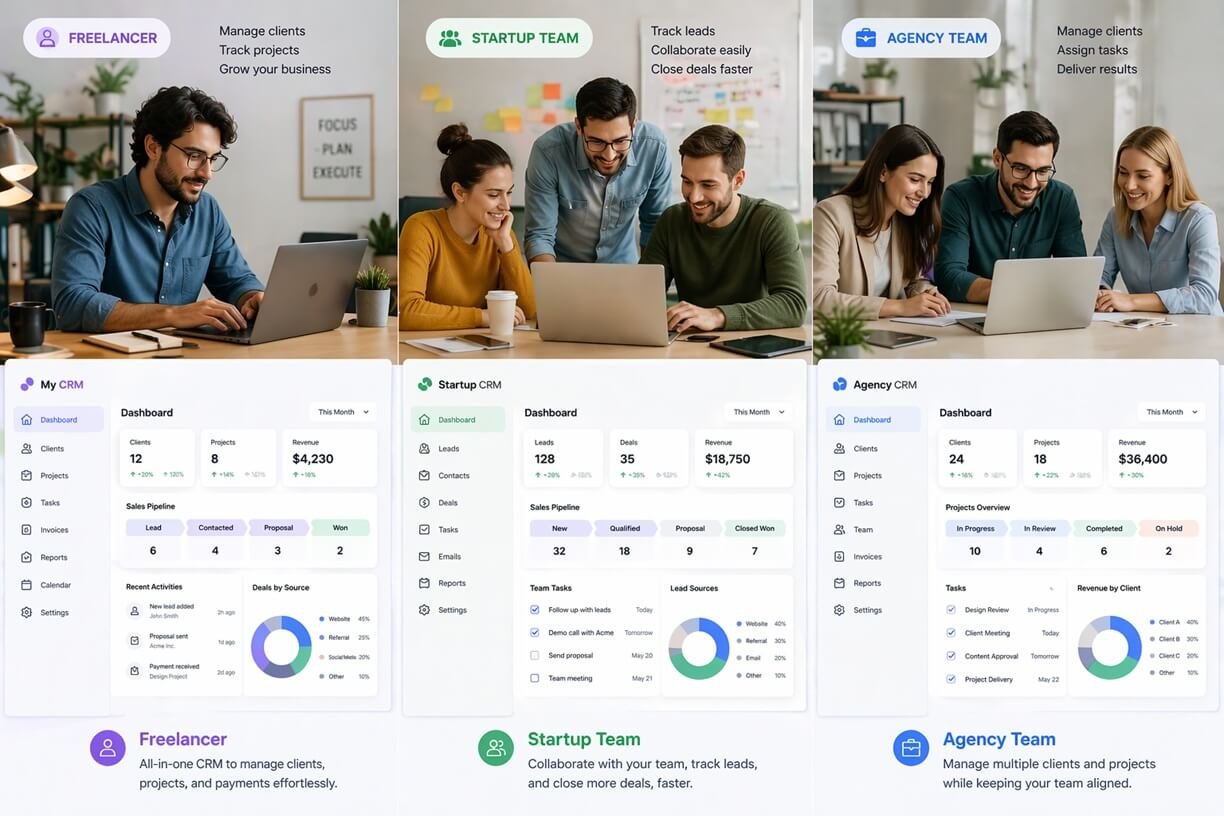
1. Agencies
- Track clients
- Manage pipelines
- Automate follow-ups
👉 Tools: Airtable, Monday.com
You may also like our guide (case study) on How a 3-Person Agency Scaled to 100 Clients Using AI Automation without Hiring.
2. Startups
- Fast setup
- No developers needed
👉 Tools: HubSpot, Notion
3. Freelancers
- Simple client tracking
- Minimal cost
👉 Tools: Notion, Airtable
4. Sales Teams
- Pipeline visibility
- Faster deal movement
👉 Tools: Pipedrive, Close
Explore our startup automation stack guide: The 2026 AI-Driven B2B Marketing System: From Disconnected Tools to Unified Success.
Pros and Cons of No-Code CRMs
✅ Pros
- Fast setup
- Low cost
- Easy to use
- Flexible
- High adoption rates
❌ Cons
- Limited deep customization
- Can outgrow some tools
- Less enterprise-level features
How We Evaluated These No-Code CRMs
We evaluated the CRM platforms in this guide based on the factors that matter most when a business wants to reduce technical complexity without giving up useful CRM capabilities.
Ease of Setup
We considered how quickly a new user can understand the platform, create a pipeline, add contacts, and begin managing customer information.
No-Code Customization
We looked at how easily users can modify pipelines, fields, views, and workflows without relying on developers.
Automation
We considered the availability and usability of visual automation features for repetitive CRM tasks such as assigning leads, creating follow-up tasks, updating records, and triggering notifications.
Reporting
We compared the availability of dashboards, sales reporting, pipeline visibility, and other tools that help teams understand CRM activity.
Integrations
We considered how well each platform can connect with common business tools, including email, calendars, marketing systems, automation platforms, and other productivity software.
Scalability
A CRM should remain useful as the team grows. We therefore considered whether each platform can support increasing numbers of users, records, workflows, and business requirements.
Overall Value
Finally, we considered whether the platform’s capabilities justify its cost for the type of business it is intended to serve.
No single CRM wins every category. The goal of this comparison is to identify which platforms are most suitable for different business needs rather than declaring one tool universally better than all others.
🚫 Common Mistakes to Avoid When Choosing a No-Code CRM
Choosing the right no-code CRM isn’t just about features—it’s about fit, usability, and long-term efficiency. Many businesses fail not because the tool is bad, but because they choose it incorrectly.
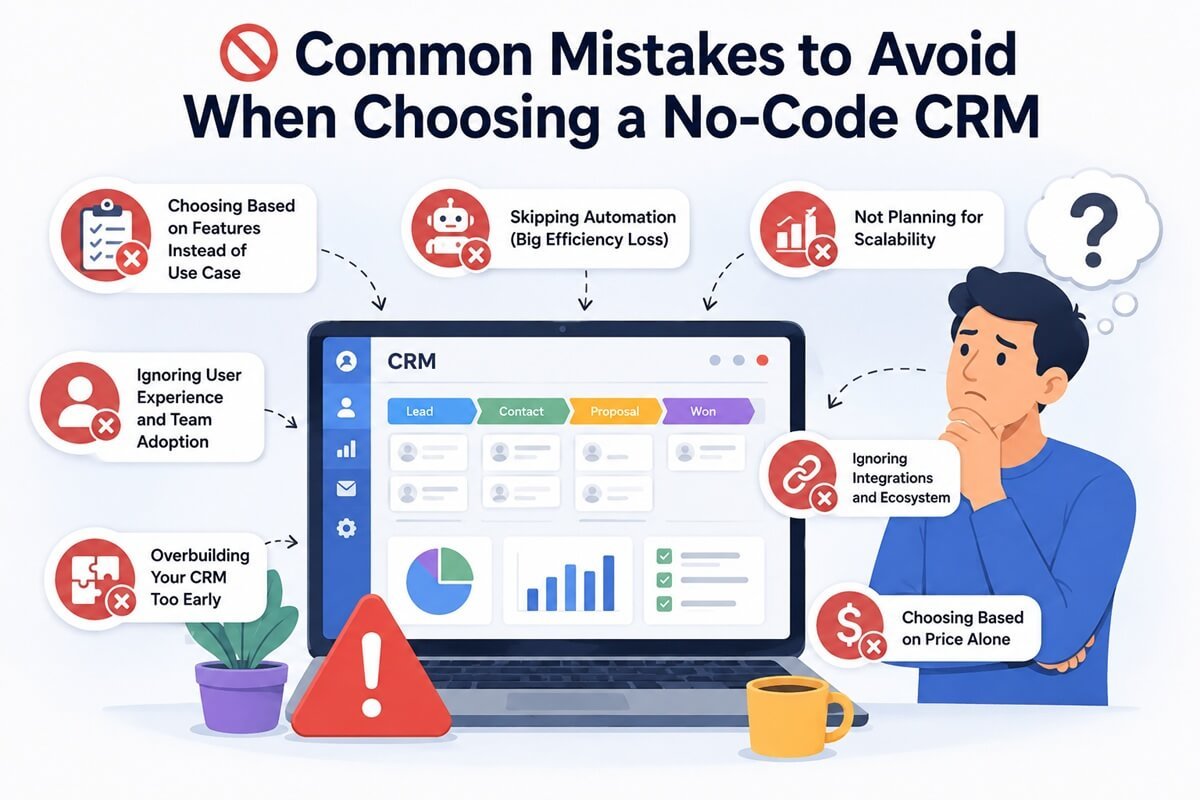
1. Choosing Based on Features Instead of Use Case
More features don’t automatically mean better results. Many tools like Zoho CRM or Salesforce offer hundreds of features—but most small teams only use a fraction of them.
Why this is a problem:
- Overwhelming interface slows adoption
- Teams avoid using the CRM altogether
- You pay for features you never use
What to do instead:
Focus on:
- Your core workflow (lead tracking, sales, client management)
- Tools that do one thing extremely well
2. Ignoring User Experience (UX) and Team Adoption
Even the most powerful CRM is useless if your team doesn’t use it daily. Platforms like Pipedrive and HubSpot succeed because they prioritize ease of use and intuitive design.
Warning signs of poor UX:
- Too many clicks to complete simple tasks
- Confusing navigation
- Long onboarding time
Impact:
- Low adoption rates
- Incomplete data
- Broken sales processes
What to do:
Choose a CRM that:
- Feels natural within 10–15 minutes
- Requires minimal training
3. Overbuilding Your CRM Too Early
One of the biggest mistakes is trying to build a “perfect system” from day one. Tools like Airtable and Notion allow deep customization—but that can backfire.
Why this hurts:
- Wastes time on setup instead of selling
- Creates unnecessary complexity
- Confuses team members
Better approach:
Start with:
- A simple pipeline (Lead → Contact → Deal → Closed)
- Basic automation
Then scale gradually.
4. Skipping Automation (Big Efficiency Loss)
Many users treat CRMs as static databases instead of automation engines. Even simple automations can save hours every week.
Examples:
- Auto-assign leads
- Send follow-up emails
- Create tasks when deals move stages
Tools like Monday.com and Close excel in this area.
Why it matters:
- Reduces manual work
- Improves response time
- Increases conversion rates
5. Not Planning for Scalability
A CRM that works today may break tomorrow as your business grows.
Common issues:
- Limited contacts or pipelines
- Expensive upgrades
- Missing integrations
What to check:
- Pricing tiers
- Integration ecosystem
- Data limits
6. Ignoring Integrations and Ecosystem
Your CRM should not exist in isolation. It must connect with:
- Email marketing tools
- Automation platforms
- Payment systems
Why this matters:
Disconnected tools = broken workflows
7. Choosing Based on Price Alone
Cheap tools can become expensive if:
- You outgrow them quickly
- You need to migrate data later
👉 Always evaluate value, not just cost
❓ FAQs: No-Code CRM
These FAQs are optimized to rank for featured snippets and AI answers.
What is the easiest no-code CRM to use in 2026?
The easiest no-code CRM tools in 2026 are designed for quick setup, intuitive navigation, and minimal learning curve. Platforms like HubSpot and Pipedrive stand out because they offer:
- Clean, user-friendly dashboards
- Drag-and-drop pipeline management
- Built-in templates for fast onboarding
For beginners or small teams, these tools allow you to start managing leads within minutes, without technical expertise.
Are no-code CRMs scalable for growing businesses?
Yes, many no-code CRMs are highly scalable—but it depends on the platform. Tools like HubSpot and Zoho CRM offer:
- Tiered pricing plans
- Advanced automation features
- Integration with marketing and sales tools
However, platforms like Notion may require additional tools or migration as your operations become more complex.
👉 Best approach: choose a CRM that grows with your business, not one you’ll outgrow in 6 months.
Can no-code CRMs replace traditional CRM systems?
For most startups, freelancers, and small-to-mid-sized businesses, yes—no-code CRMs can fully replace traditional systems. Traditional platforms like Salesforce are still useful for:
- Large enterprises
- Complex workflows
- Advanced reporting needs
But for 80–90% of teams, no-code CRMs provide:
- Faster setup
- Lower costs
- Higher usability
👉 In 2026, simplicity often delivers better results than complexity.
Are no-code CRMs secure and reliable?
Yes, modern no-code CRM platforms follow enterprise-grade security standards.
Most tools offer:
- Data encryption (in transit and at rest)
- Role-based access control
- GDPR and compliance support
Well-known platforms like HubSpot and Zoho CRM invest heavily in security infrastructure.
👉 Always review:
- Data policies
- Backup options
- Access controls
Do I need technical skills to use a no-code CRM?
No—that’s the core advantage of no-code CRM platforms. Tools like Airtable and Notion are designed for non-technical users.
You can:
- Build workflows
- Customize fields
- Automate tasks
…without writing any code.
Which no-code CRM is best for small teams and startups?
The best CRM depends on your needs:
- Ease of use: HubSpot
- Sales pipeline: Pipedrive
- Customization: Airtable
- All-in-one workspace: Notion
👉 Start with a simple tool, then scale as needed.
Final Verdict: Simplicity Wins in 2026
The CRM landscape is changing. The winners are no longer the most complex tools—but the most usable ones.
If your CRM:
- Slows down your team
- Requires constant maintenance
- Feels like a burden
…it’s time to switch.
The best no-code CRM for you depends on your needs:
- Want simplicity + growth → HubSpot
- Want flexibility → Airtable
- Want minimal setup → Notion
- Want sales focus → Pipedrive
Final Thought
You don’t need a CRM that does everything. You need one that gets the important things right. Start with your workflow. Choose the capabilities your team actually needs. Keep the setup lean, and let the system evolve as your business grows. Because the best CRM isn’t the one with the longest feature list. It’s the one that helps your business move forward.


One Comment