10 Proven n8n AI Automation for Real Estate Agents & Teams

Real estate businesses handle a constant flow of leads, property inquiries, follow-ups, appointments, documents, CRM updates, and client communications. Many of these tasks are repetitive. Agents and property teams spend hours moving information between forms, email, CRMs, spreadsheets, listing systems, and other applications instead of focusing on clients and transactions.
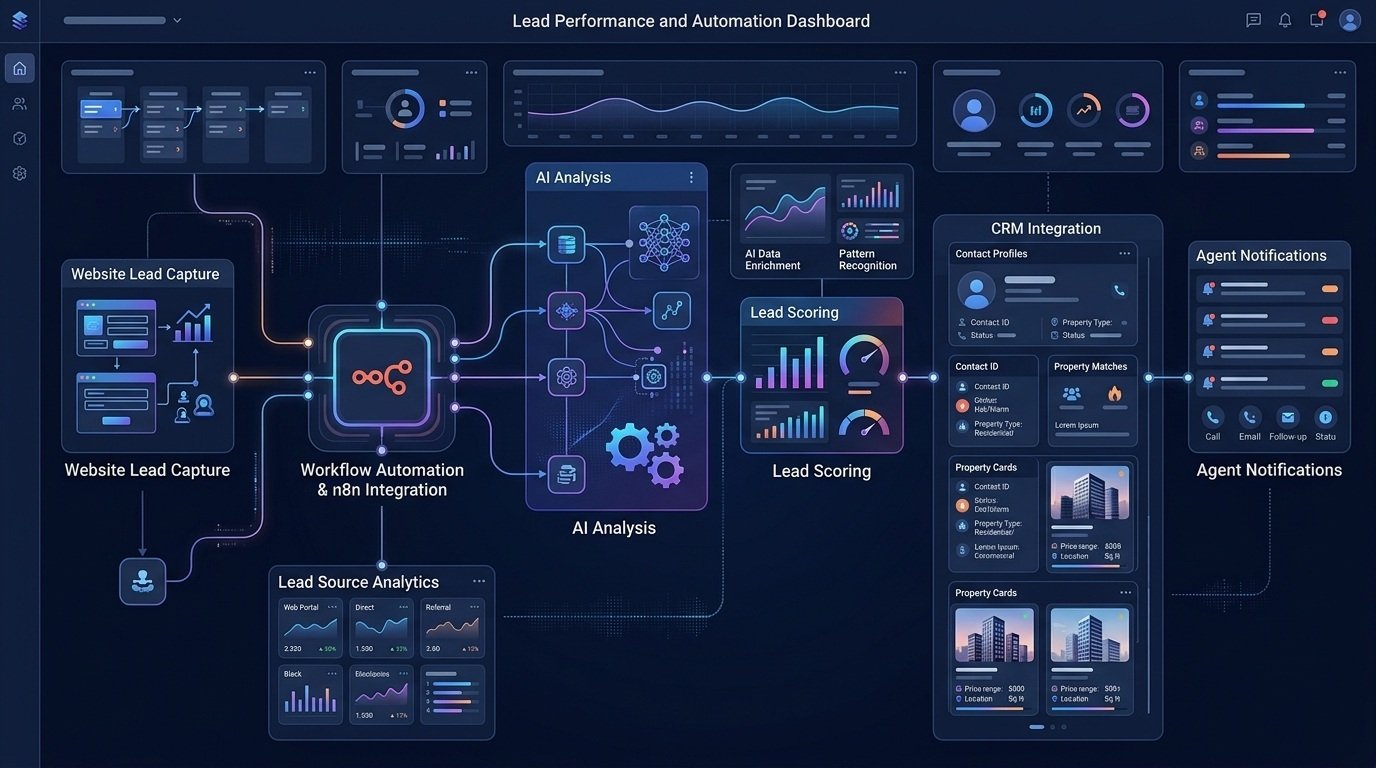
n8n AI automation can connect these systems and turn repetitive processes into automated workflows. For example, a real estate lead can submit an inquiry through a website. An n8n workflow can capture the information, validate the data, use AI to analyze the lead, assign a qualification score, update the CRM, notify the appropriate agent, and prepare a personalized follow-up.
This approach doesn’t mean every real estate decision should be automated. Instead, it allows teams to automate predictable administrative work while keeping people involved where judgment and approval matter.
If you want to build these types of workflows yourself, you can explore n8n here:
Table of Contents
What Is n8n AI Automation for Real Estate?

n8n is a workflow automation platform that can connect different applications and services. When AI is added to those workflows, real estate teams can use AI for tasks such as:
- Lead classification
- Message analysis
- Information extraction
- Summarization
- Content generation
- Lead scoring
- Data categorization
- Follow-up preparation
- Document processing
A generall real estate AI workflow can follow this structure:
Trigger → Data Validation → AI Processing → Business Logic → CRM/Action → Notification → Tracking
For example:
Website Lead → n8n → AI Lead Analysis → Lead Score → CRM → Agent Notification → Follow-Up
The important part is that AI becomes part of a larger business process instead of being used as a standalone chatbot.
10 n8n AI Workflows for Real Estate
1. AI Real Estate Lead Qualification
Real estate agents often receive leads from websites, landing pages, listing portals, social media, advertisements, and contact forms. Manually reviewing every lead can take significant time. An automated workflow can help prioritize leads.
Example workflow
Lead Form → n8n → Data Validation → AI Analysis → Lead Score → CRM → Agent Notification
The workflow could analyze information such as:
- Property type
- Preferred location
- Budget
- Buying or selling intent
- Timeframe
- Number of bedrooms
- Financing status
- Stated requirements
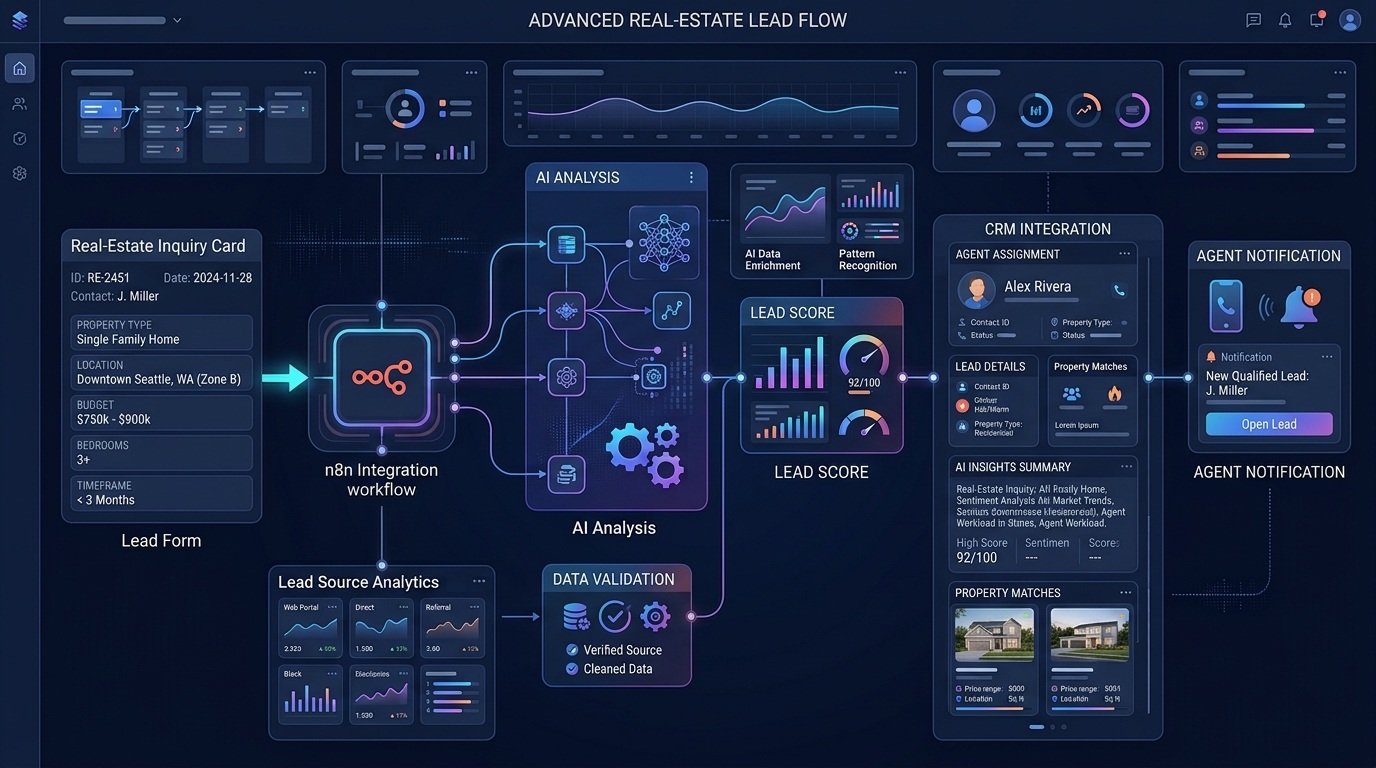
AI can classify the lead according to predefined criteria.
For example:
High priority → Immediate sales notification
Medium priority → CRM follow-up queue
Low priority → Nurture campaign
The criteria should be defined by the real estate business rather than allowing AI to make unrestricted decisions. For a deeper example of AI lead qualification, see our n8n AI Lead Qualification Workflow, which shows how lead data can be analyzed, classified, and routed through an automated workflow.
This workflow is particularly useful for teams that receive a large number of inquiries but have limited time to manually review each one.
2. Automated Lead Routing for Real Estate Agents
Lead qualification and lead routing can work together. Once a new lead has been analyzed, n8n can use predefined rules to determine where the lead should go.
For example:
New Lead → AI Classification → Location → Property Type → Agent Assignment → CRM → Notification
A workflow could route:
- Commercial inquiries to commercial agents
- Luxury property inquiries to a specialized team
- Rental inquiries to rental specialists
- Leads from a particular geographic area to the appropriate local agent
The workflow can also notify the assigned agent through email or another communication channel. This reduces the need for an employee to manually review every new inquiry and decide who should handle it.
3. AI Property Inquiry Response
Real estate websites can receive repetitive questions about properties.
Examples include:
- Is the property still available?
- How many bedrooms does it have?
- What is the asking price?
- Where is the property located?
- Are viewings available?
- What features does the property include?
An AI workflow can classify and process these inquiries.
Example
Property Inquiry → n8n → Extract Property ID → Retrieve Property Data → AI Response → Human Approval or Reply
The workflow can retrieve structured property information and use it to prepare a response. For important or sensitive questions, the workflow can send the draft to an agent for approval rather than sending it automatically.
You can extend this same approach to broader customer communication workflows. An AI Customer Support Workflow can help classify incoming questions, prepare responses, and route conversations that require human attention.
4. Real Estate CRM Data Automation
Real estate teams often enter the same information into multiple systems. A lead might arrive through a website form and then need to be copied into a CRM, spreadsheet, email platform, and task system. An n8n workflow can reduce this repetitive work.
Example workflow
Website Form → n8n → Validate Data → Create/Update CRM Record → Create Task → Notify Agent
AI can also help identify the type of inquiry and extract additional information from free-text responses. For example, a lead might write:
“I’m looking for a three-bedroom home near downtown with a budget around $450,000.”
The workflow can extract structured fields such as:
- Property type
- Bedrooms
- Location preference
- Approximate budget
- Buying intent
For teams that want to automate this process further, a Lead Enrichment & CRM Update Workflow can enrich incoming lead information and keep CRM records updated without repetitive manual data entry.

5. AI Lead Follow-Up
Getting a lead is only the beginning. Real estate teams also need to follow up consistently. An AI workflow can help prepare follow-up messages based on the lead’s previous interactions.
Example workflow
CRM Event → n8n → Retrieve Lead Data → AI Analysis → Follow-Up Draft → Human Approval → Email/Message → CRM Update
The AI could use information such as:
- Previous conversation
- Property interest
- Last contact date
- Lead preferences
- Questions asked
- Stage in the sales pipeline
Instead of sending generic messages to every prospect, the workflow can prepare more context-specific drafts. For example, a lead interested in a particular property could receive a follow-up related to that property rather than a generic sales message. For customer-facing communication, a human approval step can be added before the message is sent.
6. Property Listing Content Automation
Creating property descriptions and marketing content can also be part of an AI workflow.
For example:
Property Data → n8n → AI Content Generation → Draft Listing → Human Review → CMS/Listing System
The input could contain:
- Property type
- Location
- Bedrooms
- Bathrooms
- Square footage
- Amenities
- Features
- Nearby attractions
- Selling points
AI can turn the structured information into a draft description. The agent or marketing team can then review and edit the content before publishing. This can help reduce repetitive writing while maintaining editorial control.
The workflow could also generate different versions for:
- Website listings
- Email campaigns
- Social media
- Property brochures
- Internal sales materials
The final content should always be checked against the actual property information to avoid introducing incorrect claims. If the same property content needs to be adapted across multiple marketing channels, an AI Content Repurposing Workflow can help turn a core piece of content into additional formats for distribution.
7. AI Client and Buyer Matching
Real estate teams may manage many buyers with different requirements. An AI-assisted workflow can help organize those requirements.
Example
Buyer Inquiry → n8n → Extract Preferences → Match Against Property Data → Rank Potential Matches → Agent Review
The workflow could consider:
- Location
- Budget
- Property type
- Bedrooms
- Amenities
- Preferred timeframe
- Other stated requirements
The results can then be presented to an agent for review. This should be treated as a recommendation and organizational system rather than an autonomous decision-maker. Real estate professionals should review the criteria and results before making client-facing recommendations.
8. Real Estate Appointment and Showing Automation
Scheduling property viewings involves several repetitive steps. A workflow can connect inquiry forms, calendars, CRM records, notifications, and follow-up tasks.
Example workflow
Showing Request → n8n → Validate Request → Calendar Check → Create Appointment → CRM Update → Confirmation → Reminder
The workflow can:
- Capture the showing request
- Check required information
- Create or update the CRM record
- Create a calendar event
- Send confirmation
- Notify the assigned agent
- Create a follow-up task
After the showing, another workflow could remind the agent to record the outcome and update the lead stage. Once a prospect becomes a client, similar automation can continue through the onboarding process.
For example, an automated client onboarding workflow with n8n can organize intake information, validate submitted data, track onboarding status, and trigger the appropriate next steps.
9. AI Document Processing for Real Estate
Real estate businesses deal with many documents. Depending on the business and jurisdiction, these may include:
- Application forms
- Property information
- Invoices
- Inspection documents
- Client forms
- Agreements
- Reports
An automated workflow can extract structured information from supported documents.
Example workflow
Document Upload → n8n → Text/Data Extraction → AI Classification → Validation → Database/CRM → Human Review
AI could help identify document type or extract specific fields. For example, the workflow might identify:
- Client name
- Property address
- Document type
- Dates
- Reference numbers
- Required fields
Because real estate documents can contain sensitive or legally significant information, automated extraction should be validated before important actions are taken. AI should not be treated as a substitute for legal review or professional advice.
10. Real Estate Sales Pipeline Reporting
Real estate managers often need to understand what is happening across the sales pipeline. An automated reporting workflow can gather information from connected systems.
Example
CRM Data → n8n → Aggregate Information → AI Analysis → Report → Management Notification
The workflow could summarize:
- New leads
- Qualified leads
- Follow-ups
- Appointments
- Opportunities
- Closed transactions
- Pipeline stages
- Lead sources
AI can help turn raw data into a concise summary.
For example:
“The team received 84 new inquiries this week. Twenty-four reached the qualified stage, while 12 progressed to scheduled appointments.” The underlying data should remain available so managers can verify the AI-generated summary.
How n8n AI Real Estate Workflows Work
Most real estate automation workflows can be broken into several components.
1. Trigger
The trigger starts the automation.
Examples include:
- New website lead
- Form submission
- New CRM record
- Incoming email
- Uploaded document
- Scheduled event
- Webhook
- Calendar event
2. Data Validation
The workflow checks whether required information is present and correctly formatted. This prevents incomplete information from moving through the automation.
3. AI Processing
AI performs a specific task.
Examples include:
- Classifying a lead
- Extracting information
- Summarizing a message
- Preparing a response
- Categorizing an inquiry
- Generating a draft
The AI task should have a clearly defined purpose.
4. Business Logic
The workflow determines what happens next.
For example:
IF lead score is high → notify sales agent
IF inquiry is rental-related → route to rental team
IF document is missing information → request review
This layer is critical because AI output should not automatically control every downstream action.
5. Action
The workflow performs the appropriate action. What could include:
- Updating a CRM
- Creating a task
- Sending a notification
- Creating a calendar event
- Storing information
- Preparing an email
- Updating a database
6. Logging and Error Handling
A production workflow should also account for failure.
Useful components include:
- Error notifications
- Retry logic
- Data validation
- Workflow logs
- Human approval
- Monitoring
- Time-saved tracking
These features become increasingly important as the number of automated processes grows.
n8n vs. Manual Real Estate Workflows
Automation does not mean replacing every human step. The difference is primarily how repetitive work is handled.
| Manual Process | n8n AI Workflow |
| Employee reviews every lead | Workflow can classify leads automatically |
| Data copied between systems | Information can move between connected apps |
| Follow-ups tracked manually | Workflow can create reminders and tasks |
| Emails classified manually | AI can categorize incoming messages |
| Documents reviewed for basic information | AI can assist with extraction |
| Reports assembled manually | Data can be gathered automatically |
Human review can remain part of the workflow wherever the decision is important or the consequences of an error are significant.
What Real Estate Businesses Should Automate First
Not every process needs AI. A good first automation usually has several characteristics:
It happens frequently
A process performed once a month may not justify a complicated workflow.
It has predictable steps
Clearly defined processes are easier to automate reliably.
It involves repetitive data movement
Moving information from one application to another is often a strong automation candidate.
It has measurable results
You should be able to measure whether the workflow saves time or improves response speed.
It is relatively low-risk
Start with administrative processes before automating sensitive decisions.
Good starting points can include:
- Lead routing
- CRM updates
- Appointment notifications
- Lead classification
- Content drafts
- Internal reporting
- Email categorization
How to Build Your First n8n Real Estate Automation
You don’t need to automate an entire real estate operation at once. Start with one clearly defined process.
Step 1: Identify the repetitive task
Ask:
What task does my team perform repeatedly every week?
Step 2: Define the trigger
Determine exactly what starts the workflow.
For example:
New website lead submitted.
Step 3: Map the current process
Write down every step that happens after the trigger. This can reveal unnecessary manual work.
Step 4: Decide where AI is actually needed
Not every step requires AI. Use normal workflow logic for predictable rules and AI for tasks involving classification, extraction, summarization, or generation.
Step 5: Define the business rules
Specify what should happen for each result.
Step 6: Add human approval where appropriate
For customer-facing, financial, legal, or otherwise sensitive actions, consider requiring human review.
Step 7: Test with real-world examples
Test:
- Complete information
- Missing information
- Duplicate leads
- Unexpected responses
- Incorrect formats
- AI classification errors
- Integration failures
Step 8: Measure the result
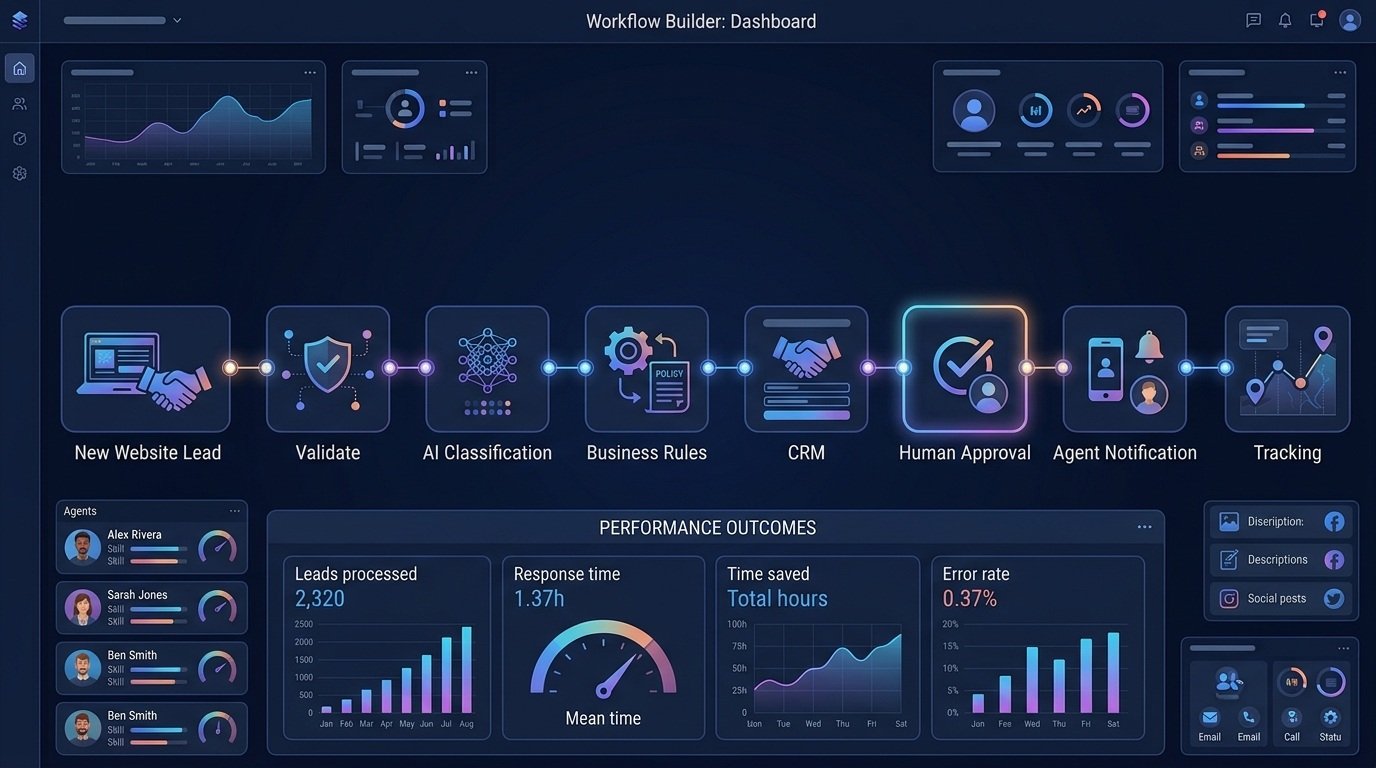
Track metrics such as:
- Leads processed
- Manual steps removed
- Response time
- Time saved
- Error rate
- Workflow failures
This helps determine whether the automation is actually delivering value.
Ready to Build Your Own Real Estate AI Workflows?
If your team has identified repetitive lead, CRM, communication, document, or reporting tasks, n8n can provide a way to connect those processes and add AI where it is useful.
Start small. A single reliable automation is usually more useful than a large collection of workflows that haven’t been properly tested.
Common Mistakes With Real Estate AI Automation
Automating Before Understanding the Process
If a process is inefficient manually, automating it may simply make an inefficient process run faster. Map and simplify the process first.
Using AI When Simple Automation Is Enough
If a rule can be handled with straightforward logic, there may be no reason to involve an AI model. Use AI where it adds value.
Sending Unvalidated Data to AI
Incomplete or incorrect information can produce unreliable results. Add validation before AI processing.
Automatically Sending Every AI-Generated Message
AI-generated content can contain errors. For important customer communication, consider a review step.
Ignoring Workflow Failures
Every production workflow should have a strategy for failed API calls, missing information, unavailable services, and other errors.
Not Measuring Time Saved
The purpose of automation should be measurable. Track the work being reduced rather than assuming that automation automatically creates value.
Automating Sensitive Decisions
Real estate workflows can involve financial, legal, housing, and personal information. Automation should be designed carefully around applicable laws, regulations, privacy requirements, and professional responsibilities.
AI should assist with appropriate tasks rather than independently making high-impact decisions that require professional judgment.
FAQs: n8n AI Automation for Real Estate
What is n8n AI automation for real estate?
n8n AI automation for real estate combines workflow automation with AI processing to automate repeatable business processes such as lead qualification, CRM updates, follow-ups, document processing, property content generation, and reporting.
Can real estate agents use n8n?
Yes. Real estate agents and teams can use workflow automation to connect forms, CRMs, email, calendars, databases, AI services, and other business applications. The exact capabilities depend on the applications and integrations being used.
What can n8n automate for real estate agents?
Potential use cases include lead routing, CRM updates, appointment workflows, email classification, follow-up preparation, content generation, document processing, and reporting.
Can n8n automate real estate lead generation?
n8n can automate parts of a lead-generation and lead-management process, such as capturing leads from connected sources, validating information, classifying inquiries, updating a CRM, and notifying agents. Lead generation itself still depends on the marketing channels and systems producing the leads.
Can n8n connect AI to a real estate CRM?
Yes. A workflow can be designed to process information with AI and then send structured results to a connected CRM, depending on the CRM’s available integration and the workflow configuration.
Can AI automatically qualify real estate leads?
AI can assist with lead qualification by analyzing predefined information and assigning classifications or scores. Businesses should define the criteria and consider human review for important decisions.
Can n8n automate real estate follow-ups?
Yes. A workflow can monitor CRM events or other triggers and prepare reminders, tasks, or follow-up drafts based on available information.
Is n8n suitable for small real estate teams?
It can be useful when a team has repetitive processes involving multiple applications and wants to reduce manual data movement or administrative work. The right approach depends on the team’s technical requirements, workflow complexity, budget, and ability to maintain the automation.
How much does real estate AI automation cost?
There is no single fixed cost. Expenses can include the automation platform, AI usage, connected applications, development, hosting, and ongoing maintenance. A practical evaluation should compare these costs with measurable benefits such as time saved, faster response times, and reduced repetitive work.
Final Thoughts
Real estate automation becomes more valuable when it is connected to the actual processes agents and property teams perform every day. With n8n, businesses can connect lead forms, CRMs, email, calendars, databases, AI services, and other applications into repeatable workflows.
AI can then be added where it provides useful capabilities such as classification, extraction, summarization, analysis, or content drafting. The best approach is not to automate everything at once. Start with one repetitive process, define the workflow clearly, add validation and error handling, keep humans involved where appropriate, and measure the result.
Once the workflow is reliable, you can determine whether another part of the real estate operation is worth automating.
“Affiliate disclosure: This article contains an affiliate link. If you sign up or make a purchase through the link, we may earn a commission at no additional cost to you.“