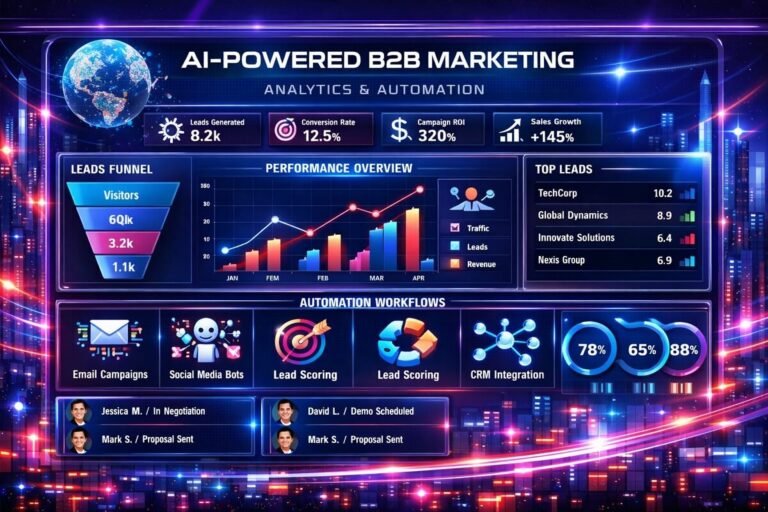
n8n AI SDR Workflow: Automate Lead Research, Qualification & Outreach

Sales development teams spend a large amount of time on repetitive tasks: finding prospects, researching companies, checking lead fit, updating CRMs, writing outreach messages, following up, and sorting replies.
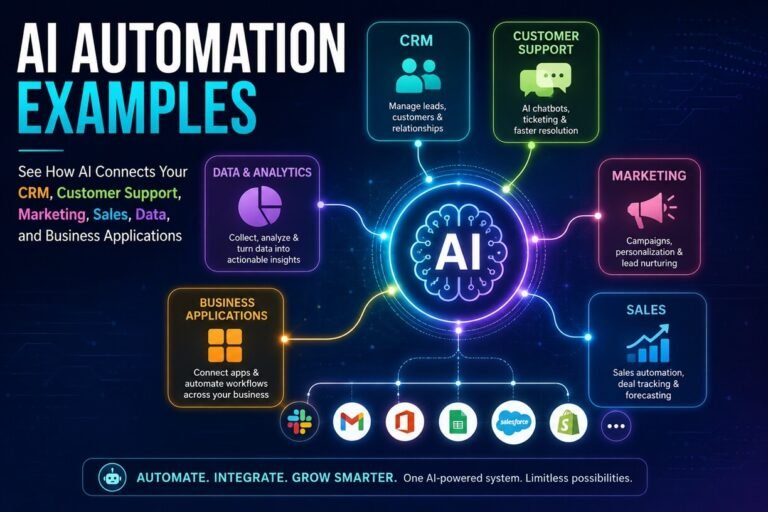
An n8n AI SDR workflow can connect these activities into one automated sales process. Instead of using AI as a standalone writing tool, n8n can connect lead sources, enrichment services, AI models, CRMs, email platforms, databases, calendars, and notifications into a repeatable workflow.
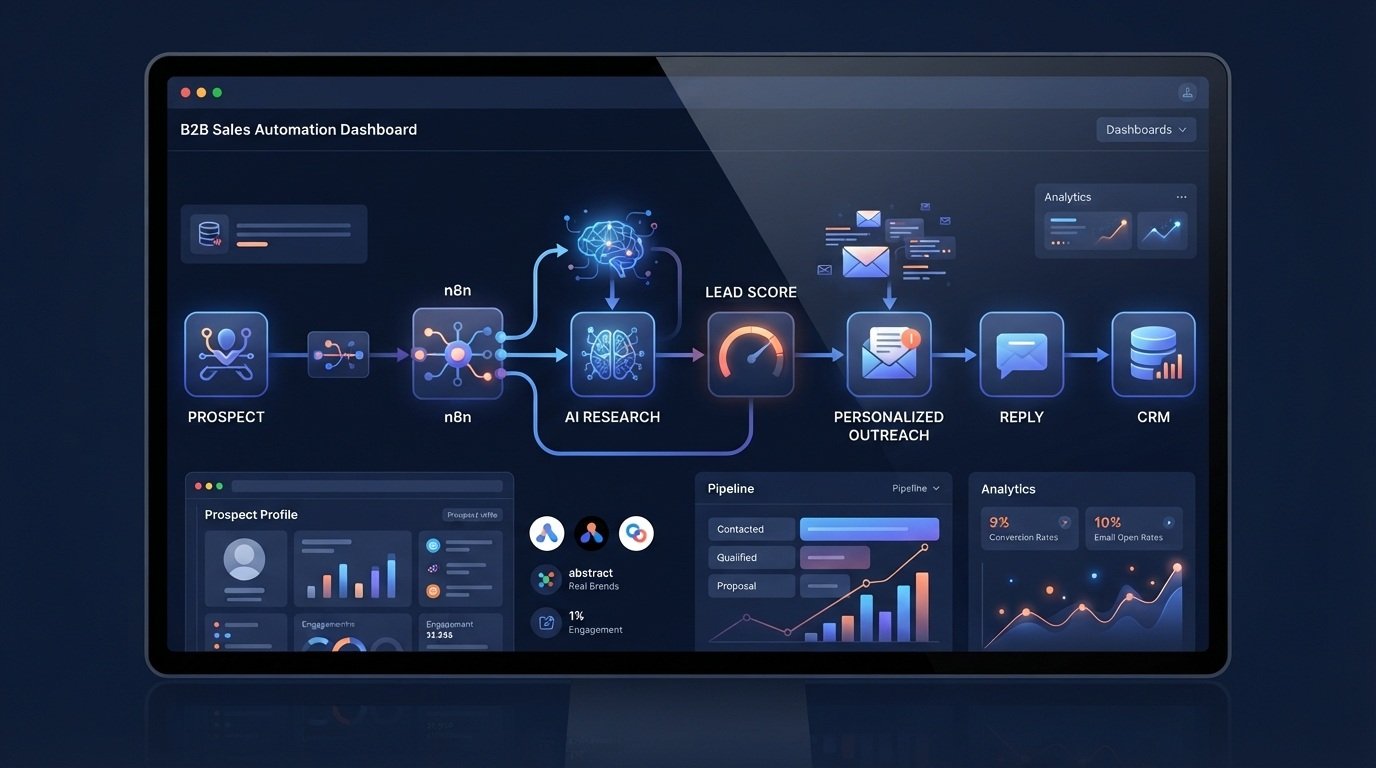
A general workflow can look like this:
Prospect Source → Data Validation → Lead Enrichment → ICP Qualification → AI Research → Lead Scoring → Personalized Outreach → Reply Classification → CRM Update → Follow-Up → Sales Handoff
The important distinction is that AI does not need to make every sales decision. Predictable steps can be handled with normal workflow logic, while AI can assist with research, classification, summarization, personalization, and content generation.
This approach can help sales teams reduce repetitive administrative work while keeping human review where it matters. If you’re new to n8n, start with our n8n AI workflow automation tutorial to understand how AI agents, triggers, data processing, and business logic fit together.
Table of Contents
What Is an n8n AI SDR Workflow?
An n8n AI SDR workflow is an automated sales development process built with n8n that combines traditional workflow automation with AI-powered tasks. An SDR workflow can potentially automate parts of:
- Prospect collection
- Lead validation
- Company enrichment
- Contact enrichment
- ICP qualification
- Lead scoring
- Prospect research
- Personalized email generation
- Outreach sequencing
- Reply classification
- CRM updates
- Follow-up reminders
- Sales notifications
- Reporting
The exact workflow depends on the applications and services connected to n8n. For example, a new prospect could enter the workflow through a form, webhook, spreadsheet, CRM, or another connected source.
n8n can then validate the information, enrich the prospect, send relevant data to an AI model, apply qualification rules, create a personalized outreach draft, and update the CRM.
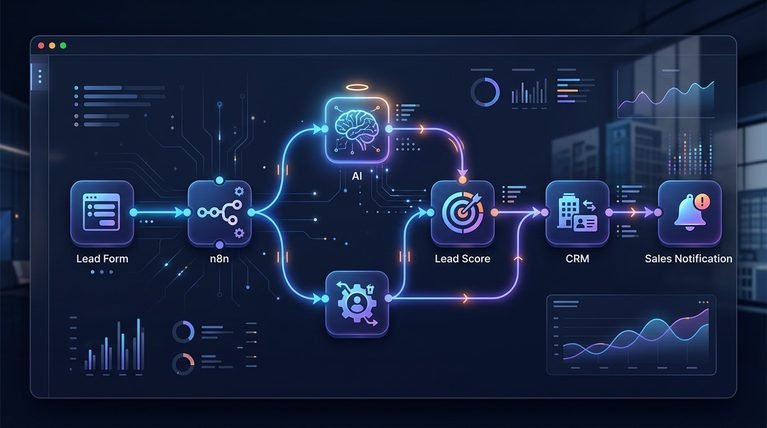
The basic architecture looks like this:
Lead Source → n8n → Validation → Enrichment → AI Qualification → Outreach → Reply Handling → CRM → Sales Handoff
This makes n8n useful for building a connected sales process rather than relying on separate AI tools for individual tasks.
What Can an AI SDR Workflow Automate?
An AI SDR workflow can automate different parts of the sales development process.
Prospect research
AI can summarize available information about a company or prospect and organize it into structured fields.
Lead qualification
The workflow can compare lead information against predefined ICP criteria.
Lead scoring
A scoring system can classify prospects based on factors such as industry, company size, role, location, or other business-defined criteria.
Personalized outreach
AI can generate outreach drafts using approved prospect and company information.
Reply classification
Incoming replies can be classified into categories such as interested, not interested, objection, request for information, or meeting request.
CRM management
The workflow can create or update records and store relevant activity.
Follow-up
n8n can monitor lead status and trigger follow-up tasks according to predefined rules.
Reporting
Workflow data can be collected and summarized for sales operations. Current n8n workflow examples demonstrate similar patterns, including lead validation, enrichment, scoring, personalized outreach, reply handling, CRM synchronization, logging, and reporting.
The Complete n8n AI SDR Workflow
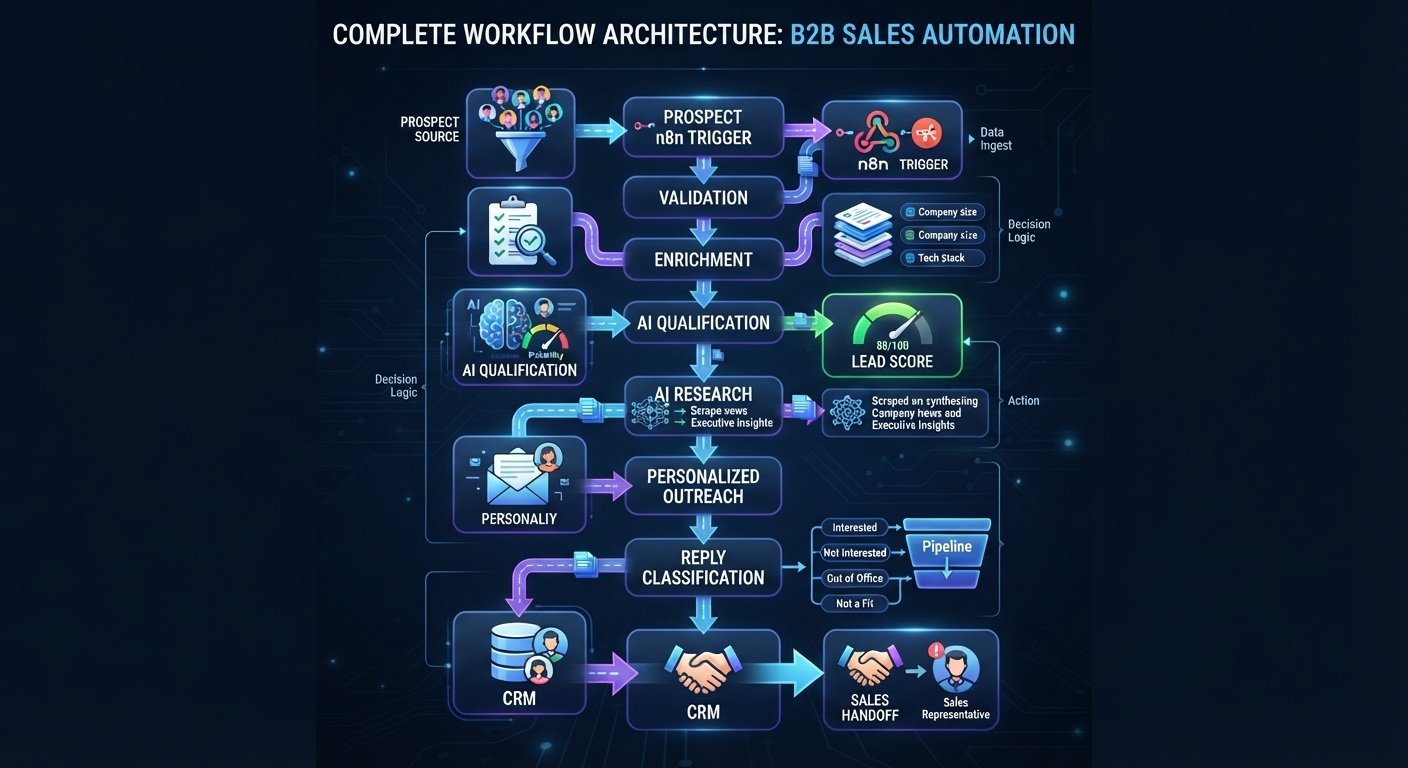
A practical architecture can look like this:
Prospect Source
↓
n8n Trigger
↓
Data Validation
↓
Lead Enrichment
↓
ICP Qualification
↓
AI Prospect Research
↓
Lead Score
↓
Business Rules
↓
Personalized Outreach Draft
↓
Human Approval
↓
Email / Outreach
↓
Reply Classification
↓
CRM Update
↓
Follow-Up or Sales Handoff
Each stage has a specific purpose.
1. Capture New Prospects
The first step is getting prospect information into the workflow. Depending on your sales process, the trigger could come from:
- A webhook
- Lead form
- CRM
- Google Sheets
- Database
- Lead-generation system
- Scheduled workflow
- Another application
For example:
New Prospect → n8n Webhook
The workflow receives information such as:
- First name
- Last name
- Company
- Job title
- Website
- Location
- Industry
- Lead source
n8n then passes the information to the next stage.
The important principle is to standardize the incoming data before using AI.
2. Validate and Clean the Lead Data
Raw lead data is rarely perfect.
A workflow should check the information before sending it to other systems.
For example:
Lead → Validate Email → Check Required Fields → Normalize Data → Continue
The workflow might check:
- Is an email address present?
- Is the email formatted correctly?
- Is the company name available?
- Is the lead already in the CRM?
- Is the domain on a suppression list?
- Is the lead from an excluded market?
- Is the contact already being contacted?
This prevents bad records from moving through the entire automation. A more advanced workflow can also check duplicate records and suppression lists before outreach. Current n8n B2B automation examples use validation and suppression logic before enrichment and outreach.
3. Enrich the Prospect
The next step is adding useful context to the raw lead.
A basic lead may only contain:
John — CEO — Example Company — email@example.com
An enrichment process could add information such as:
- Company industry
- Company size
- Website
- Business description
- Technology information
- Job role
- Location
- Other approved firmographic information
The workflow becomes:
Raw Lead → Enrichment → Structured Prospect Profile
n8n can connect to external APIs and services using native integrations or HTTP requests. This makes the enrichment layer flexible. You can change the enrichment provider without rebuilding the entire sales workflow.
4. Define Your Ideal Customer Profile
AI should not decide whether a lead is valuable without clear business criteria.
Define your ICP first.
For example:
Target industry
SaaS, agencies, professional services, or another selected market.
Company size
For example:
20–500 employees
Target roles
- Founder
- CEO
- COO
- VP Sales
- Head of Marketing
- Revenue Operations
Business problem
The company has a process that could benefit from automation.
Geographic criteria
Only target regions that fit your sales strategy. These rules can then be used by the workflow.
5. Use AI for Lead Qualification
Once the prospect has been enriched, AI can help classify the lead.
For example:
Prospect Data → AI Qualification → Fit Score → Qualification Tier
The AI could evaluate:
- Industry fit
- Company size
- Job title
- Business model
- Potential use case
- Available company information
- Stated requirements
The result might be:
HIGH FIT
MEDIUM FIT
LOW FIT
Or a numerical score based on your own scoring system. The important point is that the criteria should be defined by the business. AI should assist with applying those criteria rather than inventing the sales strategy.
6. Build a Lead Scoring System
A scoring layer can make the workflow easier to manage.
For example:
| Factor | Example Weight |
|---|---|
| ICP industry match | 25 |
| Company size | 20 |
| Job-title match | 20 |
| Use-case match | 20 |
| Geographic fit | 10 |
| Buying signal | 5 |
The total could produce a score from 0–100.
Then use normal workflow logic:
80–100 → High Priority
60–79 → Medium Priority
Below 60 → Low Priority
These numbers are only an example. Your actual scoring criteria should reflect your business. The benefit of separating AI analysis from business rules is that you can change the routing logic without changing the entire AI system.
7. Research the Prospect With AI
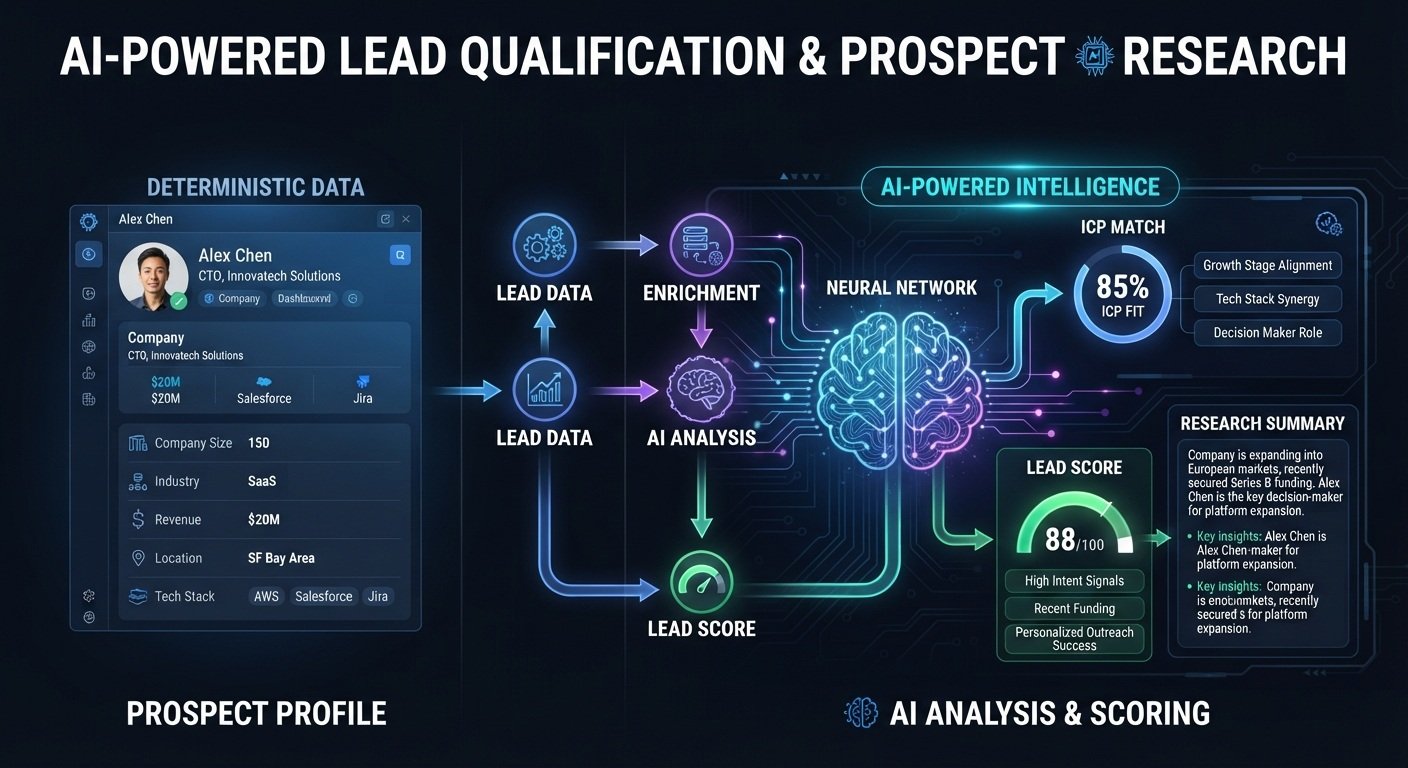
Once a prospect passes your qualification criteria, AI can help organize the available research. For example, the workflow can provide the model with approved information about:
- Company description
- Industry
- Role
- Website information
- Known business challenges
- Relevant products or services
- Available signals
The AI can then produce a structured research summary.
For example:
Company: Example SaaS
Industry: B2B SaaS
Role: VP Sales
Potential Need: Sales process automation
Relevant Signal: Growing sales team
Suggested Angle: Reduce repetitive lead-management work
This information can then be passed into the outreach-generation stage.
8. Generate Personalized Outreach
This is where AI can make the SDR workflow particularly useful. Instead of creating the same email for every prospect, the workflow can generate a draft based on structured information.
The architecture could be:
Qualified Prospect → Research Data → AI Prompt → Outreach Draft
The prompt can define:
- Brand voice
- Target audience
- Email length
- Product information
- Allowed claims
- Prohibited claims
- Call-to-action
- Personalization rules
For example:
Write a concise B2B sales email using only the verified information provided. Explain one relevant business problem, introduce the solution briefly, and end with a simple call to action.
The workflow can return:
Subject
Email body
Personalization reason
This is more controlled than simply asking an AI chatbot to “write a cold email.”
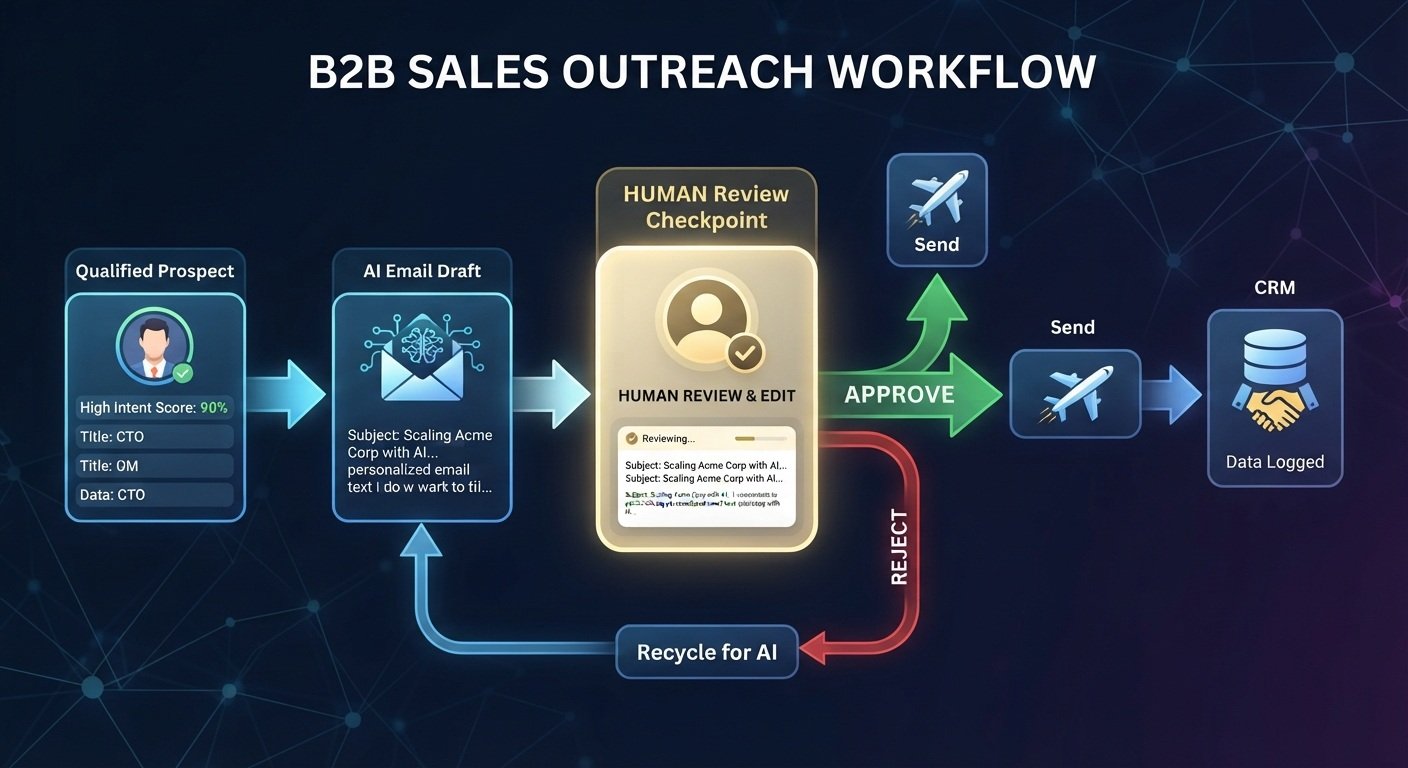
9. Add Human Approval Before Sending
Automation does not have to mean completely autonomous outreach.
For important campaigns, add a review step.
The workflow can become:
AI Draft → Human Approval → Send
An SDR can review:
- Accuracy
- Personalization
- Tone
- Claims
- Contact information
- Call to action
If approved:
Send → CRM Update
If rejected:
Return to Draft → Edit → Review
This creates a useful balance between automation and human oversight.
10. Send the Outreach
After approval, the workflow can send the message through the connected email system.
The process might be:
Approved Email → Email Provider → Prospect
The workflow can then record:
- Date sent
- Campaign
- Lead ID
- Subject
- Sequence step
- Status
That information should be stored in the CRM or database.
11. Automate Follow-Up
Most sales workflows don’t end after the first email. A follow-up process can monitor lead status.
For example:
Lead Status = Contacted
↓
No Reply
↓
Wait
↓
Generate Follow-Up
↓
Human Approval / Send
↓
Update CRM
A more advanced system can use different paths depending on the prospect’s status.
For example:
Booked Meeting → Stop Sequence
Not Interested → Stop Sequence
Positive Reply → Sales Handoff
No Reply → Follow-Up
This is one of the areas where workflow automation can remove repetitive administrative work. An existing n8n SDR template demonstrates scheduled follow-up sequences and automatically stopping outreach when a prospect books a meeting.
12. Classify Incoming Replies With AI
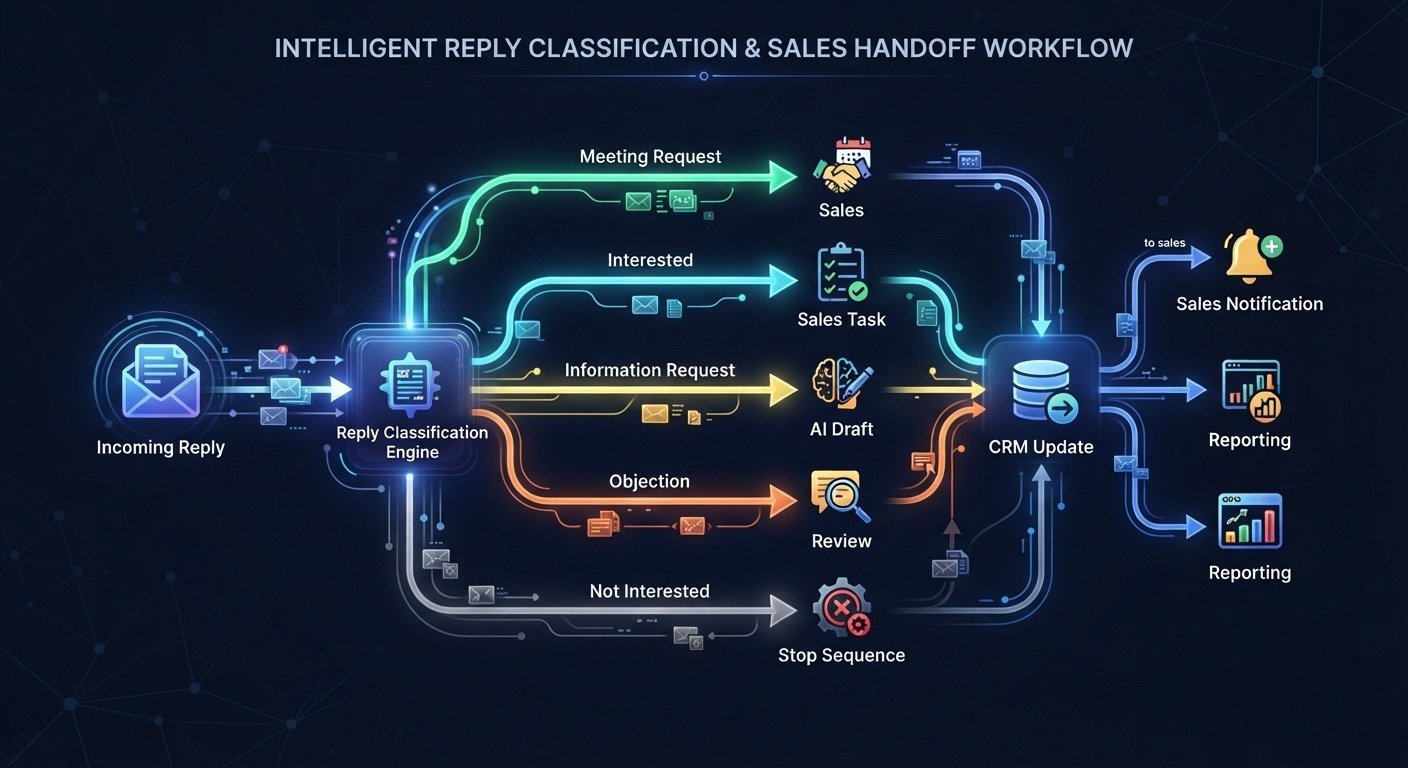
Reply handling can become another automation layer.
Suppose a prospect replies:
“This sounds interesting. Can you send me more information?”
The workflow could classify the message as:
Interested / Information Request
Another response might be:
“Not interested right now.”
The workflow could classify:
Not Interested
Another:
“Can we schedule a call next Tuesday?”
Could become:
Meeting Intent
The workflow can then route each category differently.
For example:
| Reply Type | Workflow Action |
|---|---|
| Meeting request | Notify SDR / booking workflow |
| Interested | Create sales task |
| Information request | Prepare response |
| Objection | Draft response |
| Not interested | Stop sequence |
| Unclear | Human review |
Current n8n sales workflow examples use AI-based reply classification and route different responses through different paths.
13. Update the CRM Automatically
Every important event should be reflected in your CRM.
For example:
Lead Created
→ CRM contact created
Qualified
→ Lead score updated
Outreach Sent
→ Activity recorded
Reply Received
→ Status updated
Meeting Booked
→ Sales stage updated
Not Interested
→ Sequence stopped
This creates a single source of truth for the sales team. Depending on your CRM, n8n can connect the workflow to systems such as HubSpot, Salesforce, Pipedrive, or other applications.
14. Create the Sales Handoff
When a lead reaches the appropriate stage, the workflow can notify the sales team.
For example:
High-Intent Reply
↓
n8n
↓
CRM Update
↓
Sales Notification
↓
Create Task
The notification could include:
- Prospect name
- Company
- Role
- Lead score
- Research summary
- Conversation summary
- Last message
- Suggested next action
Instead of forcing the salesperson to search through multiple systems, the workflow can provide the relevant context in one place. An AI SDR workflow can also connect with a broader inbound marketing pipeline and SDR workflow, allowing qualified leads to move from acquisition through sales handoff.
15. Add Logging and Error Handling
A production workflow needs more than the happy path. Consider what happens if:
- The enrichment API fails
- The AI model returns invalid data
- The CRM API is unavailable
- The email provider rejects a message
- Required information is missing
- A duplicate lead enters the workflow
- A workflow execution fails
Add mechanisms such as:
- Error branches
- Retry logic
- Validation
- Execution logs
- Failure notifications
- Human review
- Status tracking
Current n8n B2B workflow examples also emphasize error handling, event logging, rate limiting, compliance logic, and analytics.
The Complete Architecture
Putting everything together:
1. Prospect Source
↓
2. n8n Trigger
↓
3. Validate Lead
↓
4. Check Duplicate / Suppression
↓
5. Enrich Company & Contact
↓
6. AI Research
↓
7. ICP Qualification
↓
8. Lead Score
↓
9. Business Rules
↓
10. Generate Personalized Outreach
↓
11. Human Approval
↓
12. Send Email
↓
13. Track Activity
↓
14. Monitor Reply
↓
15. AI Reply Classification
↓
16. CRM Update
↓
17. Follow-Up / Sales Handoff
↓
18. Reporting
This is the core n8n AI SDR workflow that you can adapt to different sales teams and products.
n8n AI SDR Workflow vs. Traditional SDR Process
The biggest difference is how repetitive work is handled.
| Traditional SDR Process | n8n AI SDR Workflow |
|---|---|
| Manually collect leads | Automated lead intake |
| Manually check lead data | Automated validation |
| Research prospects manually | AI-assisted research |
| Manually qualify leads | Automated scoring + rules |
| Write every email manually | AI-generated drafts |
| Manually track follow-ups | Automated follow-up logic |
| Manually classify replies | AI-assisted classification |
| Manually update CRM | Automated CRM updates |
| Manually prepare reports | Automated reporting |
Automation does not eliminate the need for an SDR. Instead, it can move the SDR’s attention away from repetitive data handling and toward conversations, opportunities, and decisions that require human judgment.
What Should You Automate First?
You don’t need to build the entire system on day one. Start with one process. Good candidates often have these characteristics:
- 1. High frequency: The team performs the task every day or every week.
- 2. Predictable steps: The process follows a consistent sequence.
- 3. Repetitive data movement: Information is repeatedly copied between systems.
- 4. Clear business rules: You can clearly define what should happen under different conditions.
- 5. Measurable results: You can measure time saved, processing speed, response time, or workflow volume.
For example, start with:
Lead Capture → Qualification → CRM Update
Then add:
AI Research → Outreach Drafting
Then:
Reply Classification → Follow-Up
Finally:
Reporting → Optimization
This incremental approach makes troubleshooting much easier.
How to Build Your First n8n AI SDR Workflow
Step 1: Define the sales process
Write down the current process before automating it.
For example:
Lead → Research → Qualification → Outreach → Follow-Up → Meeting
Step 2: Choose the trigger
Decide exactly what starts the workflow.
Examples:
- New CRM lead
- Form submission
- Webhook
- Spreadsheet row
- Scheduled trigger
Step 3: Define the required data
Create a standard lead structure.
For example:
first_name
last_name
email
company
job_title
website
industry
company_size
location
lead_source
Step 4: Add validation
Check required fields before sending data to enrichment or AI.
Step 5: Add enrichment
Connect the data sources that provide useful prospect information. Only collect information that you actually need.
Step 6: Define your ICP
Write down the exact characteristics of a qualified prospect.
Step 7: Add AI
Use AI for tasks where it adds value:
- Research summaries
- Classification
- Information extraction
- Lead scoring assistance
- Personalization
- Reply classification
- Draft generation
Don’t use AI simply because it is available.
Step 8: Add business rules
Use deterministic workflow logic for predictable decisions.
For example:
IF score ≥ 80 → High Priority
IF score 60–79 → Nurture
IF score < 60 → Do Not Contact
Your actual rules should reflect your business.
Step 9: Add human approval
Decide which actions require human review. Customer-facing outreach is one area where review may be useful, particularly when accuracy or compliance matters.
Step 10: Connect your CRM
Store the lead, score, outreach status, replies, and other important events.
Step 11: Add error handling
Test what happens when APIs fail, data is missing, or AI returns an unexpected result.
Step 12: Measure the workflow
Track:
- Leads processed
- Qualified leads
- Enrichment success
- Outreach sent
- Replies
- Meetings
- Manual steps removed
- Processing time
- Workflow failures
- Time saved
These metrics help you determine whether the automation is actually useful.
How Much Does an n8n AI SDR Workflow Cost?
There is no single fixed price. Your total cost can depend on:
- n8n hosting
- AI model usage
- Lead enrichment services
- Email infrastructure
- CRM
- Database
- Other APIs
- Development
- Maintenance
A simple workflow using a small number of services can have a very different cost from a production system using multiple enrichment APIs, databases, AI models, and communication channels. You should therefore calculate the complete operating cost rather than looking only at the automation platform.
n8n AI SDR Workflow Compliance Considerations
Automating sales outreach requires more than connecting an email API. Your workflow should account for applicable requirements involving:
- Consent
- Marketing communications
- Opt-out requests
- Suppression lists
- Data privacy
- Regional regulations
- Email provider policies
- Data retention
Your workflow can include a suppression check before outreach:
Lead → Compliance Check → Suppression Check → Qualification → Outreach
If a prospect should not receive further communications, the workflow should prevent additional outreach. Current n8n sales workflow examples also include suppression, geographic/GDPR logic, rate limiting, and compliance-oriented workflow controls.
Always verify the requirements that apply to your specific business, audience, jurisdiction, and communication channel. For a more detailed implementation, see our n8n AI lead qualification workflow, which shows how to validate leads, score prospects, and route qualified opportunities automatically.
Common n8n AI SDR Mistakes
Automating a Bad Sales Process
Automation doesn’t automatically fix an inefficient process. Map the existing workflow first.
Using AI for Everything
Some tasks are better handled by normal workflow logic. Use AI where classification, extraction, summarization, research, or generation actually adds value.
Sending Every AI Output Automatically
AI-generated messages can contain errors. Consider adding human approval for important communications.
Ignoring Duplicate Leads
Duplicate contacts can result in unnecessary outreach. Add deduplication logic before starting a sequence.
Forgetting Suppression Lists
A prospect who has opted out should not accidentally re-enter an automated sequence. Keep suppression information available to the workflow.
No Error Handling
A workflow without error handling can silently fail. Add logging, alerts, retries, and manual review paths where appropriate.
Not Measuring Time Saved
Automation should have measurable objectives. Track the repetitive work that has actually been removed.
n8n AI SDR Workflow Example
Imagine a SaaS company receives 100 new prospects. The workflow could operate like this:
Stage 1 — Capture
100 prospects → n8n
Stage 2 — Validation
Remove incomplete or invalid records.
Stage 3 — Enrichment
Add company and prospect information.
Stage 4 — Qualification
AI evaluates the prospects against predefined criteria.
Stage 5 — Routing
High-fit prospects move into the sales workflow. Lower-fit prospects can be routed to another process.
Stage 6 — Personalization
AI prepares an outreach draft based on approved information.
Stage 7 — Review
An SDR reviews the message.
Stage 8 — Outreach
Approved messages are sent.
Stage 9 — Reply Handling
AI classifies incoming replies.
Stage 10 — Sales Handoff
Interested prospects are sent to the appropriate salesperson.
Stage 11 — Reporting
The workflow records activity and summarizes the pipeline. This creates an end-to-end automated sales development system rather than a single AI email generator.
Ready to Build Your Own n8n AI SDR Workflow?
If you’re looking to automate prospect research, qualification, outreach, follow-ups, and CRM updates, n8n provides the flexibility to connect these individual processes into one workflow.
You can start with a simple lead qualification workflow and gradually add enrichment, AI research, outreach, reply classification, CRM synchronization, and reporting.
For teams that don’t want to build everything from scratch, a pre-built workflow can also provide a faster starting point.
The exact integrations and configuration will depend on your sales process, CRM, email provider, AI model, enrichment tools, and compliance requirements.
Build vs. Buy an n8n AI SDR Workflow
There are two practical approaches.
| Build Yourself | Use a Ready-Made Workflow |
|---|---|
| Maximum customization | Faster starting point |
| Learn the n8n architecture | Less initial configuration |
| Choose every integration | Predefined workflow structure |
| Build your own business logic | Customize existing logic |
| More initial setup | Less initial development |
| Useful for technical teams | Useful for teams wanting a starting point |
A hybrid approach can also work well:
Start with a ready-made workflow → customize the nodes → connect your own CRM → adjust AI prompts → add your business rules.
This is particularly useful when the workflow architecture is already understood, but the implementation needs to match a specific sales operation. Companies that don’t want to build and maintain these automations internally can also consider AI SDR services for implementation and ongoing workflow management.
Frequently Asked Questions
What is an n8n AI SDR workflow?
An n8n AI SDR workflow combines workflow automation with AI to automate parts of sales development, including lead qualification, research, personalization, outreach, reply classification, follow-ups, and CRM updates.
Can n8n automate SDR tasks?
Yes. n8n can connect sales applications and automate workflows involving lead intake, enrichment, AI processing, email, CRM systems, databases, notifications, and reporting. The exact capabilities depend on the integrations used.
Can n8n generate personalized sales emails?
Yes. An n8n workflow can pass structured prospect information to an AI model and use the returned output to prepare personalized email drafts. The workflow should control what information the AI can use and how the output is reviewed.
Can n8n automate cold outreach?
n8n can automate parts of an outreach process, including lead processing, message generation, scheduling logic, email delivery through connected services, follow-ups, reply classification, and CRM updates. However, outreach should be configured according to applicable laws, regulations, provider policies, and your own compliance requirements.
Can n8n qualify leads with AI?
Yes. AI can analyze structured lead information and return a classification or score based on predefined criteria. Businesses should define the qualification rules rather than relying on unrestricted AI judgment.
Can n8n automate follow-ups?
Yes. A workflow can monitor lead status, wait for predefined intervals, check whether a response or meeting has occurred, and trigger the next appropriate action.
Can n8n connect an AI SDR workflow to a CRM?
Yes. Depending on the CRM and available integration, n8n can create or update contacts, leads, deals, activities, tasks, and other records.
Can an AI SDR workflow replace an SDR?
An automation workflow can handle repetitive administrative tasks, but sales processes still involve judgment, relationship building, negotiation, qualification, and other activities that may require human involvement.
A more practical approach is to use automation to assist the SDR rather than assuming every sales activity should be autonomous.
What AI models can work with n8n?
The available options depend on the workflow and integrations. n8n workflows can connect to AI services through supported integrations, APIs, and other nodes. The appropriate model depends on the task, cost, latency, output requirements, and privacy considerations.
How do I start building an n8n AI SDR workflow?
Start with one repetitive process.
A practical starting point is:
Lead Capture → Validation → Qualification → CRM Update
Once that workflow works reliably, add enrichment, AI research, personalized outreach, reply classification, follow-ups, and reporting.
Final Thoughts
An n8n AI SDR workflow can turn a collection of disconnected sales tasks into a connected automation system. Instead of manually moving prospects between spreadsheets, enrichment tools, AI applications, email platforms, and CRMs, n8n can coordinate those steps through a single workflow. The most useful architecture isn’t necessarily the most automated.
Start with a clearly defined sales process.
Then:
Capture → Validate → Enrich → Qualify → Research → Personalize → Review → Outreach → Classify → Follow Up → Update CRM → Measure
Use AI where it adds genuine value.
Use deterministic workflow logic where the rules are predictable. Keep humans involved when judgment, accuracy, customer communication, or business risk requires it. Most importantly, measure the results. A reliable n8n AI SDR workflow should not simply generate more automation. It should make the sales process easier to operate, easier to monitor, and more repeatable.
“Affiliate disclosure: This article contains an affiliate link. If you sign up or make a purchase through the link, we may earn a commission at no additional cost to you.“