
AI Agent Workflow Guide: Build Powerful Automation Systems

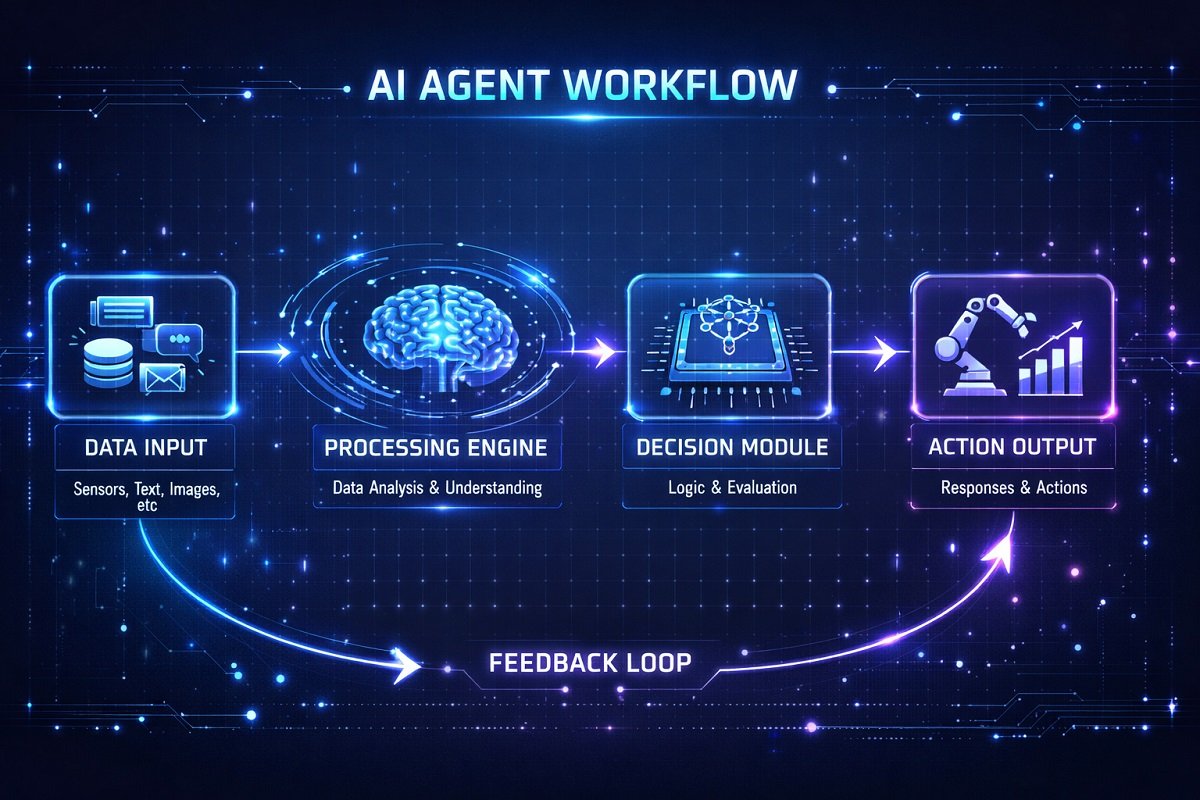
AI agent workflows are structured processes that enable AI agents to perform tasks autonomously from start to finish. An effective AI agent workflow defines how information is collected, analyzed, decisions are made, and actions are executed. Whether you’re building AI agent automation for customer support, business operations, or software development, a well-designed workflow improves efficiency, accuracy, and scalability.
Understanding AI agent workflows is crucial for businesses and developers looking to automate repetitive tasks, reduce errors, and improve productivity.
In this guide, we’ll break down everything you need to know to build powerful AI automation systems. Businesses exploring automation platforms should also review our guide on best AI workflow automation tools for small businesses.
Table of Contents
What Is an AI Agent Workflow?
An AI agent workflow is a structured sequence of steps that enables an AI agent to complete tasks autonomously with minimal human intervention. Compared to traditional automation that follows fixed rules, an AI agent workflow combines data collection, reasoning, decision-making, tool execution, and continuous learning into an intelligent process. This allows AI agents to analyze information, determine the best course of action, interact with external systems, and adapt their behavior based on new data or previous outcomes.
A typical AI agent workflow begins when the agent receives an input, such as a customer inquiry, database update, API request, or sensor reading. The AI agent then processes the information using predefined rules, large language models (LLMs), or machine learning algorithms.
Based on its analysis, it selects the most appropriate action, such as responding to a customer, updating a CRM, generating a report, scheduling a meeting, or triggering another automated workflow.
Many modern AI agent workflows also include memory, feedback loops, and integrations with business applications, allowing them to improve accuracy and performance over time.
Businesses are rapidly adopting AI agent automation because it reduces repetitive manual work, minimizes human error, speeds up decision-making, and enables teams to scale operations without significantly increasing costs. AI agents are now widely used for customer support, sales automation, document processing, IT operations, marketing campaigns, financial reporting, and workflow management across organizations of all sizes.
Although the terms are often used interchangeably, there is an important difference between AI workflow automation and an AI agent workflow. Traditional AI workflows generally execute predefined steps based on fixed rules or triggers.
In contrast, an AI agent workflow gives the agent the ability to reason, evaluate multiple options, make autonomous decisions, and dynamically adjust its actions to achieve a goal. In simple terms, every AI agent workflow is an AI workflow, but not every AI workflow includes autonomous AI agents capable of intelligent decision-making. Understanding this distinction helps businesses choose the right approach when designing scalable AI automation systems.
AI Workflow vs. AI Agent Workflow: What’s the Difference?
Although the terms AI workflow and AI agent workflow are often used interchangeably, they represent different approaches to automation. The comparison below highlights the key differences to help you choose the right automation approach for your business or project.
AI Workflow | AI Agent Workflow |
Rule-based automation | Autonomous decision making |
Fixed sequence | Dynamic decisions |
Simple triggers | Goal-driven execution |
Limited reasoning | Uses AI reasoning |
Good for repetitive tasks | Good for complex automation |
Core Components of AI Agent Workflows
Every AI agent workflow consists of several interconnected parts:
- Data Input: The raw information the agent uses (e.g., sensor data, user commands, databases).
- Processing Engine: The core AI logic, often powered by machine learning or rule-based systems, that analyzes data and makes decisions.
- Decision Module: Evaluates multiple actions and selects the optimal one based on predefined criteria or learned patterns.
- Action/Output: The response or task performed, like sending an email, updating a database, or controlling a robot.
- Feedback Loop: Captures results and updates the AI model for continuous improvement.
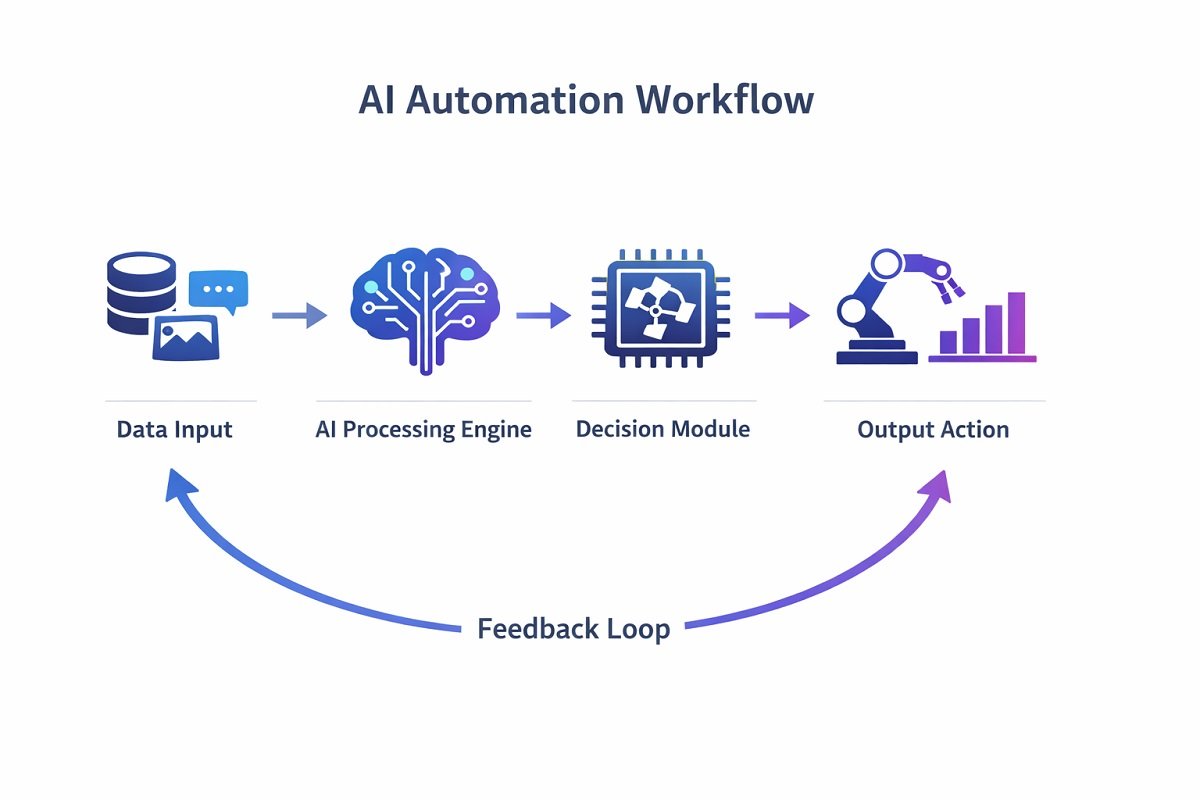
These components work together to ensure autonomous, accurate, and adaptive operations.
How AI Agents Automate Processes
AI agent workflows can streamline nearly any business or operational process by combining intelligent decision-making with automation. Unlike traditional workflows that follow fixed rules, modern AI agent workflows can analyze information, reason through different options, and take appropriate actions based on changing conditions. This makes AI workflow automation ideal for handling both repetitive tasks and more complex business processes.
Every AI agent workflow begins with a trigger. A trigger can be a customer submitting a support ticket, a new sales lead entering your CRM, an incoming email, a sensor detecting equipment issues, or even a scheduled event. Once activated, the AI agent gathers relevant information from connected systems such as databases, APIs, cloud applications, or internal documents.
The next stage is reasoning, where the AI agent analyzes the available data and determines the best course of action. Depending on the workflow, the agent may use predefined business rules, machine learning models, or large language models (LLMs) to evaluate multiple options before making a decision. This ability to reason is what separates AI agent automation from traditional workflow automation.
Many advanced AI automation systems also include memory, allowing agents to retain information from previous interactions. For example, a customer service AI agent can remember a user’s purchase history, previous conversations, or support tickets to deliver more accurate and personalized responses. This persistent memory enables AI agents to improve efficiency while creating better user experiences.
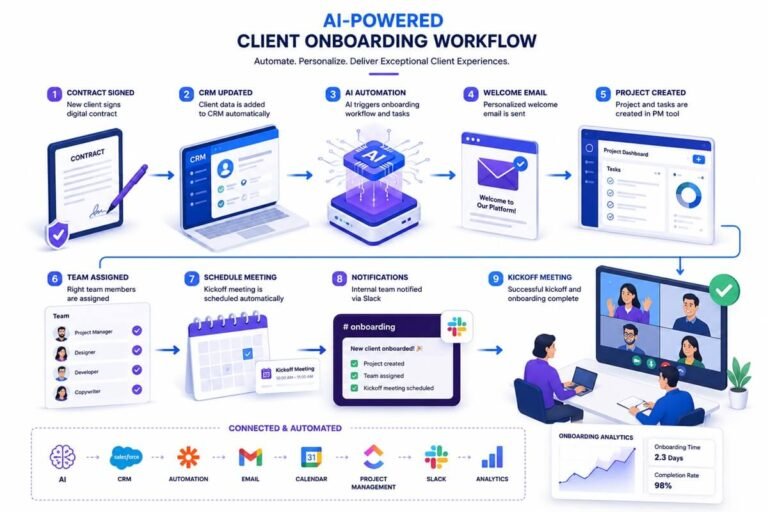
After making a decision, the AI agent uses external tools to complete the task. Modern agents can connect with CRM software, email platforms, project management tools, accounting systems, cloud storage, and communication applications through APIs. Choosing the right AI workflow platform allows businesses to integrate these tools into a unified workflow, enabling information to move automatically between departments without manual intervention.
Finally, the AI agent performs the required action, such as sending an email, updating customer records, generating reports, scheduling appointments, approving invoices, or triggering another automated workflow. A built-in feedback loop continuously monitors the results, tracks performance, and refines future decisions. Over time, this continuous improvement makes AI agent workflows more accurate, reliable, and efficient.
AI agent workflows can streamline nearly every business function, including:
- Business automation: Approving invoices, qualifying leads, scheduling appointments, managing customer interactions, and generating reports. Many companies combine AI agents with modern automation platforms to streamline operations. Our guide on AI tools for small business automation explains which platforms deliver measurable ROI.
- Industrial automation: Monitoring machinery, predicting maintenance needs, optimizing production schedules, detecting equipment failures, and controlling manufacturing processes using real-time data.
- Digital assistants: Managing calendars, responding to emails, organizing documents, scheduling meetings, creating summaries, and automating routine administrative tasks across multiple software applications.

As organizations continue adopting AI workflow automation, intelligent agents are becoming essential for improving productivity, reducing manual work, minimizing errors, and scaling operations efficiently. As conversational AI becomes more advanced, businesses are also adapting workflows for voice-first interactions. Optimizing automated systems for spoken queries is becoming increasingly important, especially with smart assistants and AI-powered search engines.
Whether used in customer support, sales, IT, finance, healthcare, or manufacturing, well-designed AI agent workflows help businesses automate complex processes while adapting to changing business needs.
Step-by-Step Guide to Building an AI Agent Workflow
Step 1: Define the Task
Identify the process you want to automate. For example, processing customer support tickets or automating inventory updates.
Step 2: Map the Workflow
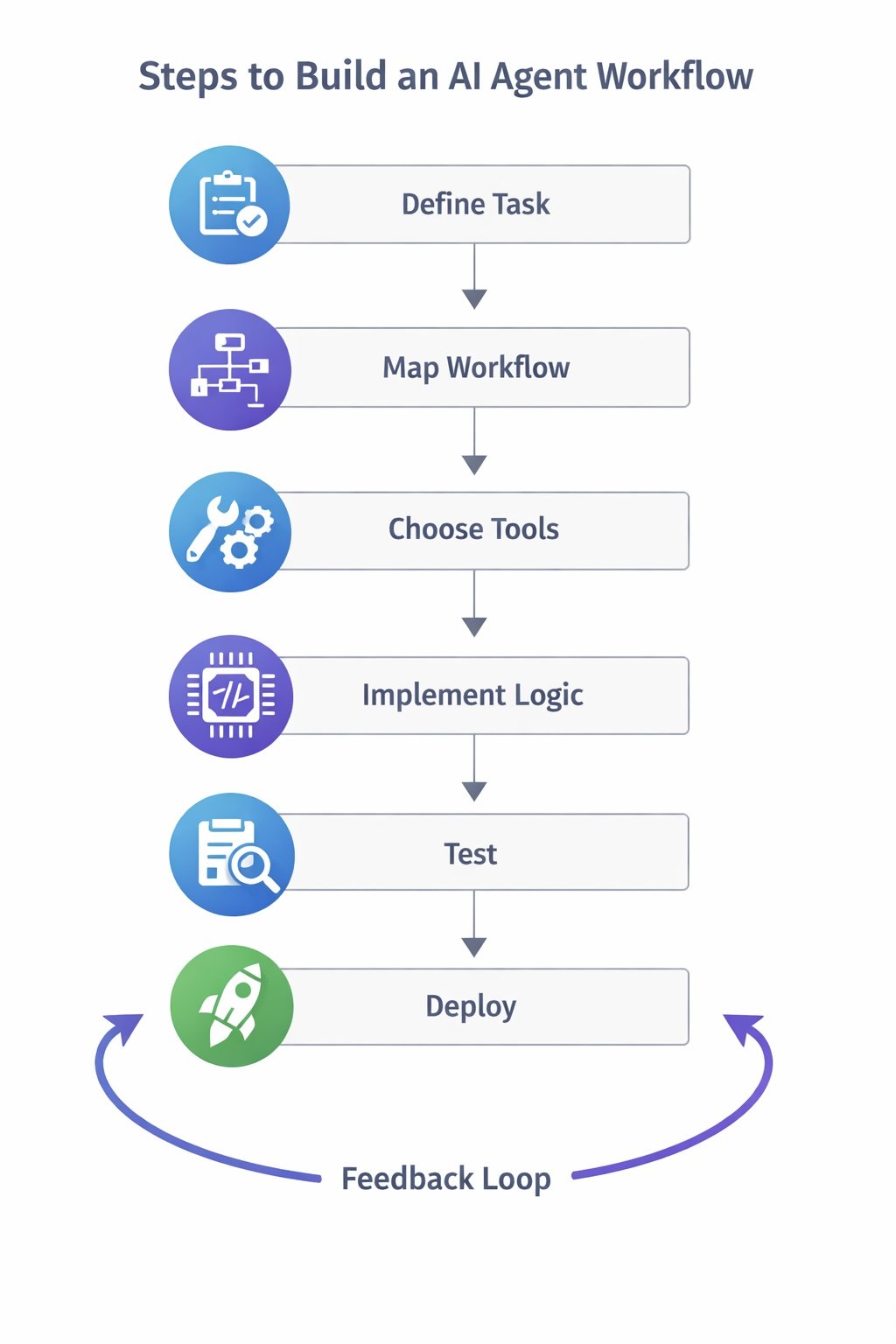
Draw a flowchart of how data moves, decisions are made, and actions are executed.
Step 3: Choose the Right Tools
Select AI platforms and libraries compatible with your workflow. Popular options include Python libraries (TensorFlow, PyTorch), RPA tools (UiPath, Automation Anywhere), or cloud AI services (AWS, Azure, Google Cloud).
Developers building custom AI agents often rely on frameworks such as TensorFlow for machine learning models. Many teams also combine AI writing assistants with automation workflows to streamline content production and internal documentation. If you are comparing popular AI productivity platforms, see our detailed comparison of Notion AI vs Jasper to understand which solution works better for automated content workflows.
Step 4: Implement Decision Logic
Program your AI to evaluate inputs and determine the next action. You can use rule-based systems, machine learning models, or hybrid approaches.
Step 5: Test and Iterate
Test your AI agent workflow using both simulated and real-world scenarios to verify that triggers, decision logic, and integrations work correctly. Monitor accuracy, identify bottlenecks, and refine prompts or workflows based on performance data. Continuous testing helps improve reliability, efficiency, and overall automation results.
Step 6: Deploy
Deploy the AI agent workflow by integrating it with your existing business systems, APIs, and databases. Monitor performance, implement robust error handling, and track key metrics to ensure smooth operation. Regular updates and continuous optimization keep your AI workflow automation accurate, secure, and scalable as business needs evolve.
AI Agent Workflow Examples
Understanding real-world AI agent workflows makes it easier to see how intelligent automation improves efficiency across different industries. Below are some common examples of how businesses use AI agent automation to streamline operations and reduce manual work.
Customer Support Automation
A customer submits a support request through a website or chatbot. The AI agent analyzes the query, searches the company’s knowledge base, generates an appropriate response, and either resolves the issue automatically or routes complex cases to a human representative. This workflow reduces response times while improving customer satisfaction.
Workflow:
Customer Question → AI Agent → Knowledge Base → Decision → Reply → Feedback
Lead Qualification and Sales
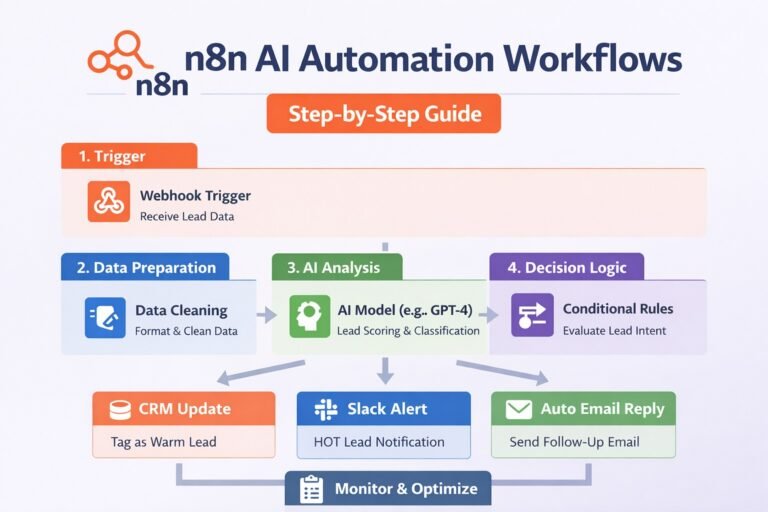
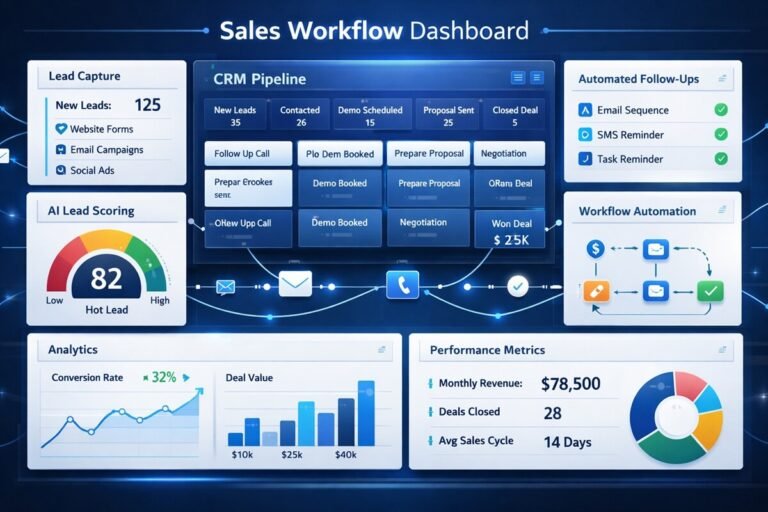
When a new lead enters a CRM, the AI agent evaluates company size, industry, engagement history, and purchase intent before automatically scoring and routing prospects to the appropriate sales representative.
Many revenue teams combine AI agents with enrichment platforms to automate this process at scale. See our Clay review and case studies to learn how businesses use AI-powered lead enrichment and workflow automation to improve sales efficiency.
Workflow:
New Lead → AI Agent → Score Lead → Assign Sales Rep → CRM Update
Invoice Processing
Finance teams use AI agent workflows to automate invoice management. The AI extracts invoice data, validates purchase orders, checks approval rules, and submits approved invoices for payment while flagging exceptions for manual review.
Workflow:
Invoice Received → Data Extraction → Validation → Approval → Payment
IT Help Desk Automation
Employees submit IT support requests through a service portal. The AI agent categorizes the issue, searches documentation for known solutions, performs automated troubleshooting when possible, and escalates unresolved problems to IT staff.
Workflow:
Support Ticket → AI Agent → Diagnose Issue → Resolve or Escalate
Content Marketing Automation
Marketing teams use AI agent workflows to research keywords, generate content briefs, draft articles, optimize SEO, and schedule content publishing. Human editors review the final output before publication, creating a faster and more efficient content production process.
Workflow:
Keyword Research → AI Agent → Content Draft → SEO Optimization → Human Review → Publish
Why These Workflows Matter
These examples demonstrate how AI agent workflows combine intelligent reasoning, automation, and software integrations to complete complex tasks with minimal human intervention. Whether you’re automating customer support, sales, finance, IT, or marketing, implementing the right AI workflow automation strategy can improve productivity, reduce operational costs, and help your business scale more efficiently.
Tools and Platforms for AI Workflow Automation
Choosing the right AI workflow platform depends on your technical expertise, workflow complexity, and business goals. The following tools are among the most popular for building AI agent workflows and intelligent automation systems.
- n8n – An open-source workflow automation platform that connects hundreds of applications and supports AI agents, APIs, and custom code. It’s ideal for businesses seeking flexible, self-hosted AI workflow automation.
- Zapier AI – Enables users to build AI-powered workflows without coding by connecting thousands of business applications. It’s a popular choice for automating repetitive business processes.
- LangGraph – A framework for building stateful, multi-agent AI workflows using graph-based orchestration. It’s particularly useful for complex AI agent systems that require memory, branching logic, and long-running tasks.
- CrewAI – Designed for creating collaborative AI agent teams where multiple specialized agents work together to accomplish complex goals through role-based coordination.
- AutoGen – An open-source framework for developing autonomous, multi-agent conversations and workflows. It allows AI agents to communicate, plan, and solve tasks collaboratively with minimal human intervention.
- OpenAI API – Provides access to powerful large language models that developers use to build intelligent chatbots, virtual assistants, content generation systems, and AI-powered automation workflows.
- Claude – An advanced AI assistant well suited for document analysis, reasoning, coding, and enterprise workflows that require long-context understanding and reliable responses.
- Gemini – Google’s multimodal AI model that supports text, images, code, and reasoning tasks, making it suitable for AI automation workflows that integrate with Google Cloud and Workspace.
- Make.com – A visual automation platform that enables users to design sophisticated workflows connecting AI models, APIs, databases, and business applications with little or no coding.
- TensorFlow & PyTorch – Popular machine learning frameworks for developing custom AI models that power intelligent decision-making within AI agent workflows.
- Microsoft Power Automate – Integrates seamlessly with Microsoft 365, Dynamics 365, and hundreds of third-party applications for enterprise workflow automation.
- UiPath & Automation Anywhere – Leading robotic process automation (RPA) platforms that combine AI capabilities with business process automation to streamline repetitive enterprise tasks.
- Google Cloud AI & AWS AI Services – Cloud platforms that provide scalable AI infrastructure, machine learning services, APIs, and automation tools for enterprise-grade AI workflows.
Businesses implementing AI workflows often evaluate CRM and marketing automation platforms alongside AI tools. For example, companies comparing sales automation ecosystems can review our analysis of GoHighLevel vs HubSpot to see how different platforms support AI-driven workflows and customer automation.
“If you’re deciding between the three most popular automation platforms, our detailed comparison of Zapier vs Make vs n8n explains their pricing, AI capabilities, integrations, and which platform is best for different types of AI agent workflows.”
Best Practices for Designing AI Workflows
- Start small: Automate one task at a time before scaling.
- Ensure data quality: Poor input data reduces AI performance.
- Maintain flexibility: Design workflows that adapt to changes in data or requirements.
- Include monitoring: Track AI decisions and system performance.
- Document thoroughly: Keep clear records of workflow design for troubleshooting and updates.
Common Challenges and How to Solve Them
- Data bottlenecks: Use preprocessing to clean and organize input.
- Decision errors: Implement feedback loops and human-in-the-loop review.
- Scalability issues: Use cloud-based infrastructure and modular workflow design.
- Integration problems: Ensure APIs and tools are compatible and tested.
Case Studies / Real-World Examples
- Customer Support AI: AI agents handle 70% of routine queries automatically, freeing human agents for complex issues.
- E-commerce Automation: AI predicts inventory shortages and triggers automated restocking.
- Healthcare AI: Agents manage patient scheduling, analyze lab results, and send alerts to medical staff.
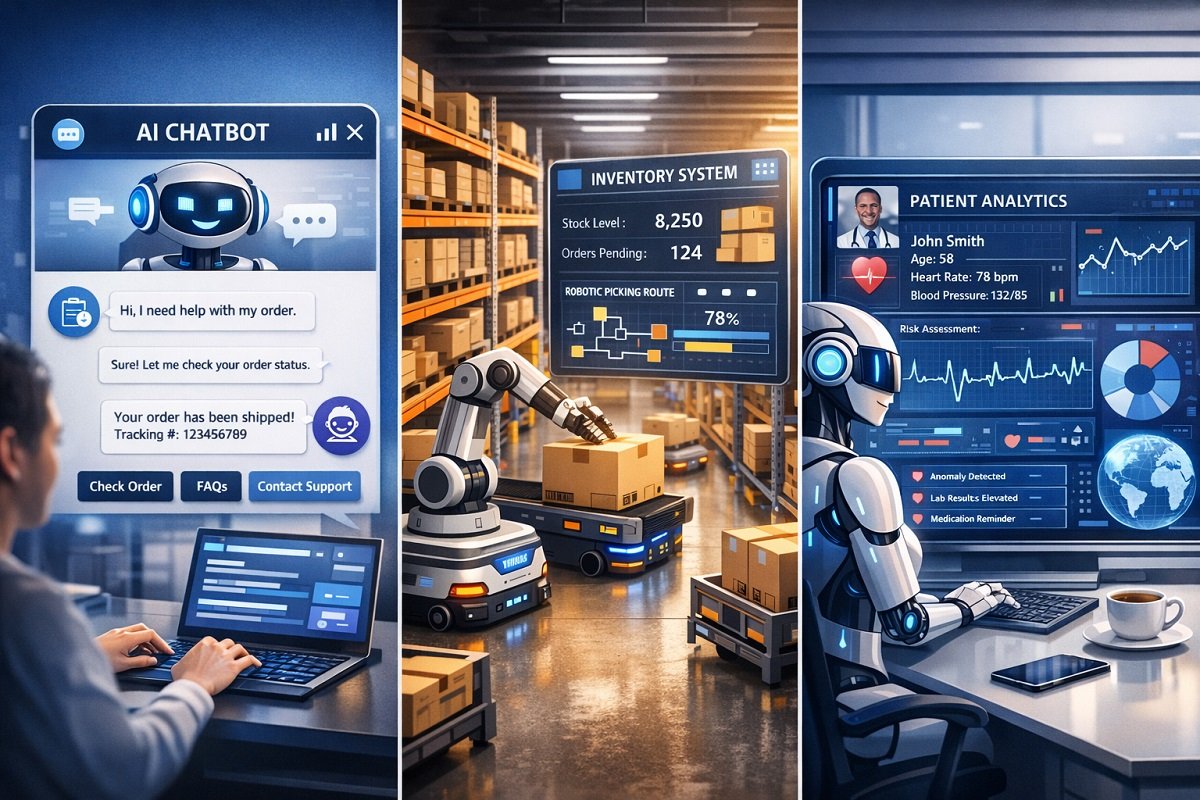
These examples show how AI workflows drive efficiency, reduce cost, and improve outcomes.
Future of AI Agent Workflows
AI agent workflows are evolving rapidly. Cloud platforms like Amazon Web Services provide a scalable infrastructure for deploying AI agents across large systems. Key trends include:
- Autonomous decision-making: Agents can make increasingly complex choices.
- Integration with IoT devices: Real-time data feeds enhance accuracy.
- Explainable AI: Clear reasoning behind decisions will improve trust.
- AI orchestration platforms: Centralized management of multiple agents for complex workflows.
Conclusion & Key Takeaways
AI agent workflows are becoming the foundation of modern business automation. Whether you’re implementing AI agent automation for customer support, sales, marketing, software development, or internal operations, designing scalable workflows ensures your AI agents can reason, act, and improve over time. By combining the right AI workflow tools, automation platforms, and continuous optimization, businesses can build intelligent systems that deliver measurable productivity gains.
Start by mapping your processes, choose suitable AI tools, and gradually implement intelligent workflows that evolve with your business or project needs.
Frequently Asked Questions (FAQs)
What problems can AI agent workflows solve?
AI agent workflows help organizations automate repetitive digital tasks such as data entry, ticket routing, report generation, and system monitoring. By delegating these tasks to intelligent systems, businesses can reduce operational delays and allow teams to focus on strategic work.
Do AI agents always require machine learning models?
No. Some AI agents rely on rule-based logic and predefined workflows instead of machine learning. These systems follow structured conditions and triggers. More advanced agents combine rules with machine learning models to adapt to new data and make smarter decisions.
How long does it take to build an AI agent workflow?
The development time depends on the complexity of the automation task. Simple workflows, such as automated email responses, can be implemented within hours, while complex systems involving predictive models or multiple integrations may take weeks or months.
Are AI agent workflows secure for business operations?
Yes, when built with proper safeguards. Secure AI workflows include role-based access control, encrypted data handling, and monitored system logs. These practices ensure that automated processes follow organizational security standards.
What skills are required to create AI automation systems?
Building AI workflows typically requires knowledge of programming, data handling, and system integration. Developers often use languages such as Python along with automation platforms or cloud services to connect databases, APIs, and AI models.
Can AI workflows integrate with existing business software?
Most modern AI platforms support API integrations, allowing them to connect with CRM systems, email platforms, analytics tools, and databases. This capability allows AI agents to operate inside existing digital ecosystems without replacing current software.
What is the difference between AI orchestration and AI workflows?
AI workflows describe the step-by-step process an individual agent follows to complete tasks. AI orchestration refers to managing multiple AI agents or workflows together so they can coordinate actions across larger systems or platforms.



One Comment