n8n AI Customer Support Workflow: Automate Tickets & Replies

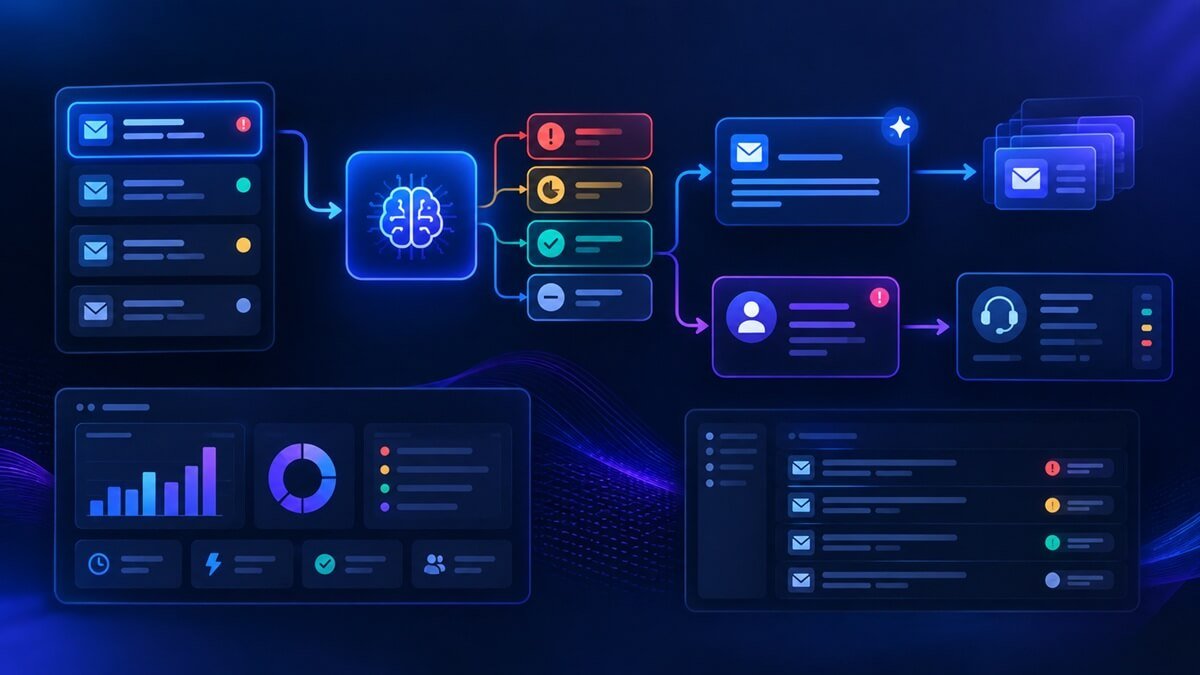
Customer support teams spend a significant amount of time handling repetitive tickets, categorizing incoming requests, writing similar replies, and deciding which issues need a human agent.
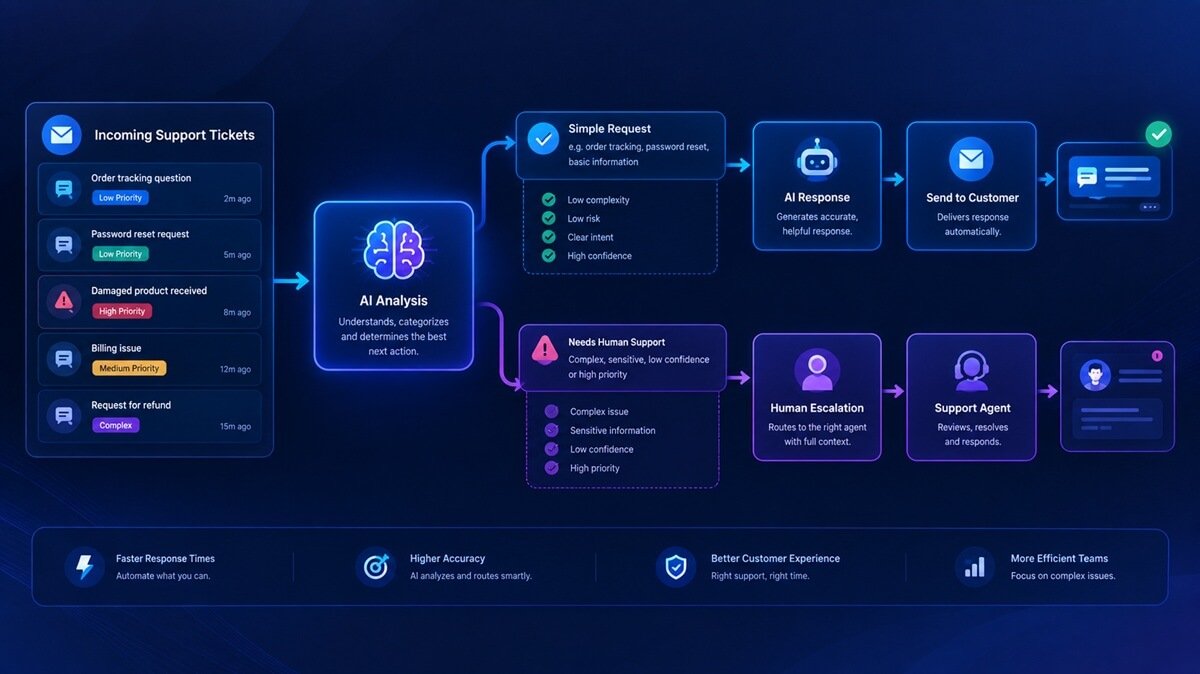
An n8n AI customer support workflow can automate much of this process without removing human oversight. Instead of sending every ticket directly to an AI model, the workflow can receive the request, analyze its intent and priority, generate an appropriate response, validate the result, and either send the reply automatically or escalate the ticket to a support agent.
A practical workflow looks like this:
Customer Ticket → n8n → Ticket Analysis → Classification → Response Decision → AI Reply or Human Escalation → Ticket Logging
This approach is useful for businesses that receive recurring questions but still need human involvement for sensitive, complex, or high-priority issues.
Explore our AI Lead Qualification system if you want to see how AI can automate another repetitive business process, or consider implementation support if you need a workflow adapted to your business process.
Table of Contents
What Is an n8n AI Customer Support Workflow?
An n8n AI customer support workflow is an automated process that uses n8n to connect customer-support systems with AI services and business applications.
If you’re comparing automation platforms before building this type of system, our guide to Zapier vs Make vs n8n explains the key differences between these popular workflow automation platforms. However, the workflow can take an incoming support request and determine:
- What the customer is asking
- What type of issue it is
- How urgent the issue may be
- Whether the request can be answered automatically
- Whether additional information is required
- Whether a human agent should review the ticket
- What response should be sent to the customer
The important distinction is that AI does not have to handle every ticket. A better design is to let AI handle predictable support requests while routing uncertain or sensitive cases to a human.
For example:
Simple FAQ → AI response
Product question → AI response
Technical issue → AI response or review
Refund request → Human review
Serious complaint → Human escalation
This creates a support workflow that combines automation with human oversight.
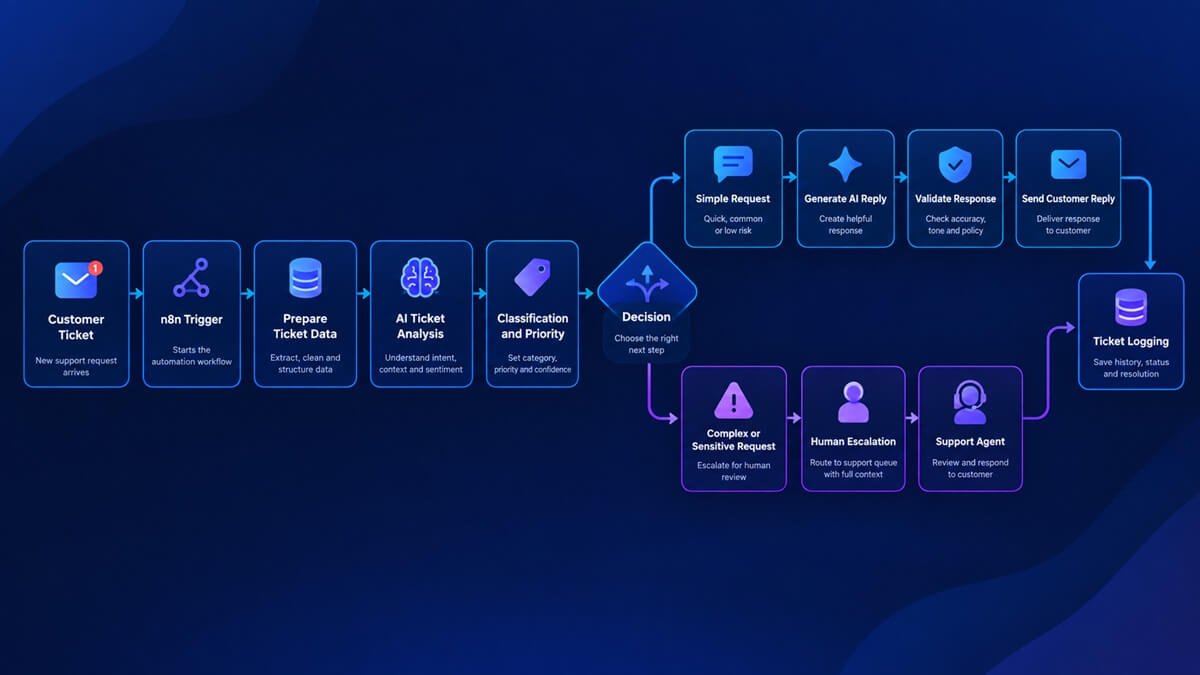
How an n8n AI Customer Support Workflow Works
A typical customer-support workflow can be divided into several stages.
1. Receive the Customer Ticket
The workflow begins when a customer submits a support request.
Depending on your support system, the trigger could come from:
- A webhook
- Support form
- Help desk
- Chat system
- Customer portal
- Website form
The incoming data might contain:
Customer Name: Sarah
Email: sarah@example.com
Subject: Damaged order
Message: My order arrived damaged. Can I get a replacement?
n8n receives this information and passes it to the next stage.
2. Prepare the Ticket Data
Before sending information to an AI model, clean and organize the incoming data.
For example, the workflow can extract:
- Customer name
- Customer email
- Ticket subject
- Ticket message
- Previous conversation
- Order number
- Product information
- Customer ID
Keeping the input structured makes the AI analysis easier to control.
3. Analyze the Support Request With AI
The AI model can analyze the ticket and return structured information.
For example:
{
“category”: “order_issue”,
“priority”: “high”,
“sentiment”: “negative”,
“intent”: “replacement_request”,
“needs_human”: true
}
Instead of asking the AI to produce a long paragraph, structured output gives the n8n workflow information that can be used for routing decisions.
4. Classify the Ticket
The workflow can categorize the request according to your support process.
Possible categories include:
- FAQ
- Product question
- Order issue
- Technical problem
- Billing
- Refund
- Cancellation
- Account issue
- Complaint
- Other
The classification determines what happens next.
5. Determine Whether AI Can Respond
Not every ticket should receive an automatic AI response.
The workflow can use rules such as:
Low-risk + high confidence → automatic response
Low confidence → human review
Refund request → human review
Complaint → escalation
Sensitive account issue → escalation
This is one of the most important parts of a reliable AI customer-support workflow.
6. Generate the Customer Response
If the request is suitable for automation, the AI can generate a response.
The response should be based on approved information rather than allowing the model to invent company policies.
For example:
Hi Sarah, I’m sorry your order arrived damaged. Please send us a photo of the damaged item along with your order number so our support team can arrange the appropriate replacement process.
The workflow can then validate the response before sending it.
7. Validate the AI Response
A separate validation step can check whether the generated answer meets your rules. Validation is particularly important when AI-generated output can affect customers or business decisions.
For example:
- Does the response answer the customer’s question?
- Is the required information included?
- Did the AI make an unsupported promise?
- Does the ticket require human approval?
- Is the response based on approved information?
If validation fails, the workflow can stop and send the ticket to a human agent.
8. Send the Response or Escalate
At this point, the workflow takes one of two paths.
Automated path:
AI Response
↓
Validation
↓
Approved
↓
Send Customer Reply
Human path:
AI Analysis
↓
High Risk / Low Confidence
↓
Create or Update Support Ticket
↓
Notify Human Agent
9. Log the Interaction
Finally, the workflow can record what happened.
Useful information to store includes:
- Ticket ID
- Customer
- Category
- Priority
- AI decision
- Response
- Escalation status
- Timestamp
- Human-agent outcome
This makes the workflow easier to monitor and improve.
n8n AI Customer Support Workflow Architecture
A practical workflow can look like this:
Customer
↓
Support Form / Email / Help Desk
↓
n8n Trigger
↓
Prepare Ticket Data
↓
AI Ticket Analysis
↓
Structured Output
↓
Classify + Prioritize
↓
Decision
├── Simple Request
│ ↓
│ Generate Reply
│ ↓
│ Validate Reply
│ ↓
│ Send Response
│
└── Complex / Sensitive Request
↓
Human Escalation
↓
Agent Response
Both Paths
↓
Ticket / CRM Logging
The advantage of this architecture is that AI becomes part of a controlled process rather than operating independently.
n8n AI Customer Support Workflow Example
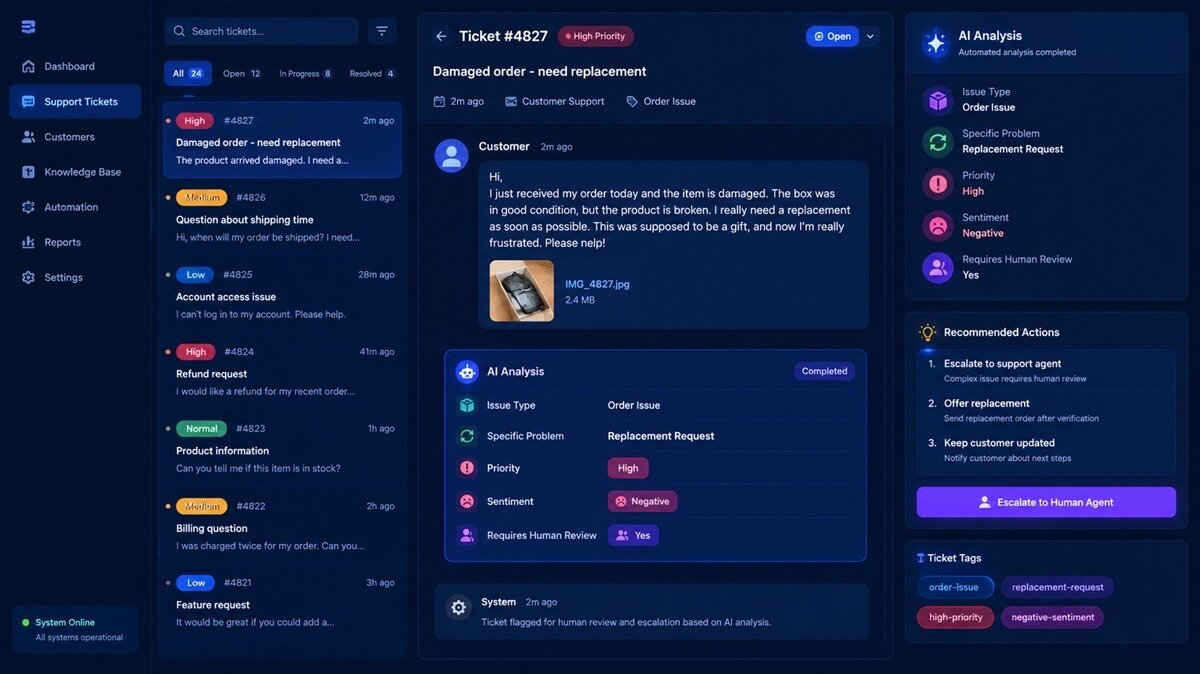
Consider a customer who sends this message:
“My order arrived damaged. Can I get a replacement?”
The workflow could process it like this.
Step 1: Receive the ticket
n8n receives the customer’s message through a support form or webhook.
Step 2: Analyze the request
The AI identifies:
- Category: Order issue
- Intent: Replacement request
- Priority: High
- Sentiment: Negative
- Human review: Required
Step 3: Check the routing rules
Because the request involves a replacement, the workflow can route it for human review.
Step 4: Create the escalation
n8n updates the support ticket and notifies the appropriate agent.
Step 5: Log the decision
The workflow records that the ticket was classified as a high-priority replacement request. The AI did not need to make a final business decision. It performed the analysis and routing work while keeping the final decision with the support team.
What Can an n8n AI Customer Support Workflow Automate?
The workflow can handle many repetitive support tasks.
FAQ Responses
Common questions can often be answered automatically when the required information is available.
Examples include:
- Shipping times
- Product availability
- Account instructions
- Basic product information
- Service details
Ticket Classification
AI can automatically identify the type of incoming request. Instead of manually reviewing every ticket, support agents can receive tickets that have already been categorized.
Ticket Prioritization
AI can identify potentially urgent requests.
For example:
Low: General information request
Medium: Product or technical question
High: Billing issue or service problem
Critical: Serious complaint or sensitive issue
Your actual categories should be based on your support policies.
AI-Generated Replies
For straightforward requests, AI can draft or send responses based on approved information. This can reduce repetitive writing for support teams.
Complaint Detection
AI can analyze the language and context of a ticket to identify potentially frustrated or dissatisfied customers.
A negative sentiment alone does not have to trigger escalation, but it can be one signal used by the workflow.
Human Escalation
Complex tickets can automatically be routed to a human agent. This is particularly useful when the customer needs a decision that the AI should not make.
AI Ticket Classification With n8n
A useful support workflow should produce structured ticket classifications.
For example:
| Ticket Type | Priority | Suggested Action |
| FAQ | Low | AI response |
| Product question | Medium | AI response |
| Technical issue | Medium | AI response or review |
| Order issue | Medium | Check policy |
| Billing issue | High | Human review |
| Refund request | High | Human review |
| Complaint | High | Escalate |
| Sensitive account issue | High | Human review |
These rules are only examples. Each business should define its own escalation policies. The important part is that the AI classification becomes an input to the n8n routing logic.
Generating AI Customer Support Replies
AI-generated replies can save support teams from repeatedly writing similar responses. However, the AI should have enough context to produce a useful answer.
A response-generation step may use:
- Customer message
- Ticket category
- Previous conversation
- Product information
- Approved policies
- Knowledge-base information
- Customer information
- Support-team instructions
A simple prompt could look like this:
You are a customer support assistant.
Analyze the provided support ticket and generate a concise,
professional response.
Rules:
– Use only the information provided.
– Do not invent policies, prices, refunds, delivery dates, or guarantees.
– Do not make decisions that require human approval.
– If the request requires human intervention, indicate that escalation is required.
– Keep the response clear and helpful.
Customer message:
{{ticket_message}}
The important part is not simply generating a natural-sounding response. The response needs to remain within the boundaries of what the business has actually approved.
Human Escalation in an n8n AI Support Workflow
A good AI customer-support workflow should have a clear human-escalation path.
You can route tickets to human agents when:
- AI confidence is low
- The request involves a refund
- The customer disputes a charge
- The customer makes a serious complaint
- The issue involves sensitive account information
- The AI cannot find an appropriate answer
- The customer requires a business decision
- The request falls outside the approved knowledge base
For example:
AI Confidence >= Required Threshold
↓
Continue
↓
Generate + Validate Reply
↓
Send
AI Confidence < Required Threshold
↓
Human Escalation
↓
Agent Review
This approach reduces the risk of allowing an AI system to make unsupported decisions.
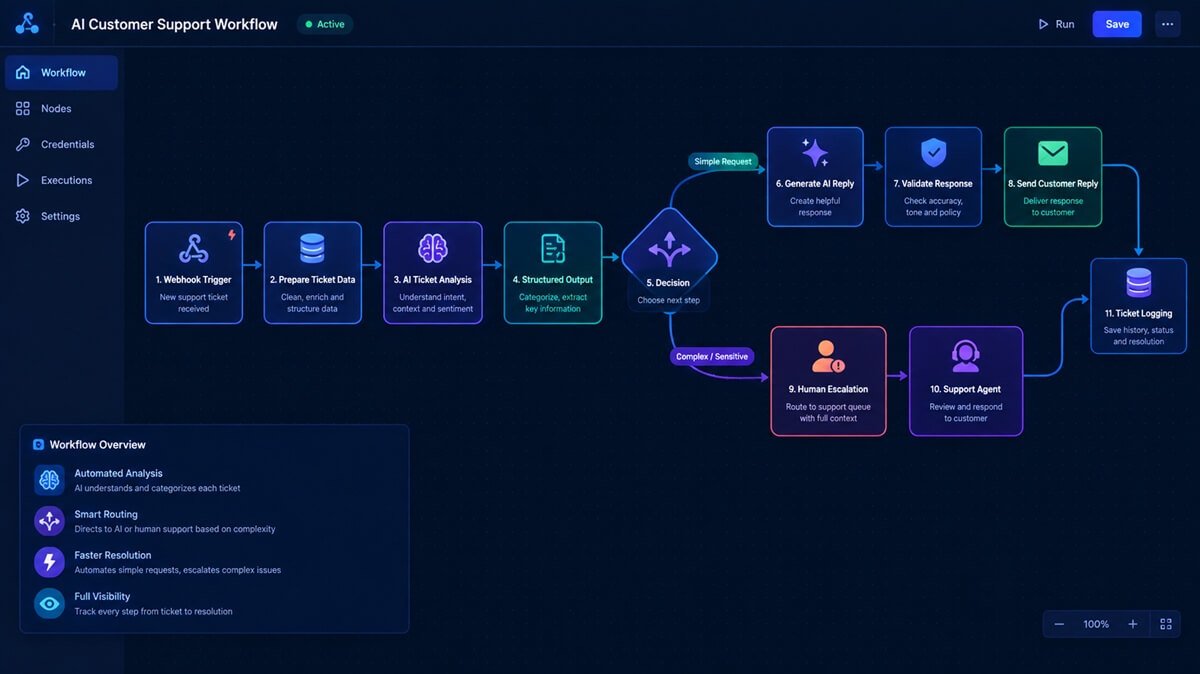
How to Build an n8n AI Customer Support Workflow
You can build the workflow in n8n using a series of connected nodes.
Step 1: Create the Support Ticket Trigger
Start with the system that receives your customer requests.
For a simple prototype, you can use a webhook.
The webhook receives information such as:
{
“name”: “Sarah”,
“email”: “sarah@example.com”,
“subject”: “Damaged order”,
“message”: “My order arrived damaged. Can I get a replacement?”
}
If you’re new to building AI-powered workflows in n8n, our n8n AI automation workflows tutorial provides a broader introduction to designing and connecting AI automation workflows.
Step 2: Prepare the Ticket Data
Use n8n to organize the incoming information.
You may normalize fields such as:
customer_name
customer_email
ticket_subject
ticket_message
ticket_id
This gives later workflow steps a predictable structure.
Step 3: Add AI Ticket Analysis
Send the ticket information to your selected AI model.
Ask the model to return structured fields such as:
{
“category”: “”,
“priority”: “”,
“intent”: “”,
“sentiment”: “”,
“confidence”: 0,
“needs_human”: false
}
Structured output is preferable to relying on free-form text because n8n can use the returned fields in conditional logic. This same structured approach can also be used for other n8n AI workflows, such as n8n AI lead qualification, where AI analyzes incoming leads and routes them based on qualification criteria.
Step 4: Route the Ticket
Use n8n’s conditional logic to determine the next step.
For example:
needs_human = true
↓
Escalate
needs_human = false
↓
Generate Response
You can also combine multiple conditions.
For example:
High Priority
OR
Low Confidence
OR
Sensitive Category
↓
Human Review
Step 5: Generate the Response
For tickets that qualify for automation, pass the relevant information to the response-generation step. The AI should receive the actual customer question and the information it is allowed to use.
Step 6: Validate the Response
Before sending the message, add a validation step. The validation process can check:
- Response exists
- Correct ticket context
- No unsupported claims
- No prohibited promises
- Appropriate tone
- Human escalation requirement
Step 7: Send the Customer Response
If the response passes validation, n8n can send it through the connected support channel.
Depending on your setup, this could be:
- Help desk
- Customer messaging platform
- CRM
- Another business application
Step 8: Escalate When Necessary
If the workflow determines that a human should intervene, update the ticket and notify the appropriate person or team.
For example:
Support Ticket
↓
AI Analysis
↓
High Priority
↓
Create Escalation
↓
Notify Agent
↓
Human Response
Step 9: Record the Result
Finally, save the workflow result.
This gives the support team a history of how tickets were handled and creates useful information for future workflow improvements.
How to Prevent AI Customer Support Mistakes
Automation should not mean giving an AI model unrestricted control over customer interactions. Several safeguards can make the workflow more reliable.
Use Structured AI Output
Instead of asking the AI to return an unrestricted paragraph, define the fields your workflow needs.
For example:
{
“category”: “technical_issue”,
“priority”: “medium”,
“confidence”: 0.91,
“needs_human”: false
}
This makes the result easier for n8n to process.
Use Confidence Thresholds Carefully
A low-confidence result can be routed to a human instead of being sent automatically. The exact threshold should be tested with real support tickets rather than chosen arbitrarily.
Restrict Business Decisions
The AI should not independently invent:
- Refund policies
- Discounts
- Delivery guarantees
- Compensation
- Account decisions
Those decisions should be controlled by your business rules.
Keep a Human Escalation Path
Every automated support system should have a way to transfer a conversation to a human.
Log Automated Decisions
Recording classifications, responses, and escalation decisions makes troubleshooting and quality improvement much easier.
Benefits of an n8n AI Customer Support Workflow
A properly designed workflow can help support teams in several ways.
Faster Initial Responses
Routine questions can be processed without waiting for an agent to manually review the ticket.
Less Repetitive Work
Support agents can spend less time answering the same basic questions.
Automatic Ticket Prioritization
Incoming requests can be classified before reaching an agent.
Consistent Responses
AI-generated responses can follow predefined instructions and communication guidelines.
Better Escalation
Complex tickets can be identified earlier instead of remaining in a general support queue.
24/7 Automation
Automated workflows can process eligible requests outside normal support hours.
The goal is not to eliminate support agents. The goal is to allow them to spend more time on issues that actually require human judgment. The same automation principles can also be applied to other repetitive processes, such as client onboarding workflows, where forms, notifications, CRM updates, document collection, and follow-ups can be connected into a single automated process.
n8n AI Customer Support Workflow vs. Manual Ticket Handling
| Task | Manual Process | AI + n8n Workflow |
| Receive ticket | Manual/system | Automated |
| Categorize ticket | Agent | AI-assisted |
| Prioritize ticket | Agent | AI + rules |
| Draft simple reply | Agent | AI-assisted |
| Send routine response | Agent | Automated |
| Identify escalation | Agent | AI + rules |
| Handle complex issue | Human | Human |
| Record workflow activity | Manual/system | Automated |
The biggest advantage is not that every support interaction becomes autonomous. Instead, the workflow can automate the repetitive parts while preserving human involvement where it matters.
When Should You Use an n8n AI Customer Support Workflow?
This approach makes the most sense when your business has:
- A recurring volume of support tickets
- Repetitive customer questions
- Clearly defined support policies
- A structured support process
- A help desk or ticketing system
- A need for faster first responses
- A team that wants to reduce manual ticket triage
It may be less suitable when every customer request is highly specialized and requires substantial human judgment. In that situation, AI may still be useful for summarizing tickets, categorizing requests, or preparing drafts rather than automatically responding.
Final Thoughts
An n8n AI customer support workflow can turn repetitive ticket handling into a structured automation system. Instead of simply asking AI to answer customers, a better architecture is:
Receive → Analyze → Classify → Decide → Respond or Escalate → Log
This approach gives businesses a practical balance between automation and human oversight.
n8n provides the workflow layer that connects triggers, AI processing, business logic, support systems, and notifications. AI handles tasks such as ticket analysis and response generation, while conditional logic determines what should happen next.
The result is a customer-support workflow that can automate routine requests while keeping complex and sensitive cases in human hands.
Want to automate more of your support workflow?
If your support process involves multiple systems, custom business rules, or complex escalation logic, business process automation consulting can help identify which parts of the process are best suited for automation.
WorkflowAISuite provides practical AI workflow systems and automation solutions designed to reduce repetitive business processes without turning every decision over to AI. Explore our AI workflow templates if you want ready-to-use automation systems, or explore AI implementation services if you need help adapting and deploying an AI workflow for your specific business process.
Frequently Asked Questions
What is an n8n AI customer support workflow?
An n8n AI customer support workflow uses n8n to connect customer-support triggers, AI analysis, conditional logic, response generation, escalation, and business applications into an automated support process.
Can n8n automate customer support tickets?
Yes. n8n can receive support tickets, process their information, use AI to classify requests, route tickets based on rules, generate responses, notify human agents, and record the outcome.
Can n8n generate AI customer support replies?
Yes. An AI model connected to an n8n workflow can generate replies using information such as the customer’s message, previous conversation, product information, and approved support instructions.
How does n8n escalate customer support tickets?
n8n can use conditional logic to identify tickets that require human attention. For example, high-priority, low-confidence, sensitive, or policy-dependent requests can be routed to a human support agent.
Can n8n connect AI with a help desk?
Yes. n8n can connect workflows with supported help-desk, email, CRM, messaging, and other business applications. The exact implementation depends on the support platform and integration available.
Is n8n suitable for customer support automation?
n8n can be a good choice when a business needs flexible workflow logic, AI processing, integrations, and custom escalation rules. It is particularly useful when the support process involves multiple applications and conditional steps.