HubSpot AI Automation: 10 AI-Powered Workflows for Sales & Marketing in 2026


HubSpot has moved beyond simple rule-based automation. With AI-powered workflow features, businesses can now use artificial intelligence to analyze CRM data, summarize records, categorize information, generate content, research prospects, and help determine what should happen next.
That creates a different type of automation. Traditional automation follows predefined instructions:
If X happens → do Y.
AI automation adds an interpretation layer:
If X happens → analyze the available information → determine the relevant output → take the appropriate action.
This distinction matters for sales and marketing teams. Instead of creating a separate rule for every possible situation, you can use AI for tasks that require understanding text, recognizing patterns, summarizing information, or generating context-aware outputs.
In 2026, HubSpot’s Breeze AI capabilities can be used within workflows for tasks such as analyzing, summarizing, and categorizing CRM information. For businesses exploring this broader approach, our guide to AI workflow automation tools for businesses covers the platforms and technologies that can support AI-assisted processes across different departments.
HubSpot also supports AI-assisted workflow creation and AI workflow actions, although availability and usage requirements vary by subscription and feature.
Table of Contents
What Is HubSpot AI Automation?
HubSpot AI automation combines HubSpot workflows with AI-powered analysis, generation, classification, research, or decision support.
A conventional workflow might update a property when a contact submits a form. An AI-powered workflow can go further by analyzing the information submitted, identifying intent, categorizing the contact, and using the resulting output in subsequent workflow branches.
For example:
Form submission → AI analyzes response → identifies buying intent → updates CRM property → routes the record → creates an appropriate follow-up task
HubSpot currently provides AI workflow actions such as Data Agent: Custom prompt, Data Agent: Research, Data Agent: Fill Smart Property, summarize record, Run Agent, and other AI-related actions. HubSpot notes that availability and usage requirements vary by subscription and that AI workflow actions require HubSpot Credits.
The important point is that AI should not replace every deterministic workflow. Use traditional automation when the rule is obvious and predictable. Use AI when the workflow needs to interpret information or generate a useful output.
10 HubSpot AI Automation Workflows to Use in 2026
Below are 10 practical HubSpot AI automation workflows that focus specifically on what AI adds to the CRM rather than repeating conventional sales and CRM automation processes.
1. AI Lead Intent Classification Workflow
Not every lead communicates buying intent in the same way. A form submission might contain a short message such as:
“We’re evaluating software for our sales team and would like to see how it works.”
Another prospect might write:
“Just researching options for next year.”
Both contacts submitted the same form, but their intent is different. An AI lead-intent workflow can analyze the available text and classify the contact into predefined categories such as:
- High intent
- Medium intent
- Low intent
- Research
- Pricing inquiry
- Product inquiry
- Support-related inquiry
Example workflow
New form submission
↓
Collect relevant form and CRM properties
↓
AI analyzes the response
↓
Assign intent category
↓
Store the result in a CRM property
↓
Branch the workflow according to the category
The important difference is that AI performs the interpretation instead of requiring a separate rule for every possible phrase. HubSpot’s Data Agent workflow actions can analyze and categorize data from enrolled records, and generated outputs can subsequently be used in workflow branches or to update CRM properties.
Best use case
This workflow is particularly useful when prospects provide meaningful information in free-text fields that traditional conditions cannot easily interpret.
2. AI-Powered Lead Qualification Workflow
Lead qualification often involves information that doesn’t fit neatly into a single CRM field. A prospect might mention:
- company size
- current software
- business problem
- implementation timeline
- budget
- team requirements
- desired outcome
Instead of asking sales representatives to manually read every response, AI can help extract and organize relevant information.
Example workflow
New qualified contact
↓
Collect relevant CRM and form information
↓
AI analyzes qualification signals
↓
Generate qualification summary
↓
Assign qualification category
↓
Store output in CRM
↓
Create appropriate sales task
For example, an AI output could be structured as:
Qualification: High
Primary need: Sales automation
Timeline: Within 3 months
Main concern: Integration
Recommended action: Sales consultation
This doesn’t mean AI should automatically make every sales decision. A better approach is to use AI for analysis and let the sales team review important decisions.
Why this is different from traditional qualification
Traditional automation asks whether a known property meets a condition. AI-assisted qualification can interpret unstructured information and turn it into structured CRM data. That makes it particularly useful when prospects communicate their needs in their own words.
3. AI Sales Call Summary → CRM Workflow

Sales representatives can spend significant time turning conversations into CRM notes. An AI workflow can reduce that administrative work. HubSpot’s current workflow AI capabilities include research actions that can use information from associated call transcripts, while other AI actions can summarize record information.
Example workflow
Sales call completed
↓
Call information becomes available
↓
AI extracts important information
↓
Generate concise summary
↓
Identify pain points and objections
↓
Update selected CRM properties
↓
Create follow-up task
A useful AI-generated summary might identify:
- customer’s primary problem
- requested features
- objections
- timeline
- competitors mentioned
- next steps
- unanswered questions
Instead of storing a long transcript and expecting a salesperson to reread it later, the CRM can contain a concise working summary.
Keep a human review step
For important deals, don’t blindly copy every AI-generated conclusion into the CRM.
A safer approach is:
AI summarizes → salesperson reviews → approved information becomes CRM data
This maintains efficiency without turning the AI output into an unquestioned source of truth.
4. AI-Personalized Sales Follow-Up Workflow
Generic automated emails are easy to ignore. The problem is that creating genuinely personalized follow-up messages manually takes time. AI can help bridge that gap.
Example workflow
Sales interaction completed
↓
Collect relevant CRM information
↓
AI summarizes the prospect’s situation
↓
Generate a personalized follow-up draft
↓
Salesperson reviews
↓
Send email
The prompt could instruct the AI to consider information such as:
- prospect’s stated problem
- product discussed
- previous conversation
- objections
- desired outcome
- next step
The goal isn’t to create a completely autonomous salesperson. Instead, AI handles the drafting work while the salesperson controls the final message. HubSpot also provides AI-assisted content generation within workflow email actions, although specific functionality depends on the HubSpot product and subscription.
Why this works
Personalization becomes more useful when it reflects the actual conversation rather than simply inserting the contact’s first name.
5. AI Email Reply Classification Workflow
Sales and marketing teams receive many different types of replies.
For example:
“Can you send me pricing?”
or:
“We’re interested but probably won’t be ready until Q1.”
or:
“Please remove me from your list.”
A traditional workflow requires many individual rules. An AI classification workflow can interpret the response and categorize it.
Example categories
- Interested
- Pricing request
- Timing issue
- Objection
- Meeting request
- Not interested
- Unsubscribe
- Support request
- Needs human response
Workflow structure
Email response received
↓
AI analyzes response
↓
Classify response
↓
Update CRM property
↓
Branch workflow
↓
Create the appropriate next action
This is particularly valuable when the same workflow receives free-form responses that would otherwise be difficult to classify using simple conditions.
Important limitation
AI classification should not override compliance-related requirements. For example, unsubscribe and consent-related processes should be handled using the appropriate deterministic controls rather than relying solely on an AI interpretation.
6. AI Deal Risk Detection Workflow

A CRM can tell you what stage a deal is in. It doesn’t always tell you why the deal might be at risk. AI can help analyze available deal information for potential warning signs.
Possible signals
An AI workflow could look for indicators such as:
- long periods without engagement
- unresolved objections
- delayed purchasing timelines
- missing decision-makers
- negative language
- repeated requests for information
- competitor references
- stalled next steps
Example workflow
Deal reaches a defined stage
↓
Collect relevant deal information
↓
AI analyzes available context
↓
Generate risk assessment
↓
Update risk property
↓
Create review task or notification
For example:
Deal risk: High
Reason: No meaningful engagement for 21 days and pricing objection remains unresolved.
The purpose isn’t to let AI decide whether a deal will close. Instead, AI can help salespeople identify which opportunities deserve attention.
Recommended approach
Use AI as an early-warning system, not as a replacement for sales judgment.
7. AI CRM Data Cleanup and Categorization Workflow
CRM data becomes messy over time. Different employees may describe the same thing differently:
- SaaS
- Software
- Software company
- B2B SaaS
- Technology
AI can help identify patterns in inconsistent text and categorize information into a controlled structure.
Example workflow
Existing or updated CRM record
↓
AI analyzes selected properties
↓
Identify category
↓
Return standardized value
↓
Update or flag CRM record
This can be useful for fields such as:
- industry
- customer type
- business model
- use case
- lead source description
- customer pain point
- product interest
HubSpot’s AI workflow features include tools for analyzing and categorizing enrolled-record data and populating certain smart properties.
Don’t automate everything immediately
For sensitive CRM fields, start with:
AI recommendation → human review → approved update
After validating the output, you can consider automating lower-risk categories.
8. AI Marketing Content Repurposing Workflow
Marketing teams repeatedly transform the same core information into different formats. For example, one long-form article might produce:
- email copy
- social media drafts
- sales enablement snippets
- short summaries
- campaign variations
AI can help automate the transformation while keeping the original content as the source.
Example workflow
New marketing content
↓
AI extracts key ideas
↓
Generate selected content variations
↓
Save drafts or outputs
↓
Marketing review
↓
Publish through the appropriate process
The important distinction is that this workflow isn’t about generating random content. The AI starts with an approved source and repurposes it for another channel. HubSpot currently supports AI-assisted content generation across several content types, and AI can also assist with email content used in workflows.
Best practice
Keep human approval before publishing externally. AI can accelerate production, but brand voice, factual accuracy, claims, and campaign strategy still deserve human oversight.
9. AI Customer Feedback Classification Workflow
Customer feedback often contains useful information that is difficult to organize manually. A single response might mention:
- product usability
- pricing
- missing features
- onboarding
- customer support
- performance
- positive experiences
AI can turn that unstructured feedback into structured categories.
Example workflow
Customer feedback submitted
↓
AI analyzes the response
↓
Identify topic
↓
Identify sentiment or priority
↓
Generate summary
↓
Update CRM or associated record
↓
Notify the responsible team when appropriate
For example:
Topic: Onboarding
Priority: High
Sentiment: Negative
Issue: Customer is struggling with implementation
Recommended action: Customer success review
This creates a bridge between qualitative customer feedback and structured operational data.
10. AI Next-Best-Action Workflow
The most advanced use of HubSpot AI automation isn’t simply generating text. It’s using AI to help determine what should happen next.
A salesperson might have hundreds of records competing for attention. Instead of treating every contact or deal identically, AI can evaluate available context and recommend an appropriate next step.
Example workflow
CRM activity changes
↓
Collect relevant record information
↓
AI evaluates context
↓
Generate recommended action
↓
Store recommendation
↓
Human reviews
↓
Execute next action
Possible recommendations could include:
- follow up with the prospect
- schedule a meeting
- send relevant information
- address an objection
- involve a specialist
- research the account
- wait for a later date
- escalate the opportunity
HubSpot now supports AI agents being run directly from workflows, with the generated output available for subsequent workflow actions. If you’re interested in how agent-based automation works beyond HubSpot, our AI agent workflow guide explains how AI agents can be incorporated into broader automation systems.
This moves automation from:
“When this happens, perform this action.”
toward:
“When this happens, analyze the situation and recommend or perform the appropriate next action.”
These examples illustrate how AI can add an interpretation or generation layer to existing business processes. That is where AI can become substantially more valuable than conventional workflow rules.
“If you want to see how similar approaches are being applied beyond HubSpot, explore AI automation examples in the real world explores practical implementations across different business functions.”
Traditional HubSpot Automation vs. HubSpot AI Automation
AI doesn’t make traditional automation obsolete. In fact, the strongest systems usually combine both.
| Traditional automation | AI automation |
|---|---|
| Fixed conditions | Context-aware analysis |
| Known inputs | Unstructured information |
| Predetermined actions | AI-generated outputs |
| Rule-based routing | AI-assisted classification |
| Fixed email templates | Personalized drafts |
| Manual summaries | AI-generated summaries |
| Static categories | AI-assisted categorization |
| Explicit triggers | AI-supported recommendations |
| Highly predictable tasks | Interpretation-heavy tasks |
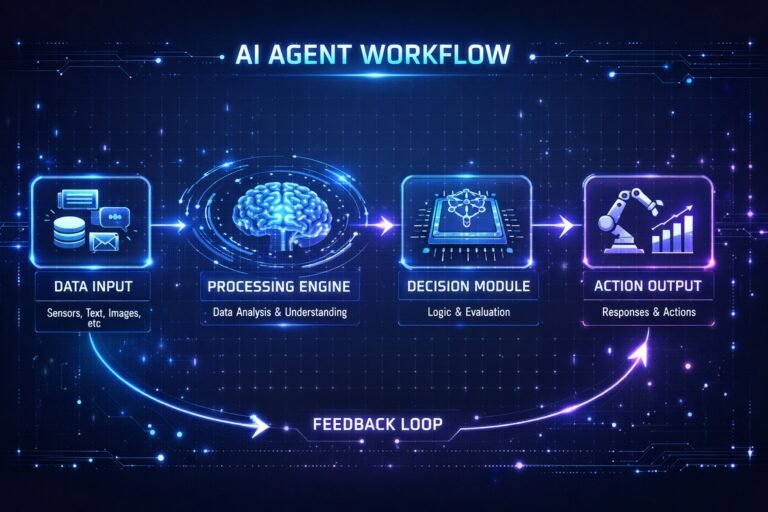
The best workflow usually looks like this:
Traditional trigger → AI analysis → deterministic action
For example:
Form submitted → AI classifies intent → HubSpot branches the record → create appropriate task
The AI handles the interpretation. The workflow handles the execution.

How to Build a HubSpot AI Automation Workflow
HubSpot currently lets users create workflows from scratch, from templates, or with AI assistance. Breeze Assistant can generate workflow triggers and actions from a natural-language description, after which the workflow can be reviewed and edited before activation.
A practical implementation process is:
Step 1: Choose a repetitive decision
Don’t start by asking:
“Where can we use AI?”
Instead ask:
“Where does our team repeatedly read information, interpret it, and then take an action?”
That is often where AI provides the most value.
Step 2: Define the trigger
Examples include:
- new contact
- form submission
- deal stage change
- completed interaction
- updated property
- customer feedback
- new activity
Keep the trigger deterministic whenever possible.
Step 3: Decide what AI needs to analyze
This is critical. Don’t assume the AI automatically understands everything about a CRM record. For example, HubSpot’s documentation notes that Data Agent custom prompts only receive the context that you provide to the prompt; additional properties or timeline information aren’t automatically included unless they’re added as relevant inputs.
Therefore, determine exactly which information the AI needs.
Step 4: Define the AI output
Avoid vague instructions such as:
“Analyze this lead.”
Instead, define the desired output.
For example:
Classify the prospect’s intent as High, Medium, Low, or Unknown and provide one sentence explaining the classification.
A structured output is easier to use in downstream workflow logic.
Step 5: Add deterministic workflow actions
After AI produces its output, HubSpot can use that output for subsequent workflow actions, including branching and record updates.
For example:
AI output = High Intent
→ Update intent property
→ Create sales task
→ Notify owner
AI output = Low Intent
→ Add to appropriate nurture path
This combination makes the overall system more predictable.
Step 6: Add human approval where necessary
Human review is especially valuable when AI affects:
- important sales decisions
- customer communication
- CRM data integrity
- compliance
- high-value opportunities
- external publishing
A good principle is: Automate the process, not accountability. A practical AI workflow should define where automation ends and human judgment begins. Our expert guide about integrating AI into human workflows explores this human-in-the-loop approach in more detail.
Step 7: Test before activating
HubSpot’s AI-assisted workflow creation does not mean you should blindly publish generated workflows. HubSpot states that AI-created workflows are turned off by default and require review before being turned on.
Test with:
- normal records
- incomplete records
- unusual inputs
- ambiguous responses
- incorrect data
- edge cases
Then compare AI outputs with what an experienced employee would have done.
When Should You Use AI in HubSpot Workflows?
AI isn’t automatically the best solution. Use conventional automation when the condition is clear.
For example:
If deal stage = Closed Won → update customer status
There is no reason to introduce AI into that decision. AI becomes more useful when the workflow requires interpretation.
Good AI candidates
- Classifying free-text responses
- Summarizing conversations
- Extracting information
- Categorizing customer feedback
- Personalizing drafts
- Identifying potential risks
- Researching records
- Generating recommendations
- Converting unstructured information into structured CRM data
Better handled with traditional automation
- Fixed notifications
- Simple property updates
- Known routing rules
- Required compliance actions
- Scheduled reminders
- Straightforward lifecycle changes
- Deterministic calculations
The goal should be AI where interpretation is valuable, rules where rules are sufficient.
A Simple HubSpot AI Workflow Architecture

A useful way to think about AI automation is:
Trigger → Data → AI → Decision → Action → Review → Measurement
For example:
New prospect submits form
↓
Collect relevant CRM and form data
↓
AI analyzes buying intent
↓
Classify the prospect
↓
Update CRM property
↓
Branch workflow
↓
Create appropriate sales task
↓
Salesperson reviews
↓
Measure conversion
This architecture is more reliable than putting AI in every step.
HubSpot AI Automation Best Practices
1. Start with one high-value workflow
Don’t attempt to automate your entire CRM at once. Choose one process where employees repeatedly spend time reading, classifying, summarizing, or drafting. Measure the result before expanding.
2. Keep AI outputs structured
Whenever possible, define:
- allowed categories
- expected format
- maximum length
- confidence or uncertainty rules
- fallback behavior
Structured outputs make downstream automation easier to control.
3. Give AI only the information it needs
More context isn’t automatically better. Provide the properties, text, transcripts, or other information that are actually relevant to the decision. HubSpot specifically notes that the Data Agent’s custom prompt only uses the context supplied to it.
4. Use deterministic actions after AI decisions
A strong pattern is:
AI interprets → workflow executes
For example:
AI: “Pricing inquiry”
Workflow: Assign appropriate property → create task → notify owner.
This creates a useful boundary between probabilistic AI and predictable automation.
5. Monitor AI outputs
Don’t measure only whether the workflow executed. Measure whether the AI output was useful. Track metrics such as:
- classification accuracy
- human correction rate
- time saved
- response time
- conversion rate
- workflow failure rate
- sales adoption
- customer response
6. Watch AI usage and plan requirements
HubSpot’s AI workflow capabilities aren’t universally available under every subscription. Some AI actions require HubSpot Credits, while particular features are limited to certain HubSpot products or tiers.
Before designing a production workflow, verify that the specific AI action you need is available in your account and understand its usage requirements.
How HubSpot AI Automation Fits Into a Larger Automation Strategy
HubSpot AI workflows shouldn’t exist in isolation. For broader CRM process design, your automation strategy may include conventional CRM workflows, sales operations, revenue operations, and AI-assisted processes.
If you’re building a broader CRM workflow system, see our guide to CRM workflow templates. For sales teams looking beyond individual AI actions, our guide to sales operations automation covers the larger operational picture. And if you’re evaluating HubSpot automation as part of a larger implementation, see our guide to HubSpot automation strategy.
For inbound sales processes specifically, our inbound SDR workflow guide covers the broader pipeline process rather than the AI-specific use cases discussed here. For organization-wide revenue processes, see our guide to revenue operations automation.
The purpose of this article is narrower: showing where AI adds an interpretation, generation, research, or recommendation layer to HubSpot workflows.
Common Mistakes to Avoid with HubSpot AI Automation
Automating decisions that don’t need AI
If a simple condition can solve the problem reliably, use a conventional workflow. AI adds complexity, cost, and another potential failure point.
Giving AI vague instructions
A prompt such as:
“Analyze this customer.”
is too broad.
Specify what information to analyze and exactly what output the workflow needs.
Allowing AI to modify everything automatically
Start with low-risk processes. For high-impact actions, introduce a human approval step.
Ignoring incomplete data
AI cannot compensate for missing information indefinitely. If the required CRM properties are empty, define a fallback path.
Treating AI output as guaranteed truth
AI-generated classifications and summaries can be wrong. Use validation and monitoring, particularly for high-value records.
Building overly complicated workflows
More AI steps don’t necessarily mean a better workflow. A simple architecture such as:
Trigger → AI classification → branch → action
can often deliver more value than a huge workflow with dozens of AI calls.
FAQs About HubSpot AI Automation
What is HubSpot AI automation?
HubSpot AI automation uses HubSpot’s AI capabilities within workflows to analyze, summarize, classify, research, generate, or recommend information before subsequent workflow actions occur. Unlike conventional rule-based automation, AI can work with certain types of unstructured information and generate outputs that can be used by the workflow.
Does HubSpot have AI-powered workflows?
Yes. HubSpot currently provides AI-assisted workflow creation and AI workflow actions, including capabilities for analyzing, summarizing, categorizing, researching, and working with CRM data. Feature availability varies by HubSpot product, subscription, and usage requirements.
Can HubSpot AI analyze CRM data?
Yes. HubSpot’s Data Agent workflow actions can analyze, summarize, and categorize information from enrolled records. HubSpot also provides research and smart-property-related AI workflow actions.
Can AI update HubSpot CRM properties?
AI-generated workflow outputs can be used with workflow actions to update properties on records or associated records. For important CRM fields, however, businesses should validate AI-generated information before allowing fully automatic updates.
Can HubSpot AI create workflows?
Yes. HubSpot provides AI-assisted workflow creation through Breeze. Users can describe the desired workflow and have AI generate triggers and actions, which can then be reviewed and edited.
Can HubSpot AI personalize automated emails?
HubSpot provides AI-assisted content generation for workflow emails, subject to product and subscription availability. AI can help generate or refine email content within workflow actions.
Is HubSpot AI automation suitable for small businesses?
It can be, particularly when a small team has repetitive tasks involving CRM data, lead responses, customer feedback, summaries, or personalized communication. However, small businesses should start with a workflow where the time savings are measurable rather than adding AI simply because it is available.
Does HubSpot AI replace sales representatives?
No. The strongest use cases generally use AI to reduce repetitive analysis, summarization, classification, research, and drafting while allowing salespeople to handle relationships, judgment, negotiation, and important decisions.
Final Thoughts
HubSpot AI automation is most useful when a workflow needs more than a simple rule. Traditional automation is excellent at predictable tasks:
If this happens → do that.
AI becomes valuable when the process requires interpretation:
Read this information → understand it → classify or summarize it → recommend what should happen next.
The 10 workflows covered here show where that distinction can make a practical difference:
- AI lead intent classification
- AI-powered lead qualification
- AI sales call summarization
- AI-personalized sales follow-up
- AI email reply classification
- AI deal risk detection
- AI CRM data categorization
- AI marketing content repurposing
- AI customer feedback classification
- AI next-best-action recommendations
The best HubSpot automation strategy isn’t to replace every rule with AI. It’s to use AI for interpretation and generation, deterministic automation for execution, and human judgment where the decision matters.
That combination can turn HubSpot from a system that simply moves records between predefined stages into a more intelligent operating layer for sales and marketing teams in 2026.