Business Process Automation Consulting: Scale Faster


Many businesses don’t have a people problem—they have a process problem. Employees often spend hours every week copying data between systems, sending repetitive emails, updating spreadsheets, preparing reports, processing invoices, requesting approvals, scheduling tasks, and following up on routine work.
These activities seem manageable when a company is small, but as operations grow, manual processes become slower, more expensive, and harder to control. Business Process Automation Consulting helps companies identify these inefficiencies and replace repetitive manual work with streamlined, technology-driven workflows.
Instead of automating processes simply because automation is possible, a good consultant evaluates how work currently gets done, identifies bottlenecks, determines which tasks are suitable for automation, recommends the right technology, and helps the organization implement and improve the new workflows.
The goal isn’t to eliminate people from the process. It’s to eliminate unnecessary manual work so employees can spend more time on decision-making, customer relationships, strategy, and other high-value activities.
Table of Contents
What Is Business Process Automation Consulting?
Business process automation consulting is a professional service that helps organizations analyze, redesign, and automate repetitive business processes.
A consultant examines how information and tasks move through a company and looks for opportunities to reduce manual intervention. Depending on the business, this might involve automating workflows across CRM platforms, accounting software, project management systems, customer support tools, HR platforms, databases, and communication applications.
For example, a company might currently handle a new customer manually:
- A salesperson enters customer information into a CRM.
- An employee copies the information into an accounting system.
- Another employee creates an onboarding task.
- Someone sends a welcome email.
- A manager manually checks whether required documents have been received.
- The operations team creates a report.
A well-designed automated workflow could connect these steps so that one action triggers the next. When a deal is marked as won, the system could automatically create the customer record, notify the appropriate team, generate onboarding tasks, send predefined communications, and update reporting systems.
The consultant’s job is to determine how the process should work—not simply which software should be used.
Why Businesses Need Process Automation Consulting
Automation becomes increasingly valuable as a company grows.
A process that takes five minutes when performed ten times per week may not seem important. But when the same process occurs hundreds or thousands of times, the accumulated labor cost can become significant. Manual processes can also create problems beyond labor costs.
Common issues include:
- Data entry errors
- Duplicate information
- Missed deadlines
- Slow approvals
- Inconsistent processes
- Poor visibility into workflow status
- Delayed customer responses
- Employee frustration
- Increasing administrative costs
- Difficulty scaling operations
Automation can address many of these problems by creating standardized workflows that execute routine tasks consistently. However, automation is most effective when it is applied to a well-designed process. Automating a poorly designed workflow can simply make a bad process run faster. That’s why consulting is valuable.
Signs Your Business Needs Automation Consulting
Not every company needs to automate every process. However, several warning signs suggest that an organization should evaluate its workflows.
1. Employees Spend Too Much Time on Repetitive Tasks
If employees regularly perform the same administrative activities, those tasks may be good automation candidates.
Examples include:
- Copying information between applications
- Sending routine notifications
- Creating recurring reports
- Updating records
- Assigning tasks
- Scheduling reminders
- Processing standard requests
The key question is:
Could this task be performed consistently without requiring a person to make a new decision every time?
If the answer is yes, automation may be appropriate.
2. Your Business Relies Heavily on Spreadsheets
Spreadsheets are useful, but they can become problematic when they are used as the central system for complex operational workflows.
Warning signs include multiple versions of the same spreadsheet, manual data consolidation, unclear ownership, and employees spending significant amounts of time updating reports. Automation can synchronize information between systems and reduce unnecessary manual spreadsheet work.
3. Approvals Are Slowing Down Operations
Many businesses still rely on email messages or chat conversations for approvals. A general workflow might look like:
Employee request → email manager → manager responds → employee forwards approval → finance processes request
A workflow automation system can turn this into a structured approval process with notifications, rules, timestamps, and automatic status updates.
4. Employees Enter the Same Data Multiple Times
Duplicate data entry is one of the clearest automation opportunities. If customer information must be entered separately into a CRM, accounting platform, support system, and internal database, integration can potentially eliminate much of that work.
5. Errors Are Becoming More Frequent
Manual processes create opportunities for mistakes. Automation can reduce errors caused by repetitive data entry, forgotten steps, inconsistent calculations, and missed notifications.
Automation doesn’t eliminate every type of error, however. Incorrect business rules or poor system design can create new problems. That’s why workflows need to be tested carefully before deployment.
6. Growth Requires Constantly Hiring More Administrative Staff
If transaction volume increases but your company must continuously add employees just to keep up with routine work, your processes may not be scaling efficiently. Automation allows companies to increase operational capacity without necessarily increasing administrative workload at the same rate.
What Does a Business Process Automation Consultant Do?
A business process automation consultant typically works across several stages.
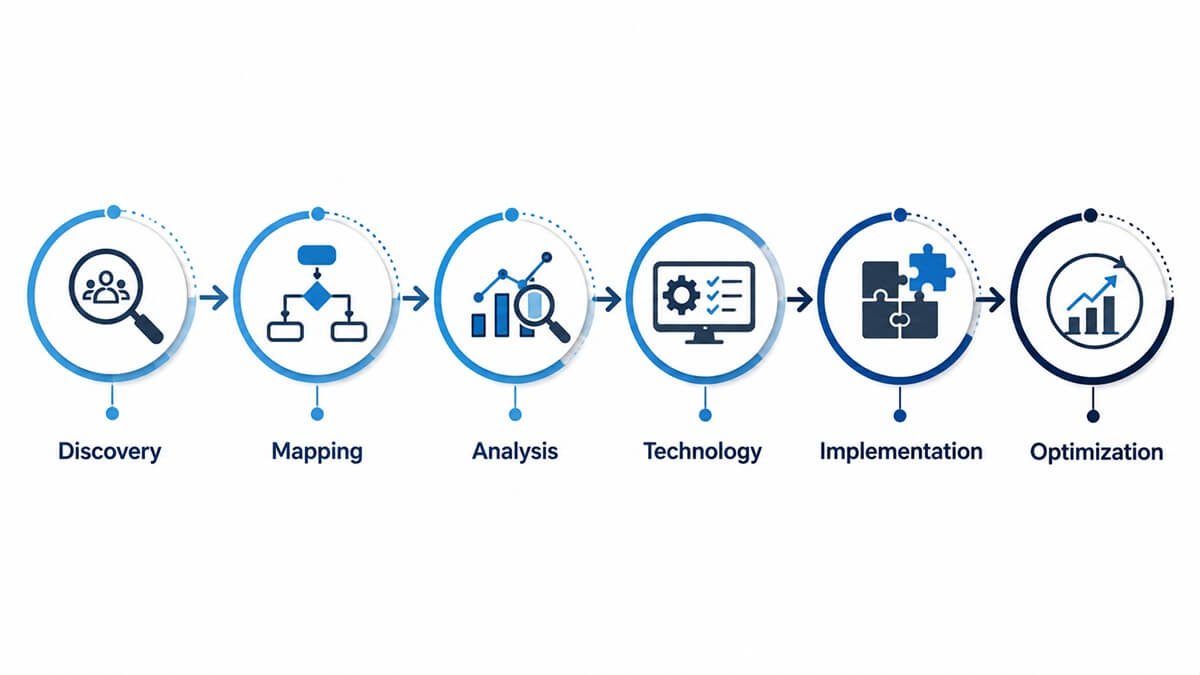
Step 1: Process Discovery
The first step is understanding how work actually gets done. A consultant may interview employees, review documentation, examine software usage, analyze workflow data, and observe how tasks move between departments.
The goal is to identify:
- Who performs each task?
- What triggers the process?
- Which systems are involved?
- How much time does each step take?
- Where do delays occur?
- Where do errors happen?
- Which steps require human judgment?
- Which steps are repetitive?
This stage is important because documented processes don’t always match real-world processes.
Step 2: Process Mapping
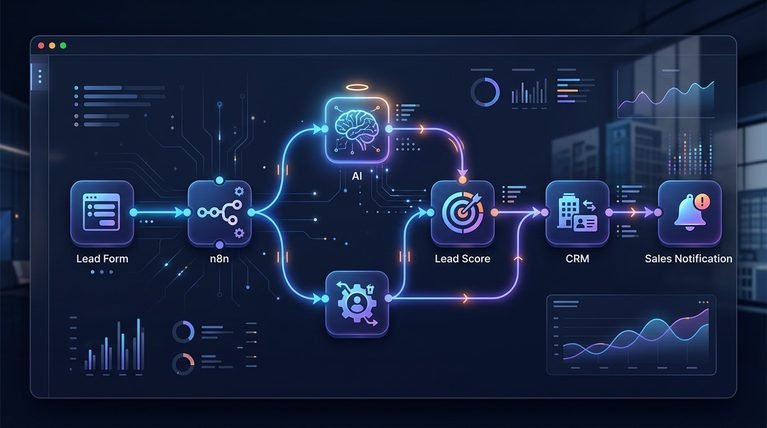
The consultant creates a visual or structured representation of the current workflow, often using AI workflow diagrams to make complex automation processes easier to understand.
For example:
Customer inquiry → qualification → sales call → proposal → approval → contract → onboarding
Each stage can then be evaluated for automation opportunities. Process mapping also helps identify unnecessary steps. Sometimes the best solution isn’t automation. It may simply be removing a redundant approval or changing who is responsible for a task.
Step 3: Identify Automation Opportunities
The consultant evaluates each process based on factors such as:
- Frequency
- Time required
- Labor cost
- Error rate
- Business impact
- Complexity
- Risk
- Data availability
- Integration requirements
High-volume, repetitive, rules-based tasks are often strong automation candidates. Processes requiring complex judgment, negotiation, creativity, or sensitive human interaction may require human involvement.
Step 4: Develop an Automation Strategy
After identifying opportunities, the consultant prioritizes them. A practical automation roadmap might categorize processes as:
- High priority: High volume, low complexity, strong ROI
- Medium priority: Valuable but requiring integration or process redesign
- Low priority: Low volume or limited financial impact
This prevents companies from spending months automating processes that have little business value.
Step 5: Select the Right Technology
Technology selection depends on the workflow. Depending on the requirements, businesses starting use AI workflow automation alongside CRM automation, ERP systems, accounting integrations, API integrations, and other technologies.
Including:
- Robotic process automation
- AI-powered automation
- Database workflows
- Document automation
- Customer service automation
- Project management automation
The right ai workflow tools should be selected based on the business process rather than forcing the business to adapt to a particular tool.
Step 6: Build and Integrate the Workflow
Once the strategy is approved, the automation is implemented. This can involve connecting applications, creating triggers and actions, establishing business rules, configuring notifications, and determining what happens when an exception occurs.
A good automation should also account for failures.
For example:
What happens if the customer record is incomplete?
What happens if an API connection fails?
Who receives an alert when automation stops?
These questions are essential for reliable business automation.
Step 7: Test the Automation
Testing should happen before a workflow is deployed across the organization.
Consultants test:
- Normal scenarios
- Missing information
- Incorrect data
- Duplicate records
- Failed integrations
- Permission issues
- Exception conditions
- High-volume situations
Depending on the complexity of the workflow, businesses may also need to compare platforms such as Zapier, Make, and n8n before choosing an automation solution. The goal is to make sure the workflow behaves correctly under both normal and unexpected conditions.
Step 8: Train Employees and Monitor Performance
Automation changes how employees work. Teams should understand what has changed, why it changed, and what they should do when something goes wrong. After launch, the workflow should also be monitored.
Business processes change over time, so automation should be treated as an evolving system rather than a one-time project.
Which Business Processes Can Be Automated?
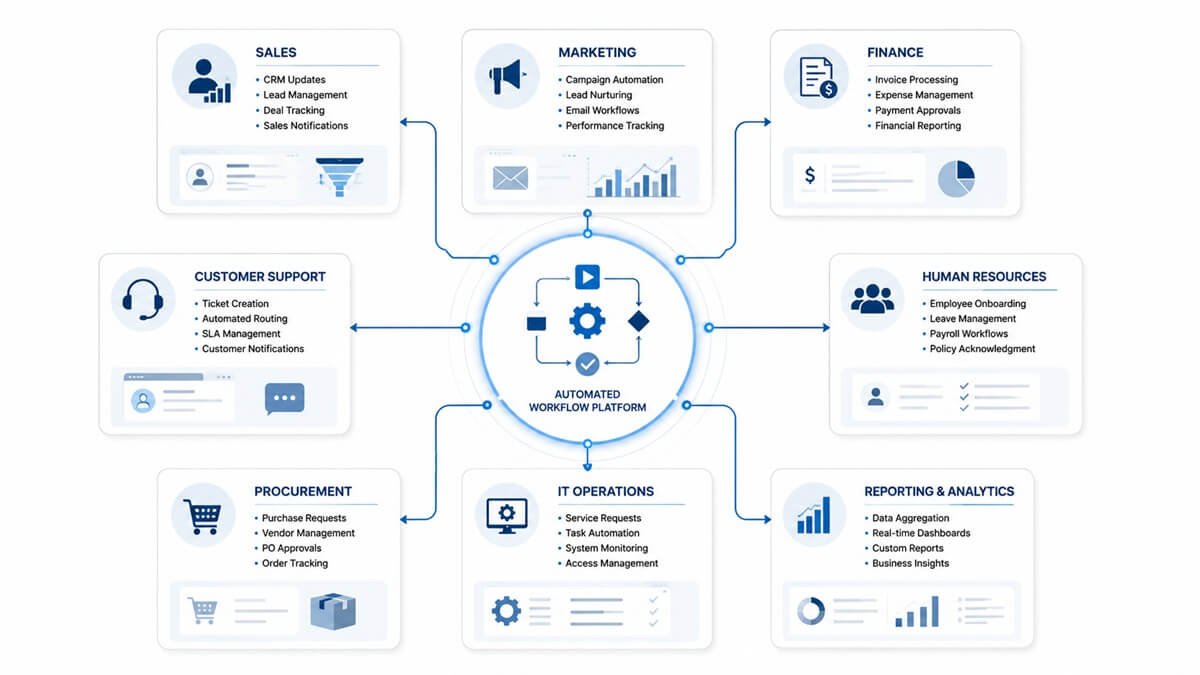
Almost every department can benefit from carefully selected automation.
Sales Automation
Sales teams often spend significant time performing administrative tasks. Potential automation opportunities include:
- Lead assignment
- Follow-up reminders
- CRM updates
- Lead notifications
- Meeting scheduling
- Proposal workflows
- Sales reporting
- Customer onboarding triggers
For example, businesses can use lead generation workflow templates to automate actions such as assigning qualified leads to the appropriate salesperson and creating follow-up tasks when a new lead enters the CRM.
Marketing Automation
Marketing teams can automate many repetitive communication and data-management tasks using predefined AI workflow templates. Examples include:
- Email sequences
- Lead nurturing
- Form processing
- Campaign notifications
- Audience segmentation
- Reporting
- Content distribution workflows
Automation allows marketers to maintain consistent communication without manually triggering every action.
Finance and Accounting Automation
Finance departments often handle highly repetitive processes. Potential applications include:
- Invoice processing
- Payment reminders
- Expense approvals
- Purchase approvals
- Recurring reports
- Financial notifications
- Data synchronization
Automating these processes can reduce administrative work while improving consistency.
Human Resources Automation
HR teams can automate many administrative stages of the employee lifecycle. Examples include:
- Employee onboarding
- Document collection
- Interview scheduling
- Training reminders
- Leave requests
- Employee notifications
- Offboarding workflows
For example, once a new employee is added to an HR system, automated tasks could be created for IT, payroll, facilities, and the employee’s manager.
Customer Support Automation
Customer service workflows can also benefit from automation. Examples include:
- Ticket routing
- Customer notifications
- Escalation alerts
- Follow-up reminders
- Knowledge-base suggestions
- Customer feedback requests
- Support reporting
Automation can help ensure that requests reach the right person without requiring manual routing.
Procurement Automation
Procurement workflows often involve multiple approvals and documentation. Automation can help manage:
- Purchase requests
- Approval routing
- Supplier notifications
- Purchase orders
- Contract reminders
- Procurement reporting
IT Operations
IT teams can automate repetitive operational tasks such as:
- User account requests
- Access approvals
- Software provisioning
- Ticket routing
- System notifications
- Routine reporting
- Employee offboarding tasks
Business Process Automation Consulting vs. DIY Automation
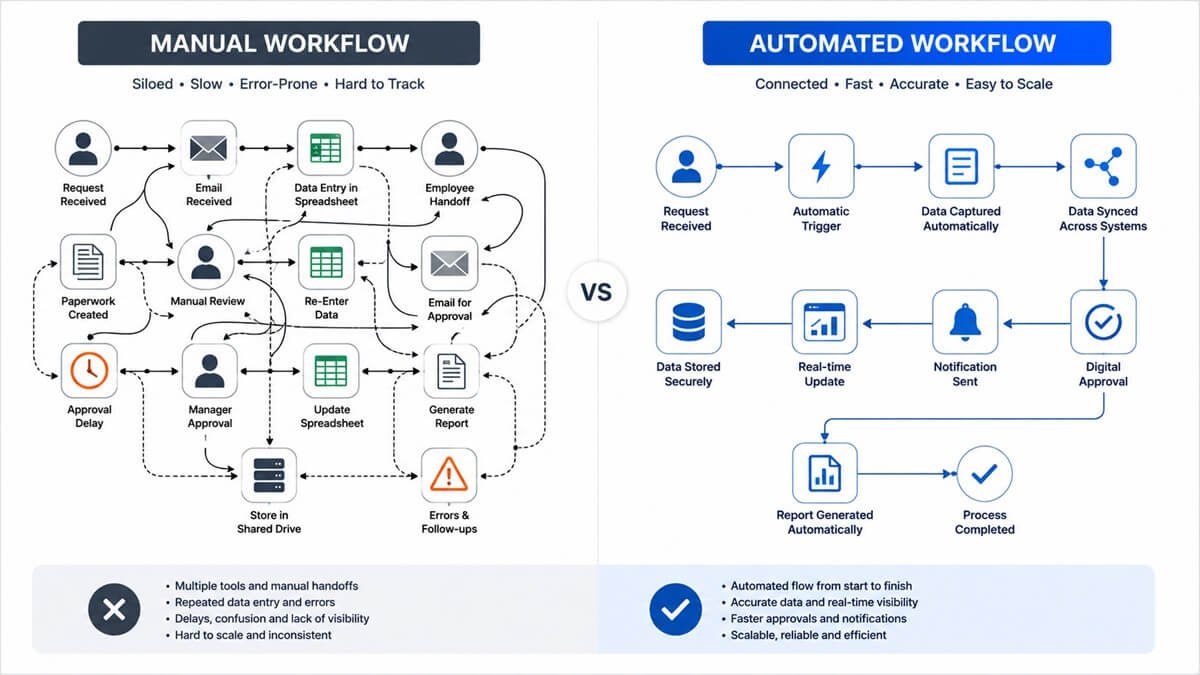
Many businesses can create simple automations without a consultant. For example, connecting a form to an email notification may require little technical expertise. The challenge appears when automation becomes more complex.
A company may need to connect several systems, manage conditional logic, handle exceptions, protect sensitive information, maintain permissions, and ensure that workflows remain reliable as the organization grows. That’s where consulting can provide additional value.
| DIY Automation | Consulting-Led Automation |
| Good for simple workflows | Better for complex processes |
| Usually limited to individual tasks | Can address end-to-end processes |
| Lower initial cost | Higher initial investment |
| Often created by individual users | Designed around organizational requirements |
| May lack documentation | Typically includes process documentation |
| Maintenance can become inconsistent | Governance can be built into the solution |
The choice doesn’t have to be either-or. Many organizations use employees for simple automations while bringing in specialists for larger or higher-risk projects.
Benefits of Business Process Automation
A well-designed automation strategy can produce several benefits.
Reduced Manual Work
The most obvious benefit is reducing repetitive administrative tasks. Employees can spend less time performing routine actions and more time on activities that require judgment and expertise.
Faster Processes
Automation can execute tasks immediately instead of waiting for an employee to complete them. For example, an automated approval notification can be triggered as soon as a request is submitted.
Fewer Human Errors
Standardized workflows can reduce mistakes associated with repetitive data entry and forgotten steps.
Better Process Consistency
Automation ensures that defined rules are applied consistently. This can be particularly valuable when different employees currently handle the same process in different ways.
Improved Visibility
Automated workflows can provide information about where tasks are located within a process. Managers can see whether a request is waiting for approval, processing, completed, or experiencing an exception.
Easier Scaling
Automation can increase operational capacity without requiring every additional transaction to generate the same amount of manual work.
Better Employee Experience
Employees generally prefer spending their time on meaningful work rather than repetitive administrative tasks. Removing unnecessary manual work can improve productivity and reduce frustration.
Improved Customer Experience
Faster internal processes can lead to faster customer responses, more consistent communication, and fewer administrative mistakes.
How Much Does Business Process Automation Consulting Cost?
There is no single price for business process automation consulting. The cost depends on factors such as:
- Number of processes
- Workflow complexity
- Number of applications involved
- Integration requirements
- Data volume
- Security requirements
- Custom development
- AI requirements
- Implementation scope
- Training and ongoing support
A simple workflow connecting two applications require relatively little consulting work. A company-wide automation program involving multiple departments, enterprise systems, custom integrations, and extensive governance can require a much larger investment.
Rather than focusing only on the upfront consulting fee, businesses should evaluate the expected return on investment. For example, if an automation saves 500 employee hours annually, reduces costly errors, and speeds up customer processing, those benefits should be included in the business case.
How to Calculate the ROI of Process Automation
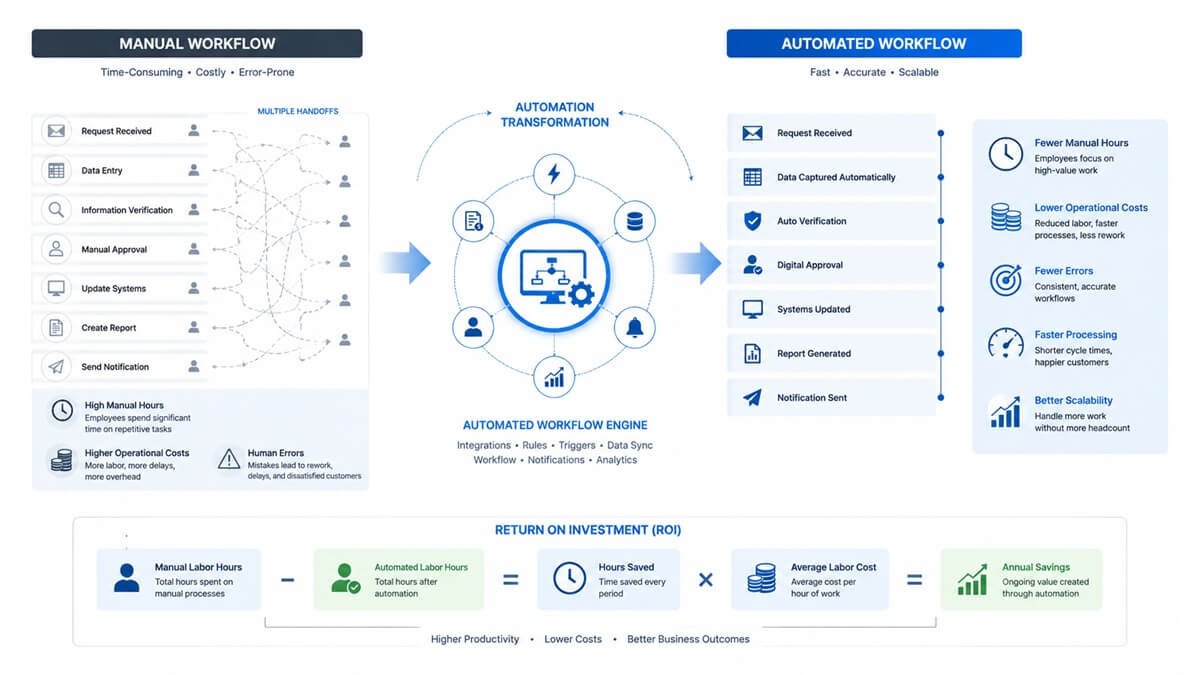
A simple ROI analysis can start with the current cost of performing a process manually. Consider a process that requires:
- 20 hours of employee time per week
- $30 average hourly labor cost
- 50 working weeks per year
The annual labor cost would be:
20 × $30 × 50 = $30,000 per year
If automation reduces the process to five hours per week, the remaining annual labor cost becomes:
5 × $30 × 50 = $7,500
The potential annual labor savings are therefore:
$30,000 − $7,500 = $22,500
A complete ROI calculation should also consider software costs, implementation costs, maintenance, training, error reduction, revenue impact, and other operational benefits.
The objective isn’t simply to automate the largest number of tasks. It’s to automate the processes that create the greatest measurable business value.
Common Business Automation Mistakes
Automation can create significant value, but poor implementation can create new problems.
Automating a Broken Process
If the current workflow contains unnecessary steps, automating every step simply makes the inefficient process faster.
Start by asking:
Does this step need to exist?
Automating Everything
Not every process should be automated. Tasks requiring human judgment, relationship management, creativity, or complex exceptions may benefit from keeping a person involved.
Choosing Technology Before Understanding the Process
Businesses sometimes choose an automation platform first and then try to force their processes into it. The better approach is to understand the process and requirements before selecting technology.
Ignoring Exceptions
A workflow that works perfectly under normal conditions can fail when something unexpected happens. Every important automation should have clearly defined exception handling.
Failing to Document the Workflow
If only one employee understands how an automation works, the company has created a new dependency. Documentation should explain:
- What triggers the workflow
- What actions occur
- Which systems are connected
- What rules are applied
- Who owns the process
- What happens when something fails
Forgetting Security and Permissions
Automation often moves business information between systems. Following AI workflow security best practices can help businesses address access permissions, data protection, authentication, and auditability during the design process rather than after deployment.
Organizations can also use established frameworks such as the NIST Cybersecurity Framework 2.0 to structure their approach to cybersecurity risk management.
How to Choose a Business Process Automation Consultant
Choosing the right consultant is about more than finding someone who knows automation software. Look for a provider that understands business processes as well as technology.
Look for Relevant Experience
Ask whether the consultant has worked with businesses similar to yours. Industry experience can be helpful because different industries have different workflows, compliance requirements, and operational challenges.
Ask About Their Process
A strong consultant should be able to explain how they discover, analyze, prioritize, implement, and monitor automation opportunities. Be cautious of providers that immediately recommend a tool without first asking about your existing processes.
Request Specific Examples
Ask for examples of previous automation projects. Ideally, the consultant should be able to explain:
- The original problem
- The process that was automated
- The technology used
- The implementation challenges
- The measurable outcome
Evaluate Integration Expertise
Your automation may need to communicate with existing systems. Ask whether the consultant has experience with APIs, databases, webhooks, integrations, and the specific platforms your organization already uses.
Discuss Ongoing Support
Automation isn’t always a set-it-and-forget-it project. Applications change, APIs are updated, employees change roles, and business processes evolve. Ask how maintenance, monitoring, troubleshooting, and future improvements will be handled.
“Businesses that need help moving from strategy to deployment may also consider professional AI implementation services to build, integrate, and maintain their automation workflows.”
Real-World Business Process Automation Examples
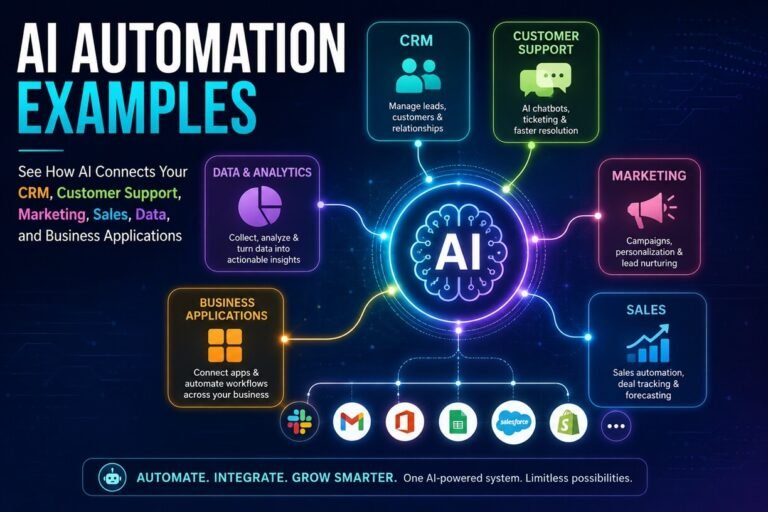
Consider a few common scenarios. As these scenarios represent some of the most common AI automation examples businesses can use to reduce repetitive work and connect multiple stages of a process.
Example 1: Automated Lead Management
A marketing form generates a new lead. Instead of an employee manually checking the form and entering the information into the CRM:
Form submission → CRM record → Lead scoring → Sales assignment → Notification → Follow-up task
The workflow handles routine administration while the salesperson focuses on the prospect.
Example 2: Employee Onboarding
A new employee is added to the HR system. Automation can trigger:
HR record created → IT task → Account setup → Manager notification → Training tasks → Welcome communication
This reduces the number of manual handoffs between departments.
Example 3: Invoice Approval
A supplier submits an invoice. An automated process can:
Receive invoice → Extract information → Validate data → Route for approval → Notify finance → Update accounting system
Employees remain involved where judgment is required, while routine administrative steps are handled automatically.
Example 4: Customer Support Escalation
A customer submits a support ticket. The system can automatically determine its category and priority, assign it to the appropriate team, send a confirmation, and notify a manager if the ticket remains unresolved beyond a defined threshold. This creates a more predictable support process.
AI and Business Process Automation
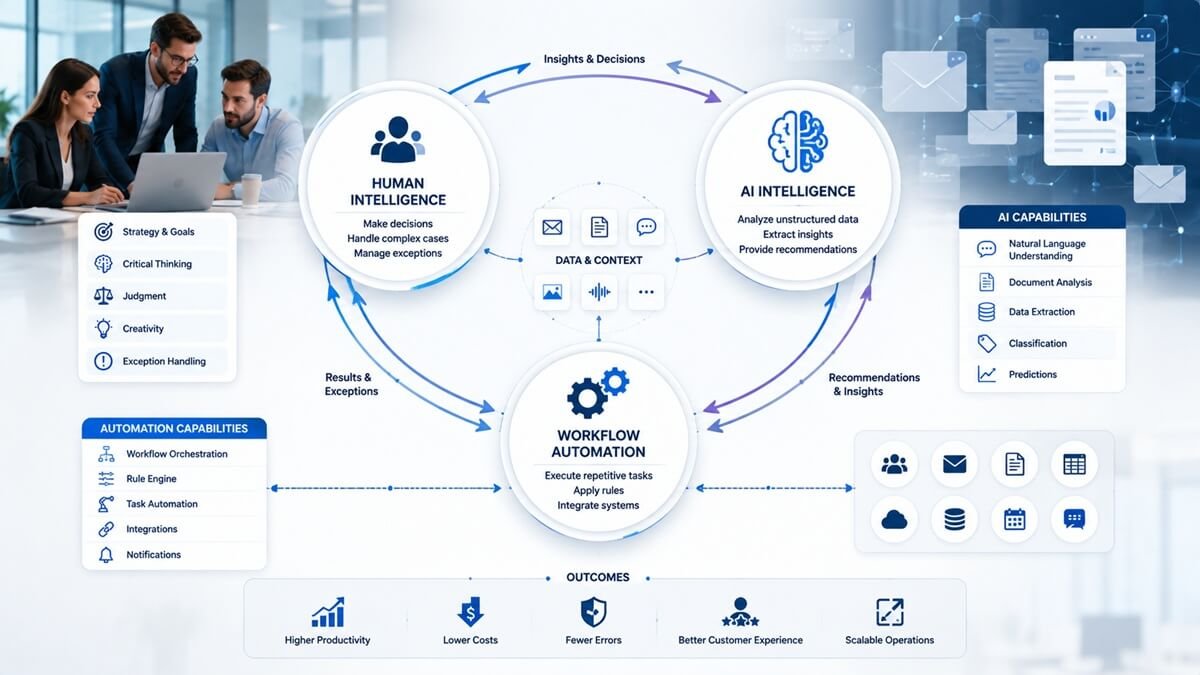
Artificial intelligence is expanding what businesses can automate. Traditional automation typically follows predefined rules:
If X happens, perform Y.
AI can add capabilities such as understanding unstructured information, classifying documents, summarizing conversations, extracting information, generating responses, and assisting employees with decisions.
For example, an automation workflow could receive an incoming customer email, classify the request, extract relevant information, identify the appropriate department, create a ticket, and draft a response for an employee to review.
However, AI should not automatically replace traditional workflow automation.
The best solution combines both. Traditional automation handles predictable rules. AI handles tasks involving unstructured information or language. Humans handle judgment, exceptions, and high-impact decisions.
This approach is particularly useful when integrating AI into human workflows, allowing technology to handle routine or information-heavy tasks while employees remain responsible for judgment and high-impact decisions.
This combination can create more flexible business processes while maintaining appropriate human oversight.
How to Build a Business Process Automation Strategy
A sustainable automation program should be treated as a business initiative rather than a collection of disconnected software projects. Start with your business objectives.
For example:
- Reduce administrative costs
- Improve customer response times
- Reduce processing errors
- Increase employee productivity
- Shorten approval cycles
- Improve operational visibility
- Support business growth
Then identify the processes that influence those objectives. Next, measure the current baseline. Record metrics such as:
- Processing time
- Employee hours
- Error rate
- Number of transactions
- Waiting time
- Cost per transaction
- Customer response time
After automation is implemented, compare the results against the baseline. This creates a measurable feedback loop:
Measure → Automate → Monitor → Improve
A Practical Automation Priority Matrix
Businesses can prioritize automation opportunities using two simple factors:
Business impact and implementation effort.
High Impact + Low Effort
Automate these first.
Examples may include simple notifications, task creation, data synchronization, and routine reporting.
High Impact + High Effort
Plan these carefully.
They may require system integrations, process redesign, or significant organizational change, but they can produce substantial long-term value.
Low Impact + Low Effort
Automate when convenient.
These projects may improve employee experience but should not distract from higher-value opportunities.
Low Impact + High Effort
Usually postpone or avoid.
The expected return may not justify the investment.
Frequently Asked Questions About Business Process Automation Consulting
What should I prepare before meeting a business process automation consultant?
You do not need to have a complete automation plan before speaking with a consultant. Start by identifying the workflows that cause the most delays, repetitive work, errors, or employee frustration. Useful information includes the applications your teams use, approximate transaction volumes, process documentation, approval steps, and any known bottlenecks. A consultant can then validate the workflow and identify opportunities that may not be obvious internally.
How does a consultant determine whether a process is worth automating?
A consultant generally evaluates the process based on factors such as frequency, processing time, labor requirements, error rates, business impact, complexity, integration requirements, and potential risk. A high-volume process with predictable rules and measurable costs is usually a stronger candidate than a low-volume process requiring significant judgment. The objective is to identify automation opportunities that produce meaningful business value rather than simply increase the number of automated tasks.
Can a consultant automate workflows across multiple business applications?
Yes. Complex automation projects involve connecting several applications rather than automating work inside a single platform. Depending on the environment, integrations may use APIs, webhooks, databases, native connectors, middleware, or other integration methods. Before implementation, the consultant should determine whether the existing systems can exchange the required information reliably and securely.
What happens when an automated workflow encounters an exception?
A reliable automation should have an exception-handling strategy. Instead of allowing the workflow to fail silently, the system can pause the process, record the problem, notify an appropriate employee, and provide the information needed to resolve the issue. Common exceptions include missing data, failed integrations, duplicate records, invalid inputs, permission problems, and unusual customer requests. Human intervention should remain available when the workflow cannot safely make the decision itself.
How can businesses maintain human oversight after automation?
Human oversight can be built directly into the workflow. For example, an automated system collects information, validate data, prepare a recommendation, and route the result to an employee for approval before taking a high-impact action. This human-in-the-loop approach is particularly useful for financial decisions, sensitive customer issues, compliance-related processes, and situations where exceptions require professional judgment.
How should a company measure the success of an automation project?
Success should be measured against a baseline established before implementation. Useful KPIs can include processing time, employee hours per transaction, error rate, approval time, backlog, cost per transaction, response time, and workflow completion rate. Depending on the process, businesses also measure customer satisfaction, revenue impact, or the number of manual interventions required. Comparing pre-automation and post-automation results provides stronger evidence of business value than simply reporting that a workflow was deployed.
What information should a consultant document after an automation is implemented?
Documentation should explain the purpose of the workflow, its trigger conditions, connected systems, business rules, permissions, owners, exception procedures, and monitoring requirements. It should also identify what employees should do when automation fails.
How does automation consulting address data security?
Security should be considered during workflow design rather than added after implementation. A consultant should review which systems exchange information, what data is being transferred, who can access it, how authentication is handled, and what records or logs are retained. Sensitive workflows also require role-based access, approval controls, encryption, audit trails, and restrictions on what information automation tools can access.
Can business process automation work with legacy software?
It can, but the available integration options depend on the legacy system. Some older applications provide APIs or database access, while others require middleware, file-based exchanges, specialized connectors, or robotic process automation. A consultant should assess the technical limitations of the existing environment before recommending an implementation approach.
What is the difference between automating a task and automating an entire process?
Task automation focuses on an individual repetitive action, such as sending a notification or creating a record. Process automation connects multiple steps into a coordinated workflow. For example, instead of separately automating an email, CRM update, and task assignment, an end-to-end workflow could connect those actions to a single business event. Process-level automation can provide greater value when delays and inefficiencies occur between departments or systems.
When should a business redesign a process instead of automating it?
Redesign is often preferable when a workflow contains unnecessary approvals, duplicate data entry, redundant handoffs, unclear ownership, or steps that exist only because of outdated procedures. Automating such a process without redesigning it can preserve the underlying inefficiency. A consultant should therefore determine whether a step should be removed, simplified, standardized, or reassigned before deciding whether it should be automated.
Can automation consulting help businesses create a long-term automation roadmap?
Yes. Instead of implementing isolated workflows, a consultant can help organizations establish an automation roadmap based on business priorities, expected ROI, technical dependencies, risk, and implementation effort. This allows high-value opportunities to be addressed first while creating standards for integrations, security, documentation, ownership, and ongoing maintenance.
The Future of Business Process Automation
Business automation is moving beyond simple task automation toward increasingly connected workflows. Instead of automating individual actions in isolation, companies are building systems that connect entire business processes.
For example:
Customer inquiry → qualification → CRM update → proposal → approval → contract → payment → onboarding → customer support
The more effectively these systems communicate, the less manual coordination is required between departments. AI will also make automation more capable of handling information that previously required human interpretation.
But technology alone will not create efficient operations. Companies still need clearly defined processes, good data, appropriate controls, responsible system design, and employees who understand how the new workflows operate.
Final Thoughts: Is Business Process Automation Consulting Worth It?
Business Process Automation Consulting can be valuable for organizations that are losing time and money to repetitive manual work, disconnected systems, slow approvals, and inefficient workflows. The biggest opportunity isn’t necessarily automating the most tasks. It’s identifying the processes where automation can create the greatest measurable impact.
A successful approach starts with understanding the existing workflow, removing unnecessary steps, prioritizing high-value opportunities, selecting appropriate technology, implementing carefully, and continuously measuring performance.
When done correctly, automation can help businesses process more work without increasing administrative effort at the same rate. Employees can spend less time on repetitive tasks, customers can receive faster service, and management can gain greater visibility into how work moves through the organization.
The companies that benefit most from automation aren’t necessarily those with the most technology. They’re the ones that understand which processes should be automated, which should remain human-led, and how the two can work together efficiently.