AI Implementation Services: A Complete Guide for Modern Businesses


Artificial intelligence has moved beyond experimentation. Businesses of every size now use AI to automate repetitive tasks, improve customer experiences, generate insights from data, and increase productivity.
Yet adopting AI successfully involves much more than subscribing to a chatbot or purchasing software. Organizations need a structured implementation strategy that aligns technology with business goals, existing systems, and operational workflows.
This is where AI implementation services provide value. Instead of building everything internally, many organizations partner with AI implementation specialists who handle planning, integration, workflow automation, security, testing, employee training, and ongoing optimization.
This approach allows companies to deploy AI faster while minimizing technical risks and reducing the need for large in-house engineering teams.
Whether you’re a startup exploring AI for the first time, a growing business automating operations, or an enterprise modernizing legacy systems, understanding the implementation process is essential for long-term success.
In this guide, you’ll learn:
- What AI implementation services include
- How the AI implementation process works
- Different service models and deployment options
- Typical implementation costs
- Common mistakes businesses should avoid
- Real-world industry use cases
- Best practices for maximizing AI ROI
- How to choose the right AI implementation partner
What Are AI Implementation Services?
AI implementation services help businesses plan, deploy, integrate, and optimize artificial intelligence solutions across their operations. Instead of simply purchasing AI software, organizations receive expert guidance that ensures AI tools fit existing workflows, technology infrastructure, security requirements, and business objectives.
Implementation generally covers the entire lifecycle of an AI project—from initial strategy and readiness assessment to deployment, employee training, performance monitoring, and continuous improvement.
Compared to traditional software installation, AI implementation often involves connecting multiple systems, preparing business data, configuring automation workflows, integrating APIs, and ensuring the AI models deliver measurable business outcomes.
The exact services vary depending on business needs, but most projects include:
- AI strategy and planning
- Business process analysis
- AI readiness assessment
- Workflow automation
- CRM and ERP integration
- AI model selection
- API integration
- Data preparation
- Employee training
- Security and compliance
- Performance monitoring
- Continuous optimization
The goal isn’t simply to “use AI.” The goal is to improve business performance through practical, measurable automation.
Why AI Implementation Is More Than Installing Software
Many businesses assume AI adoption is as simple as purchasing an AI tool and giving employees access. In reality, successful AI projects require careful planning, high-quality data, workflow redesign, governance, and change management. For example, implementing an AI-powered customer support assistant may require:
- Connecting CRM systems
- Importing historical support tickets
- Building a knowledge base
- Defining escalation rules
- Creating approval workflows
- Testing responses
- Monitoring accuracy
- Training staff
Without these steps, even advanced AI models may produce inconsistent or unreliable results. Successful AI implementation focuses on integrating technology into real business processes rather than deploying isolated tools.
Why Businesses Invest in AI Implementation Services
Organizations adopt AI for many reasons, but most initiatives focus on improving efficiency, reducing costs, and enabling employees to spend more time on high-value work. Common business goals include:
Automating Repetitive Tasks
AI can automate routine activities such as:
- Data entry
- Email responses
- Lead qualification
- Invoice processing
- Meeting summaries
- Customer support
- Report generation
- Content drafting
Automation reduces manual work while improving consistency and speed.
Improving Decision-Making
Modern AI systems analyze large volumes of structured and unstructured data to identify trends, forecast outcomes, and recommend actions. Examples include:
- Sales forecasting
- Demand prediction
- Inventory optimization
- Marketing attribution
- Customer segmentation
- Financial risk analysis
These insights help businesses make faster, data-driven decisions.
Enhancing Customer Experience
AI implementation often improves customer interactions through:
- Intelligent chatbots
- Personalized recommendations
- AI-powered search
- Automated ticket routing
- Voice assistants
- Sentiment analysis
Customers receive quicker, more personalized support while businesses reduce operational costs.
Increasing Employee Productivity
Employees spend significant time on repetitive administrative work. AI helps teams by:
- Summarizing meetings
- Drafting emails
- Searching company knowledge
- Generating reports
- Creating documentation
- Automating approvals
- Managing workflows
Instead of replacing employees, AI allows them to focus on strategic and creative work.
Reducing Operational Costs
Well-designed AI implementations lower costs by:
- Reducing manual labor
- Decreasing processing time
- Improving accuracy
- Preventing repetitive errors
- Optimizing resource allocation
- Increasing operational efficiency
Many businesses recover implementation costs within months through productivity improvements and process optimization.
Key Benefits of AI Implementation Services
Working with experienced implementation specialists offers advantages beyond technical deployment.
| Benefit | Business Impact |
| Faster deployment | Launch AI projects in weeks instead of months |
| Lower implementation risk | Avoid common technical mistakes |
| Better integrations | Connect AI with existing software |
| Improved security | Protect sensitive business data |
| Employee adoption | Increase user acceptance and productivity |
| Scalability | Expand AI across departments as needs grow |
| Better ROI | Focus on measurable business outcomes |
| Ongoing optimization | Continuously improve AI performance |
Signs Your Business Is Ready for AI Implementation
Not every organization is prepared for AI adoption. Successful projects generally share several characteristics. Your business may be ready if you:
- Perform repetitive manual tasks daily
- Manage growing volumes of customer data
- Use cloud-based business software
- Need faster reporting
- Want to improve customer service
- Experience workflow bottlenecks
- Require better forecasting
- Plan to scale operations
- Have executive support for digital transformation
- Can define measurable business goals
Organizations that begin with clear objectives usually achieve better implementation outcomes than those adopting AI simply because it’s a trend.
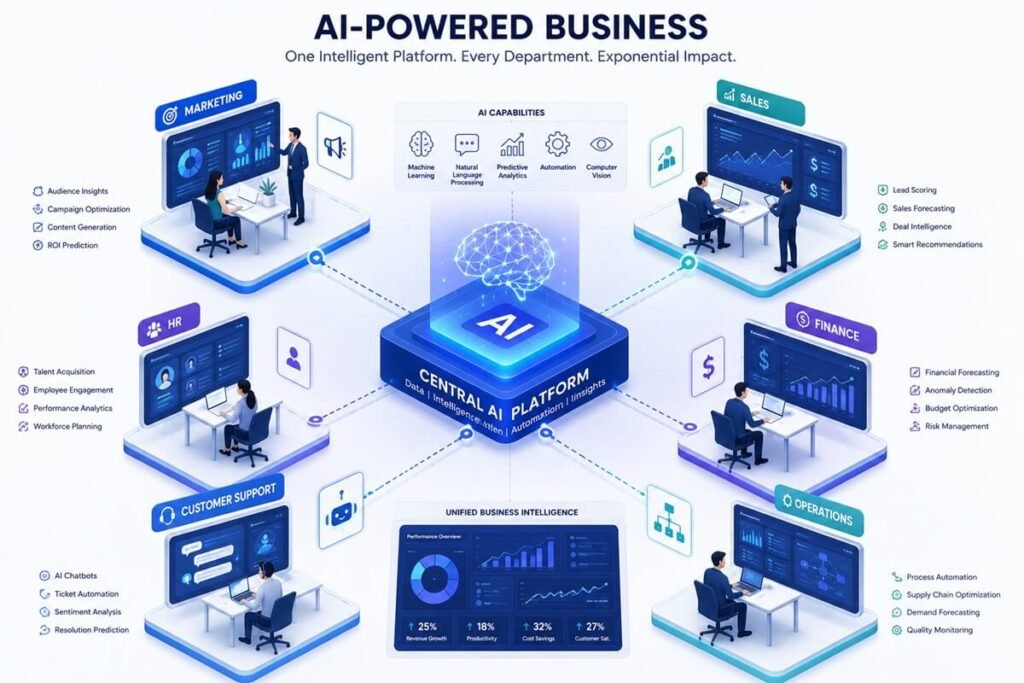
Common Business Areas Where AI Delivers Value
AI implementation can benefit nearly every department.
| Department | Example AI Applications |
| Marketing | Content generation, campaign optimization, lead scoring |
| Sales | Lead qualification, forecasting, CRM automation |
| Customer Support | Chatbots, ticket classification, knowledge assistants |
| Finance | Invoice processing, fraud detection, forecasting |
| Human Resources | Resume screening, onboarding, employee support |
| Operations | Workflow automation, scheduling, reporting |
| IT | Help desk automation, monitoring, documentation |
| Procurement | Vendor analysis, contract review, inventory forecasting |
Rather than automating entire departments, successful implementations often begin with one high-impact process before expanding across the organization.
How AI Implementation Services Work
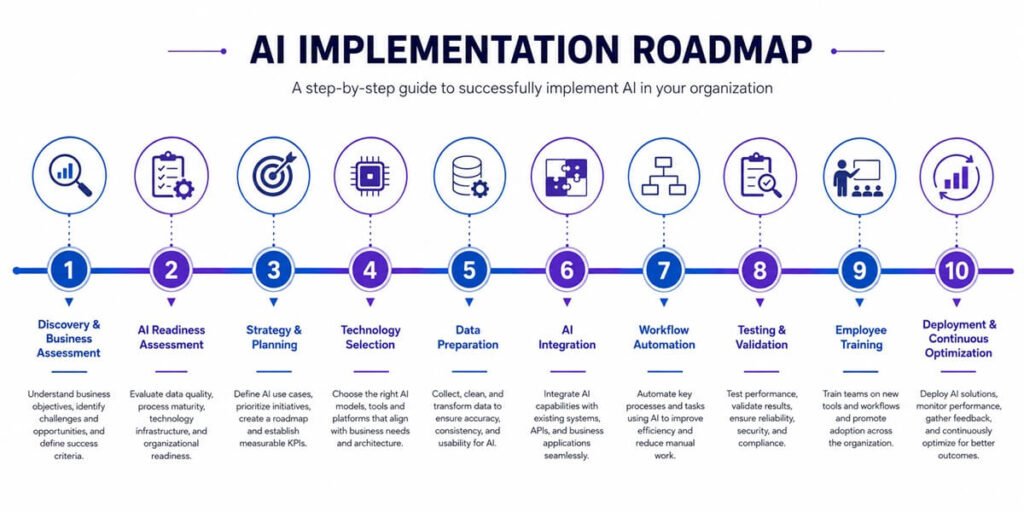
Most providers follow a structured methodology that reduces risk and ensures measurable results. Although every project differs, the implementation lifecycle generally includes:
- Discovery and business assessment
- AI readiness evaluation
- Strategy development
- Technology selection
- Data preparation
- System integration
- Workflow automation
- Testing and validation
- Employee training
- Deployment
- Monitoring and optimization
Each phase builds on the previous one, creating a scalable AI foundation instead of isolated automation projects.
AI Consulting vs AI Implementation Services
Although the terms are often used interchangeably, AI consulting and AI implementation serve different purposes. Understanding the distinction helps businesses choose the right partner and set realistic expectations.
AI consulting focuses on strategy—identifying opportunities, evaluating feasibility, estimating ROI, and creating an AI roadmap. AI implementation takes those plans and turns them into working solutions by integrating AI into business processes, systems, and workflows.
Many providers offer both services, but implementation requires deeper technical expertise in integration, automation, data engineering, and change management.
AI Consulting vs AI Implementation Comparison
| Feature | AI Consulting | AI Implementation |
| Primary Goal | Develop AI strategy | Build and deploy AI solutions |
| Business Assessment | ✔ | ✔ |
| AI Roadmap | ✔ | ✔ |
| Tool Selection | ✔ | ✔ |
| Workflow Automation | Limited | ✔ |
| CRM & ERP Integration | Limited | ✔ |
| API Development | ✖ | ✔ |
| Data Preparation | Advisory | ✔ |
| Employee Training | Basic | Comprehensive |
| Deployment | ✖ | ✔ |
| Performance Monitoring | Optional | ✔ |
| Ongoing Optimization | Limited | ✔ |
- When to choose consulting: If you’re exploring AI, need executive guidance, or want a strategic roadmap before investing.
- When to choose implementation: If you’ve identified use cases and are ready to deploy AI into production.
Types of AI Implementation Services
- AI implementation is not a one-size-fits-all offering. Depending on your business goals, providers may specialize in different areas.
1. AI Strategy & Planning
Before any technical work begins, implementation partners help define:
- Business objectives
- Success metrics
- Budget
- Timeline
- Risk assessment
- Priority use cases
Deliverables often include:
- AI roadmap
- Implementation timeline
- ROI projections
- Technology recommendations
2. Workflow Automation
One of the fastest ways to realize AI value is by automating repetitive business processes. Examples include:
- Lead qualification
- Customer onboarding
- Proposal generation
- Invoice processing
- Contract approvals
- Employee onboarding
- Report generation
- Meeting summaries
- Email classification
Modern automation combines AI with workflow platforms such as Make, n8n, Zapier, or enterprise orchestration tools.
3. AI Agent Development
Many organizations now deploy AI agents that can perform multi-step business tasks rather than simply answering questions. Examples include:
- Sales assistants
- Customer support agents
- HR assistants
- Procurement assistants
- Knowledge management assistants
- IT help desk agents
Unlike traditional chatbots, AI agents can retrieve information, interact with business systems, execute workflows, and escalate complex requests when necessary.
4. AI Knowledge Base Implementation
Large language models perform best when grounded in accurate company information. Implementation teams build centralized knowledge systems by:
- Organizing documentation
- Cleaning outdated information
- Structuring policies
- Connecting cloud storage
- Indexing internal documents
- Creating searchable knowledge repositories
This enables AI assistants to provide accurate, context-aware responses.
5. CRM & ERP Integration
Most businesses already rely on systems such as CRMs, ERPs, accounting software, and project management platforms. AI delivers the greatest value when connected to these systems. Common integrations include:
- Customer relationship management (CRM)
- Enterprise resource planning (ERP)
- Accounting software
- Marketing automation platforms
- Project management tools
- Customer support systems
- Document management platforms
Examples of AI-powered workflows:
- Auto-create CRM records from website forms
- Generate personalized follow-up emails
- Summarize customer interactions
- Predict customer churn
- Recommend next best actions for sales teams
6. Custom AI Application Development
Some businesses require AI solutions beyond off-the-shelf software. Custom implementations may include:
- Internal AI copilots
- Industry-specific AI tools
- Document intelligence platforms
- Predictive analytics dashboards
- AI-powered search engines
- Recommendation systems
- Quality control applications
- Custom reporting tools
These solutions are designed around unique business processes and competitive advantages.
7. AI Security & Governance
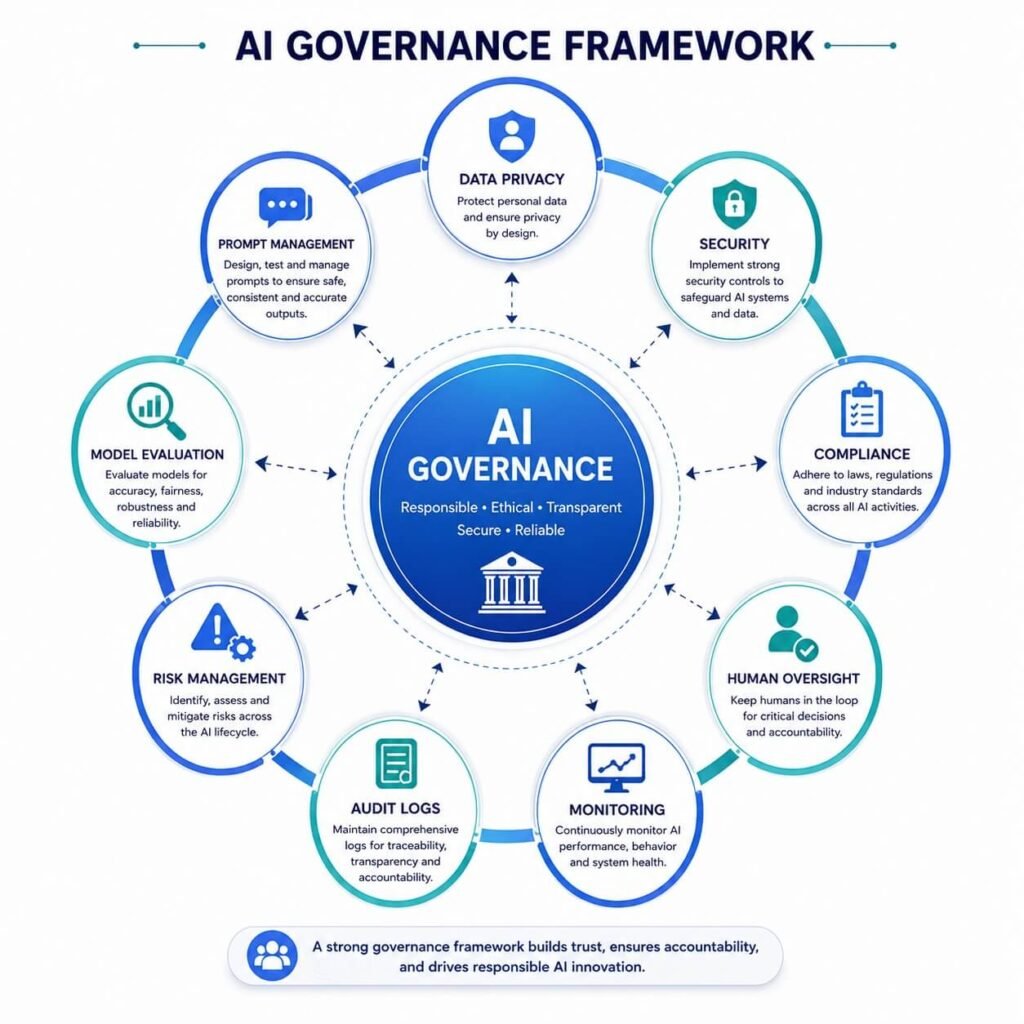
As AI becomes embedded in core business operations, governance is essential. Implementation services often include:
- Access controls
- Data encryption
- Audit logging
- Role-based permissions
- AI usage policies
- Prompt management
- Compliance monitoring
- Model evaluation
- Human approval workflows
Strong governance reduces operational and regulatory risks while building trust across the organization.
AI Readiness Assessment
Successful AI projects begin with understanding your organization’s current capabilities. An AI readiness assessment evaluates whether your business has the people, processes, data, and technology needed for implementation.
Skipping this step often leads to delays, poor adoption, or failed projects.
Business Goals
The first question isn’t “Which AI model should we use?” It’s “What business problem are we solving?” Examples of measurable goals include:
- Reduce customer response time by 40%
- Increase sales conversion rates by 20%
- Automate 60% of repetitive administrative work
- Cut invoice processing time from five days to one day
- Improve forecasting accuracy
Clear objectives help prioritize use cases and measure ROI.
Process Readiness
Not every process is suitable for AI. Ideal candidates are:
- Repetitive
- Rule-based
- Time-consuming
- High-volume
- Data-driven
Examples include:
- Customer inquiries
- Data extraction
- Email categorization
- Scheduling
- Report generation
- Document processing
Processes that require extensive human judgment or involve highly sensitive decisions may need human oversight.
Data Readiness
AI systems rely on high-quality data. Before implementation, assess:
- Data accuracy
- Data completeness
- Data consistency
- Data accessibility
- Security requirements
- Data ownership
Poor-quality data can significantly reduce AI performance and increase implementation costs.
Technology Readiness
Evaluate your current technology stack:
- Cloud infrastructure
- CRM platform
- ERP systems
- Document storage
- APIs
- Identity management
- Workflow automation tools
- Business intelligence platforms
Modern cloud-based systems with open APIs are generally easier to integrate than legacy software.
Organizational Readiness
Technology alone doesn’t determine success. Employee adoption and executive support are equally important. Questions to consider:
- Do executives support AI initiatives?
- Are department leaders aligned?
- Will employees receive training?
- Is there a change management plan?
- Are success metrics clearly defined?
Organizations that actively involve stakeholders throughout the implementation process typically achieve better adoption and long-term results.
AI Maturity Model
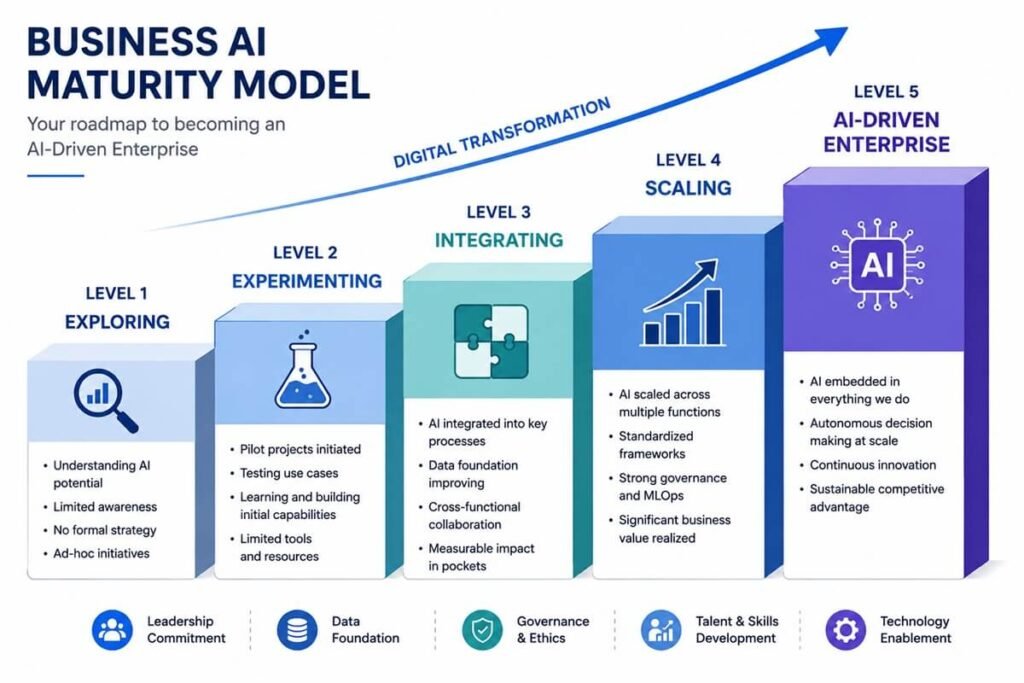
Businesses are at different stages of AI adoption. Understanding your current maturity level helps determine the appropriate implementation strategy.
| Level | Characteristics | Next Step |
| Level 1 – Exploring | Researching AI opportunities | Identify high-impact use cases |
| Level 2 – Experimenting | Using standalone AI tools | Launch pilot projects |
| Level 3 – Integrating | AI connected to business systems | Expand workflow automation |
| Level 4 – Scaling | AI used across multiple departments | Standardize governance and security |
| Level 5 – AI-Driven Enterprise | AI embedded in core operations with continuous optimization | Innovate and optimize at scale |
The goal is not to reach Level 5 immediately but to progress through each stage with measurable business outcomes.
Building an AI Implementation Strategy
A successful AI implementation strategy aligns technology investments with business priorities. Rather than deploying AI everywhere at once, organizations should focus on a phased approach.
Step 1: Define Business Objectives
Examples include:
- Increase operational efficiency
- Improve customer satisfaction
- Reduce costs
- Accelerate revenue growth
- Enhance decision-making
Each objective should have measurable KPIs.
Step 2: Prioritize High-Impact Use Cases
Score potential projects based on:
- Business value
- Ease of implementation
- Data availability
- Technical complexity
- Expected ROI
- Time to value
Quick wins build momentum and demonstrate the value of AI to stakeholders.
Step 3: Select the Right Technology Stack
Your AI stack may include:
- Large Language Models (LLMs)
- Workflow automation platform
- Vector database
- CRM
- ERP
- Business intelligence tools
- Cloud infrastructure
- API management
- Identity and access management
Choosing interoperable technologies helps avoid future integration challenges.
Step 4: Establish Governance
Governance should address:
- Data privacy
- Security
- Compliance
- Human oversight
- AI ethics
- Model monitoring
- Access controls
- Incident response
Strong governance supports responsible AI adoption and reduces operational risk.
Step 5: Measure Success
Define KPIs before implementation, such as:
- Hours saved
- Cost reductions
- Customer satisfaction (CSAT)
- Net Promoter Score (NPS)
- Lead conversion rates
- First response time
- Revenue growth
- Employee productivity
- Return on investment (ROI)
Regular reviews ensure AI initiatives continue to deliver value as business needs evolve.
AI Implementation Process: A Step-by-Step Framework
Once your business has a clear strategy and defined use cases, the next stage is execution. A structured implementation process minimizes risk, improves adoption, and increases the likelihood of delivering measurable business value.
Although every organization has unique requirements, successful AI projects generally follow the same lifecycle.
Phase 1: Discovery & Business Analysis
Every implementation begins by understanding the business—not the technology. The discovery phase identifies operational challenges, existing workflows, bottlenecks, and opportunities where AI can create measurable improvements.
Typical activities include:
- Stakeholder interviews
- Business process mapping
- Workflow analysis
- Software inventory
- Data source identification
- KPI definition
- Risk assessment
Deliverables
- Business requirements document
- AI opportunity assessment
- Project scope
- Budget estimate
- Timeline
- Success metrics
Best Practice: Focus on solving one or two high-value business problems first instead of attempting organization-wide AI adoption.
Phase 2: AI Solution Design
After defining business objectives, implementation teams design the technical solution. This includes selecting:
- AI models
- Automation platforms
- APIs
- Cloud infrastructure
- Security controls
- Integration methods
- Data pipelines
The goal is to create a scalable architecture that supports future growth.
Choosing the Right AI Model
Not every AI model is suitable for every task.
| AI Technology | Best For |
| Large Language Models (LLMs) | Writing, summarization, customer support, coding |
| Retrieval-Augmented Generation (RAG) | Company knowledge bases and document search |
| Machine Learning Models | Predictions, recommendations, forecasting |
| Computer Vision | Image recognition and quality inspection |
| Speech AI | Voice assistants and transcription |
| Predictive Analytics | Sales forecasting, inventory planning |
| AI Agents | Multi-step task automation |
Many businesses combine several AI technologies into one solution rather than relying on a single model.
Selecting the Right Deployment Model
Organizations can deploy AI in several ways.
Ideal for:
Cloud-Based AI
- Startups
- SMBs
- Fast deployment
- Lower upfront investment
Advantages:
- Rapid implementation
- Automatic updates
- Lower infrastructure costs
- High scalability
Hybrid AI
Suitable for organizations needing both cloud flexibility and on-premises security.
Examples include:
- Healthcare
- Financial services
- Government
- Manufacturing
On-Premises AI
Best for organizations with strict compliance or data residency requirements.
Advantages:
- Greater control
- Enhanced privacy
- Custom infrastructure
Disadvantages:
- Higher cost
- Longer deployment
- Dedicated IT resources
AI Technology Stack
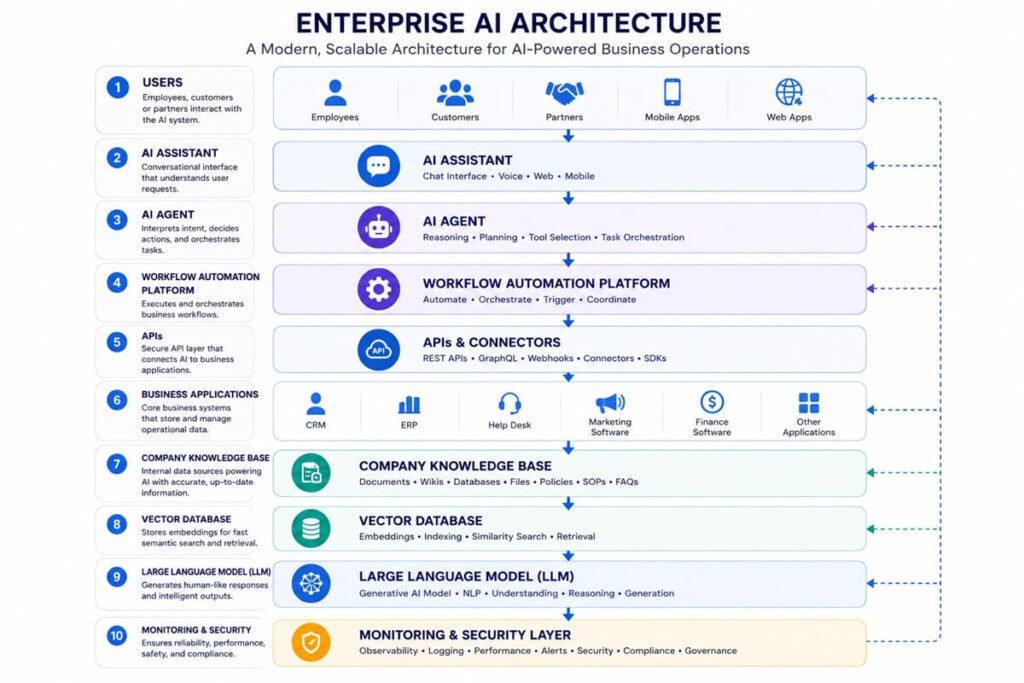
A modern AI implementation rarely consists of a single application. Instead, it combines multiple technologies that work together. A general enterprise AI stack includes:
| Layer | Purpose |
| User Interface | Chatbot, web app, internal portal |
| AI Model | LLM, ML model, vision model |
| AI Agent Layer | Task planning and orchestration |
| Workflow Automation | Multi-step business processes |
| API Layer | Connects business systems |
| Vector Database | Semantic search and retrieval |
| Business Applications | CRM, ERP, HR, Finance |
| Data Storage | Databases and cloud storage |
| Security Layer | Authentication, encryption, monitoring |
This layered approach makes the solution easier to maintain and scale.
AI Infrastructure Architecture
Below is a simplified architecture commonly used by modern businesses.
Employees / Customers
│
▼
AI Assistant or Portal
│
▼
AI Agent Layer
│
▼
Workflow Automation Platform
│
┌────────┼─────────┐
▼ ▼ ▼
CRM ERP Help Desk
│ │ │
└─────────┼─────────┘
▼
Company Knowledge Base
│
▼
Vector Database (RAG)
│
▼
Large Language Model (LLM)
│
▼
Monitoring • Security • Logging
This architecture allows AI to retrieve company knowledge, interact with business systems, automate workflows, and maintain governance through centralized monitoring.
Phase 3: Data Preparation
Data quality is one of the biggest factors influencing AI performance. Even the most advanced AI models cannot produce reliable results if they are trained or prompted with incomplete, outdated, or inconsistent information.
Key tasks include:
- Removing duplicate records
- Standardizing formats
- Correcting errors
- Filling missing values
- Organizing documents
- Defining metadata
- Eliminating obsolete information
Structured vs. Unstructured Data
Most businesses store both types of information.
| Structured Data | Unstructured Data |
| CRM records | PDFs |
| Sales reports | Emails |
| Inventory | Word documents |
| Databases | Videos |
| Transactions | Images |
| Financial records | Chat conversations |
Modern AI systems can combine both data types to provide richer insights.
Knowledge Base Development
For AI assistants and copilots, a well-organized knowledge base is essential. Implementation teams typically:
- Collect internal documentation
- Organize company policies
- Import manuals
- Index support articles
- Connect cloud storage
- Create searchable document repositories
A centralized knowledge base helps AI deliver accurate, context-aware answers instead of relying solely on publicly available information.
Retrieval-Augmented Generation (RAG)
Many businesses don’t want AI to answer based only on its pre-trained knowledge. Instead, they use Retrieval-Augmented Generation (RAG).
RAG allows AI to:
- Search company documents
- Retrieve relevant information
- Use that information to generate accurate responses
- Cite internal sources when appropriate
Benefits include:
- Reduced hallucinations
- Up-to-date answers
- Better compliance
- More accurate customer support
- Improved employee productivity
RAG is now a foundational component of enterprise AI implementations.
Phase 4: System Integration
AI delivers the greatest value when connected to the software your business already uses. Common integrations include:
Customer Relationship Management (CRM)
Examples:
- Lead scoring
- Automated follow-ups
- Opportunity summaries
- Customer insights
- Sales forecasting
Enterprise Resource Planning (ERP)
Examples:
- Inventory optimization
- Purchase recommendations
- Financial reporting
- Procurement automation
Help Desk Platforms
Examples:
- Ticket classification
- AI-assisted responses
- Suggested knowledge articles
- Automatic routing
Marketing Platforms
Examples:
- Email personalization
- Campaign optimization
- Audience segmentation
- Content generation
HR Systems
Examples:
- Resume screening
- Employee onboarding
- Policy assistants
- Internal HR chatbots
API Integration
Application Programming Interfaces (APIs) allow AI systems to exchange information with existing business applications.
Examples include:
- Reading customer data
- Creating invoices
- Updating CRM records
- Sending emails
- Scheduling meetings
- Creating support tickets
- Generating reports
Without APIs, AI becomes isolated and cannot automate end-to-end business processes.
Workflow Automation
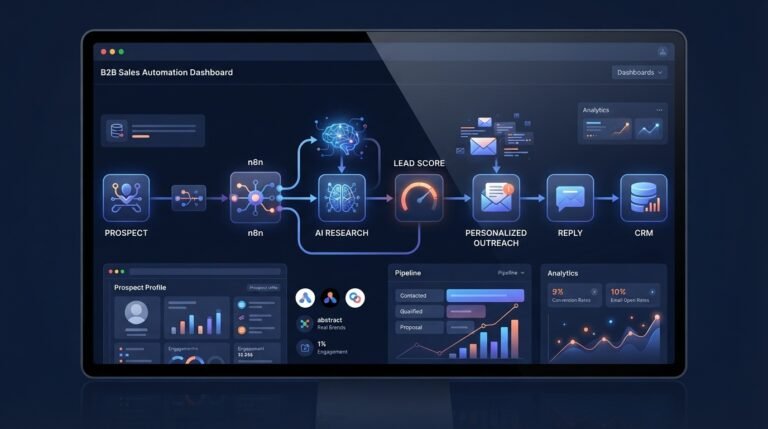
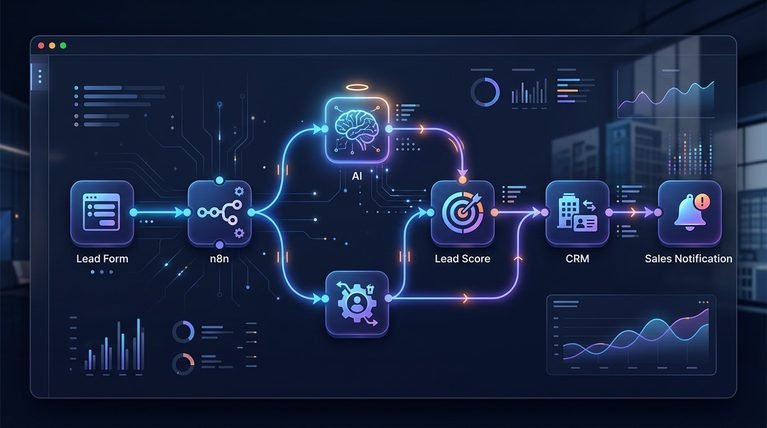
One of the most valuable aspects of AI implementation is combining intelligence with automation. Example workflow:
- Customer submits a contact form.
- AI analyzes the inquiry.
- Lead is scored automatically.
- CRM record is created.
- Sales representative is assigned.
- Personalized email is generated.
- Meeting invitation is scheduled.
- Management dashboard is updated.
Instead of replacing employees, AI handles repetitive tasks while humans focus on relationship building and strategic decisions.
Phase 5: Testing & Validation
Before deploying AI across the organization, implementation teams conduct comprehensive testing. Areas to validate include:
- Response accuracy
- Workflow reliability
- API functionality
- Security controls
- User permissions
- Performance under load
- Error handling
- Edge cases
Testing should involve both technical teams and end users to ensure the solution performs well in real-world scenarios.
User Acceptance Testing (UAT)
Employees who will use the AI solution daily should participate in User Acceptance Testing. They evaluate:
- Ease of use
- Response quality
- Workflow efficiency
- Missing features
- Integration with daily tasks
- Overall user experience
Early feedback helps identify improvements before full deployment and encourages stronger user adoption.
Key Takeaways
The technical execution phase transforms AI from a strategic concept into a working business solution. By designing a scalable architecture, preparing high-quality data, integrating with existing systems, and validating performance before launch, organizations lay the groundwork for long-term success.
AI Security and Governance
As AI becomes integrated into business operations, security and governance are no longer optional—they are essential. AI systems often process customer records, financial information, proprietary documents, and other sensitive business data. Without proper safeguards, organizations face risks such as data breaches, inaccurate outputs, compliance violations, and unauthorized access.
A successful AI implementation includes a governance framework that defines how AI is used, monitored, and improved over time.
Core Components of AI Governance
A comprehensive AI governance strategy should address:
- Data privacy and protection
- Role-based access control
- Human oversight
- Model monitoring
- Prompt management
- Audit logging
- Risk management
- Regulatory compliance
- Incident response
- Continuous model evaluation
Governance ensures AI remains accurate, secure, and aligned with business objectives throughout its lifecycle.
Data Security Best Practices
Protecting sensitive information should be a priority from the beginning of every AI project. Organizations building generative AI applications should also review the OWASP Top 10 for Large Language Model Applications to understand common security risks.
Recommended practices include:
- Encrypt data at rest and in transit
- Implement Multi-Factor Authentication (MFA)
- Restrict user permissions using role-based access
- Mask or anonymize personally identifiable information (PII)
- Monitor AI activity with audit logs
- Conduct regular security assessments
- Back up critical data
- Review third-party AI vendor security policies
Organizations should also establish clear policies on what data employees can and cannot share with AI systems.
AI Compliance Considerations
Depending on your industry and location, AI implementations may need to comply with regulations such as:
| Industry | Common Compliance Requirements |
| Healthcare | HIPAA |
| Financial Services | PCI DSS, SOX |
| Retail | PCI DSS |
| Government | FedRAMP (where applicable) |
| Manufacturing | ISO standards |
| Global Businesses | GDPR |
| California Businesses | CCPA |
Compliance requirements should be reviewed before selecting AI vendors or integrating business systems.
Human-in-the-Loop (HITL)
Not every decision should be made entirely by AI. A Human-in-the-Loop (HITL) approach allows employees to review or approve AI-generated outputs before critical actions are taken.
Examples include:
- Approving legal documents
- Reviewing financial reports
- Validating customer communications
- Confirming HR decisions
- Verifying medical recommendations
Combining AI with human oversight improves accuracy, accountability, and trust.
Employee Training and Change Management
Technology alone does not guarantee success. Employees need to understand how AI supports their work and how to use it responsibly. Effective training programs typically include:
- AI fundamentals
- Company AI policies
- Prompt-writing best practices
- Workflow demonstrations
- Security awareness
- Hands-on practice
- Feedback sessions
- Ongoing learning resources
Organizations that invest in employee training generally experience higher adoption rates and better project outcomes.
AI Deployment Strategies
Rolling out AI across an entire organization at once can increase risk and make it harder to identify issues. A phased deployment strategy is usually more effective.
Pilot Deployment
Start with a single department or workflow.
Examples:
- Customer support chatbot
- Marketing content generation
- Internal knowledge assistant
- Invoice processing automation
Pilot projects help validate assumptions, collect feedback, and demonstrate measurable ROI.
Departmental Rollout
Once the pilot succeeds, expand to additional teams such as:
- Sales
- Marketing
- Finance
- Human Resources
- Operations
- Customer Success
This phased approach reduces disruption while building organizational confidence.
Enterprise-Wide Deployment
After successful departmental implementations, organizations can scale AI across the business by:
- Standardizing governance
- Reusing automation templates
- Sharing AI knowledge bases
- Monitoring performance centrally
- Continuously optimizing workflows
AI Implementation Timeline
Implementation timelines vary based on project complexity.
| Project Type | Estimated Timeline |
| AI Chatbot | 2–4 weeks |
| Workflow Automation | 3–6 weeks |
| CRM AI Integration | 4–8 weeks |
| AI Knowledge Base | 4–8 weeks |
| Multi-Department Deployment | 2–4 months |
| Enterprise AI Transformation | 6–12 months |
Starting with smaller projects often leads to faster results and lower implementation risks.
AI Implementation Costs
The cost of AI implementation depends on business size, project scope, integrations, customization, and ongoing support.
Small Businesses
Typical investment:
$5,000–$25,000
Common projects:
- AI chatbot
- Content automation
- CRM automation
- Basic workflow automation
Mid-Sized Businesses
Typical investment:
$25,000–$100,000
Common projects:
- Multi-system integrations
- AI agents
- Knowledge bases
- Sales automation
- Customer service automation
Enterprise Organizations
Typical investment:
$100,000+
Common projects:
- Enterprise AI platforms
- Custom AI applications
- Advanced analytics
- Company-wide automation
- AI governance frameworks
Tip: Rather than focusing solely on implementation cost, evaluate the expected return through productivity gains, operational savings, and revenue growth.
Factors That Influence AI Implementation Costs
Several variables affect the total investment required.
| Factor | Cost Impact |
| Number of integrations | High |
| Data quality | High |
| Workflow complexity | High |
| Custom AI development | High |
| Employee training | Medium |
| Security requirements | High |
| Compliance needs | High |
| Cloud infrastructure | Medium |
| Ongoing support | Medium |
Clearly defining project scope early helps control costs and avoid unexpected delays.
Measuring AI ROI
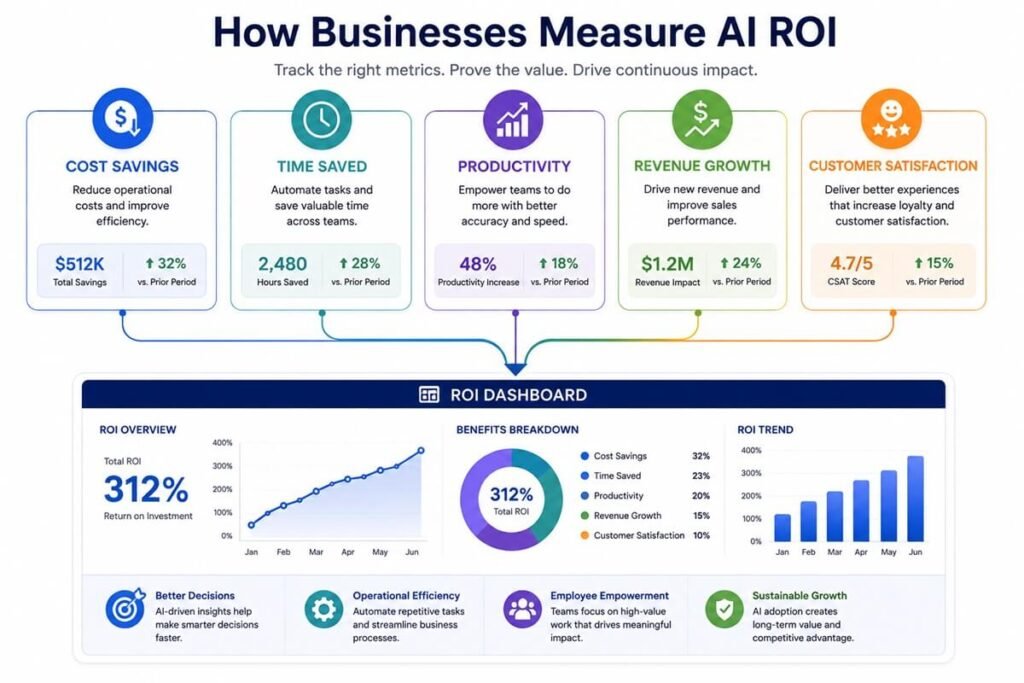
AI projects should be evaluated using measurable business outcomes rather than technical metrics alone. Common Key Performance Indicators (KPIs) include:
- Time saved per employee
- Cost reduction
- Customer satisfaction (CSAT)
- Net Promoter Score (NPS)
- Revenue growth
- Lead conversion rate
- First response time
- Employee productivity
- Error reduction
- Process completion time
Example ROI Calculation
Before AI
- 5 employees spend 20 hours per week on manual reporting.
- Total: 100 hours/week.
After AI
- Reporting time decreases to 20 hours/week.
Result
- 80 hours saved each week.
- Over one year, that’s more than 4,000 hours available for higher-value work.
Even without reducing headcount, organizations often realize significant value through increased productivity and faster decision-making.
Common AI Implementation Mistakes
Many AI initiatives fail because organizations underestimate the importance of planning, governance, and user adoption. Avoid these common mistakes:
- Implementing AI Without Clear Goals
- Ignoring Data Quality
- Trying to Automate Everything
- Underestimating Change Management
- Neglecting Security
- Choosing Tools Before Defining Requirements
- Failing to Measure Success
AI Implementation Best Practices
Organizations that consistently succeed with AI often follow these principles:
- Align AI initiatives with business strategy.
- Secure executive sponsorship early.
- Start with a limited pilot project.
- Build cross-functional implementation teams.
- Focus on data quality before deployment.
- Integrate AI with existing business systems.
- Implement strong governance and security controls.
- Train employees continuously.
- Measure outcomes using clear KPIs.
- Continuously optimize AI workflows based on real-world performance.
These practices create a strong foundation for scalable, sustainable AI adoption rather than isolated experiments.
AI Implementation Use Cases by Industry
AI implementation is not limited to large enterprises. Organizations across nearly every industry are using AI to automate repetitive work, improve decision-making, and enhance customer experiences.
Healthcare
Healthcare organizations use AI to streamline administrative tasks while supporting clinical teams. Common implementations include:
- AI appointment scheduling
- Medical documentation assistants
- Patient support chatbots
- Clinical knowledge search
- Insurance verification
- Medical coding assistance
Benefits
- Reduced administrative workload
- Faster patient responses
- Improved operational efficiency
Financial Services
Banks, insurance providers, and accounting firms implement AI to improve accuracy and reduce fraud. Common use cases:
- Fraud detection
- Risk assessment
- Loan application analysis
- Financial forecasting
- Automated reporting
- Customer service assistants
Benefits
- Faster processing
- Reduced risk
- Improved compliance
Manufacturing
Manufacturers leverage AI to improve production efficiency and reduce downtime. General implementations:
- Predictive maintenance
- Quality inspection
- Inventory forecasting
- Production scheduling
- Supply chain optimization
Benefits
- Lower maintenance costs
- Increased productivity
- Reduced equipment failures
Retail & E-commerce
Retailers use AI throughout the customer journey.
Examples include:
- Personalized product recommendations
- Customer support automation
- Inventory forecasting
- Dynamic pricing
- Demand prediction
- Marketing personalization
Benefits
- Higher conversions
- Better customer experience
- Increased sales
Professional Services
Consulting firms, law firms, and agencies use AI to automate knowledge work. Common implementations:
- Proposal generation
- Contract summarization
- Meeting notes
- Knowledge management
- Client onboarding
- Document search
Benefits
- Faster service delivery
- Increased employee productivity
- Better client experiences
Human Resources
HR departments increasingly rely on AI to improve employee experiences.
Use cases:
- Resume screening
- Candidate matching
- Employee onboarding
- Policy assistants
- Internal HR chatbots
- Performance summaries
Benefits
- Reduced hiring time
- Better employee support
- Improved efficiency
Sales & Marketing
Sales and marketing teams often realize some of the fastest AI ROI.
Examples:
- Lead scoring
- CRM automation
- Email personalization
- Sales forecasting
- Campaign optimization
- AI-generated content
- Competitive analysis
Benefits
- More qualified leads
- Increased conversions
- Better campaign performance
Customer Support
Support teams can automate routine interactions while improving response quality.
Examples:
- AI chatbots
- Ticket classification
- Knowledge assistants
- Response drafting
- Case summarization
- Customer sentiment analysis
Benefits
- Faster response times
- Lower support costs
- Higher customer satisfaction

Choosing the Right AI Implementation Partner
Selecting the right implementation partner is one of the most important decisions in your AI journey. Beyond technical expertise, look for a team that understands your business processes, industry challenges, and long-term goals.
Evaluate Industry Experience
Choose a partner with experience delivering AI projects in your industry or for businesses with similar operational complexity.
Ask for:
- Case studies
- Client references
- Measurable results
- Success stories
Assess Technical Expertise
A strong implementation partner should be skilled in:
- AI strategy
- Workflow automation
- API development
- Cloud infrastructure
- CRM and ERP integrations
- Data engineering
- Security and compliance
The goal is to integrate AI into your existing technology stack—not replace it unnecessarily.
Prioritize Scalability
AI needs evolve over time. Select a partner that designs flexible, scalable solutions capable of supporting future growth. Avoid solutions that lock your business into proprietary platforms without a clear migration path.
Review Security Practices
Ask questions such as:
- How is sensitive data protected?
- What access controls are available?
- How are AI interactions logged?
- How is compliance managed?
- What monitoring tools are included?
Security should be built into the implementation from day one.
Understand Support Services
AI implementation doesn’t end at deployment. Look for ongoing services such as:
- Performance monitoring
- Workflow optimization
- Prompt refinement
- Model updates
- User training
- Technical support
Continuous improvement ensures AI continues delivering value as your business grows.
90-Day AI Implementation Roadmap
A phased rollout helps reduce risk while generating early wins.
| Phase | Timeline | Key Activities |
| Discovery | Weeks 1–2 | Business assessment, stakeholder interviews, AI readiness evaluation |
| Strategy | Weeks 3–4 | Prioritize use cases, define KPIs, select technology stack |
| Build | Weeks 5–8 | Configure AI, integrate systems, prepare data, develop workflows |
| Test | Weeks 9–10 | Validate performance, conduct user acceptance testing, refine workflows |
| Launch | Weeks 11–12 | Deploy solution, train employees, monitor KPIs, optimize continuously |
This roadmap can be adapted for organizations of different sizes while maintaining a structured approach.
AI Implementation Checklist
Use this checklist before launching your project:
- Define clear business objectives.
- Identify high-value use cases.
- Secure executive sponsorship.
- Assess AI readiness.
- Audit and prepare business data.
- Select the right AI models and tools.
- Integrate AI with existing systems.
- Implement security and governance controls.
- Train employees on new workflows.
- Establish KPIs and success metrics.
- Conduct thorough testing.
- Plan for ongoing optimization and support.
In-House Team vs. AI Implementation Partner
| Factor | In-House Team | AI Implementation Partner |
| Initial Cost | High | Moderate |
| Time to Deploy | Slower | Faster |
| Specialized Expertise | Limited | Extensive |
| Integration Experience | Varies | Proven |
| Ongoing Support | Internal | Included (varies) |
| Scalability | Depends on staffing | Easier to scale |
Custom AI vs. Off-the-Shelf AI
| Feature | Off-the-Shelf | Custom AI |
| Deployment Speed | Fast | Moderate |
| Customization | Limited | High |
| Upfront Cost | Lower | Higher |
| Competitive Differentiation | Low | High |
| Long-Term Flexibility | Moderate | Excellent |
Pilot Project vs. Full Enterprise Rollout
| Factor | Pilot | Enterprise Rollout |
| Risk | Lower | Higher |
| Investment | Lower | Higher |
| Deployment Time | Weeks | Months |
| Scope | Single workflow | Multiple departments |
| Recommended For | First-time AI adopters | Mature organizations |
FAQs About AI Implementation Services
What are AI implementation services?
AI implementation services help businesses plan, integrate, deploy, and optimize artificial intelligence solutions that improve workflows, automate repetitive tasks, and support better decision-making.
What are AI implementation services?
AI implementation services help businesses plan, integrate, deploy, and optimize artificial intelligence solutions that improve workflows, automate repetitive tasks, and support better decision-making.
How long does AI implementation take?
Small AI projects may be completed in 2–6 weeks, while enterprise-wide implementations often take 6–12 months, depending on complexity and the number of integrations.
How much do AI implementation services cost?
Costs vary by project scope. Small business implementations may range from $5,000 to $25,000, while larger enterprise projects can exceed $100,000.
Can small businesses benefit from AI implementation?
Yes. Small businesses can use AI for customer support, marketing automation, CRM workflows, content generation, scheduling, and administrative tasks without hiring large engineering teams.
What is the biggest challenge during AI implementation?
The most common challenges include poor data quality, unclear objectives, limited employee adoption, and weak governance. Starting with a well-defined pilot project and measurable goals can significantly improve outcomes.
Do businesses need in-house AI engineers?
Not necessarily. Many organizations successfully deploy AI by partnering with implementation specialists who handle strategy, integrations, automation, training, and ongoing optimization.
What industries benefit the most from AI implementation?
Healthcare, finance, manufacturing, retail, professional services, logistics, education, and customer support all see measurable improvements through AI-powered automation and analytics.
How do I measure AI ROI?
Track metrics such as time saved, cost reductions, customer satisfaction, revenue growth, process completion time, employee productivity, and error reduction. Compare these KPIs against your pre-implementation baseline to quantify business impact.
Conclusion
AI is no longer a future initiative—it’s becoming a core capability for organizations that want to improve efficiency, reduce costs, and deliver better customer experiences. However, successful adoption requires more than selecting the latest AI model or subscribing to a new tool. It requires a structured implementation strategy that aligns technology with business goals, integrates seamlessly with existing systems, and empowers employees to work more effectively.
Whether you’re automating customer support, enhancing sales operations, modernizing internal workflows, or building AI-powered knowledge systems, the right implementation approach can help you achieve measurable results while minimizing risk.
By starting with a readiness assessment, prioritizing high-impact use cases, establishing strong governance, and continuously measuring performance, businesses can build AI solutions that scale with confidence and deliver long-term value.
Ready to Implement AI in Your Business?
Whether you’re exploring your first AI workflow or planning an enterprise-wide transformation, a structured implementation process is the key to long-term success.
At Workflow AI Suite, we help businesses:
- Develop practical AI strategies
- Automate repetitive workflows
- Integrate AI with CRM, ERP, and business systems
- Build AI agents and knowledge assistants
- Improve productivity with secure, scalable AI solutions
Start with a clear roadmap, focus on measurable outcomes, and implement AI that drives real business results—not just experimentation.