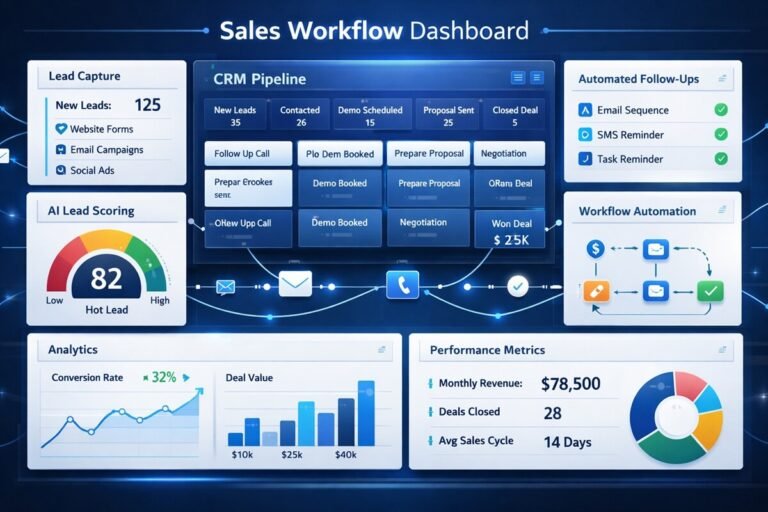
AI Operations Management: How to Run Internal Process


Businesses are moving into a new phase of automation. For years, companies used software to record transactions, store information, manage customers, and coordinate employees. Then workflow automation began connecting those systems and handling repetitive tasks. Now, artificial intelligence is adding another capability: systems can interpret information, understand context, generate content, make recommendations, and in some cases take actions across business applications.
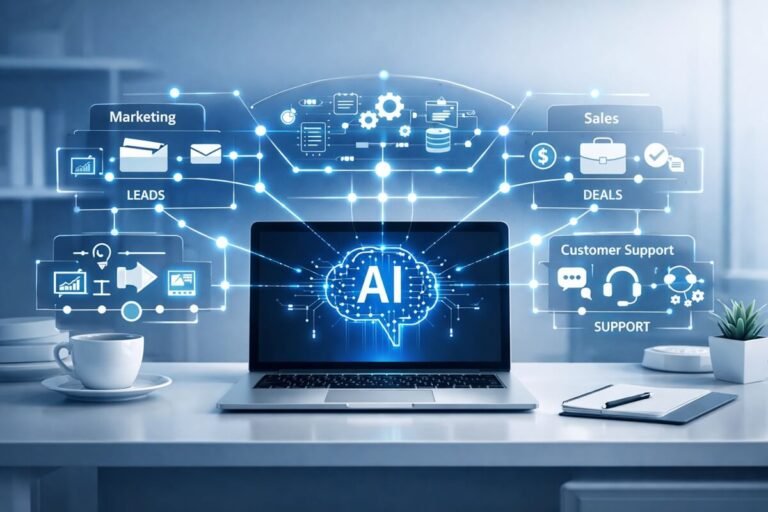
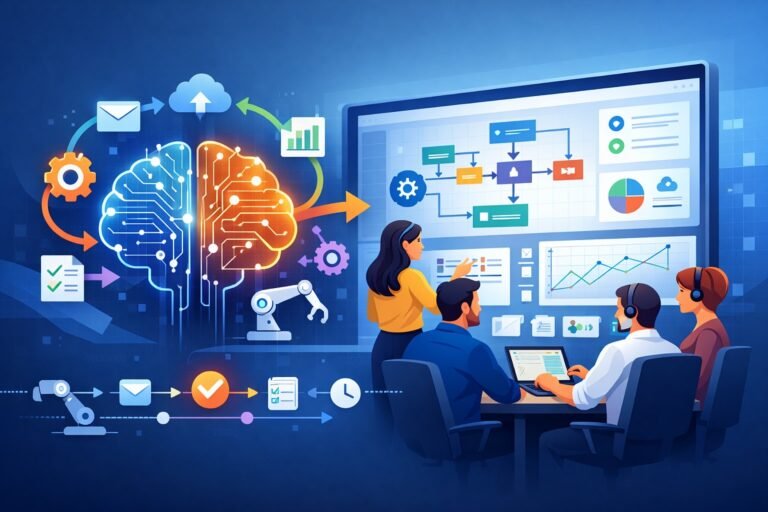
That shift is creating a broader discipline: AI Operations Management. AI Operations Management is the use of artificial intelligence, workflow automation, business rules, operational data, integrations, and human oversight to coordinate, execute, monitor, and improve a company’s internal processes.
It is not simply using an AI chatbot to answer questions. It is about putting AI inside the operational machinery of a business. An AI operations system might receive an invoice, extract information from it, compare the information against a purchase order, identify an exception, route the invoice for approval, update an accounting system, and record what happened.
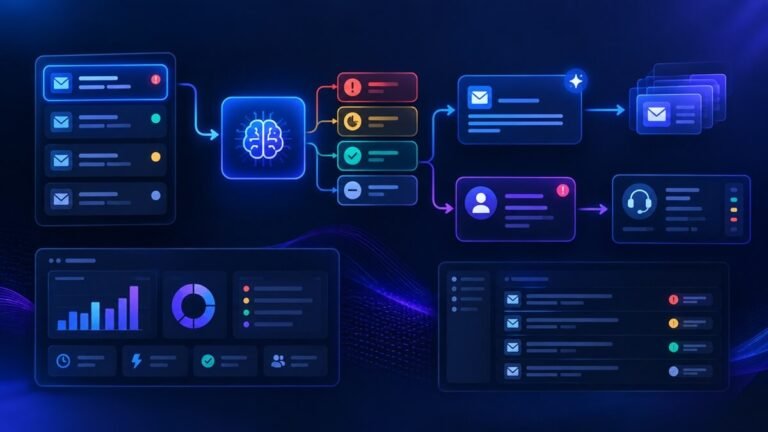
Another system might receive a customer request, understand its intent, retrieve relevant customer information, draft an answer, check the response against company policies, and either send it or escalate the case to an employee. The important distinction is that AI becomes connected to work, rather than remaining an isolated productivity tool.
This guide explains what AI Operations Management means, how it works, where businesses can apply it, how AI agents and automation fit together, how to design a reliable architecture, how to measure ROI, and how organizations can introduce AI into operations without creating unnecessary risk.
Table of Contents
What Is AI Operations Management?
AI Operations Management is the practice of using AI systems to understand, coordinate, execute, monitor, and optimize internal business processes. It combines several technologies and disciplines:
- Artificial intelligence and machine learning
- Generative AI
- Large language models
- AI agents
- Workflow automation
- Business process management
- APIs and system integrations
- Business rules
- Operational databases
- Human approvals
- Monitoring and analytics
- Security and access controls
- AI governance
Traditional business automation generally follows predefined instructions.
For example: When a new customer completes a form, create a CRM record and send an email. AI-enabled operations can handle more variable situations:
When a new customer request arrives, understand what the customer needs, identify the appropriate workflow, retrieve relevant information, determine whether the request can be handled automatically, execute the appropriate actions, and escalate the case if confidence or policy requirements are not satisfied.
That difference matters because real businesses rarely operate entirely through clean, predictable inputs. Employees receive emails, PDFs, contracts, messages, spreadsheets, support tickets, voice transcripts, and other information that doesn’t follow a fixed structure. AI can help convert that unstructured information into operational actions.
A simple definition
A useful way to think about the concept is:
AI Operations Management = AI intelligence + workflows + business systems + business rules + human oversight + continuous improvement
The goal is not maximum autonomy. The target is better business operations.
Why AI Operations Management Matters
Most organizations already have dozens or hundreds of internal workflows. Consider what happens when a company receives a new customer order. Someone may need to:
- Read the order.
- Verify customer information.
- Check inventory.
- Confirm pricing.
- Review payment status.
- Create or update records.
- Notify another department.
- Generate documentation.
- Schedule fulfillment.
- Update the customer.
None of these tasks necessarily requires a human to perform every step manually. The problem is that business processes often grew organically. Different departments adopted different applications, spreadsheets, approval procedures, and communication channels.
As a result, work becomes fragmented. AI Operations Management attempts to create an intelligent operational layer across those processes.
Instead of asking employees to move information manually between systems, the organization can design workflows in which AI interprets information and automation moves it between the systems that need it.
This becomes especially valuable as transaction volume increases. A business that handles 100 requests per week may manage them manually. A business handling 10,000 requests may need a fundamentally different operating model.
How AI Operations Management Works
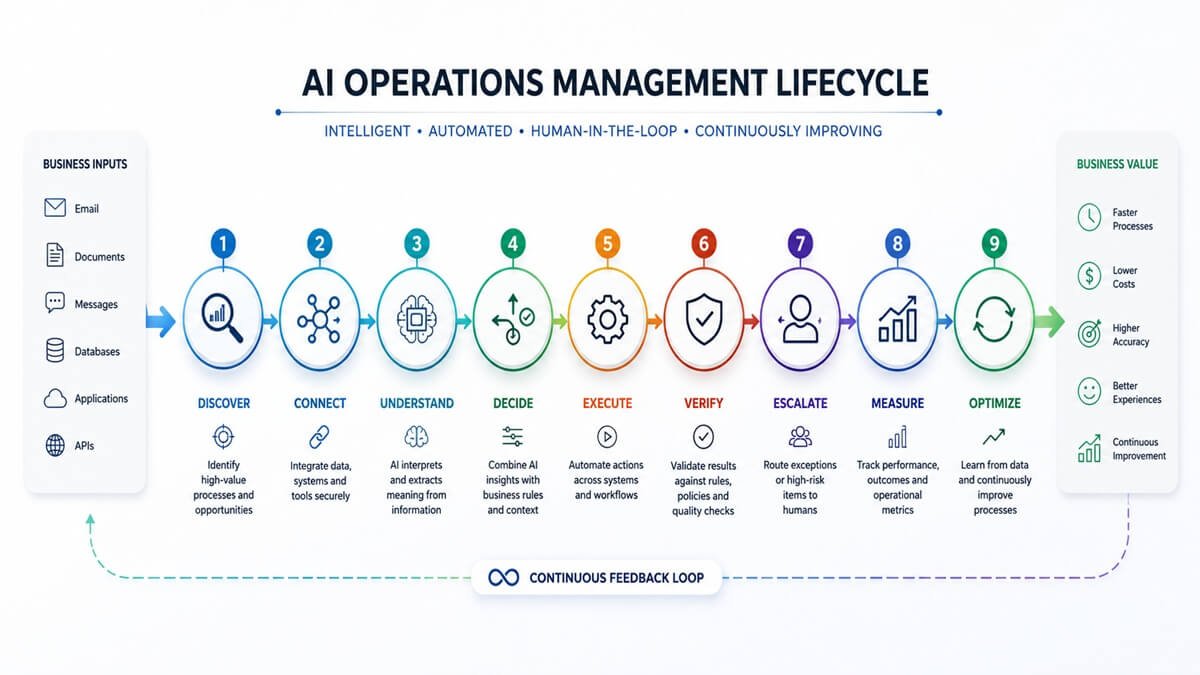
A practical AI operations workflow can be understood as a nine-stage cycle:
Discover → Connect → Understand → Decide → Execute → Verify → Escalate → Measure → Optimize
Each stage has a different purpose.
1. Discover
First, the organization identifies the processes that consume time or create operational friction. Examples include:
- repetitive data entry
- document processing
- manual reporting
- customer-ticket routing
- employee onboarding
- invoice processing
- lead qualification
- approval workflows
- internal information requests
The objective is not to automate everything. It is to find processes where AI and automation can produce measurable value.
2. Connect
The AI system needs access to the information and applications involved in the process. These might include:
- CRM platforms
- accounting systems
- ERP software
- help-desk systems
- HR systems
- calendars
- cloud storage
- databases
- internal knowledge bases
- messaging platforms
- APIs
Integration is what turns AI from a standalone assistant into an operational system.
3. Understand
The AI interprets incoming information. For example, it might determine that:
“The customer says their shipment arrived damaged and wants a replacement.”
The system can identify:
- customer identity
- request type
- sentiment
- urgency
- relevant policy
- required information
- appropriate workflow
This is where modern AI can provide capabilities beyond traditional rule-based automation.
4. Decide
The system determines what should happen next. The decision combines:
- AI reasoning
- company policies
- deterministic business rules
- customer data
- historical information
- permissions
- risk thresholds
Importantly, AI should not necessarily make every decision independently. Some decisions can be deterministic. Others may require AI interpretation. And some should require human approval.
5. Execute
Once the next action is known, the workflow performs it.
For example:
- create a ticket
- update a CRM record
- send a message
- generate a document
- schedule a meeting
- create a task
- update an ERP record
- request approval
- retrieve additional information
6. Verify
The workflow checks whether the action produced an acceptable result. Verification can include:
- business-rule checks
- required-field validation
- confidence thresholds
- duplicate detection
- policy checks
- approval requirements
- output validation
7. Escalate
If the system is uncertain or the action is high-risk, it should involve a human.
For example:
AI confidence below threshold → route to employee.
Or:
Transaction exceeds approval limit → require manager approval.
This prevents the pursuit of automation from becoming an excuse for uncontrolled autonomy.
8. Measure
The organization measures what actually happened. Useful metrics include:
- processing time
- automation rate
- exception rate
- error rate
- human intervention
- cost per transaction
- SLA performance
- throughput
- customer satisfaction
- AI accuracy
9. Optimize
Finally, the organization improves the workflow based on operational data. This turns AI Operations Management into a continuous process rather than a one-time automation project.
AI Operations Management vs Traditional Operations Management
Traditional operations management depends heavily on people coordinating processes across established systems. AI Operations Management introduces AI into the operational loop.
| Traditional Operations | AI Operations Management |
| Manual information processing | AI-assisted information interpretation |
| Human-driven routing | Intelligent routing |
| Fixed workflows | More adaptive workflows |
| Manual document review | AI document understanding |
| Periodic reporting | Continuous operational analysis |
| Human handoffs | Automated handoffs where appropriate |
| Rules-based automation | Rules combined with AI capabilities |
| Reactive issue handling | Automated detection and escalation |
| Manual optimization | Data-driven optimization |
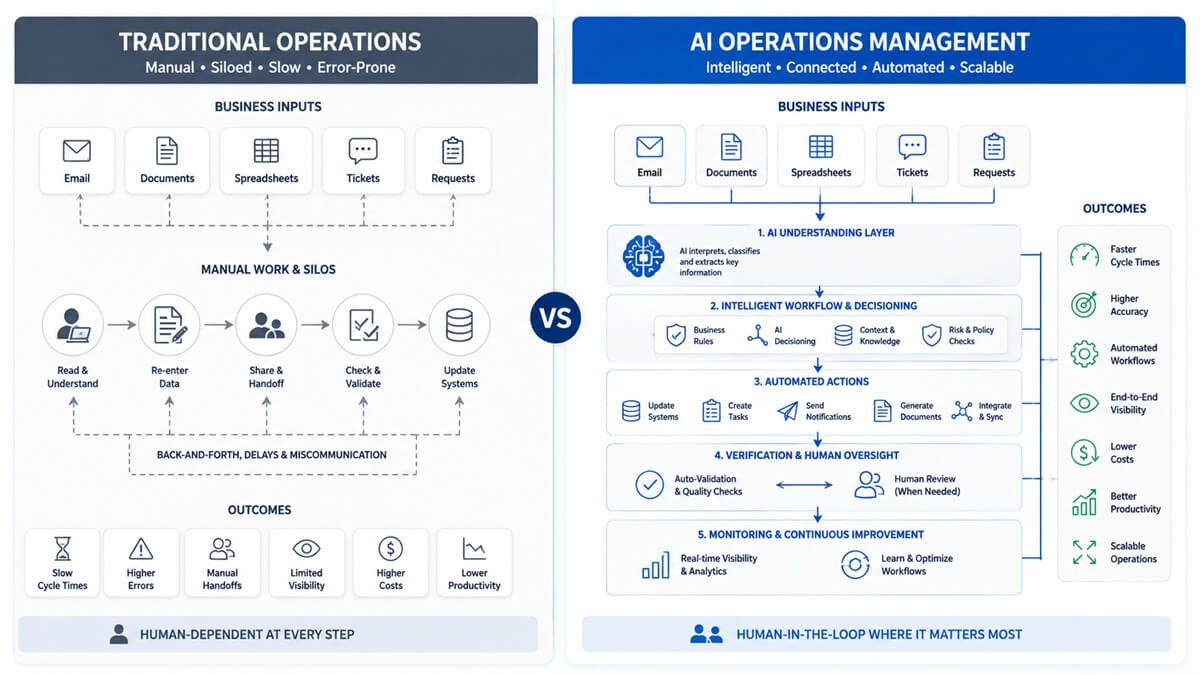
However, AI Operations Management does not mean removing humans from operations. The more useful interpretation is:
AI handles more of the repetitive operational work while humans focus on judgment, exceptions, relationships, strategy, and accountability.
The Difference Between AI Operations Management and Workflow Automation
Workflow automation and AI Operations Management overlap, but they are not identical. Traditional workflow automation generally excels when the process is predictable.
For example:
New form submission → create record → send email → assign task.
The workflow knows exactly what to do. AI becomes useful when the input is variable or requires interpretation.
For example:
Customer message → identify intent → understand context → retrieve information → determine appropriate response → execute workflow.
AI can therefore expand the range of processes that can be automated. The strongest systems often combine both.
Deterministic automation handles:
- fixed rules
- calculations
- scheduled actions
- predictable routing
- database updates
- repetitive system actions
AI handles:
- language
- documents
- classification
- summarization
- contextual interpretation
- unstructured information
- recommendations
- complex variable inputs
The combination is often more powerful than either approach alone.
AI Operations Management vs AI Agents
AI agents are becoming an important part of operational automation, but an AI agent is not synonymous with AI Operations Management. An AI agent is generally designed to pursue a goal by interpreting context, selecting actions, using tools, and potentially adjusting its approach based on results.
For example:
“Review new sales leads every morning and identify which ones require immediate attention.” An agent could:
- Retrieve new leads.
- Research relevant information.
- Analyze lead context.
- Score opportunities.
- Update the CRM.
- Create follow-up tasks.
- Notify the salesperson.
AI Operations Management provides the broader environment around that agent.
It determines:
- what systems the agent can access
- what permissions it has
- which actions require approval
- what policies it must follow
- how its performance is monitored
- what happens when it fails
- how its actions are recorded
Therefore:
AI agents can be components of an AI operations system, but they are not the entire system.
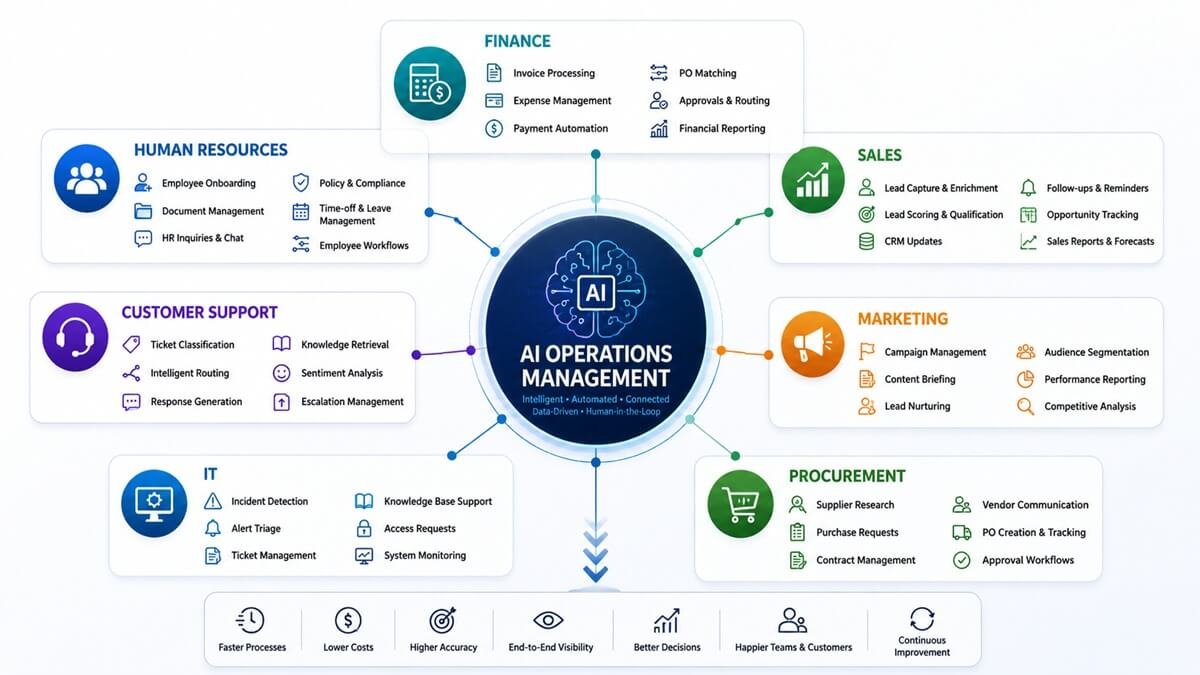
What Can AI Operations Management Automate?
Almost every department contains processes that can potentially benefit from AI-enabled operations. The right question is not:
“Can AI do this?”
The better question is:
“Can AI perform this process reliably enough to create more value than the cost and risk of implementing it?”
AI Operations Management for Finance
Finance departments often deal with large amounts of structured and unstructured information. Potential applications include:
- invoice extraction
- expense classification
- payment reminders
- purchase-order matching
- financial document processing
- report preparation
- anomaly detection
- approval routing
- accounts-receivable workflows
- reconciliation assistance
Example
An invoice arrives by email. The AI operations workflow can:
- Detect the invoice.
- Extract supplier and invoice information.
- Identify the purchase order.
- Compare the amounts.
- Detect discrepancies.
- Route valid invoices for approval.
- Escalate exceptions.
- Record the result.
The important point is that AI is not merely generating text. It is participating in an operational process.
AI Operations Management for Human Resources
HR teams frequently coordinate information across employees, managers, systems, and documents. Potential workflows include:
- employee onboarding
- document collection
- HR question routing
- policy information retrieval
- interview scheduling
- employee communications
- training reminders
- offboarding workflows
- internal HR ticket classification
Example: Employee onboarding
A new employee is added to the HR system. The workflow can automatically:
- create onboarding tasks
- request required documents
- notify the appropriate teams
- prepare account-access requests
- schedule onboarding meetings
- provide relevant internal information
- monitor completion
- notify HR about missing steps
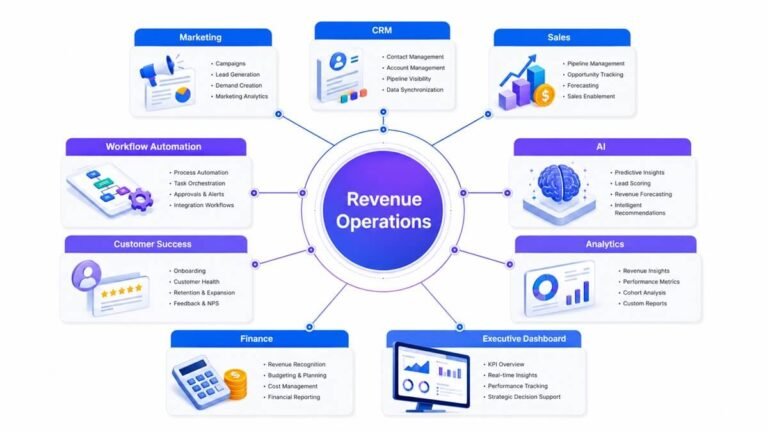
Human HR professionals remain responsible for decisions that require judgment or involve sensitive employment matters.
AI Operations Management for Sales
Sales operations contain many repetitive activities. AI can assist with:
- lead qualification
- lead routing
- CRM updates
- meeting preparation
- follow-up drafting
- pipeline analysis
- sales summaries
- opportunity research
- task creation
- customer-information retrieval
Example: Lead qualification
A lead enters through a website. The AI operations workflow could:
Capture → enrich → classify → score → route → notify → monitor
Instead of requiring a salesperson to manually inspect every lead, the system can prioritize attention.
AI Operations Management for Customer Support
Customer service is particularly suitable for AI-enabled workflows because support requests often arrive as unstructured language. A support workflow could:
- Receive the request.
- Identify the issue.
- Retrieve customer information.
- Search relevant knowledge.
- Determine priority.
- Draft a response.
- Check the response.
- Send it when appropriate.
- Escalate complex cases.
- Record the outcome.
The most effective approach is not necessarily to automate every support interaction. For many organizations, the better model is:
AI handles routine requests → humans handle exceptions and complex relationships.
AI Operations Management for Marketing
Marketing operations can use AI for:
- campaign workflows
- content research
- briefing
- reporting
- audience analysis
- lead nurturing
- campaign monitoring
- competitive research
- data classification
- performance summaries
For example, an AI system can collect campaign information from multiple sources, summarize performance, identify unusual changes, and prepare a report for the marketing team. The human team can then make the strategic decisions.
AI Operations Management for IT
IT operations involve many repetitive processes that can benefit from automation and AI. Potential applications include:
- ticket classification
- incident routing
- alert summarization
- knowledge retrieval
- employee IT support
- routine troubleshooting
- incident documentation
- access-request workflows
- operational reporting
AI can help reduce the amount of time IT teams spend searching through information and manually categorizing requests. For higher-risk infrastructure changes, stronger controls and approvals should remain in place.
AI Operations Management for Procurement
Procurement teams can use AI to process:
- supplier information
- purchase requests
- contracts
- invoices
- vendor communications
- product specifications
- approval workflows
An AI system might analyze a supplier request, identify the relevant procurement policy, collect missing information, and route the request to the correct approver.
The AI Operations Management Stack
A mature AI operations environment can be viewed as several layers.
Layer 1: Business Systems
These are the systems where business activity already occurs.
Examples:
- CRM
- ERP
- HRIS
- accounting
- support platforms
- project management
- databases
Layer 2: Operational Data
AI needs access to reliable information. This may include:
- customer records
- transactions
- documents
- policies
- product information
- employee information
- historical activity
Layer 3: AI Models
These provide capabilities such as:
- language understanding
- classification
- summarization
- extraction
- generation
- reasoning
- prediction
Layer 4: AI Agents
Agents can perform multi-step tasks and interact with tools when appropriate.
Layer 5: Workflow Orchestration
The orchestration layer controls how tasks move between systems.
Layer 6: Business Rules
Rules provide deterministic controls.
For example:
Orders above a defined value require approval. A business should not ask an AI model to “probably remember” a critical approval rule. That rule should be explicit.
Layer 7: Human Oversight
Humans remain part of the system where judgment, accountability, or risk requires it.
Layer 8: Monitoring and Analytics
Organizations need visibility into what their AI workflows are doing.
This includes:
- success rates
- failures
- exceptions
- latency
- costs
- human overrides
- security events
- business outcomes
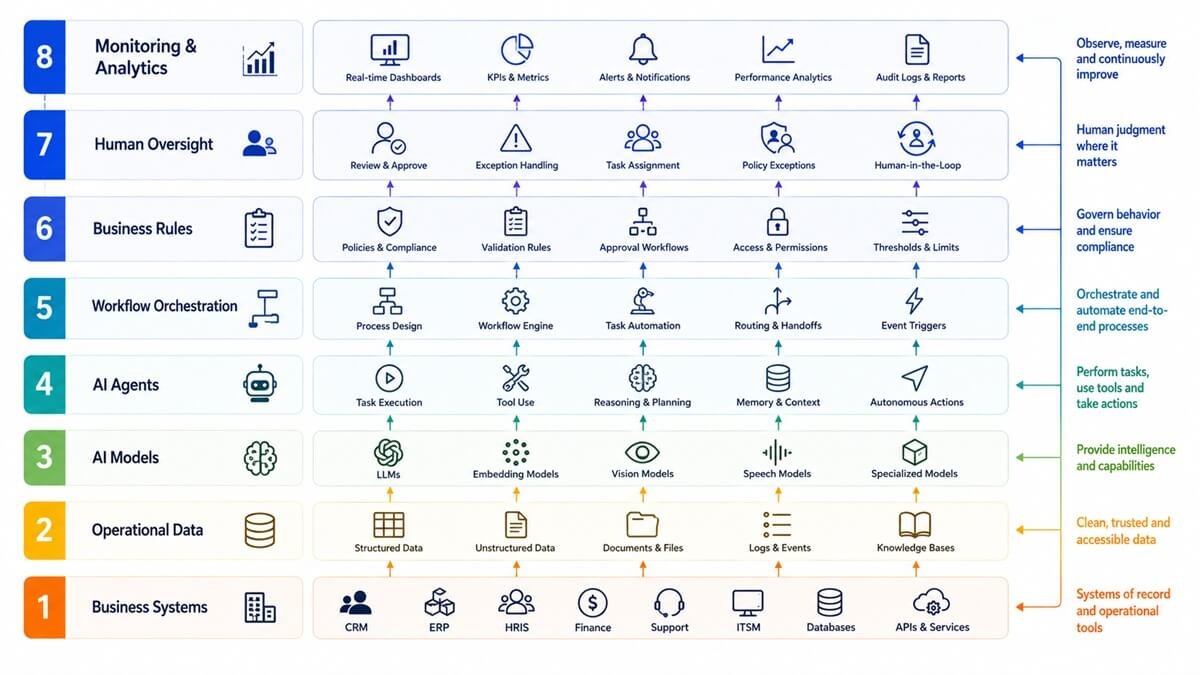
AI Operations Management Architecture
A simplified architecture looks like this:
Business inputs
↓
Email / Forms / Documents / CRM / Tickets / APIs
↓
AI understanding layer
↓
Classification / Extraction / Reasoning / Retrieval
↓
Decision layer
↓
Business rules + AI reasoning + Permissions + Risk controls
↓
Workflow orchestration
↓
CRM / ERP / HR / Finance / Support / Messaging / Databases
↓
Verification
↓
Human approval or automated completion
↓
Monitoring + analytics
↓
Continuous optimization
This architecture illustrates an important principle:
The AI model is only one component of the operational system. A powerful model connected to poor data, weak permissions, and badly designed workflows can still produce a poor operational outcome.
Four Levels of AI Operational Automation
Businesses can also classify processes by how much autonomy AI receives.
Level 1: AI Assistance
AI recommends or prepares work.
Example:
Generate a customer-support response for an employee to review. The employee makes the final decision.
Level 2: AI-Driven Execution With Approval
AI performs most of the process but requires human approval before consequential actions.
Example:
Prepare a purchase order and route it to the manager for approval.
Level 3: Conditional Autonomy
AI can complete predefined low-risk tasks independently but escalates exceptions.
Example:
Automatically process standard invoices but route discrepancies to finance.
Level 4: Higher Autonomy
AI can plan and execute multi-step workflows with limited intervention. This level requires considerably stronger controls, monitoring, testing, and governance. Businesses should not jump directly to Level 4. The right level depends on the process’s complexity and risk.
Real-World AI Operations Management Examples
Understanding complete workflows is more useful than looking at isolated AI features.
Example 1: Invoice Processing
Before
An employee opens an email, downloads the invoice, reads it, finds the purchase order, enters information, checks the amount, sends it for approval, and updates accounting software.
AI-enabled workflow
Invoice received
↓
AI extracts information
↓
Purchase order identified
↓
Amounts compared
↓
Business rules applied
↓
No exception → approval workflow
↓
Approved → accounting system updated
↓
Exception → finance employee notified
This workflow reduces manual handling while preserving a path for human review.
Example 2: Customer Support
Customer message
↓
Intent classification
↓
Customer identification
↓
Relevant information retrieved
↓
Policy/knowledge retrieved
↓
Response generated
↓
Quality and policy checks
↓
Routine → automatic response
↓
Complex → human escalation
↓
Outcome recorded
This is an example of AI and workflow automation working together.
Example 3: Sales Operations
New lead
↓
Lead information captured
↓
Company information enriched
↓
Lead characteristics analyzed
↓
Lead scored
↓
CRM updated
↓
Salesperson assigned
↓
Follow-up task created
↓
Performance monitored
The salesperson can spend more time engaging with prospects instead of performing administrative work.
Example 4: Employee Onboarding
Employee hired
↓
HR record created
↓
Required documents identified
↓
Tasks generated
↓
Departments notified
↓
Access requests initiated
↓
Meetings scheduled
↓
Missing tasks detected
↓
HR notified
The system acts as an operational coordinator.
Benefits of AI Operations Management
- 1. Faster Processing: AI systems can process information continuously instead of waiting for employees to manually review every item.
- 2. Reduced Repetitive Work: Employees can spend less time copying information, categorizing requests, and moving data between applications.
- 3. Greater Operational Capacity: Automation can help organizations handle higher volumes without increasing manual workload at the same rate.
- 4. More Consistent Processes A properly designed workflow applies the same rules repeatedly.
- 5. Better Operational Visibility: AI operations systems can capture information about where processes succeed, fail, or require intervention.
- 6. Faster Decision Support: AI can bring relevant information together more quickly for employees.
- 7. Improved Employee Productivity: Employees can spend more time on work requiring judgment, creativity, relationships, and expertise.
- 8. Continuous Operations: Certain low-risk workflows can operate outside normal working hours.
The value is therefore not simply “AI saves time.” The larger opportunity is to create an operating environment where routine work moves through the organization with less friction.
AI Operations Management Risks and Challenges
AI introduces new operational capabilities, but it also introduces new risks.
AI Hallucinations
AI systems can produce incorrect information with convincing language. For operational workflows, that means generated information should not automatically be treated as factual.
Use:
- retrieval
- validation
- structured data
- confidence thresholds
- business rules
- human review where appropriate
Organizations deploying generative AI in operational workflows can also consult NIST’s guidance on managing risks that are specific to generative AI systems.
Poor Data Quality
AI cannot compensate for fundamentally incorrect or outdated business data. If the CRM contains incorrect information, connecting an AI agent to it may simply automate bad decisions faster.
Security
AI systems may have access to sensitive business information. Organizations need:
- least-privilege access
- authentication
- authorization
- secure credentials
- data protection
- audit logs
- controlled tool access
Excessive Autonomy
Giving an AI system permission to perform consequential actions without appropriate controls can create unnecessary risk.
Integration Failures
A workflow may depend on several systems. If one API fails, the entire process may be interrupted. Reliable workflows therefore need:
- retries
- error handling
- fallback paths
- alerts
- logging
Accountability
Organizations should know:
- which AI system acted
- what information it used
- which workflow executed
- what action occurred
- whether a human approved it
- what happened afterward
AI governance should therefore be part of the operational architecture rather than something added after deployment.
The NIST AI Risk Management Framework (AI RMF) provides a voluntary framework for managing AI risks, organized around the functions Govern, Map, Measure, and Manage. NIST also emphasizes continuous risk management across the AI system lifecycle. Organizations can use this as for identifying, assessing, and managing risks.
Human-in-the-Loop AI Operations
Human oversight should be based on risk rather than applied identically to every task.
Low-risk processes
AI can often operate with limited intervention for tasks such as:
- classification
- summarization
- internal notifications
- routine data organization
- low-impact administrative actions
Medium-risk processes
AI can perform the work while applying additional checks.
Examples:
- customer communications
- CRM modifications
- workflow routing
- procurement recommendations
- document processing
High-risk processes
Human approval may be appropriate for:
- significant financial transactions
- sensitive employment decisions
- legal decisions
- security-critical changes
- consequential customer actions
NIST specifically highlights the importance of clearly defining human roles and responsibilities in human-AI configurations, including when systems act autonomously and when human oversight is required. However, effective AI governance also requires clear accountability, appropriate human oversight, and systems designed with robustness and security in mind—principles reflected in the OECD AI Principles.
The principle is simple: The higher the potential impact of an AI action, the stronger the controls around that action should be.
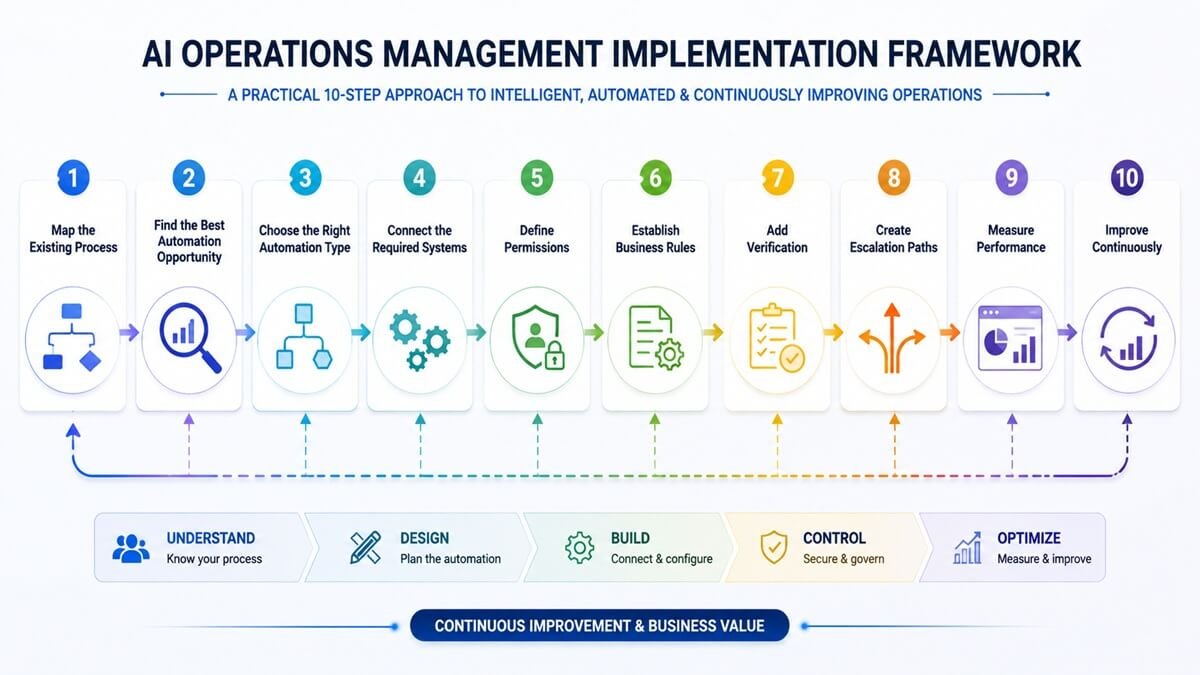
How to Implement AI Operations Management
Implementing AI operations successfully requires more than selecting an AI model.
Step 1: Map the Existing Process
Document:
- inputs
- outputs
- systems involved
- human tasks
- decision points
- approvals
- exceptions
- bottlenecks
Do not automate a process that nobody understands.
Step 2: Find the Best Automation Opportunity
Look for processes with:
- high volume
- repetitive work
- predictable outcomes
- significant administrative effort
- measurable performance
- manageable risk
A useful prioritization concept is:
Automation opportunity = Volume × Repetition × Time × Error potential × Business impact
This is not a financial formula; it is a practical way to compare candidate workflows.
Step 3: Choose the Right Automation Type
Ask whether the workflow needs:
- traditional automation
- AI-assisted automation
- AI agent
- human-in-the-loop automation
If simple rules solve the problem, use simple rules. AI should be introduced where it adds meaningful capability.
Step 4: Connect the Required Systems
Identify which applications the workflow needs. Avoid connecting every system simply because an integration exists. The AI should have access only to the information and tools required for its job.
Step 5: Define Permissions
Establish exactly what the AI can:
- read
- create
- modify
- delete
- send
- approve
Use least-privilege access wherever practical.
Step 6: Establish Business Rules
Important rules should be explicit.
For example:
Orders over a specified threshold require human approval.
This is more reliable than expecting a language model to infer the policy from general context every time.
Step 7: Add Verification
Determine what must be checked before an action is considered successful.
Examples:
- required fields
- valid customer ID
- matching purchase order
- valid account
- policy compliance
- confidence threshold
Step 8: Create Escalation Paths
Every serious AI workflow should have a defined response for uncertainty.
For example:
AI uncertain → pause workflow → create review task → notify employee → resume after decision
Step 9: Measure Performance
Track the workflow after launch.
Do not assume that a successful demonstration means the system is successful in production.
Step 10: Improve Continuously
Analyze:
- failed cases
- human overrides
- recurring exceptions
- slow steps
- incorrect outputs
- unexpected behavior
Then refine the workflow.
Businesses looking for practical ways to operationalize AI risk management can also use the NIST AI RMF Playbook, which provides implementation-oriented guidance around governance, mapping, measurement, and risk management.
How to Decide Which Processes Should Be Automated
A useful process-scoring framework considers five factors.
1. Volume
How often does the task occur?
2. Repetition
How similar are the tasks?
3. Time
How much employee time does the process consume?
4. Risk
What happens if the system makes a mistake?
5. Business impact
How much value could improvement create?
A high-volume, repetitive, low-risk workflow is usually a better starting point than a low-volume, highly consequential decision.
How to Measure AI Operations ROI
AI operations should be measured using business outcomes, not just model performance.
A simple ROI calculation is:
ROI = (Business Benefits − Implementation Cost) ÷ Implementation Cost × 100
But “business benefits” should include more than labor savings.
Consider:
- employee hours saved
- faster processing
- increased throughput
- reduced errors
- fewer missed tasks
- reduced support costs
- improved SLA performance
- faster customer response
- increased revenue capacity
- improved employee productivity
For example, suppose an automated process saves 500 employee hours per year. That is useful, but it may not be the complete benefit. If the saved capacity allows employees to serve more customers, process more orders, or focus on higher-value activities, the business impact may be considerably larger.
AI Operations Management KPIs
Organizations should establish operational KPIs before scaling automation.
| KPI | What It Measures |
| Automation Rate | Percentage of workflow volume completed automatically |
| Exception Rate | Percentage of cases requiring special handling |
| Processing Time | Time required to complete the workflow |
| Error Rate | Frequency of incorrect outcomes |
| First-Pass Success | Percentage completed correctly without rework |
| Human Intervention Rate | How often employees must intervene |
| Cost Per Task | Average cost of processing a task |
| SLA Compliance | Percentage meeting service targets |
| AI Accuracy | Quality of AI outputs or decisions |
| Throughput | Number of tasks processed |
| ROI | Financial or operational value generated |
The most important KPI depends on the workflow.
- A customer-support system may prioritize resolution time and customer satisfaction.
- A finance workflow may prioritize accuracy and exception rates.
- An internal knowledge workflow may prioritize response quality and employee time saved.
AI Operations Management for Small Businesses
AI operations are not limited to large enterprises.
Small businesses can begin with relatively focused workflows.
Potential starting points include:
- lead management
- email processing
- customer support
- meeting workflows
- document processing
- invoice handling
- reporting
- internal knowledge
- appointment coordination
The key is to start small.
Instead of attempting to build an autonomous AI business, choose one repetitive process that is:
- frequent
- measurable
- relatively low risk
- currently inefficient
Automate it, measure it, improve it, and then expand.
AI Operations Management for Enterprises
Large organizations face a different challenge.
Enterprise processes often span multiple departments and systems.
An enterprise AI operations environment may need:
- centralized governance
- identity management
- permission controls
- AI inventories
- audit logs
- model evaluation
- data governance
- workflow monitoring
- vendor management
- compliance controls
- standardized development practices
At enterprise scale, the problem becomes less about whether an AI model can perform a task and more about whether the organization can operate AI reliably across hundreds or thousands of workflows.
That requires architecture and governance.
AI Operations Management vs Business Process Management
Business Process Management, or BPM, focuses on understanding, designing, managing, and improving business processes.
AI Operations Management extends this concept by introducing AI capabilities into the process.
BPM might define:
Customer complaint → classify → assign → resolve → close.
AI can add capabilities such as:
Understand the customer’s message → determine the complaint type → retrieve context → summarize the issue → recommend routing → draft response → identify exceptions.
- The two disciplines therefore complement each other.
- BPM provides process discipline.
- AI adds intelligence and flexibility.
- Workflow automation provides execution.
Together, they can form a modern operational system.
AI Operations Management vs RPA
Robotic Process Automation, or RPA, is useful for predictable computer-based tasks.
For example:
- copying information
- entering structured data
- moving records
- triggering repetitive actions
AI is more useful when the workflow involves:
- language
- documents
- interpretation
- classification
- variable inputs
- contextual decisions
Modern organizations do not necessarily have to choose one.
A workflow might use:
AI → understand document → RPA/API → update legacy system → workflow engine → human approval
This hybrid approach can be especially useful when organizations have older systems that lack modern integrations.
The Role of Data in AI Operations Management
AI operations depend heavily on data quality.
A workflow may involve:
Input data → AI interpretation → decision → action
If the input is incomplete or incorrect, the entire chain can be affected.
Organizations should therefore consider:
- data accuracy
- freshness
- ownership
- access
- consistency
- privacy
- retention
- source reliability
AI should not become a new layer hiding existing data problems.
Instead, AI operations can expose those problems by showing where workflows repeatedly encounter missing or conflicting information.
AI Operations Governance
AI governance determines how an organization controls AI systems.
Important governance questions include:
Who owns the AI workflow?
Someone should be responsible for its performance.
What data can it access?
Permissions should be explicit.
What actions can it perform?
Tools and capabilities should be scoped.
What decisions require human approval?
Risk thresholds should be defined.
How is performance evaluated?
Testing should occur before and after deployment.
What happens when the AI fails?
Fallback and escalation procedures should exist.
How are changes controlled?
Significant workflow or model changes should be tracked.
NIST’s AI RMF emphasizes governance as a cross-cutting function and recommends clearly defined organizational roles, responsibilities, documentation, monitoring, and risk management throughout the AI lifecycle.
Common AI Operations Management Mistakes
- 1. Automating a Broken Process
- 2. Using AI Where Simple Automation Is Better
- 3. Giving AI Too Much Access
- 4. Ignoring Exceptions
- 5. Measuring Only Time Saved
- 6. Treating a Prototype as a Production System
- 7. Removing Humans Too Early
- 8. Building Isolated AI Tools
The Future of AI Operations Management
The evolution of business automation can be viewed as a progression:
Manual Work
↓
Rule-Based Automation
↓
Workflow Automation
↓
AI-Assisted Operations
↓
AI Agents
↓
Multi-Agent Operational Systems
The difference between these stages is not simply technological sophistication. It is the amount of operational responsibility software can safely handle.
Future AI operations systems are likely to become better at:
- understanding business context
- coordinating multiple applications
- handling exceptions
- planning multi-step tasks
- monitoring workflows
- identifying bottlenecks
- recommending process improvements
- adapting workflows to changing conditions
- interacting naturally with employees
However, increased capability should be accompanied by stronger governance.
The future is unlikely to be:
“AI does everything.”
A more practical model is:
AI handles more operational complexity while humans retain control over goals, judgment, accountability, and high-impact decisions.

A Practical AI Operations Management Framework
Businesses can use the following framework to design AI-enabled operations.
1. Discover
Find inefficient, repetitive processes.
2. Connect
Bring together the systems and information required.
3. Understand
Use AI to interpret unstructured operational information.
4. Decide
Combine AI reasoning with deterministic business rules.
5. Execute
Perform the required operational actions.
6. Verify
Check the output and action.
7. Escalate
Route uncertain or high-risk cases to humans.
8. Measure
Track performance and business outcomes.
9. Optimize
Continuously improve the workflow.
This framework can be applied to a single workflow or an organization’s broader AI operations strategy.
How Workflow AI Fits Into AI Operations Management
AI Operations Management requires more than an AI model.
A useful operational platform needs to connect intelligence with execution.
That means the system should be able to work across:
- workflows
- business applications
- data
- AI models
- agents
- rules
- approvals
- notifications
- monitoring
This is where an AI workflow platform can become an important part of the operational architecture. Rather than treating AI as a standalone destination, businesses can use AI as an intelligence layer inside the workflows where work already happens.
For organizations building an AI-first operating model, the objective should be to create workflows that are connected, measurable, controllable, and continuously improvable.
AI Operations Management Best Practices
The following principles provide a practical foundation.
Start with business outcomes
Do not begin with:
“Where can we use AI?”
Begin with:
“Which operational problem is worth solving?”
Start with manageable workflows
Prove value on a focused process before expanding.
Combine AI and deterministic automation
Use each technology for what it does best.
Keep critical business rules explicit
Do not rely exclusively on model interpretation for important controls.
Design escalation from the beginning
Human intervention should be part of the architecture, not an emergency workaround.
Monitor real-world performance
Production behavior matters more than demonstration performance.
Protect data and permissions
AI should receive only the information and access it requires.
Document workflows
Operational knowledge should not exist only inside the model or inside one employee’s head.
Test continuously
AI behavior can vary with changing models, data, prompts, tools, and workflows.
Optimize based on evidence
Use actual workflow data to determine what needs improvement.
Frequently Asked Questions About AI Operations Management
What does AI Operations Management include beyond AI automation?
AI Operations Management covers the broader operating environment around automation, including workflow design, business rules, system integrations, AI agents, permissions, human approvals, monitoring, governance, and continuous optimization.
Can AI Operations Management work with existing business software?
Yes. In many cases, AI operations are most valuable when they connect existing systems rather than requiring an organization to replace them. APIs, webhooks, databases, and integration layers can connect AI-enabled workflows to existing applications.
Does every AI operations workflow need an AI agent?
No. Many processes can be handled more reliably with conventional automation or a combination of rules and AI. Agents are most useful when a task involves multiple steps, variable inputs, tool use, and some degree of planning.
What happens when an AI operations system is uncertain?
A properly designed workflow can pause the automated process and route the case to a human, request additional information, or follow a predefined fallback procedure. Uncertainty should be treated as an operational state rather than ignored.
Can AI Operations Management be used without replacing employees?
Yes. A common operating model is to automate repetitive work while keeping employees responsible for exceptions, judgment, relationships, and high-impact decisions.
How should a company choose its first AI operations project?
Choose a process that occurs frequently, consumes meaningful manual effort, has measurable outcomes, and has manageable risk. A focused workflow with clear inputs and outputs is generally a better starting point than an organization-wide autonomous system.
What skills are needed to manage AI operations?
A mature AI operations team may need a combination of process management, automation, software integration, data, AI, security, governance, and domain expertise. The exact mix depends on the complexity and risk of the organization’s workflows.
How often should AI workflows be reviewed?
There is no universal interval. High-impact workflows should be monitored continuously and formally reviewed according to their risk, business importance, and rate of change. Changes to models, tools, policies, data, or business processes can also justify a new review.
Can AI Operations Management be used across multiple departments?
Yes. The same underlying approach can support finance, HR, sales, marketing, customer service, procurement, IT, and other functions. The workflows, data, permissions, and controls should be adapted to each department’s requirements.
What is the difference between AI Operations Management and AI Operations (AIOps)?
The terms can overlap, but AIOps is commonly used in the IT industry for applying AI and machine learning to IT operations, such as monitoring, incident management, and infrastructure analysis. AI Operations Management is a broader business-operations concept covering internal workflows across functions such as finance, HR, sales, support, procurement, and IT.
Can AI Operations Management support regulated businesses?
Potentially, but regulated environments require additional controls appropriate to their industry, data, and use cases. AI systems handling consequential processes should have appropriate governance, documentation, security, monitoring, and human oversight. The NIST AI RMF is one voluntary resource organizations can use when developing an AI risk-management approach.
Final Verdict
AI Operations Management represents a shift from using AI as an isolated productivity tool to embedding AI directly into business operations.
The central idea is simple: AI should not just generate information. It should help businesses move work forward. A mature AI operations system can:
- understand unstructured information
- connect business systems
- apply business rules
- make or support operational decisions
- execute workflow actions
- verify results
- escalate exceptions
- measure performance
- continuously improve processes
The strongest implementations do not attempt to automate everything. They identify the right processes, use AI where it provides genuine value, keep deterministic rules where they are more reliable, maintain human oversight where risk requires it, and continuously measure operational outcomes.
That makes AI Operations Management less about replacing people and more about redesigning how work moves through an organization.
For businesses building an AI-first future, the competitive advantage doesn’t come from having access to the newest AI model. You need building the best operational system around AI. And that system connects intelligence with workflows, data, applications, decisions, people, and measurable business outcomes.