
Workflow Optimization Framework: 7 Steps to Improve Efficiency

Businesses rarely become inefficient overnight. More often, small process problems accumulate over time: employees copy information between systems, approvals sit in inboxes, teams repeat the same tasks, spreadsheets become difficult to manage, and customers wait longer than necessary.
These problems are symptoms of an inefficient workflow. A workflow optimization framework provides a structured way to identify these inefficiencies, measure their impact, redesign the process, automate appropriate tasks, and continuously improve performance.
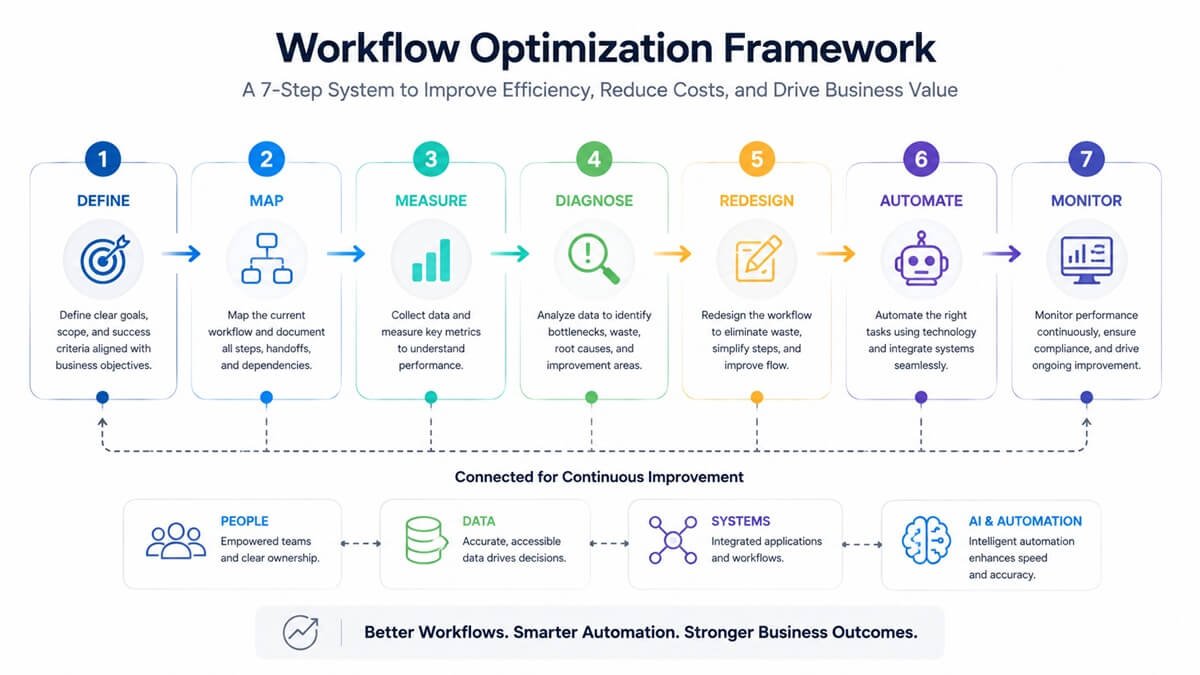
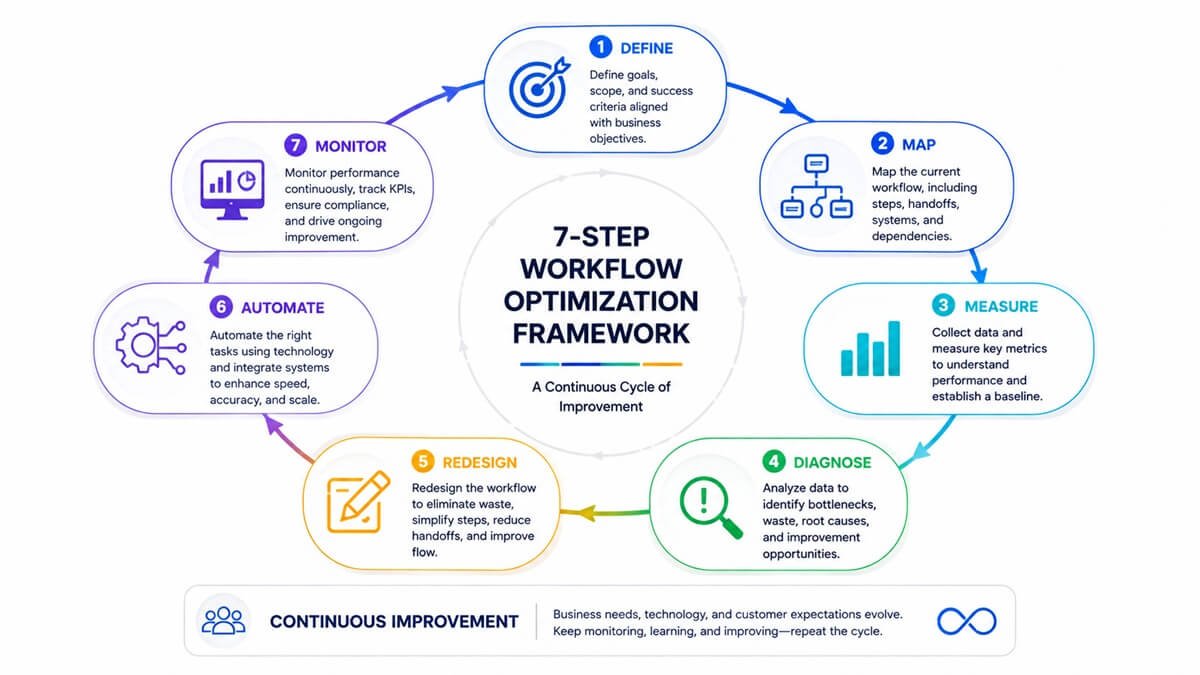
In this guide, we introduce a practical 7-step Workflow Optimization Framework:
Define → Map → Measure → Diagnose → Redesign → Automate → Monitor
The goal is not simply to automate more work. The goal is to create workflows that are faster, simpler, more reliable, measurable, and scalable.
Table of Contents
What Is a Workflow Optimization Framework?
A workflow optimization framework is a structured system for analyzing, measuring, redesigning, automating, and continuously improving business workflows.
A workflow describes how work moves from a starting point to a defined outcome. It involves employees, software applications, data, approvals, decisions, customers, and automated systems. This process-oriented view is consistent with the ISO process approach, which treats organizational activities as interconnected processes designed to produce intended results.
For example, a customer-support workflow might look like:
Customer inquiry → Ticket creation → Information collection → Issue classification → Assignment → Resolution → Customer notification → Ticket closure
Workflow optimization examines each part of this process to determine whether work can be completed with less time, fewer errors, fewer handoffs, and less unnecessary effort. A useful workflow optimization framework should answer five questions:
- What is the workflow supposed to accomplish?
- How does the workflow currently operate?
- Where are time, money, and effort being wasted?
- How can the workflow be redesigned?
- How will performance be measured after improvement?
Why Workflow Optimization Matters for Business Efficiency
An inefficient workflow can affect much more than employee productivity. When unnecessary steps accumulate, businesses may experience:
- Longer processing times
- Higher operational costs
- More data-entry errors
- Excessive employee workload
- Delayed approvals
- Duplicate work
- Poor customer experiences
- Inconsistent results
- Limited visibility into operations
- Difficulty scaling
Consider an invoice-processing workflow. An employee receives an invoice by email, downloads it, enters information into a spreadsheet, checks the vendor record, sends the invoice to a manager, waits for approval, manually updates the accounting system, and emails the finance team.
The workflow may technically work, but it contains several opportunities for improvement. A redesigned process could extract invoice information automatically, validate the data, route the invoice to the appropriate approver, update the accounting system, and notify the relevant employee automatically.
The important point is that workflow optimization should come before automation. Automating an inefficient process can simply make the inefficient process happen faster.
Workflow Optimization vs. Workflow Automation
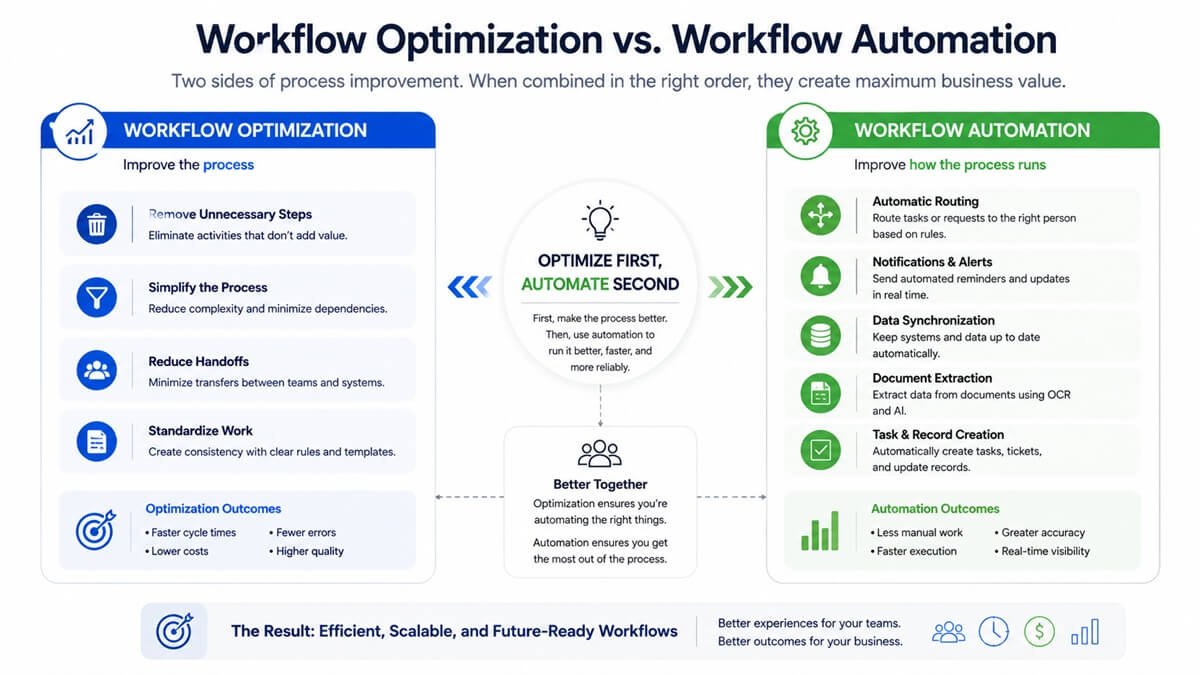
Workflow optimization and workflow automation are related, but they are not the same thing. Workflow optimization focuses on improving the process itself. Workflow automation focuses on using workflow automation tools for businesses to execute appropriate parts of that process automatically.
For example:
| Workflow Activity | Optimization | Automation |
| Remove duplicate approval | Yes | No |
| Combine redundant steps | Yes | No |
| Standardize data entry | Yes | Sometimes |
| Automatically route requests | No | Yes |
| Send notification emails | No | Yes |
| Extract information from documents | No | Yes |
| Redesign an inefficient process | Yes | No |
| Monitor workflow KPIs | Yes | Yes |
The ideal sequence is:
Simplify → Standardize → Automate → Measure → Improve
This prevents companies from investing in technology before understanding what the workflow actually needs.
The 7-Step Workflow Optimization Framework
The following framework can be applied to individual workflows, departments, or larger business processes.
Step 1: Define the Workflow Goal
Before changing a workflow, clearly define what the workflow needs to accomplish.
Avoid starting with:
“Which task can we automate?”
Instead ask:
“What business outcome are we trying to improve?”
The goal might be to:
- Reduce customer response time
- Process invoices faster
- Reduce manual data entry
- Improve lead response rates
- Shorten employee onboarding
- Reduce errors
- Increase order-processing capacity
- Improve approval turnaround time
Define the Workflow Scope
Identify:
- Starting point
- Ending point
- Workflow owner
- People involved
- Systems involved
- Inputs
- Outputs
- Business objective
- Success criteria
For example:
Workflow: Employee onboarding
Trigger: New employee accepts an offer
Outcome: Employee is fully prepared to begin work
Participants: HR, IT, hiring manager, finance
Systems: HR platform, email, identity management, payroll, project management
Success metric: Complete onboarding tasks before the employee’s first day
Defining the scope prevents optimization projects from becoming unnecessarily broad.
Step 2: Map the Current Workflow
You cannot optimize a workflow you do not understand. Start by documenting what actually happens today.
Do not rely solely on the official procedure document. Employees often develop workarounds that are not included in formal documentation.
A simple workflow map might look like this:
Customer inquiry
↓
Employee reads email
↓
Employee copies customer information
↓
Customer record searched
↓
Issue classified
↓
Ticket assigned
↓
Employee receives notification
↓
Issue resolved
↓
Customer contacted
↓
Ticket closed
At this stage, do not try to fix everything. The purpose is to establish a realistic picture of the current process.
What to Document
For every workflow step, identify:
- Who performs the task?
- What information is required?
- Which software is used?
- How long does the task take?
- Does the task require a decision?
- Does another employee need to approve it?
- What happens if information is missing?
- What happens when an exception occurs?
- Does the task create duplicate data?
- Does the task depend on another system?
This often reveals inefficiencies that are difficult to see when employees only consider their own part of the process.
Step 3: Measure Workflow Performance
Once the workflow is mapped, establish a baseline. Without baseline measurements, it is difficult to determine whether optimization actually improved the process.
Useful workflow KPIs include:
| KPI | What It Measures |
| Cycle Time | Total time from workflow start to completion |
| Processing Time | Time employees actively spend working |
| Wait Time | Time work spends waiting |
| Throughput | Amount of work completed during a period |
| Error Rate | Percentage of transactions containing errors |
| Rework Rate | Percentage requiring correction |
| Cost per Transaction | Average operational cost |
| Automation Rate | Percentage of activities performed automatically |
| SLA Compliance | Percentage completed within the required timeframe |
Workflow Efficiency Formula
A simple way to evaluate workflow efficiency is:
Workflow Efficiency = Value-Adding Processing Time ÷ Total Workflow Cycle Time × 100
For example, if a process takes 10 hours from beginning to completion but employees actively work on it for only 2 hours:
2 ÷ 10 × 100 = 20% workflow efficiency
The remaining time involve waiting for approvals, information, system updates, or other dependencies. That does not automatically mean the process is inefficient, because some waiting may be necessary. However, it identifies an area worth investigating.
Establish a Baseline
Before optimization, record measurements such as:
- Average cycle time
- Average processing time
- Number of employees involved
- Number of handoffs
- Error rate
- Monthly transaction volume
- Cost per transaction
- Number of manual tasks
- Number of approval stages
Then compare those measurements after the redesigned workflow is implemented.
Step 4: Identify Bottlenecks and Workflow Waste
Once performance has been measured, identify where the workflow loses time or creates unnecessary work. Common workflow bottlenecks include:
Excessive Approvals
A simple request may require three or four approval stages even when the financial or operational risk is minimal.
Ask:
Does every approval add meaningful control? If not, the approval structure may need to be redesigned.
Duplicate Data Entry
Employees may enter the same customer, invoice, employee, or order information into multiple systems.
This creates:
- More work
- More opportunities for errors
- Inconsistent information
- Poor employee experience
Excessive Handoffs
Every handoff can introduce waiting time and communication overhead.
For example:
Employee → Team Leader → Finance → Manager → Finance → Employee
may be unnecessarily complicated.
Manual Reconciliation
Employees frequently spend time comparing information between spreadsheets, emails, databases, and business applications. Where possible, systems should share information directly rather than relying on manual reconciliation.
Waiting for Information
A workflow can become slow even when individual tasks are quick.
For example:
5-minute task → 8-hour wait → 3-minute task → 1-day approval → 5-minute task
The biggest opportunity may be reducing waiting time rather than reducing task duration.
Rework
Rework occurs when employees must correct or repeat work.
Common causes include:
- Missing information
- Incorrect data
- Unclear instructions
- Poor validation
- Incorrect routing
- System errors
Reducing the cause of rework is usually more valuable than simply processing rework faster.
Step 5: Redesign the Workflow
After identifying bottlenecks, redesign the workflow before introducing automation.
A useful principle is:
Eliminate → Simplify → Standardize → Automate
Eliminate Unnecessary Steps
Ask of every activity:
If we removed this step, what would happen?
If the answer is “nothing important,” the step may not be necessary.
Simplify Complex Processes
Look for opportunities to:
- Combine related activities
- Reduce handoffs
- Remove unnecessary approvals
- Standardize forms
- Reduce duplicate data entry
- Clarify responsibilities
- Create clearer decision rules
Standardize Repetitive Work
Standardization is particularly valuable when multiple employees perform the same process differently.
Create consistent:
- Forms
- Templates
- Naming conventions
- Approval rules
- Data fields
- Escalation procedures
- Customer communication templates
Standardization makes later automation much easier.
Design for Exceptions
One of the most common workflow-design mistakes is optimizing only the normal path. Real businesses encounter exceptions.
For example:
Normal path: Invoice received → Validated → Approved → Paid
Exception: Invoice received → Missing purchase order → Needs review → Vendor contacted → Corrected invoice received → Revalidated
A good workflow includes a clear exception path instead of forcing unusual cases through the standard process.
Step 6: Automate the Right Tasks
After redesigning the workflow, identify tasks that technology can reliably handle. Not every workflow activity should be automated.
Good Candidates for Automation
Automation is particularly useful for tasks that are:
- Repetitive
- Rules-based
- High-volume
- Time-consuming
- Predictable
- Digitally accessible
- Prone to manual data-entry errors
Examples include:
- Sending notifications
- Updating records
- Routing requests
- Creating tasks
- Synchronizing data
- Generating standard reports
- Extracting information
- Triggering approval requests
- Updating workflow status
Where AI Can Help
Traditional automation follows predefined rules. AI can add capabilities such as:
- Document classification
- Information extraction
- Summarization
- Natural-language processing
- Email drafting
- Data interpretation
- Content generation
- Semantic search
- Decision support
For example:
Traditional workflow:
Email received → Employee reads email → Employee categorizes request → Employee creates ticket
AI-assisted workflow:
Email received → AI analyzes request → Category identified → Relevant information extracted → Ticket created → Employee reviews
The employee remains involved where judgment is important, while AI handles the repetitive interpretation work. For a broader look at how these systems fit into business processes, see our guide to AI workflows explained for businesses and teams.
Use Human-in-the-Loop Controls
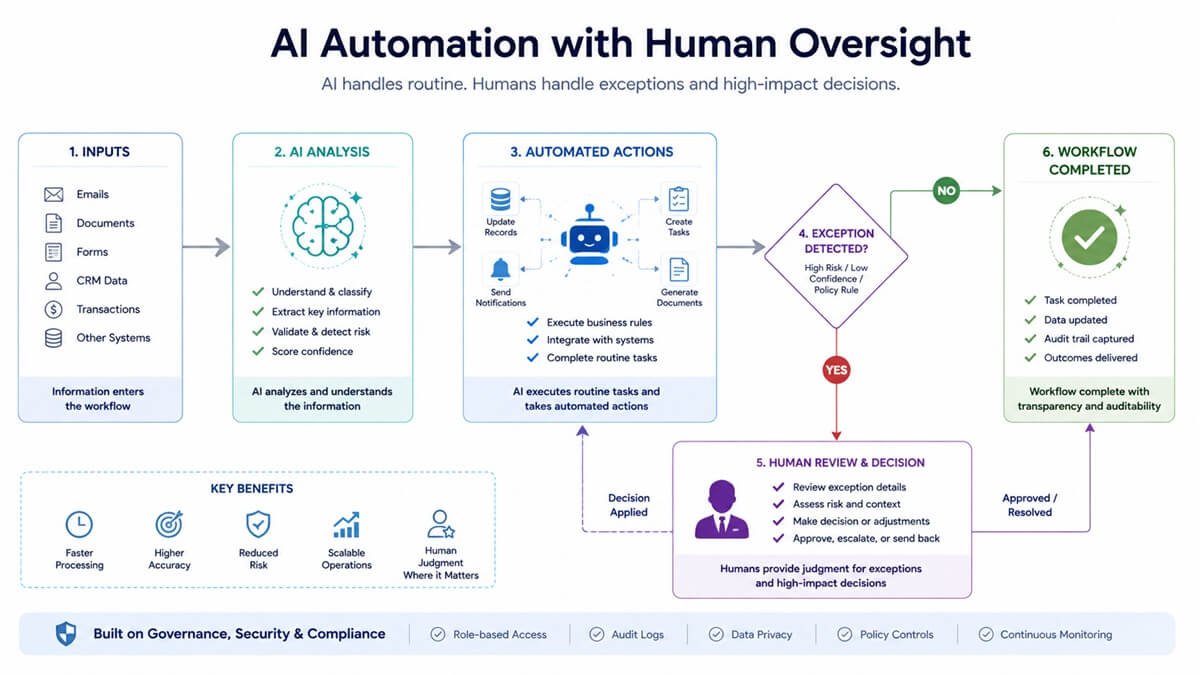
AI should not automatically make every business decision. Organizations implementing AI-enabled workflows can also use the NIST AI Risk Management Framework as a reference for managing AI risks and incorporating trustworthiness considerations into AI systems.
For higher-risk workflows, use human review for financial decisions, sensitive customer communications, legal decisions, compliance exceptions, high-value transactions, unusual cases, and decisions with significant business consequences.
This approach is also central to integrating AI into human workflows. A strong workflow defines when automation acts independently and when a person must intervene.
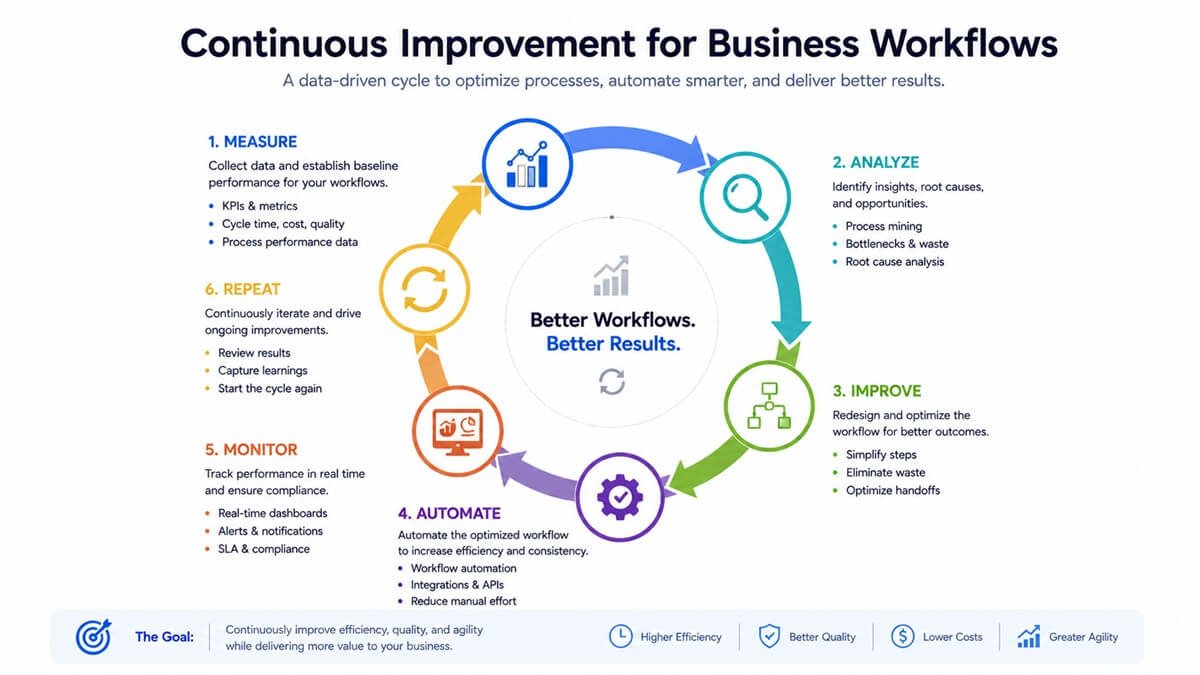
Step 7: Monitor and Continuously Improve
Workflow optimization should not end when the new process goes live. Business conditions, employees, customers, software, and transaction volumes change. For organizations moving from individual workflow improvements toward broader
AI adoption, AI implementation services can provide a more structured approach to deployment, integration, and ongoing optimization. A workflow that works well today may become inefficient six months later. Use a continuous improvement cycle:
Measure → Analyze → Improve → Automate → Monitor → Repeat
Monitor Important KPIs
Track the same baseline metrics established earlier. For example:
| Metric | Before | Target |
| Cycle time | 48 hours | 24 hours |
| Manual processing | 15 minutes | 5 minutes |
| Handoffs | 5 | 2 |
| Error rate | 4% | <1% |
| Approval stages | 3 | 1 |
These numbers are illustrative. Your organization should establish targets based on actual workflow data.
Watch for New Bottlenecks
Optimization can sometimes move a bottleneck rather than eliminate it.
For example:
Before: Data entry is the bottleneck.
After automation: Approval becomes the bottleneck.
The workflow therefore needs continuous monitoring rather than a one-time optimization project.
A Practical Workflow Optimization Example
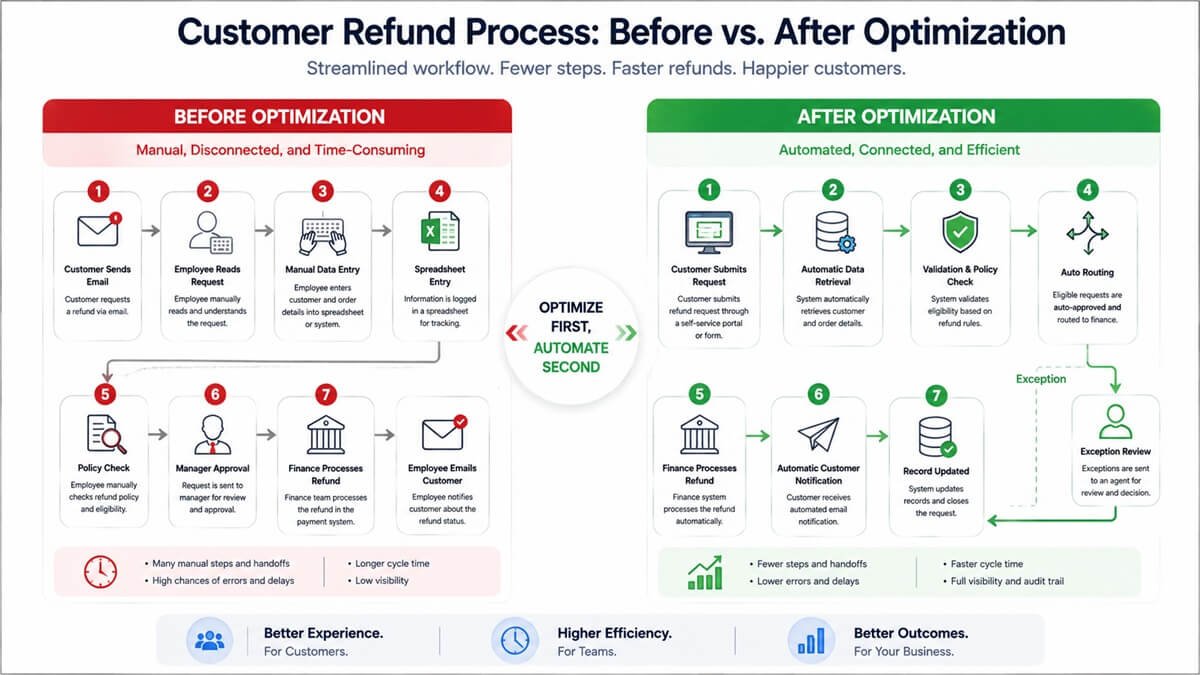
Consider a fictional company processing customer refund requests.
Before Optimization
The original process looks like this:
Customer sends email
↓
Employee reads request
↓
Employee copies customer information
↓
Employee searches order system
↓
Employee checks refund policy
↓
Employee creates spreadsheet entry
↓
Manager reviews request
↓
Finance processes refund
↓
Employee emails customer
This workflow contains several potential inefficiencies:
- Manual data entry
- Multiple systems
- Spreadsheet dependency
- Manual policy checking
- Approval delays
- Repetitive customer communication
After Optimization
The redesigned workflow becomes:
Customer submits refund request
↓
Customer/order information automatically retrieved
↓
Request validated against refund rules
↓
Eligible request automatically routed
↓
Exception sent to employee for review
↓
Approved refund sent to finance
↓
Customer automatically notified
↓
Record updated
The goal is not to eliminate employees. The goal is to allow employees to spend less time on repetitive administration and more time handling exceptions and customer issues that require judgment.
How to Prioritize Workflows for Optimization
Most businesses have more inefficient workflows than they can optimize at once. Start with workflows that have the greatest potential business impact. For example, lead generation workflow templates can provide a starting point for standardizing and automating repetitive sales processes.
A simple scoring model is:
Optimization Priority Score = Business Impact × Frequency × Inefficiency × Automation Potential
Score each category from 1 to 5. For example:
| Factor | Score |
| Business Impact | 5 |
| Frequency | 5 |
| Inefficiency | 4 |
| Automation Potential | 5 |
| Priority Score | 500 |
The exact formula can be adjusted to suit the organization.
High-Priority Workflow Characteristics
Prioritize workflows that are:
- Performed frequently
- Expensive
- Slow
- Error-prone
- Highly repetitive
- Customer-facing
- Dependent on multiple systems
- Dependent on many handoffs
- Easy to measure
- Suitable for automation
A high-volume workflow that saves employees only five minutes per transaction can produce significant annual savings when thousands of transactions are processed.
Workflow Optimization Metrics and KPIs
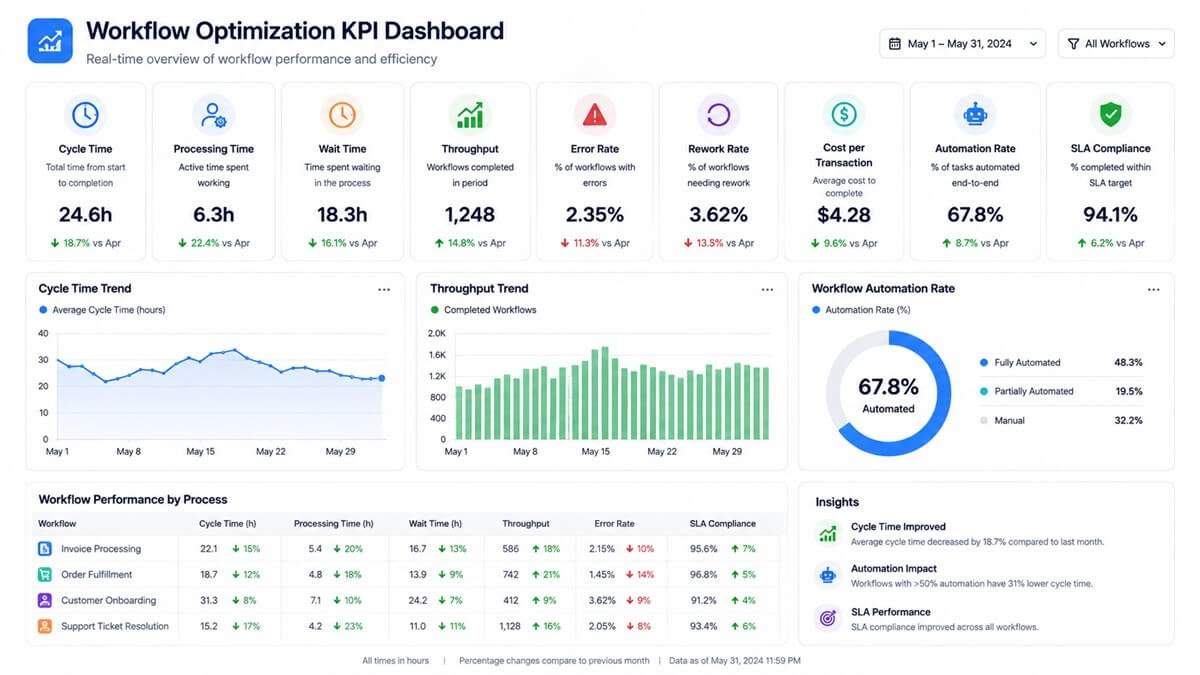
Choosing the right metrics is essential. Do not measure productivity only by the number of tasks employees complete. Measure the outcome of the entire workflow.
Cycle Time
How long does it take for a workflow to move from start to completion? Lower cycle time is often desirable, but not if it causes errors or reduces quality.
Processing Time
How much active employee time is required?
This helps identify opportunities to reduce manual work.
Wait Time
How much time does work spend waiting?
This can reveal approval and handoff problems that processing-time measurements miss.
Throughput
How much work can the process complete during a specific period?
Improved throughput can indicate greater operational capacity.
Error Rate
How frequently does the workflow produce incorrect results?
Automation can reduce some forms of human error, but poorly designed automation can also introduce systematic errors.
Rework Rate
How often does work need to be corrected? This is especially useful for identifying problems with data quality, instructions, and validation.
Cost per Transaction
Estimate the average operational cost of completing one workflow instance. This allows optimization initiatives to be evaluated financially.
Automation Rate
Measure what percentage of eligible workflow activities are automated.
However, automation rate should never become the primary success metric. A workflow with 90% automation is not necessarily better than one with 50% automation.
Business outcomes matter more than automation percentages.
Common Workflow Optimization Mistakes
1. Automating Before Optimizing
This is one of the most common mistakes. If the workflow contains unnecessary steps, automating those steps may increase complexity rather than reduce it.
2. Optimizing Individual Tasks Instead of the Entire Workflow
A department may optimize its own task while creating additional work for another department. Always consider the end-to-end workflow.
3. Ignoring Employees
Employees who perform a workflow every day often know exactly where problems occur.
Ask them:
- Where do you lose the most time?
- What information is usually missing?
- Which task do you repeat?
- Which system causes the most problems?
- Where does work normally get stuck?
4. Measuring Activity Instead of Outcomes
Completing more tasks does not necessarily mean the business is more efficient.
Measure:
- Speed
- Quality
- Cost
- Customer outcomes
- Error reduction
- Capacity
5. Creating Too Many Approvals
Approvals are useful when they manage risk. They become inefficient when every low-risk activity requires management intervention.
6. Ignoring Exceptions
A workflow designed only for perfect inputs will struggle in the real world. Build clear exception paths.
7. Using Too Many Disconnected Tools
Adding another application to fix every workflow problem can create new integration and data-management problems. Consider whether existing systems can handle the requirement before introducing another tool.
8. Failing to Establish a Baseline
Without baseline data, claims of improvement are difficult to verify. Measure performance before making changes.
9. Optimizing for Speed Alone
A faster workflow is not necessarily a better workflow. Optimization should balance:
Speed + Quality + Cost + Reliability + Customer Experience
Workflow Optimization Tools
Different workflow problems require different technologies. AI workflow automation tools can be useful when a workflow requires more than simple rule-based automation.
Process Mapping Tools
Useful for visually documenting workflows and identifying process relationships.
Business Process Management Platforms
Useful for managing structured, repeatable business processes across departments.
Workflow Automation Platforms
Useful for connecting applications and automating repetitive tasks. Platform selection can vary considerably depending on integration requirements, workflow complexity, and technical expertise. Our comparison of Zapier, Make, and n8n explores how these approaches differ.
Robotic Process Automation
Useful when repetitive work must be performed across systems that do not easily integrate.
Process Mining
Useful for analyzing real workflow data to discover how processes actually operate, rather than relying only on documentation.
AI Workflow Platforms
Useful for workflows involving unstructured information, natural language, classification, extraction, summarization, or AI-assisted decisions. Businesses can also use AI workflow diagrams and automation processes to visualize how these components fit together.
The best technology depends on the workflow. Do not choose a tool first and then look for a problem to solve. Start with the workflow problem.
How AI Changes Workflow Optimization
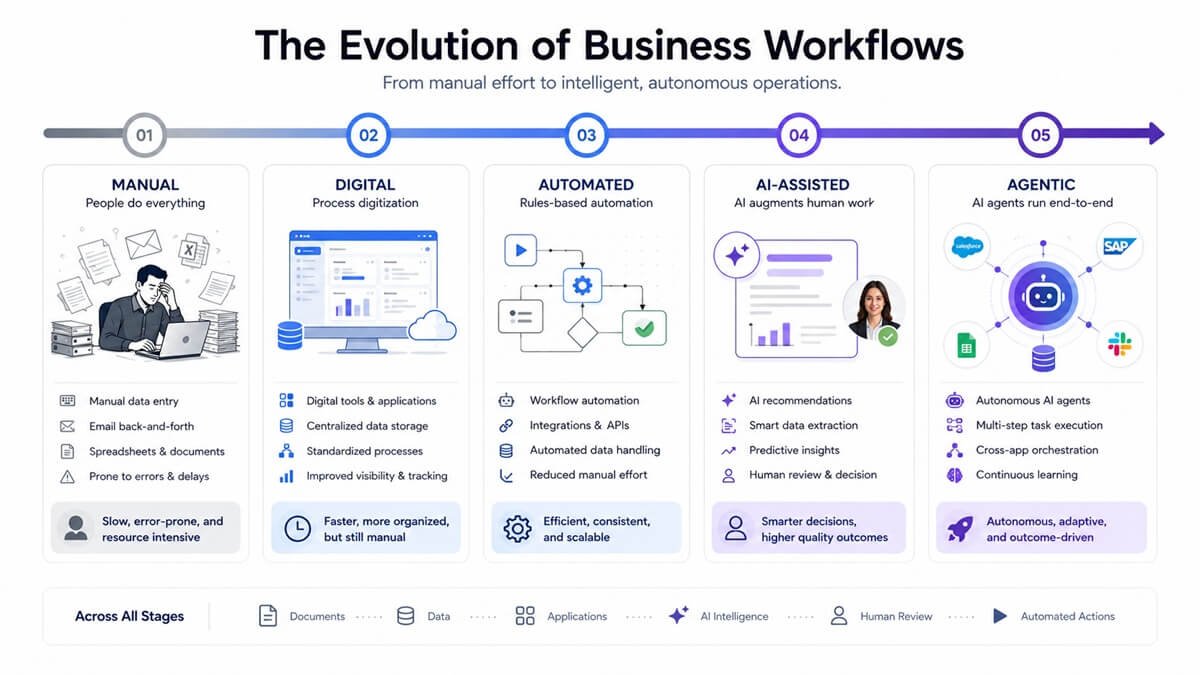
AI is changing workflow optimization because businesses can now automate activities that previously required people to interpret unstructured information. This is why real-world AI automation examples are useful when evaluating where AI can create practical business value.
Traditional automation is generally strongest when the rules are predictable:
IF condition → THEN action
AI can be useful when information is less structured:
Analyze information → Interpret context → Generate output → Route to appropriate action
For example, consider an incoming sales email. A traditional workflow may require an employee to:
- Read the email
- Identify the customer
- Determine the request
- Classify the lead
- Enter information into the CRM
- Assign the lead
- Draft a response
An AI-assisted workflow could:
- Analyze the email
- Extract customer information
- Identify intent
- Classify the lead
- Update the CRM
- Recommend routing
- Draft a response
- Ask an employee to review when necessary
This creates a progression:
Manual → Digital → Automated → AI-Assisted → Agentic
However, AI should be introduced based on business value, reliability, risk, and process requirements, not simply because AI is available.
Workflow Optimization and AI Agents
AI agents can extend workflow automation beyond simple triggers and predefined rules. An AI agent workflow guide can help explain how agentic systems differ from conventional workflow automation. An agentic workflow may be able to:
- Understand a goal
- Gather information
- Use business applications
- Perform multiple steps
- Evaluate intermediate results
- Respond to changing conditions
- Escalate unusual situations
For example:
Customer asks a complex question
↓
AI analyzes the request
↓
Retrieves customer information
↓
Searches internal knowledge
↓
Checks relevant business rules
↓
Drafts response
↓
Requests human approval when required
↓
Updates customer record
This approach can be powerful, but it also requires stronger controls around permissions, data access, reliability, monitoring, and human oversight. The more autonomy a workflow has, the more important governance becomes.
A Workflow Optimization Checklist
Use this checklist before redesigning a business workflow:
- Define the business outcome
- Identify the workflow owner
- Define the start and end points
- Document all participants
- Map the current workflow
- Identify systems and data sources
- Document every handoff
- Measure cycle time
- Measure processing time
- Measure wait time
- Identify bottlenecks
- Identify duplicate work
- Identify unnecessary approvals
- Identify sources of rework
- Remove unnecessary steps
- Simplify the workflow
- Standardize repetitive processes
- Design exception paths
- Identify automation opportunities
- Identify appropriate AI opportunities
- Establish human-review requirements
- Test the redesigned workflow
- Measure post-implementation performance
- Monitor workflow KPIs
- Review the workflow regularly
Frequently Asked Questions About Workflow Optimization
Who should be responsible for workflow optimization in a company?
Workflow optimization usually works best when there is a clearly identified process owner who is accountable for the workflow’s overall performance. However, optimization should not be handled by that person alone. Employees who perform the work, IT or operations teams, finance, compliance, and other stakeholders may all provide important information about how the process actually functions.
How do you calculate the ROI of workflow optimization?
Calculate the measurable financial benefit created by the improvement and compare it with the implementation cost. Potential benefits can include reduced labor requirements, fewer errors, faster processing, lower rework costs, increased capacity, and reduced operational expenses. For recurring workflows, estimate the annual benefit rather than looking only at savings from individual transactions.
How long does workflow optimization take?
There is no universal timeline. A simple workflow involving one department may be evaluated and redesigned relatively quickly, while a workflow spanning several departments and business applications can require substantially more analysis and testing. The complexity of the process, number of stakeholders, data quality, integrations, and required controls all affect the timeline.
What is a good first workflow to optimize?
A good candidate is usually a process that occurs frequently, creates measurable operational costs, involves repetitive work, and has clearly identifiable performance problems. Starting with a manageable workflow can also make it easier to establish a baseline, test the redesigned process, and demonstrate measurable results before tackling larger cross-department workflows.
How do you get employees to adopt a redesigned workflow?
Involve the people who perform the workflow before the redesign is finalized. Employees can identify workarounds, exceptions, and practical problems that don’t appear in formal process documentation. Explain why the workflow is changing, provide appropriate training, and give employees a way to report problems after implementation.
How do you test a workflow before deploying it across the business?
Test the redesigned workflow using realistic transactions, including both normal and unusual cases. Verify that information moves correctly between systems, approvals occur as intended, exceptions are routed properly, and the resulting output meets business requirements. A limited pilot can expose problems before the workflow is introduced more broadly.
What should be documented after optimizing a workflow?
Document the new workflow’s purpose, owner, steps, systems, inputs, outputs, decision rules, approval requirements, exception procedures, automation dependencies, and performance measures. Documentation should be updated whenever significant changes are made so employees and administrators have an accurate reference for how the process operates.
What happens when an automated workflow fails?
A production workflow should have a defined failure and recovery procedure. Depending on the process, this involves notifying an employee, placing the transaction in an exception queue, retrying the failed action, recording the failure for investigation, or temporarily switching to a manual procedure. Critical workflows should not depend on automation failing silently.
How should workflow optimization handle compliance and audit requirements?
Compliance requirements should be considered during workflow design rather than added afterward. Identify which activities require approvals, records, access controls, documentation, or human review, then make those requirements part of the workflow. Automated processes should also maintain sufficient records to demonstrate what happened and, where appropriate, who approved or reviewed an action.
How can a company keep an optimized workflow from becoming inefficient again?
Treat optimization as an ongoing operational responsibility. Assign ownership, monitor meaningful performance indicators, review significant workflow changes, and investigate recurring exceptions or performance deterioration. A workflow should evolve as business requirements, software, transaction volumes, and organizational structures change rather than being considered permanently finished after its initial redesign.
Final Takeaway
Effective workflow optimization starts with understanding how work actually moves through an organization—not with choosing an automation tool.
The biggest improvements often come from removing unnecessary approvals, reducing handoffs, eliminating duplicate data entry, improving information flow, and creating clearer paths for exceptions. Once the process is well designed, automation and AI can be introduced where they provide measurable benefits.
The strongest workflow improvements also remain measurable after implementation. Track cycle time, wait time, errors, rework, cost, and overall service quality to determine whether the redesigned process is delivering the intended results.
Ultimately, the goal is not maximum automation. It is a workflow that enables people and technology to work together efficiently while maintaining the right balance of speed, quality, reliability, control, and customer experience.






One Comment