How to Build an AI Agent with n8n: Step-by-Step Tutorial (2026)

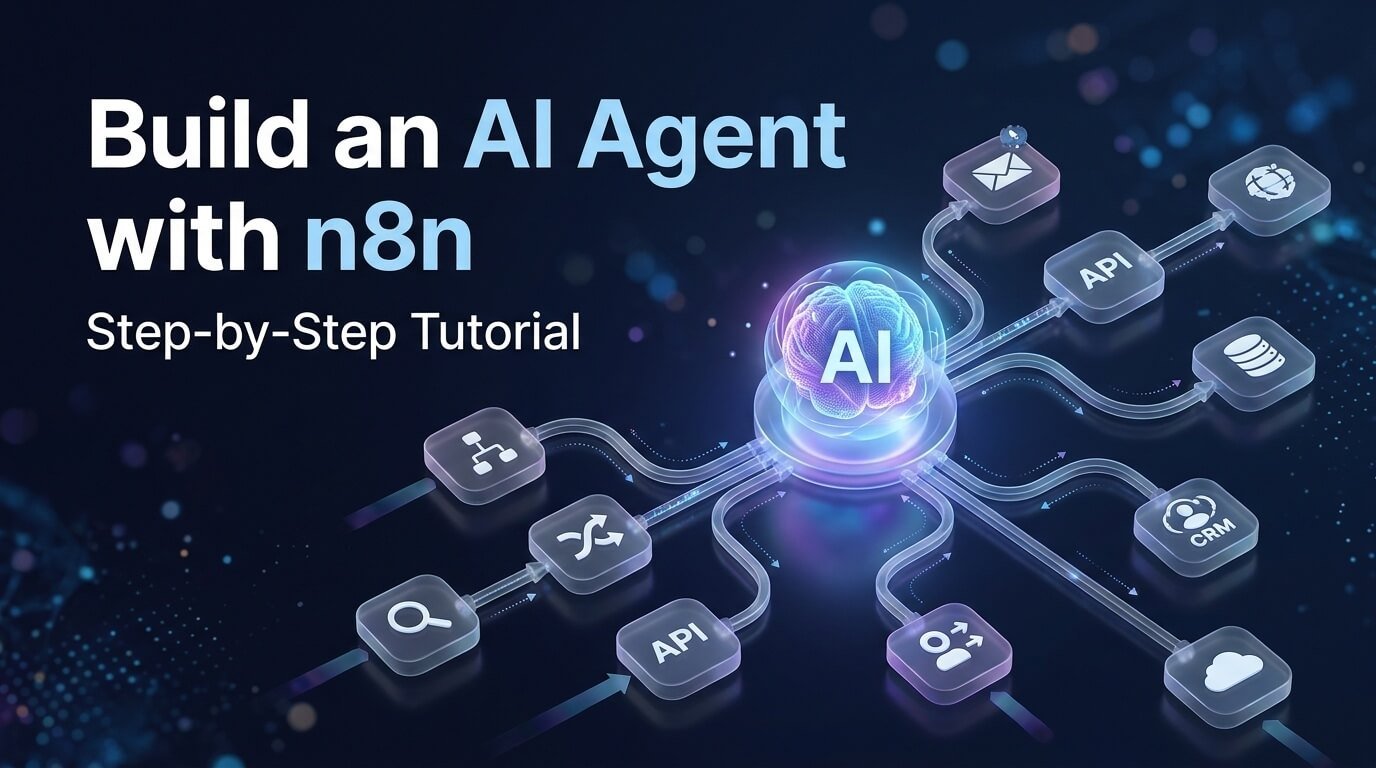
AI agents are changing how businesses approach automation. Instead of creating a workflow where every possible step has to be defined in advance, an AI agent can interpret a request, decide what information it needs, use connected tools, and take actions based on the task.
With n8n, you can build these AI-powered systems visually and connect them to the apps, APIs, databases, and workflows your business already uses. In this guide, you’ll learn how to build an AI agent with n8n from scratch, how AI agents differ from traditional automation, how to give an agent tools and memory, and how to turn a simple agent into a useful business automation system.
We’ll use a practical example throughout the tutorial: an AI research and lead-assistance agent that can receive a request, reason about the task, use connected tools, and return a useful result.
Quick answer: To build an AI agent with n8n, you generally need an input or trigger, an AI Agent, a chat model, instructions, and one or more tools. You can then add memory, business integrations, approval steps, and additional workflows as your use case becomes more advanced.
Table of Contents
What Is an AI Agent in n8n?
An AI agent is an AI-powered system that can decide what actions to take to accomplish a goal rather than simply generating a response.
A traditional automation might follow a fixed sequence:
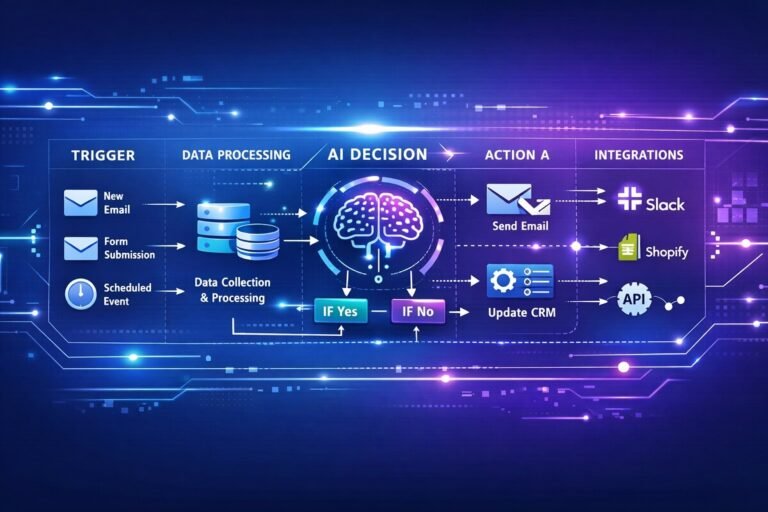
Trigger → Action → Action → Action → Result
An AI agent introduces a decision-making layer:
Input → AI Agent → Decide → Use Tool → Observe Result → Decide Again → Final Response
For example, imagine you tell an agent:
“Research this company, summarize what it does, and prepare a lead qualification report.”
A traditional workflow would need predetermined steps for every part of the process.
An AI agent can instead determine that it needs to:
- Retrieve company information.
- Search or query a connected data source.
- Analyze the information.
- Evaluate the lead against defined criteria.
- Save the result.
- Return a summary.
The agent does not replace workflow automation. Instead, it adds a decision-making layer to it. n8n describes agentic workflows as combinations of AI agents and traditional workflow automation, allowing agents to make decisions and interact with tools while the workflow provides the surrounding automation infrastructure.
How Does an n8n AI Agent Work?
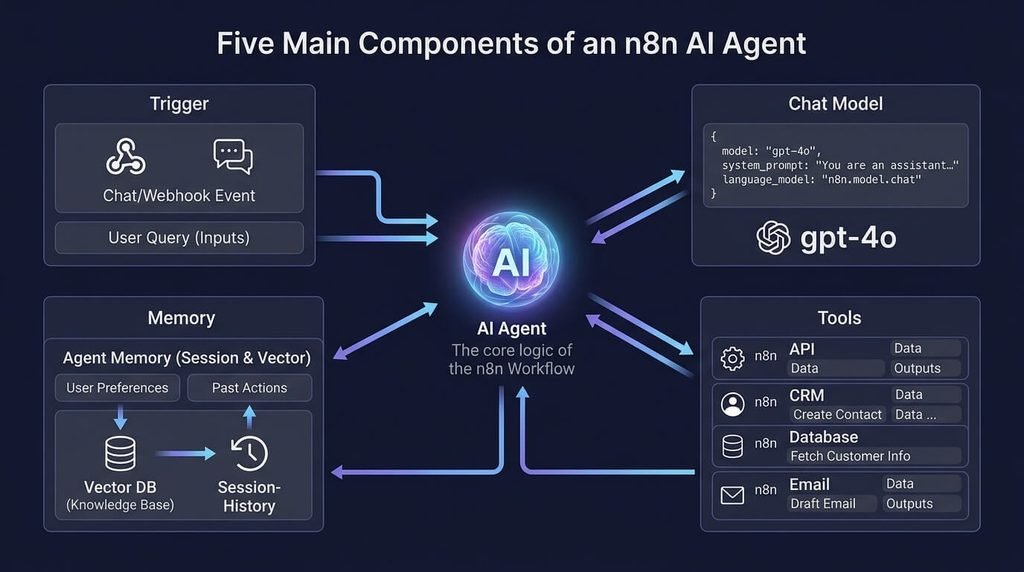
A useful way to understand an n8n AI agent is to break it into several components.
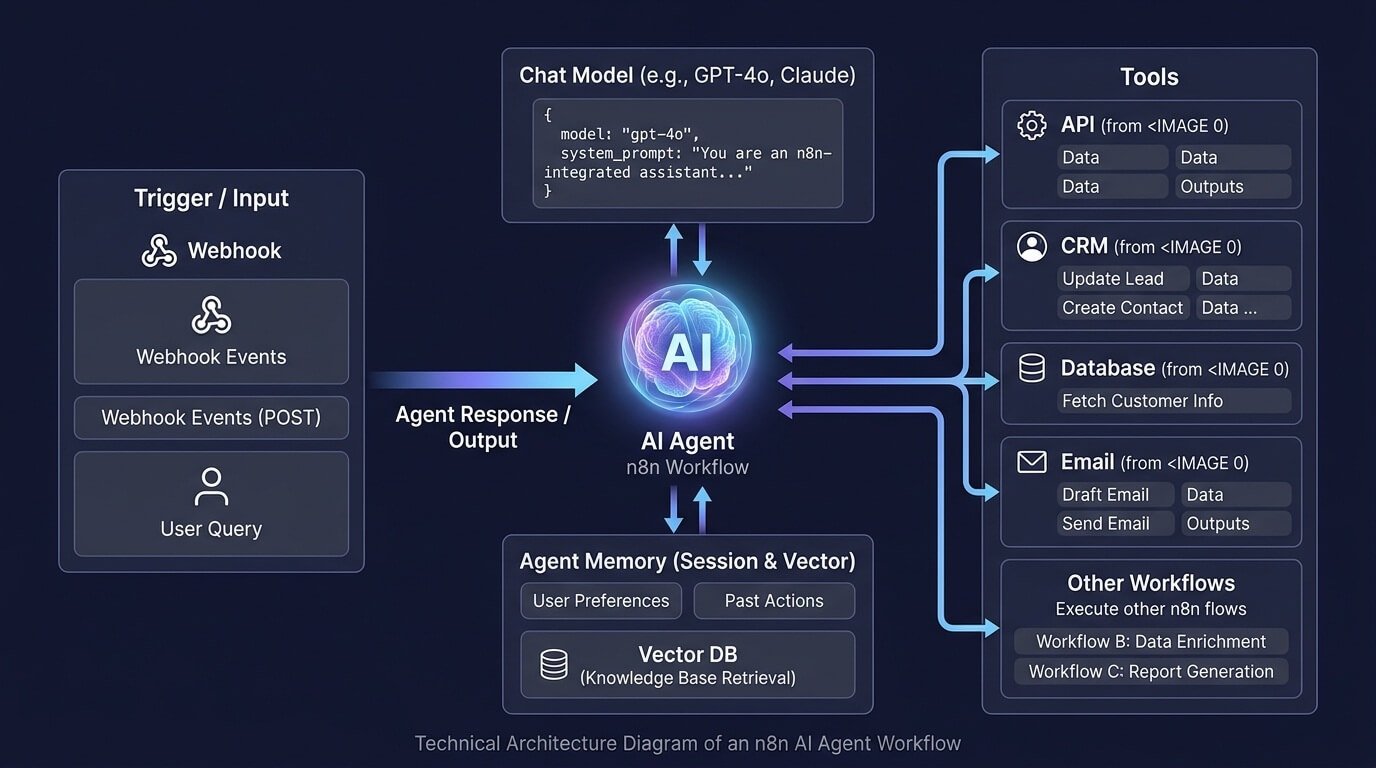
1. Trigger or Input
The trigger gives the agent something to work with.
Depending on your application, this could be:
- A chat message
- A webhook request
- An email
- A form submission
- A Slack message
- A scheduled workflow
- Another n8n workflow
For a beginner project, a chat-based trigger is one of the easiest ways to test an agent.
2. AI Agent
The AI Agent is the decision-making component. It receives the user’s request and determines how to respond or which connected tools may be necessary.
n8n’s current agent capabilities can also be used outside a traditional workflow. n8n introduced a newer Agents experience in September 2026 that allows users to define what an agent should do, choose a model, and provide tools and workflows it can use. Agents can then be interacted with through channels such as Slack, scheduled executions, or other workflows.
For workflow-based builds, the AI Agent node can act as the central orchestrator between the incoming request, language model, and tools.
3. Chat Model
The AI model provides the language and reasoning capabilities. Depending on your setup, you can connect a supported model such as:
- Google Gemini
- OpenAI
- Anthropic
- Other supported chat models
The exact model you choose depends on your budget, required capabilities, latency, context requirements, and tool-calling performance.
4. Tools
Tools are what allow the agent to do more than generate text. For example, an agent could have tools that allow it to:
- Search information
- Query a database
- Read a spreadsheet
- Send an email
- Create a calendar event
- Update a CRM
- Make an HTTP request
- Run another n8n workflow
- Retrieve information from a knowledge base
n8n’s AI-agent examples demonstrate this model clearly: the agent receives a request, determines which tool is appropriate, executes the tool, and then uses the result to formulate its response.
5. Memory
Memory allows the agent to maintain conversational context. Without memory, every interaction may effectively start from scratch. With memory, the agent can maintain relevant context from previous messages, making conversations more natural and useful.
For example:
User: My company sells outdoor equipment.
User: What kind of leads should I target?
With conversation memory available, the agent can use the earlier context instead of requiring the user to repeat the business description.
Memory should be designed carefully, however. More memory is not automatically better. You need to consider what information should be retained, for how long, and whether sensitive information should be stored.
What You Need to Build an AI Agent with n8n
Before building the workflow, prepare the following:
Required
- An n8n Cloud account or self-hosted n8n instance
- Access to an AI model supported by your n8n setup
- Appropriate credentials for the AI model
Optional
Depending on your agent:
- Gmail credentials
- Google Sheets credentials
- CRM credentials
- Slack credentials
- Database credentials
- HTTP/API credentials
- Search or research tools
- A vector database or other knowledge source
- Another n8n workflow that can be used as a tool
You don’t need all of these to build your first agent. In fact, starting with one or two simple tools is usually easier than immediately building a complicated multi-tool system.
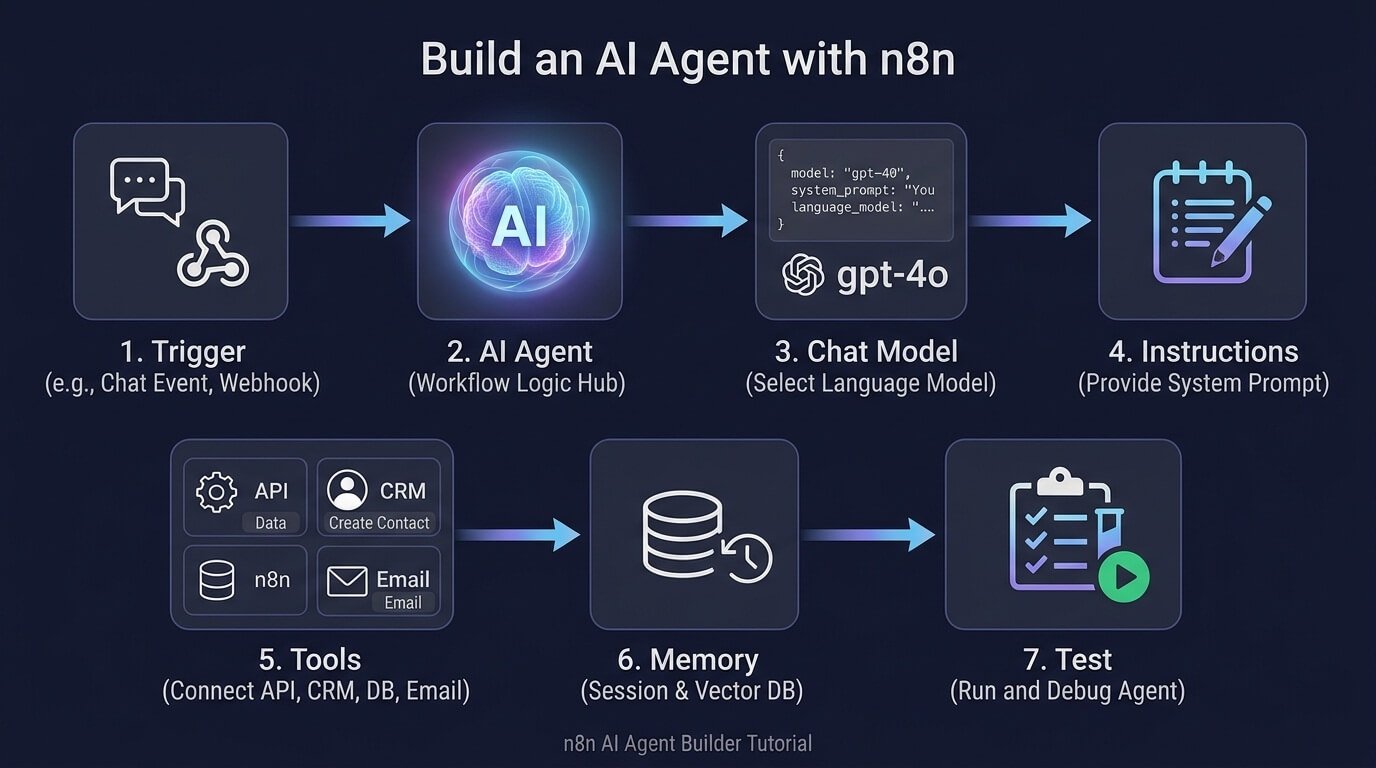
Step 1: Create Your n8n Workflow
Log in to your n8n account and create a new workflow. For this tutorial, we’ll use a chat-style interaction because it makes testing the agent straightforward.
Add a Chat Trigger to your workflow.
The basic architecture will look like this:
Chat Trigger → AI Agent → Response
The AI Agent will also have connections to:
Chat Model
and
Tools
The exact interface and available options can change as n8n evolves, so use the current node names and configuration options shown in your n8n instance. n8n’s own starter agent templates use a chat interface, an AI Agent, a language model, tools, and conversation memory as the core building blocks of a beginner-friendly agent.
Step 2: Add the AI Agent
Add an AI Agent node to the workflow and connect the Chat Trigger to it. The AI Agent becomes the central decision-making component. Think of it as the manager of your automation.
The trigger says:
“Here is what the user wants.”
The AI Agent determines:
“What should I do with this request?”
The connected tools then provide the capabilities required to complete the task.
For example, if the user asks:
“Find information about this company and summarize it.”
The agent might determine that it needs a research or HTTP tool.
If the user asks:
“Save this lead to our CRM.”
The agent can determine that it needs a CRM tool.
This separation between reasoning and actions is one of the most important concepts to understand when building AI agents.
Step 3: Connect an AI Model
Next, connect a supported chat model to your AI Agent. Depending on your setup, this could be a Google Gemini Chat Model, OpenAI Chat Model, Anthropic Chat Model, or another supported option. You’ll need to configure the appropriate credentials.
For example, n8n’s first-agent workflow templates currently demonstrate using Google Gemini as the language model and provide instructions for connecting the model credentials inside n8n.
Choose a model appropriate for your use case rather than automatically selecting the most expensive model. For simple tasks, you may only need a relatively lightweight model. For complex reasoning, research, or multi-step tasks, a stronger model may be useful.
Step 4: Give Your AI Agent Clear Instructions
This is one of the most important steps.
Your agent needs a clearly defined role.
Avoid vague instructions such as:
You are a helpful AI assistant.
Instead, define:
- What the agent is responsible for
- What it should not do
- When it should use tools
- How it should handle missing information
- What format its responses should use
- When it should ask for clarification
- Which actions require confirmation
For example:
You are a business research assistant.

Your job is to research companies and prepare concise lead research summaries.

Rules:
1. Use available tools when additional information is required.
2. Do not invent company information.
3. Clearly identify information that could not be verified.
4. Keep research summaries concise and structured.
5. Do not send emails or modify CRM records without explicit authorization.
6. If required information is missing, ask the user for it.
7. Return the final result using clear headings and bullet points.
A strong system prompt gives the agent boundaries. It also reduces the chance that the agent will use tools unnecessarily or take actions that you did not intend. n8n’s own AI-agent guidance recommends clearly defining the agent’s task and explicitly explaining when and how tools should be used.
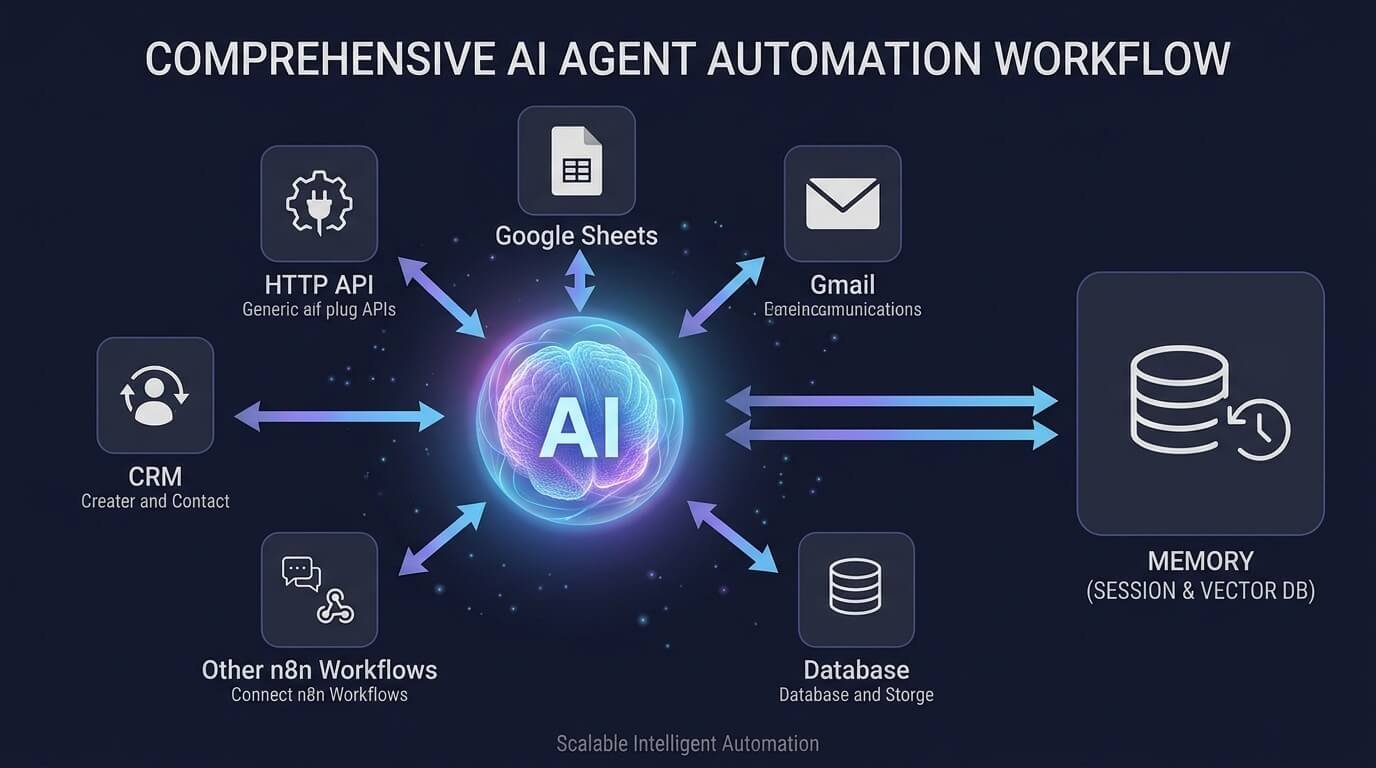
Step 5: Add Tools to Your AI Agent
This is where your automation becomes much more powerful. An AI model by itself can generate text. An AI agent with tools can interact with external systems. For example, you could connect:
HTTP Request Tool
Useful for calling APIs and retrieving information from external services.
Google Sheets
Useful for reading or updating structured business data.
Gmail
Useful for email-related automation.
Google Calendar
Useful for scheduling and retrieving calendar information.
CRM Tools
Useful for creating, updating, or retrieving customer records.
Database Tools
Useful for querying business data.
Other n8n Workflows
Useful when you want your agent to delegate a specific task to a predefined automation.
n8n specifically supports the concept of using workflows as tools for agents, which is useful because you can keep complex business logic inside a normal workflow while allowing an agent to decide when that workflow should be used.
Step 6: Build a Simple AI Agent Tool
Let’s make the example more practical. Suppose your agent needs to retrieve information from an external API. You could create a tool that performs an HTTP request. The architecture becomes:
User → Chat Trigger → AI Agent → HTTP Tool → API → AI Agent → User
The process might look like this:
- The user asks a question.
- The AI Agent analyzes the request.
- The agent determines that external information is required.
- The agent calls the HTTP tool.
- The HTTP tool retrieves the information.
- The agent receives the result.
- The agent interprets the information.
- The agent creates the final response.
This is fundamentally different from simply asking an LLM to answer a question from its existing knowledge.
Step 7: Add Memory
Now add conversation memory if your use case requires ongoing conversations. A memory component allows the agent to retain relevant conversation history.
For example:
- User: I’m looking for B2B software companies.
- Agent: What type of software?
- User: CRM software.
- Agent: What company size?
Without conversational context, the second message may not be enough to understand what “What company size?” refers to. With appropriate memory, the agent can understand that the conversation is about finding B2B CRM software companies. n8n’s AI-agent examples use conversation memory to maintain context across interactions.
Don’t store everything forever
Memory should be intentional.
Ask:
- Does the agent actually need this information later?
- How long should it be retained?
- Is the information sensitive?
- Can the information be safely stored?
- Should the user be able to clear the conversation?
For business systems, memory and data retention should be treated as part of the workflow design rather than added as an afterthought.
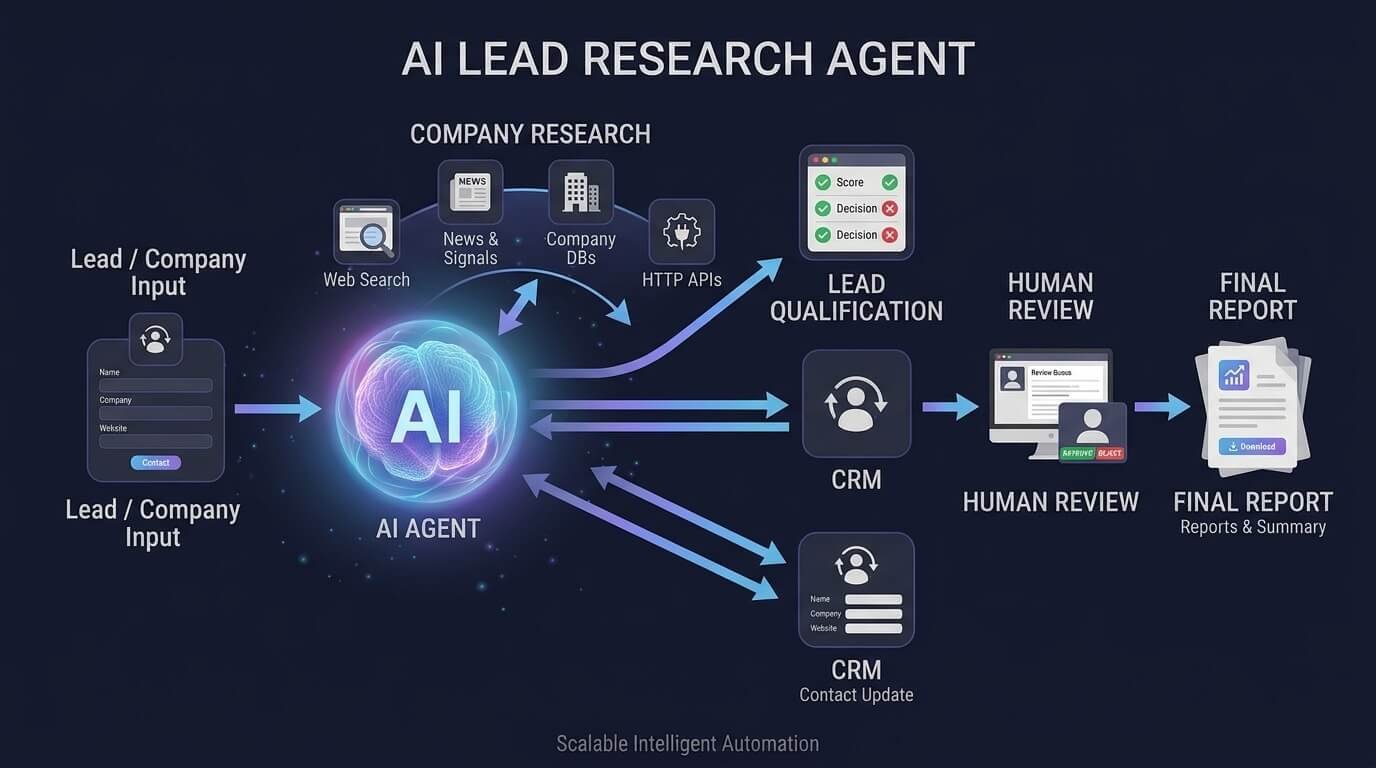
Step 8: Create a Useful Business Agent
Once your basic agent works, you can turn it into a business automation. Let’s use an AI Lead Research Agent as an example. The user might submit:
“Research Acme Software and tell me whether it looks like a good B2B lead.”
The workflow could be:
Chat/Form → AI Agent → Company Research Tool → Lead Qualification Tool → CRM → Final Summary
The agent could:
- Identify the company.
- Retrieve available company information.
- Analyze the information.
- Apply predefined qualification criteria.
- Create a structured summary.
- Save the result.
- Ask for human approval before any outreach.
This architecture can be adapted to many business processes. For example, you could create an:
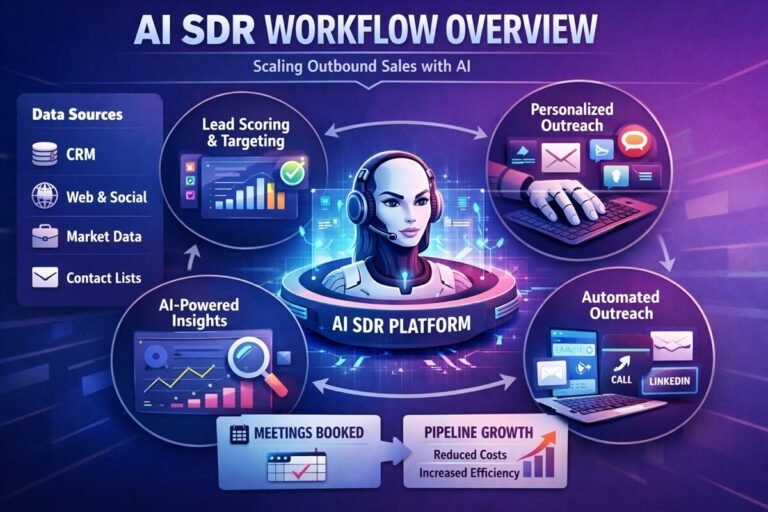
- AI SDR agent
- Customer support agent
- Lead qualification agent
- Email processing agent
- Research agent
- Content research agent
- CRM assistant
- Internal operations assistant
For a practical sales example, you can also see how an n8n AI SDR workflow can automate lead research, qualification, and outreach.
Step 9: Add Human Approval Before Important Actions
One of the biggest mistakes beginners make with AI agents is giving the agent too much authority too quickly. If an agent can:
- Send emails
- Delete records
- Update a CRM
- Create appointments
- Spend money
- Modify customer information
you should consider adding approval or other safeguards before allowing those actions automatically.
For example:
AI Agent → Prepare Email → Human Approval → Send Email
rather than:
AI Agent → Send Email
This allows the agent to do the time-consuming preparation while a human remains responsible for the final action. Human approval is particularly useful when the consequences of a wrong decision are significant.
Step 10: Test Your AI Agent
Don’t immediately connect your agent to every business system. Start with simple tests.
Test 1: Basic request
Ask:
“What can you help me with?”
Make sure the agent responds according to your instructions.
Test 2: Tool request
Ask something that requires one of your connected tools.
Verify that the correct tool is selected.
Test 3: Missing information
Give the agent an incomplete request.
For example:
“Research this company.”
without providing a company.
The agent should ask for the missing information instead of inventing an answer.
Test 4: Incorrect tool
Give it a request that should not require a particular tool. Make sure it doesn’t unnecessarily call the tool.
Test 5: Multiple steps
Give it a request that requires more than one action. Observe whether it can use the available tools in an appropriate sequence.
Test 6: Failure
Temporarily make a tool unavailable or return an error. Your agent should handle the failure gracefully instead of pretending that the action succeeded.
Step 11: Add Guardrails
A production AI agent needs more than a good prompt. Consider adding safeguards around:
Tool permissions
Only give the agent access to tools it actually needs.
Data access
Limit access to sensitive business information.
Human approval
Require approval for high-impact actions.
Error handling
Define what happens when an API, CRM, or other service fails.
Iteration limits
Agents that can repeatedly call tools should have reasonable limits to reduce runaway execution and unnecessary costs.
Output validation
Check important outputs before they are sent to another system.
Logging
Keep enough execution information to understand what the agent did when something goes wrong. A useful principle is:
Give an AI agent the minimum permissions required to accomplish its job.
Don’t give an email-sending agent access to your entire business database unless there is a genuine reason for it.
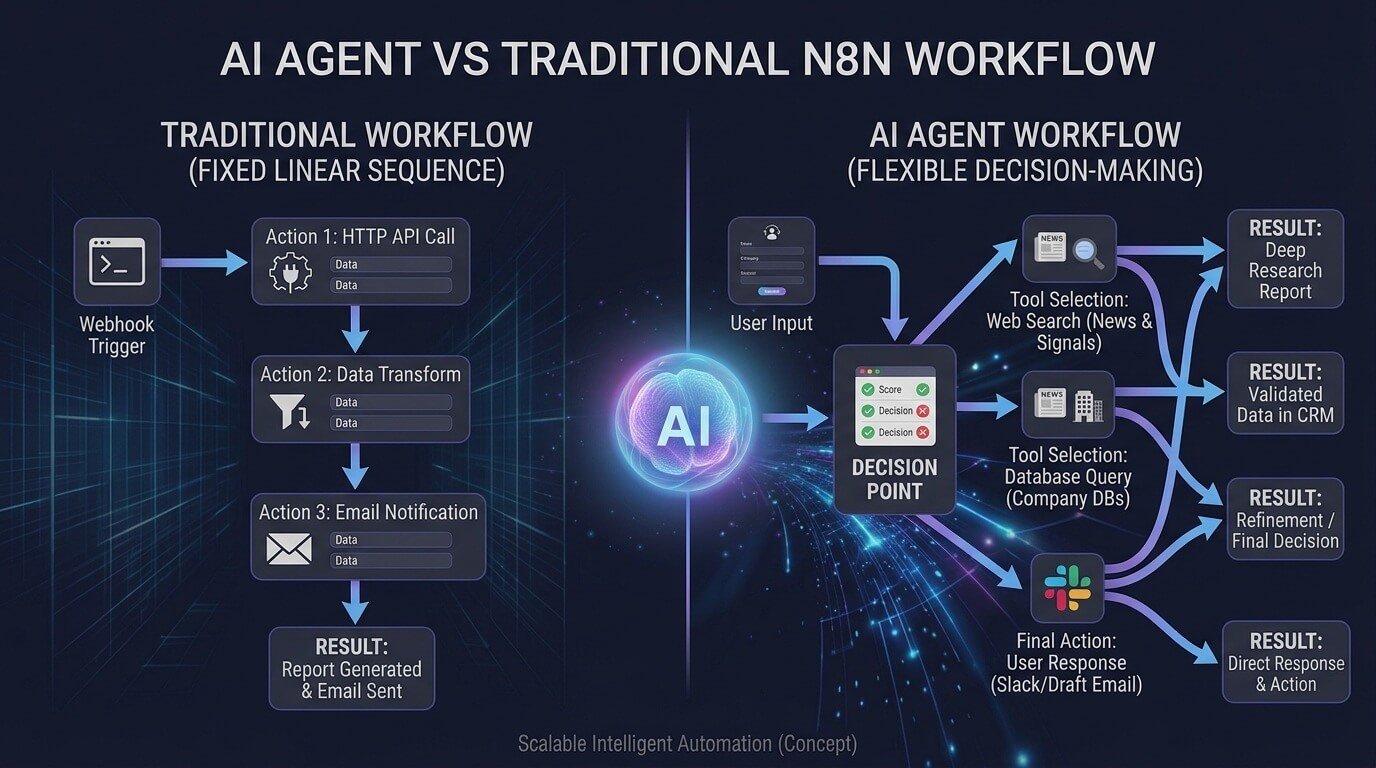
AI Agent vs Traditional n8n Workflow
AI agents and traditional workflows are not competing technologies. They solve different problems.
| Traditional n8n Workflow | AI Agent |
|---|---|
| Follows predefined logic | Can choose between actions |
| Highly predictable | More flexible |
| Excellent for repeatable processes | Useful for variable tasks |
| Easier to test | Requires more testing |
| Usually deterministic | Can produce different decisions |
| Best when rules are known | Useful when the path is less predictable |
Consider a simple lead-routing system.
If your rule is:
Score above 80 → Sales
Score 50–79 → Follow-up
Score below 50 → Nurture
a traditional workflow may be the simplest solution.
But if the task is:
“Research this company, determine its likely business model, identify relevant decision-makers, summarize the opportunity, and recommend what information is still missing.”
an AI agent may be more appropriate because the exact sequence of actions can vary. The best systems often combine both approaches.
When Should You Use an AI Agent?
AI agents are particularly useful when the task involves uncertainty, natural-language instructions, or multiple possible actions. Consider an AI agent when:
- The user request can vary significantly.
- Multiple tools may be relevant.
- The agent needs to decide what to do next.
- Information needs to be retrieved dynamically.
- The task involves unstructured text.
- The workflow needs conversational interaction.
- Different requests require different paths.
A traditional workflow may be better when:
- The process is completely predictable.
- The rules are simple.
- Every execution follows the same path.
- You need maximum determinism.
- The task doesn’t require reasoning.
Don’t use an AI agent simply because AI is available. If a normal n8n workflow can perform the task reliably, it may be the better architecture.
n8n AI Agent Use Cases
Once you understand the basic architecture, you can build agents for many business applications.
1. AI Sales Agent
An AI sales agent could:
- Research prospects
- Enrich lead information
- Qualify opportunities
- Summarize accounts
- Prepare personalized outreach
- Update CRM records
For more advanced sales automation, an agent can work alongside predefined workflows that control qualification, routing, and human approval.
2. AI Customer Support Agent
A customer support agent could:
- Read incoming questions
- Search a knowledge base
- Identify the issue
- Draft a response
- Retrieve customer information
- Escalate complex cases
You can combine the agent with conventional n8n routing logic to ensure certain issues always reach a human.
3. AI Email Agent
An email agent could:
- Classify incoming emails
- Extract important information
- Summarize conversations
- Draft responses
- Route messages
- Create tasks
Your existing n8n AI Email Automation article can serve as a supporting resource for readers interested in this use case.
4. AI Lead Qualification Agent
An agent can analyze information about a prospect and use predefined criteria to classify the opportunity.
For example:
Hot → Sales review
Warm → Follow-up
Cold → Nurture
For a more structured implementation, readers can continue to your n8n AI Lead Qualification Workflow guide.
5. AI Research Agent
A research agent could:
- Receive a research question
- Search available sources
- Retrieve information
- Summarize findings
- Save the research
- Notify a team member
n8n’s own AI-agent examples demonstrate research-oriented agents using tools to retrieve information and then process the results.
How to Make Your n8n AI Agent More Reliable
Building an agent is relatively easy. Building one that behaves consistently is harder. Use these practices to improve reliability.
1. Define a narrow objective
Don’t create an agent that is supposed to:
“Run the entire business.”
Start with one clearly defined job.
For example:
“Qualify inbound B2B leads using the approved qualification criteria.”
A narrow objective is easier to test and improve.
2. Give tools descriptive names
Instead of:
Tool 1
use:
Search Company Information
The agent needs enough context to understand what each tool is for.
3. Describe when tools should be used
Your system instructions should explain which situations justify using each tool.
4. Validate important data
Don’t blindly pass AI-generated information into your CRM. Where possible, validate important fields before saving them.
5. Separate thinking from high-impact actions
Let the agent research and prepare an action. Then use deterministic workflow logic or human approval before the final action.
6. Start with one agent
You don’t need a multi-agent architecture for every project. A single agent with a few well-designed tools is often easier to understand, test, and maintain. n8n’s own agentic workflow guidance identifies the single-agent pattern as a useful architecture because it can maintain state, use different tools, and remain simpler than a multi-agent system.
7. Monitor executions
Review actual executions rather than assuming the agent behaves exactly as intended.
Look for:
- Unnecessary tool calls
- Incorrect tool selection
- Hallucinated information
- Repeated actions
- Poor error handling
- Unexpected outputs
- Excessive model usage
Should You Build One AI Agent or Multiple Agents?
For beginners, start with one. A single agent can often handle multiple related tools.
For example:
Sales Agent
→ Research Company
→ Search CRM
→ Qualify Lead
→ Prepare Email
As your system becomes more complex, you may decide to divide responsibilities.
For example:
Manager Agent
→ Sales Agent
→ Research Agent
→ Customer Support Agent
→ Data Agent
This can make sense when each specialized agent has a clearly defined responsibility. However, multi-agent systems introduce additional complexity. You have more prompts, more tool interactions, more failure points, and more things to monitor. Build the simplest architecture that solves the problem.
n8n AI Agent Workflow Example
Here’s a simple architecture you can use as a starting point:
                 ┌─────────────────┐
                 │   Chat Trigger  │
                 └────────┬────────┘
                          │
                          ▼
                 ┌─────────────────┐
                 │    AI Agent     │
                 │                 │
                 │   Instructions  │
                 │   Decision      │
                 │   Tool Selection│
                 └─────┬─────┬─────┘
                       │     │
             ┌─────────┘     └──────────┐
             ▼                          ▼
     ┌───────────────┐          ┌───────────────┐
     │  Chat Model   │          │     Tools     │
     └───────────────┘          └───────┬───────┘
                                        │
                         ┌──────────────┼──────────────┐
                         ▼              ▼              ▼
                       CRM            API          Database
                         │              │              │
                         └──────────────┼──────────────┘
                                        ▼
                                 ┌─────────────┐
                                 │ Final Reply │
                                 └─────────────┘
Memory can be connected to the agent when conversational context is required. For more advanced implementations, the tools can also be complete n8n workflows, allowing the agent to call predefined business processes rather than directly controlling every individual node. n8n’s current Agents architecture explicitly supports using workflows as tools.
Common n8n AI Agent Mistakes
Mistake 1: Giving the agent too many tools
More tools don’t automatically make an agent better. Too many similar tools can make tool selection harder. Start with the minimum number required.
Mistake 2: Using vague instructions
“Help the customer” isn’t a complete specification. Define the role, objective, boundaries, tools, and expected output.
Mistake 3: Letting the agent take irreversible actions
Don’t immediately allow a new agent to send emails, delete records, or make important changes without safeguards.
Mistake 4: Skipping failure testing
A workflow that works once is not necessarily production-ready. Test what happens when:
- The API fails.
- Credentials expire.
- The tool returns empty data.
- The user gives incomplete information.
- The AI chooses an inappropriate tool.
- A downstream service is unavailable.
Mistake 5: Making everything agentic
Some processes don’t need an AI agent. If a simple IF node, Switch node, or predefined workflow can reliably perform the job, use it. AI should solve a real problem rather than add complexity.
FAQs: Build an AI Agent with n8n
What is an AI agent in n8n?
An AI agent in n8n is an AI-powered automation component that can interpret a request, make decisions, and use connected tools or workflows to accomplish a task.
Can beginners build an AI agent with n8n?
Yes. n8n provides visual workflow building and AI-agent components that allow users to connect language models, tools, memory, and other services without building the entire agent framework from scratch. n8n also provides first-agent workflow templates intended to help users build and test their first AI agent.
Does an n8n AI agent need an API key?
If the agent uses a hosted AI model that requires API authentication, you’ll generally need the appropriate credentials. The exact requirement depends on the model and deployment method you choose.
Can an n8n AI agent use tools?
Yes. Tools are one of the main reasons to build an agent rather than using a basic chatbot. Tools allow the agent to interact with external services, APIs, databases, applications, and workflows.
Can an n8n AI agent access a CRM?
Yes, provided you configure the appropriate CRM integration, API, or workflow tool and give the agent the required permissions.
Can an n8n AI agent send emails?
An agent can be connected to email functionality, but sending messages automatically should be carefully controlled. For many business applications, it’s safer to have the agent prepare the email and require approval before sending it.
Can an n8n AI agent use memory?
Yes. Memory can be added when your use case requires the agent to retain conversational context.
Should I use an AI agent instead of a normal n8n workflow?
Not necessarily. Use a traditional workflow when the process is predictable and rule-based. Consider an AI agent when the task requires natural-language interpretation, dynamic decisions, or choosing between multiple tools.
Can an AI agent call another n8n workflow?
Yes. n8n’s current Agents architecture allows workflows to be exposed as tools that an agent can use. This is particularly useful for business automation because you can keep critical logic inside predefined workflows while allowing the agent to decide when those workflows should be used.
Final Thoughts
Building an AI agent with n8n doesn’t require you to create an entire AI system from scratch. The basic architecture is straightforward:
Input → AI Agent → Model → Tools → Result
From there, you can add memory, APIs, databases, CRMs, email, Slack, approval steps, and complete n8n workflows as tools. The most important part isn’t adding as many tools as possible. It’s designing an agent with a clear job, controlled permissions, useful tools, reliable instructions, and appropriate safeguards.
- Start with a small problem.
- Build one agent.
- Give it one or two useful tools.
- Test it thoroughly.
Then expand the system when you know where AI-based decision-making actually adds value. Once you understand this architecture, you can use the same approach to build AI sales agents, customer support agents, research assistants, lead qualification systems, email automation, and other business-focused AI workflows.
If you’re new to n8n, start with a basic workflow first and then gradually add AI capabilities as your automation becomes more sophisticated.
Related n8n Guides:
- n8n AI Workflow Automation: Step-by-Step Tutorial — Learn the fundamentals of building AI-powered workflows with n8n.
- n8n AI SDR Workflow — Explore how AI can automate lead research, qualification, and sales outreach.
- n8n AI Lead Qualification Workflow — Build a workflow that scores and routes leads.
- n8n AI Email Automation — Learn how to automate email processing and AI-assisted replies.
- n8n AI Customer Support Workflow — Explore AI-powered ticket handling and escalation.
- n8n AI Workflow Automation for Small Business — See practical ways businesses can use n8n AI automation.
- AI Agent Workflow Guide — Learn the broader principles behind AI-agent-based automation.
- Zapier vs Make vs n8n — Compare the three automation platforms before choosing a workflow automation stack.
Ready to build your first AI agent? Start with a simple use case, connect only the tools your agent needs, and expand from there.