HubSpot Automation Agency: Build High-Converting CRM Workflows

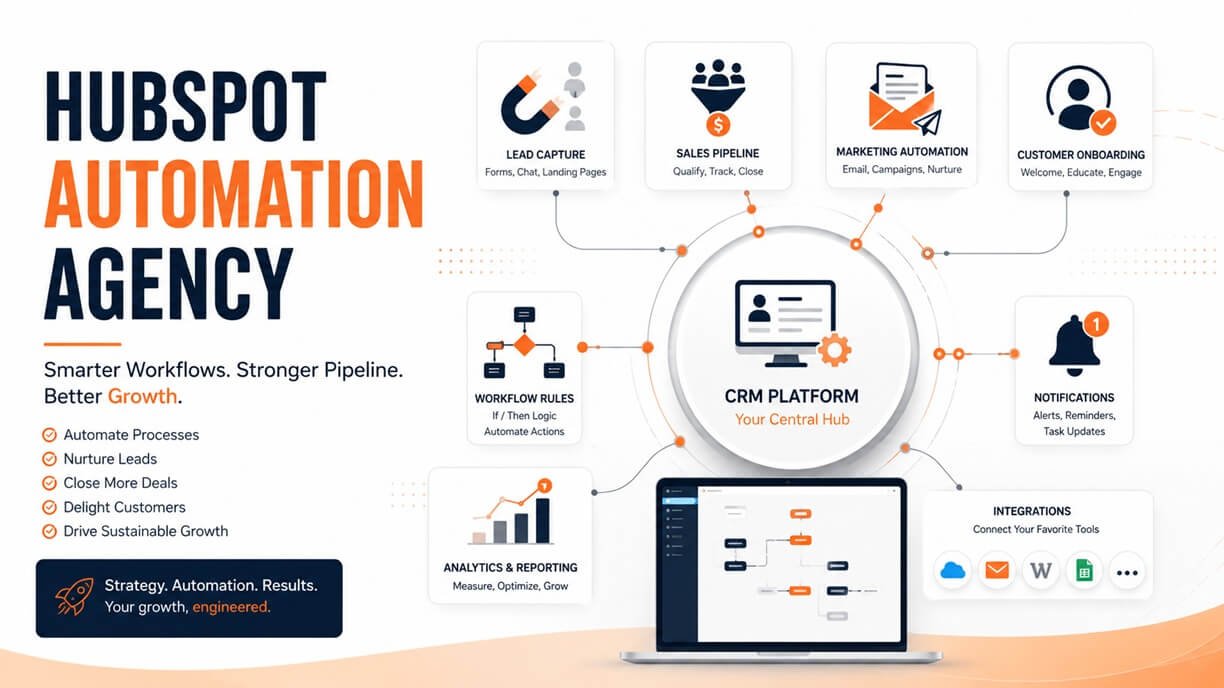
A HubSpot automation agency helps businesses turn repetitive CRM, marketing, sales, service, and operational processes into structured automated workflows inside HubSpot.
The best automation projects are not about creating the largest possible number of workflows. They are about identifying where manual work, slow handoffs, inconsistent data, and missed follow-ups are hurting the customer journey—and then designing automation around those problems.
HubSpot workflows can enroll records based on defined criteria and perform actions such as updating CRM data, creating tasks, sending notifications, routing records, and connecting with external systems. HubSpot currently supports workflow automation across several Hubs, with availability depending on the subscription and feature.
This guide explains what a HubSpot automation agency does, which processes can be automated, how professional workflow architecture works, what an implementation process looks like, how to evaluate an agency, and how to measure whether automation is actually producing business value.
Table of Contents
What Is a HubSpot Automation Agency?
A HubSpot automation agency is a specialized service provider that designs, builds, integrates, audits, and optimizes automated processes within the HubSpot platform. Instead of asking employees to manually perform the same CRM tasks every time a lead submits a form, a deal changes stage, or a customer reaches a particular milestone, an agency can design rules that allow HubSpot to handle appropriate steps automatically.
A general automation can follow this structure:
Business event → Trigger → Conditions → Workflow logic → Automated actions → Human handoff → Measurement
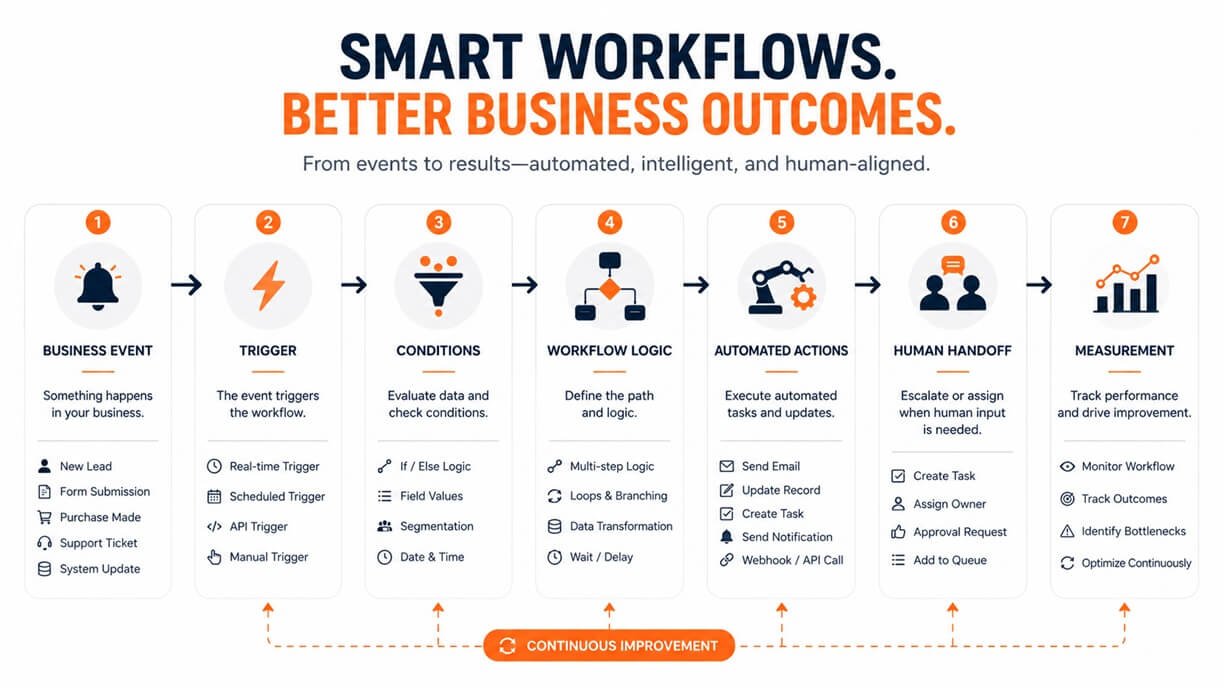
For example:
Demo request → Lead qualification → Territory check → Sales assignment → Internal notification → Follow-up task → Conversion tracking
The agency’s role goes beyond clicking together workflow actions. It should first understand the business process, determine what should happen, identify exceptions, establish the necessary CRM data structure, and then translate that process into maintainable automation.
HubSpot describes workflows as a shared automation engine that can operate across marketing, sales, service, data, and other customer-platform processes.
What Does a HubSpot Automation Agency Do?
A professional agency can work across several layers of a HubSpot implementation.
CRM automation
CRM automation focuses on keeping records accurate and moving information through the system without unnecessary manual intervention.
Examples include:
- Updating contact properties
- Creating or updating company records
- Associating related records
- Assigning owners
- Standardizing information
- Creating records automatically
- Moving information between CRM objects
- Maintaining lifecycle data
HubSpot workflows can act on records such as contacts, companies, deals, tickets, and other supported objects depending on the account configuration.
Lead management automation
Lead processes often contain repetitive administrative work. An agency can design workflows that:
- Capture new leads
- Check qualification criteria
- Assign leads to appropriate representatives
- Notify sales teams
- Create follow-up tasks
- Update lifecycle information
- Escalate unattended leads
- Trigger appropriate nurturing
The goal is not simply to automate lead assignment. The workflow should make the company’s lead-management rules consistent.
Sales automation
Sales teams can use automation to reduce administrative work around the pipeline. Possible processes include:
- Deal-stage updates
- Follow-up task creation
- Sales notifications
- Stalled-deal alerts
- Ownership assignment
- Internal handoffs
- Renewal reminders
- Pipeline administration
Marketing automation
Marketing workflows can coordinate actions after prospects interact with a company’s content or campaigns.
Examples include:
- Lead nurturing
- Form follow-up
- Re-engagement
- Lifecycle-stage management
- Campaign-related actions
- Internal notifications
- Audience management
Service automation
Customer service processes can also benefit from structured automation. Possible use cases include:
- Ticket routing
- Escalation
- SLA-related notifications
- Follow-up tasks
- Customer feedback workflows
- Renewal-related processes
Integration automation
A more advanced HubSpot automation agency can connect HubSpot with other business systems. Depending on the required architecture, this can involve marketplace integrations, workflow actions, webhooks, or other integration methods. HubSpot documents webhooks as a way for workflows to send information to external systems.
How HubSpot Workflow Automation Actually Works
A good automation strategy starts by understanding the mechanics of a workflow. At its simplest, a workflow has three fundamental components:
- Enrollment trigger: Determines which records enter the workflow.
- Actions: Determines what HubSpot should do after enrollment.
- Record data: Determines which CRM information the workflow reads or changes.
HubSpot’s current workflow builder allows users to create workflows from scratch, templates, or AI-assisted creation, then configure enrollment triggers and actions.
Example
Imagine a company receives a new demo request. The process could look like this:
Form submitted
↓
Check company size
↓
Check geographic region
↓
Assign sales owner
↓
Create follow-up task
↓
Notify sales representative
↓
Send confirmation
↓
Monitor meeting booking
↓
Escalate if no action occurs
The important point is that the workflow isn’t simply “send an email.”
It coordinates several connected business actions.
HubSpot Automation Agency Services
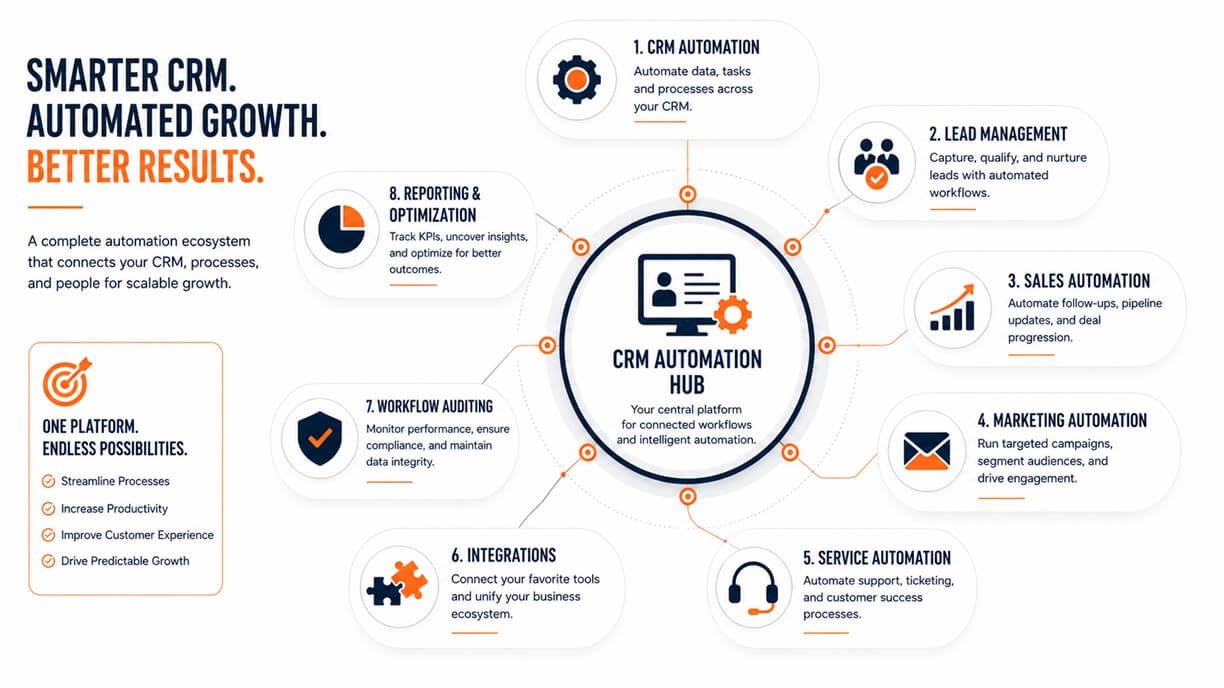
A comprehensive agency engagement can include several distinct services.
| Service | What It Involves | Primary Objective |
| Workflow design | Mapping automation logic | Create reliable processes |
| CRM automation | Automating record management | Reduce administration |
| Lead routing | Assigning leads using business rules | Improve response |
| Sales automation | Automating pipeline activities | Keep opportunities moving |
| Marketing automation | Automating prospect engagement | Support nurturing |
| Service automation | Automating customer processes | Improve consistency |
| CRM cleanup | Correcting data problems | Improve data reliability |
| Integration | Connecting external systems | Reduce data silos |
| Workflow audit | Reviewing existing automation | Find problems |
| Optimization | Improving existing workflows | Increase efficiency |
| Documentation | Recording automation logic | Improve maintainability |
| Reporting | Measuring workflow outcomes | Demonstrate business impact |
The exact scope varies by company. A small organization might need five carefully designed workflows, on the other hand, a larger organization requires an extensive automation architecture spanning multiple teams.
Why Companies Hire a HubSpot Automation Agency
Businesses rarely hire an automation agency simply because automation sounds attractive. Usually, there is an underlying operational problem.
Leads are not followed up consistently
A lead might submit a high-intent form but remain untouched for hours because nobody owns the next action. Automation can establish a defined routing and follow-up process.
Employees repeatedly update the same information
If employees constantly copy information between CRM records, spreadsheets, email systems, or other platforms, automation may eliminate some of that repetitive work.
Sales and marketing disagree about lead ownership
Automation cannot solve a broken strategy by itself, but a properly designed workflow can enforce clearly defined rules once the teams agree on them.
Deals become inactive
A workflow can identify certain stalled conditions and create an appropriate internal task or notification.
CRM reporting becomes unreliable
Poor data quality can make otherwise sophisticated dashboards misleading. Data-oriented workflows can help standardize and maintain information where the available HubSpot functionality supports it.
Customer handoffs are inconsistent
When marketing, sales, onboarding, and service each use different processes, important steps can fall between teams. Automation can make ownership and handoff conditions explicit.
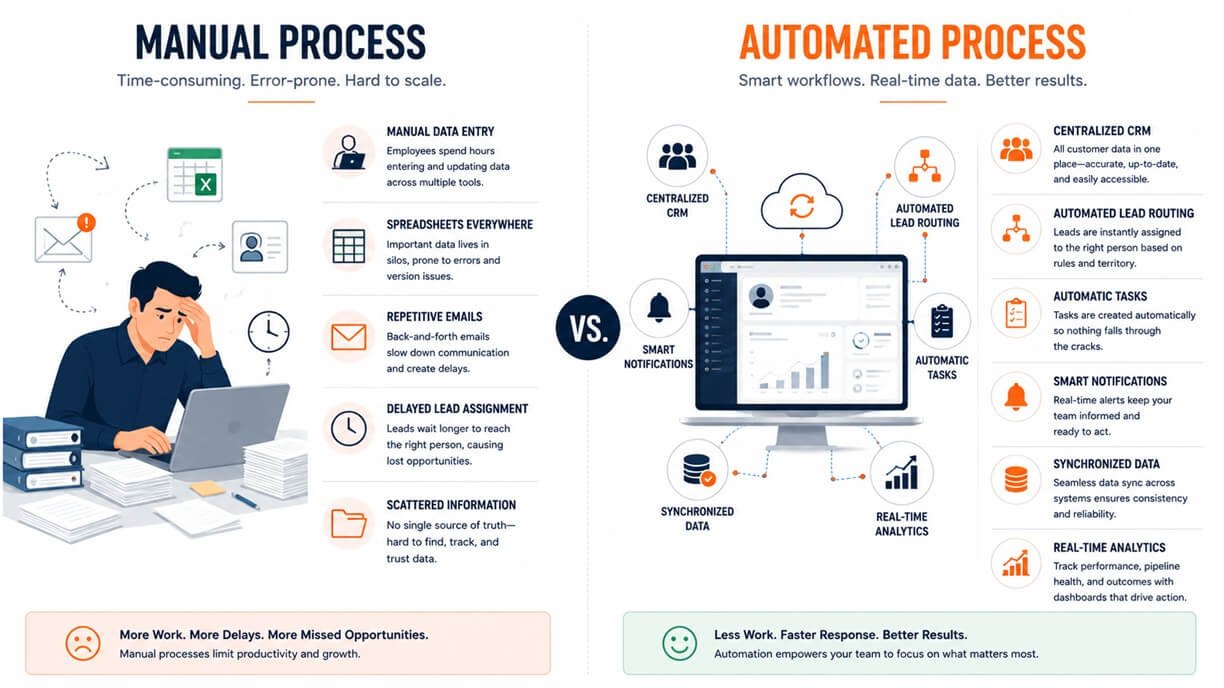
HubSpot Automation vs. Doing It In-House
Not every business needs an agency. The decision depends on the complexity of the CRM environment, available expertise, internal capacity, and the business consequences of getting the implementation wrong.
| Factor | In-House | Agency |
| Platform knowledge | Depends on internal staff | Specialized expertise available |
| Business context | Strong internal knowledge | Requires discovery |
| Implementation speed | Depends on workload | Often dedicated project resources |
| Complex integrations | May require development resources | Can bring specialized expertise |
| Existing workflow audit | Internal perspective | External perspective |
| Long-term ownership | Usually internal | Can be internal or outsourced |
| Cost structure | Employee/resource cost | Project or consulting cost |
| Documentation | Depends on internal process | Should be part of professional delivery |
When in-house makes sense
An internal team may be perfectly capable when:
- Processes are relatively simple.
- The CRM is well maintained.
- A knowledgeable HubSpot administrator is available.
- There are few integrations.
- The business can dedicate time to testing and maintenance.
When an agency becomes more valuable
External expertise can make more sense when:
- The portal has accumulated many workflows.
- Automation conflicts are difficult to diagnose.
- Multiple teams depend on the CRM.
- Integrations are complicated.
- Data quality is poor.
- The business is migrating or restructuring its CRM.
- Internal employees lack the time for a major automation project.
When Should You Hire a HubSpot Automation Agency?
A useful way to answer this question is to look for operational symptoms rather than company size. You may benefit from outside expertise if several of these conditions exist:
- Employees perform repetitive CRM tasks every day.
- Leads are assigned manually.
- Sales representatives frequently miss follow-up tasks.
- Marketing and sales use inconsistent lifecycle definitions.
- Your workflows have become difficult to understand.
- Multiple automations appear to affect the same records.
- CRM data requires frequent manual correction.
- Your HubSpot portal contains undocumented workflows.
- External systems need to exchange data with HubSpot.
- You cannot clearly explain what happens after important customer events.
- Automation failures are discovered only after a business process breaks.
- Your team wants automation but does not have the internal capacity to design and test it.
The strongest signal is usually not the number of employees. It is process complexity. A 20-person company with a complicated sales and onboarding operation have a greater need for specialist automation than a 200-person company with simple processes.
HubSpot Automation Workflow Examples
The following examples demonstrate how different business processes can be automated without treating every workflow as the same problem.
Example 1: New lead routing
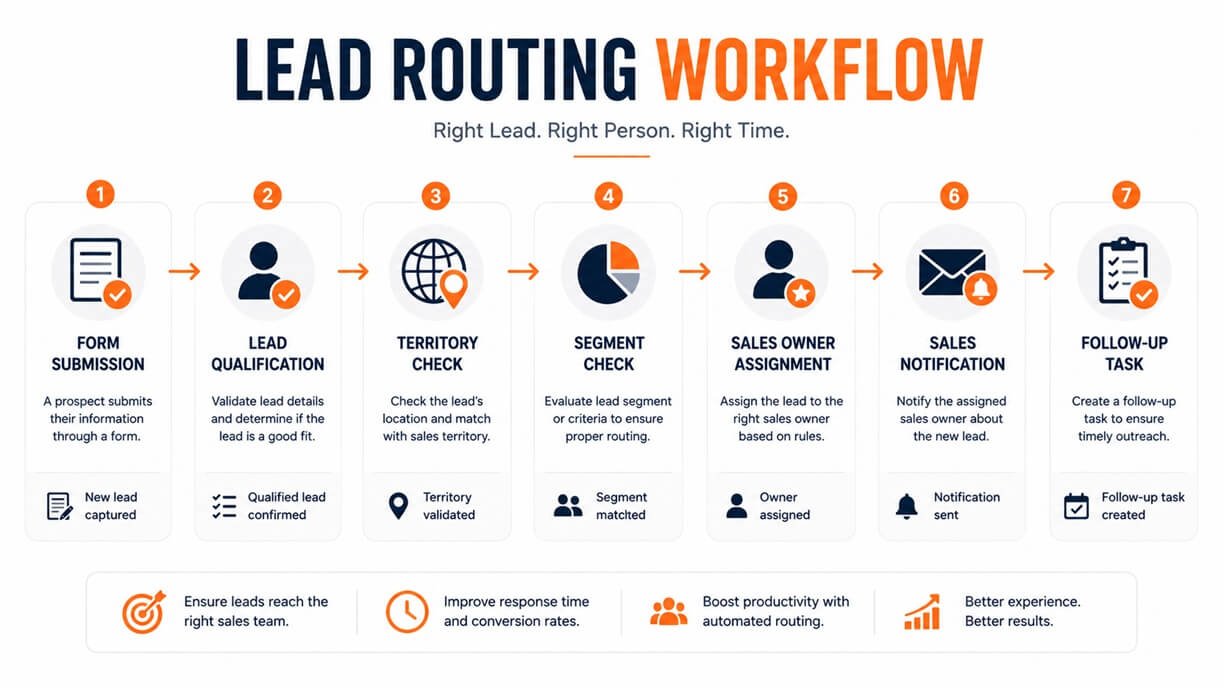
Trigger: New qualified lead
Logic:
- Check territory
- Check customer segment
- Check product interest
- Identify appropriate owner
Actions:
- Assign owner
- Create task
- Notify representative
- Update CRM properties
Outcome: The lead enters the correct sales process without manual assignment.
Example 2: Demo request workflow
Trigger: Demo request
Logic:
- Validate required information
- Determine lead category
- Check existing customer status
Actions:
- Send confirmation
- Assign appropriate owner
- Create follow-up task
- Notify sales
Outcome: A high-intent inquiry receives a consistent response.
Example 3: Stalled opportunity
Trigger: Deal remains in a specific stage for a defined period
Logic:
- Check whether recent activity exists
- Check whether the opportunity is still open
Actions:
- Create task
- Notify owner
- Escalate according to business rules
Outcome: Opportunities that require attention become visible before they disappear into the pipeline.
Example 4: Customer onboarding
Trigger: Deal reaches the appropriate completed stage
Logic:
- Identify customer type
- Determine onboarding path
- Check required information
Actions:
- Create onboarding tasks
- Notify responsible team
- Update customer properties
- Initiate appropriate communication
Outcome: Sales-to-customer-success handoff becomes a defined process.
Example 5: Renewal management
Trigger: Renewal milestone approaches
Logic:
- Identify account owner
- Check account status
- Determine renewal category
Actions:
- Create internal task
- Notify account owner
- Start the appropriate customer communication process
Outcome: Renewal preparation begins before the deadline.
HubSpot Automation Workflow Architecture
A workflow should be designed like a business process, not simply assembled from available automation actions.
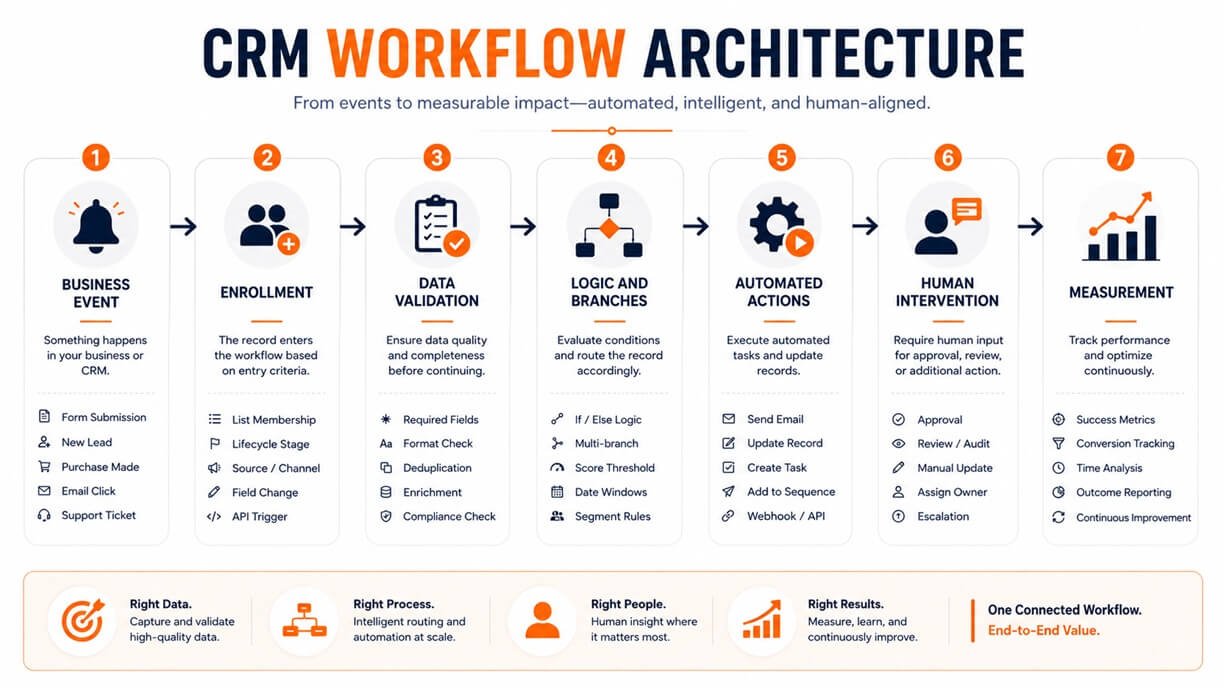
A robust architecture can follow this model:
Step 1: Define the business event
What actually starts the process?
Examples:
- Form submission
- Deal-stage change
- Ticket status change
- Date reached
- Property change
- Customer action
Step 2: Define enrollment rules
Who should enter?
This is critical because poor enrollment logic can cause the wrong records to enter a workflow. HubSpot specifically provides enrollment triggers to determine which records should automatically enter workflows.
Step 3: Validate the data
Before performing important actions, determine whether the necessary information exists.
For example:
Is the sales region known?
If not, the workflow may need a data-resolution path rather than blindly assigning ownership.
Step 4: Add business logic
Use conditions and branches to represent legitimate differences between cases.
For example:
Enterprise lead → Enterprise sales team
SMB lead → SMB sales team
Unknown segment → Data review
Step 5: Execute actions
Actions can include communication, CRM updates, tasks, delays, branches, and supported integrations. HubSpot’s current workflow actions are organized into categories including delays, branches, communication, CRM, and AI actions.
Step 6: Define human intervention
Not everything should be automated. A workflow should clearly identify where a human needs to make a judgment.
Step 7: Measure the result
Determine whether the automation actually improved the underlying business process.
Common HubSpot Automation Mistakes
Automation can create new problems when it is poorly designed.
Automating a broken process
If a process contains unnecessary approvals, duplicate work, or unclear ownership, automation can make the bad process happen faster.
Better approach: Map the process first.
Creating overlapping workflows
Two workflows can potentially affect the same records or properties. This can create unexpected outcomes.
Better approach: Maintain an inventory of important workflows and document which processes they control.
Using weak enrollment criteria
If enrollment rules are too broad, inappropriate records may enter.
Better approach: Define precisely who should enter, under what conditions, and whether re-enrollment is appropriate.
Ignoring exceptions
Real businesses rarely operate according to perfect rules. For example, a lead might:
- Change territory
- Already have an owner
- Become a customer
- Request deletion
- Have incomplete information
A professional workflow should account for relevant exceptions.
Excessive notifications
Automation should reduce noise, not create more of it. If every minor CRM change generates an alert, employees may eventually ignore important notifications.
Poor documentation
A workflow that only one employee understands is an operational risk.
Document:
- Purpose
- Trigger
- Enrollment criteria
- Actions
- Branches
- Dependencies
- Owner
- Exceptions
- Last review date
Measuring activity instead of outcomes
A workflow can execute thousands of actions and still fail to improve the business. The important question is:
Did the automation improve the process?
How Much Does a HubSpot Automation Agency Cost?
There is no universal agency price because automation projects vary considerably in scope. A simple workflow configuration and a complex CRM transformation are fundamentally different projects.
Factors that can influence cost include:
- Number of workflows
- CRM complexity
- Number of teams involved
- Existing data quality
- Number of integrations
- Custom development requirements
- Migration requirements
- Reporting needs
- Documentation requirements
- Testing requirements
- Ongoing optimization
Agencies may structure engagements as:
Fixed project
Useful when the scope is clearly defined.
Consulting engagement
Useful when the company needs specialist guidance but wants to execute much of the implementation internally.
Monthly retainer
Useful when automation requires continuous optimization and support.
Audit followed by implementation
Useful when the business knows its automation needs improvement but does not yet know exactly what should change. The right comparison is therefore not simply “Which agency is cheapest?”
Instead ask:
What business problem will this project solve, how will success be measured, and what is included in the implementation?
Also verify which HubSpot subscription features are required. HubSpot’s current documentation states that full workflow functionality is tied to specific paid Hub and subscription levels, while simpler automation capabilities are available in other configurations.
HubSpot Automation ROI: What Should You Measure?
Automation should have measurable objectives. Before implementation, establish a baseline. Then compare the process after automation.
Lead response time
Measure how long it takes for a qualified lead to receive the next appropriate action.
Goal: Reduce unnecessary waiting.
Manual processing time
Estimate how many employee hours are spent performing repetitive tasks.
Formula:
Hours saved = Previous manual hours − New manual hours
Conversion rate
Compare the percentage of leads progressing to the desired next stage. Automation does not automatically increase conversion, but better timing and process consistency can contribute to improved results.
Sales cycle length
Measure the average time required to move opportunities through the relevant stages.
Error rate
Track how often data or process errors occur.
Rework rate
Measure how often employees need to correct an earlier process.
SLA compliance
For processes with defined response requirements, monitor how often the expected time standard is met.
Automation rate
A simple measurement can be:
Automation Rate = Automated eligible processes ÷ Total eligible processes × 100
Financial ROI
A simplified calculation is:
ROI = (Financial benefit − Automation investment) ÷ Automation investment × 100
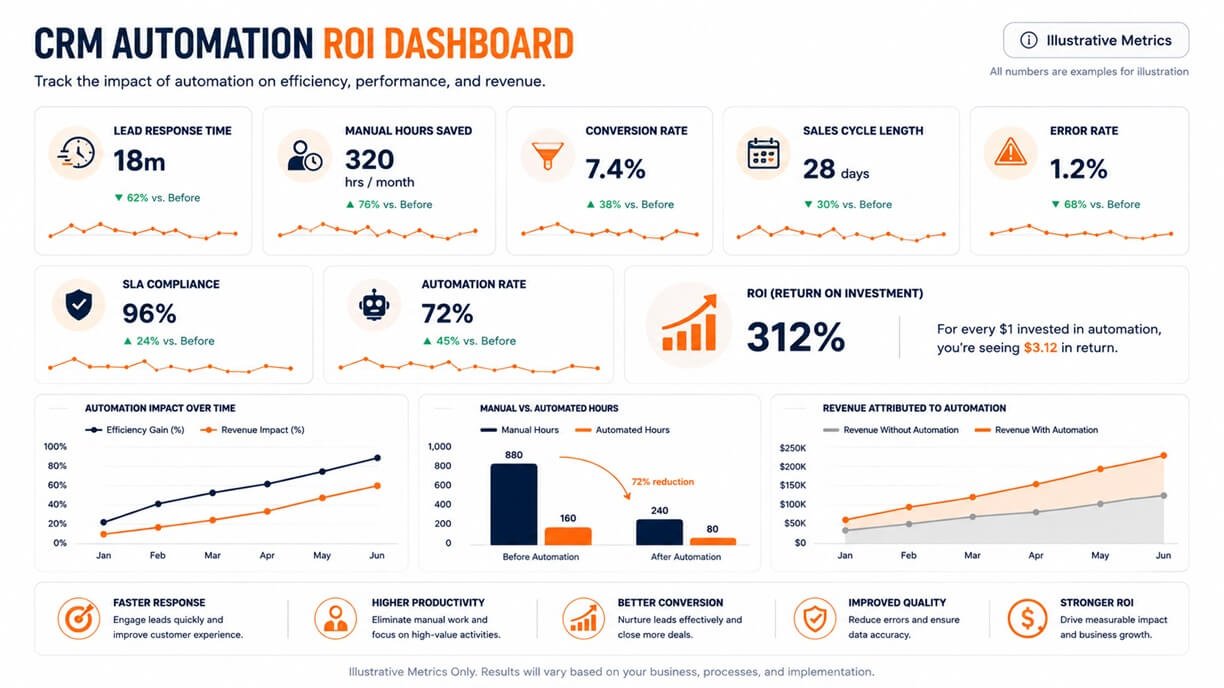
Not every benefit will be immediately financial. Time saved, improved data quality, faster response, and reduced operational risk can all contribute to the overall value.
HubSpot Automation Implementation Process
A professional implementation should follow a controlled process rather than immediately building workflows.
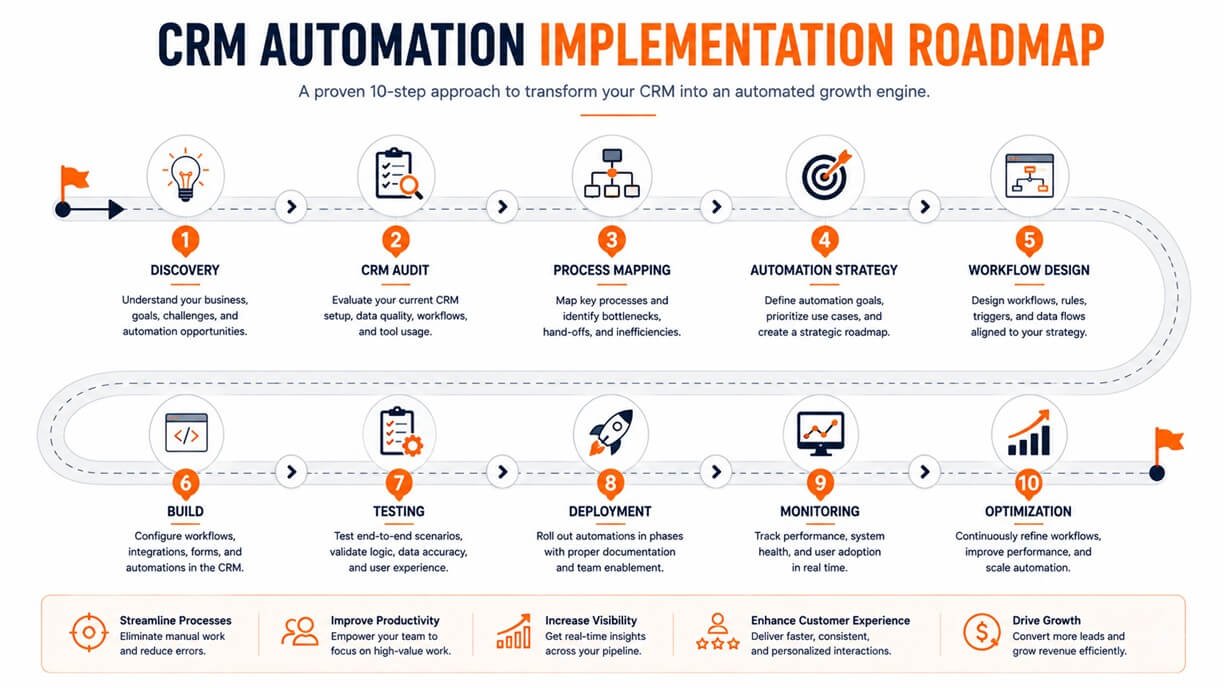
Phase 1: Discovery
Understand:
- Business objectives
- Teams
- Customer journey
- Existing systems
- Current bottlenecks
- Important CRM objects
- Existing automation
The output should be a clear understanding of what the business is trying to improve.
Phase 2: CRM audit
Review:
- Properties
- Pipelines
- Lifecycle definitions
- Existing workflows
- Integrations
- Data quality
- Ownership rules
- Reporting
The objective is to understand the current environment before changing it.
Phase 3: Process mapping
Document the current process.
For example:
Lead arrives → Manual review → Spreadsheet update → Sales assignment → Email → Follow-up → CRM update
Then identify unnecessary steps.
Phase 4: Automation strategy
Prioritize processes based on:
Business impact × Frequency × Automation feasibility
High-frequency processes with clear rules are often strong candidates for early automation.
Phase 5: Workflow design
Define:
- Trigger
- Enrollment criteria
- Data requirements
- Branches
- Actions
- Exceptions
- Human handoffs
- Exit conditions
Phase 6: Build
Construct the workflows according to the approved design. HubSpot currently supports creating workflows from templates, AI-assisted creation, or from scratch.
Phase 7: Testing
Test realistic scenarios.
Include:
- Normal records
- Missing information
- Existing customers
- Duplicate situations
- Boundary conditions
- Different teams
- Different lifecycle stages
Testing should verify not only that the workflow works, but that it does not act when it should not.
Phase 8: Deployment
Publish the workflow after reviewing enrollment settings, timing, actions, and dependencies. HubSpot provides review and publishing controls and allows workflow performance and health to be monitored after launch.
Phase 9: Monitoring
Monitor:
- Enrollment
- Completion
- Errors
- Bottlenecks
- Unexpected outcomes
- User feedback
Phase 10: Optimization
Automation should be treated as an evolving system. Review performance and change workflows when:
- Business rules change
- CRM architecture changes
- Teams change
- Customer behavior changes
- Performance data reveals a problem
HubSpot Automation Audit Checklist
Use this checklist before rebuilding an existing automation environment.
- Inventory existing workflows
- Identify workflow owners
- Document each workflow’s purpose
- Review enrollment criteria
- Check re-enrollment settings
- Identify overlapping workflows
- Review CRM properties used by automation
- Check data quality
- Review ownership rules
- Identify obsolete workflows
- Review external integrations
- Check notification volume
- Test important workflows
- Review workflow errors
- Document exceptions
- Measure business outcomes
- Establish a workflow review schedule
This audit can reveal that the problem is not a lack of automation. Sometimes the bigger issue is too much poorly organized automation.
HubSpot Automation Agency vs. HubSpot Implementation Agency
These services overlap, but they do not necessarily mean the same thing. A HubSpot implementation agency generally focuses on establishing or configuring the broader HubSpot environment.
That may involve:
- CRM setup
- Pipelines
- Data migration
- Object configuration
- Integrations
- User setup
- Reporting
- Process configuration
A HubSpot automation agency has a narrower emphasis on making repeatable business processes operate automatically.
That can involve:
- Workflow architecture
- Lead routing
- Sales automation
- Marketing automation
- Customer lifecycle processes
- Data automation
- Workflow auditing
- Optimization
There is significant overlap. For a new HubSpot implementation, you may need both. For an established portal with inefficient workflows, an automation-focused specialist may be the more relevant choice.
How AI Is Changing HubSpot Automation
AI is changing how workflows can be designed and how automated processes can handle information. HubSpot currently documents AI-assisted workflow creation through Breeze, allowing users to describe an automation goal and generate workflow triggers and actions that can then be refined.
AI can potentially contribute to automation in several ways.
AI-assisted workflow creation
Instead of starting with a blank workflow, users can describe the desired process in natural language. The important distinction is that AI-generated workflow logic still needs human review.
AI-assisted data processing
AI can be useful when a process requires interpreting or categorizing information rather than simply checking a fixed CRM property. For example, a business might want to categorize incoming information before deciding what process should happen next.
AI-powered workflow actions
HubSpot’s current workflow documentation includes AI actions, and HubSpot also documents a Run Agent workflow action that can deploy AI-powered agents from workflows.
This introduces another layer beyond traditional rule-based automation. A simplified progression looks like this:
Manual
→ Employee performs every step
Rule-based
→ Software follows predefined conditions
Automated
→ Multiple connected actions execute without manual intervention
AI-assisted
→ AI helps interpret, generate, summarize, or categorize information
Agentic
→ AI-powered agents can perform defined tasks within a controlled workflow
The key principle remains the same:
AI should improve a well-designed process—not hide a poorly designed one.
How to Choose the Best HubSpot Automation Agency
Choosing an agency should involve more than reviewing its service page.
1. Look for relevant experience
Ask whether the agency has worked with processes similar to yours. Relevant experience is more useful than a generic claim that the agency “knows HubSpot.”
2. Ask how they approach discovery
A strong provider should want to understand your business process before proposing automation. Be cautious if the first conversation immediately becomes a list of workflows they want to build.
3. Ask about documentation
Every important workflow should have understandable documentation. You should not become dependent on one external person simply because nobody else understands your automation architecture.
4. Ask how they test
Find out how the agency tests:
- Normal scenarios
- Exceptions
- Data problems
- Workflow conflicts
- Integrations
- Edge cases
5. Ask about existing automation
If you already have workflows, ask whether the agency will audit them before building new ones.
6. Ask how success is measured
A good agency should be able to connect implementation with business metrics.
7. Ask about post-launch support
Determine whether the engagement ends at launch or includes:
- Monitoring
- Troubleshooting
- Optimization
- Documentation updates
- Workflow reviews
Questions to Ask Before Hiring a HubSpot Automation Agency
Before signing a project, ask prospective providers:
Strategy
- How will you identify which processes should be automated first?
- How do you determine whether a process should be changed before automation?
- How do you prioritize competing automation requests?
Technical implementation
- How do you document workflow dependencies?
- How do you prevent conflicting workflows?
- How do you handle incomplete CRM data?
- How do you test workflow edge cases?
- How do you manage external integrations?
Governance
- Who owns the workflows after implementation?
- How are changes documented?
- How frequently should workflows be reviewed?
- How do you handle changes to our CRM structure?
Measurement
- Which KPIs should we establish before implementation?
- How will we measure time saved?
- How will we determine whether automation improved conversion or response time?
Support
- What happens when a workflow fails?
- Is post-launch monitoring included?
- How are future workflow changes handled?
These questions help distinguish an automation strategist from a provider that simply configures individual workflows.
A Practical 30-Day HubSpot Automation Roadmap
You do not need to automate everything at once. A focused 30-day program can provide a better starting point.
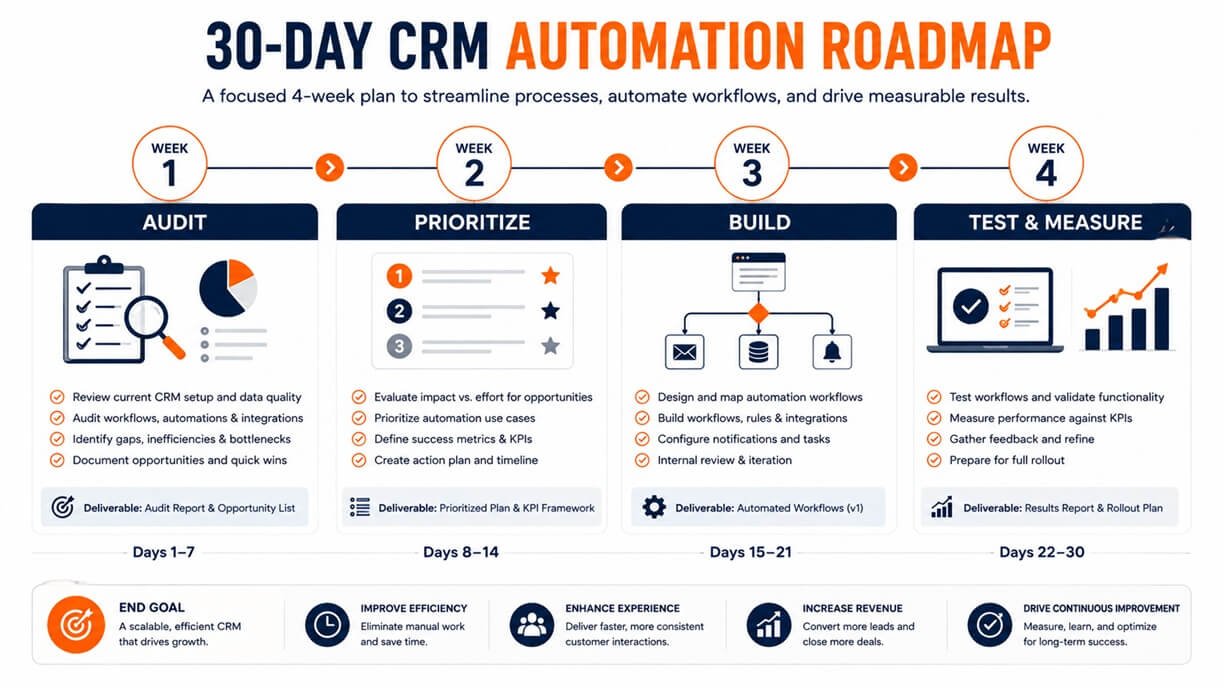
Week 1: Audit
Identify:
- Repetitive processes
- Manual CRM tasks
- Lead handoff problems
- Data inconsistencies
- Existing automation
- High-impact bottlenecks
Do not build anything yet.
Week 2: Prioritize
Score each candidate process according to:
Frequency + Business impact + Process clarity + Automation feasibility
Choose the highest-value opportunities.
Week 3: Build
Create the first priority workflows.
Focus on a small number of workflows that solve meaningful problems rather than producing dozens of low-value automations.
Week 4: Test and measure
Test the workflows using representative scenarios.
Then monitor:
- Execution
- Errors
- Employee feedback
- Response times
- Manual work removed
- Business outcomes
Use those findings to determine what should be improved next.
The Future of HubSpot CRM Automation
CRM automation is moving beyond simple “if this happens, do that” rules. The broader progression is:
Manual processes
Employees perform repetitive actions themselves.
Digital processes
Information is stored in centralized systems.
Rule-based automation
Predefined conditions trigger predefined actions.
AI-assisted automation
AI helps interpret information and support workflow creation or decision-making.
Agentic automation
AI-powered systems can perform defined tasks within controlled business processes.
This progression does not mean traditional workflows are becoming obsolete. Instead, organizations are likely to combine deterministic rules with AI where each approach makes sense.
For example:
- Deterministic rule: If a deal reaches a specific stage, create a task.
- AI-assisted step: Analyze available information and categorize the opportunity.
- Human decision: Sales representative reviews the recommendation.
- Automated action: The appropriate next workflow begins.
That combination can be more useful than attempting to replace every human decision with AI.
Frequently Asked Questions About HubSpot Automation Agencies
Can a HubSpot automation agency work with an existing CRM portal?
Yes. An agency does not necessarily need to build a new HubSpot environment from scratch. A specialist can audit an existing portal, identify inefficient or conflicting automation, and recommend changes while preserving workflows that are already working effectively.
Can a HubSpot automation agency help with CRM governance?
Yes. Automation and governance are closely related when workflows depend on consistent properties, ownership rules, lifecycle definitions, and documented processes. An agency can help establish conventions for naming, documentation, ownership, testing, and change management.
What happens if a HubSpot workflow needs information that is not stored in HubSpot?
The solution depends on the process. The required information needs to be added to the CRM, retrieved through an integration, synchronized from another system, or handled through an appropriate external automation mechanism. HubSpot supports integrations and webhook-based connections for certain external-system scenarios.
Can automation be designed around multiple CRM objects?
Yes, depending on the workflow and subscription capabilities. HubSpot’s workflow system can work with multiple supported record types, allowing processes to involve relationships between contacts, companies, deals, tickets, and other supported objects.
Should every repetitive task be automated?
No. A task is not automatically a good automation candidate simply because it happens frequently. Automation is most useful when the process is sufficiently predictable, the desired outcome is clear, and the cost of maintaining the automation is justified by its value.
How often should HubSpot workflows be reviewed?
There is no universal review interval. High-impact workflows should be reviewed whenever the underlying business process, CRM structure, ownership model, integrations, or customer journey changes. A periodic governance review can also identify obsolete or overlapping automation before it becomes a larger problem.
Can a company gradually replace manual processes with automation?
Yes. A phased approach is often safer than attempting to automate an entire CRM environment simultaneously. Companies can start with a small number of well-defined processes, measure the results, and expand automation based on what they learn.
What should happen to a workflow when the underlying business process changes?
The workflow should be reviewed before the new process is introduced. Updating the documentation, enrollment logic, actions, dependencies, and tests helps prevent an old workflow from continuing to enforce outdated business rules.
Final Thoughts: What Makes a HubSpot Automation Agency Valuable?
A good HubSpot automation agency does more than build workflows. It helps translate business processes into reliable CRM automation. The strongest approach is:
Understand the process → Remove unnecessary steps → Define the rules → Design the workflow → Build carefully → Test exceptions → Measure outcomes → Optimize continuously
HubSpot provides a substantial automation foundation, including workflow triggers, actions, branching logic, CRM updates, integrations, and increasingly AI-assisted capabilities.
But technology alone does not create an effective automation strategy. The real value comes from connecting automation to business objectives. If a workflow saves time but creates bad data, it is not successful. Same, if it sends thousands of notifications but does not improve response times, it is not successful.
However, if it removes manual work while improving consistency, speed, visibility, and customer experience, it becomes a meaningful business improvement. That is why the best HubSpot automation projects follow one principle:
Optimize the process first. Automate second.