
25 AI Automation Examples for High-Growth Companies

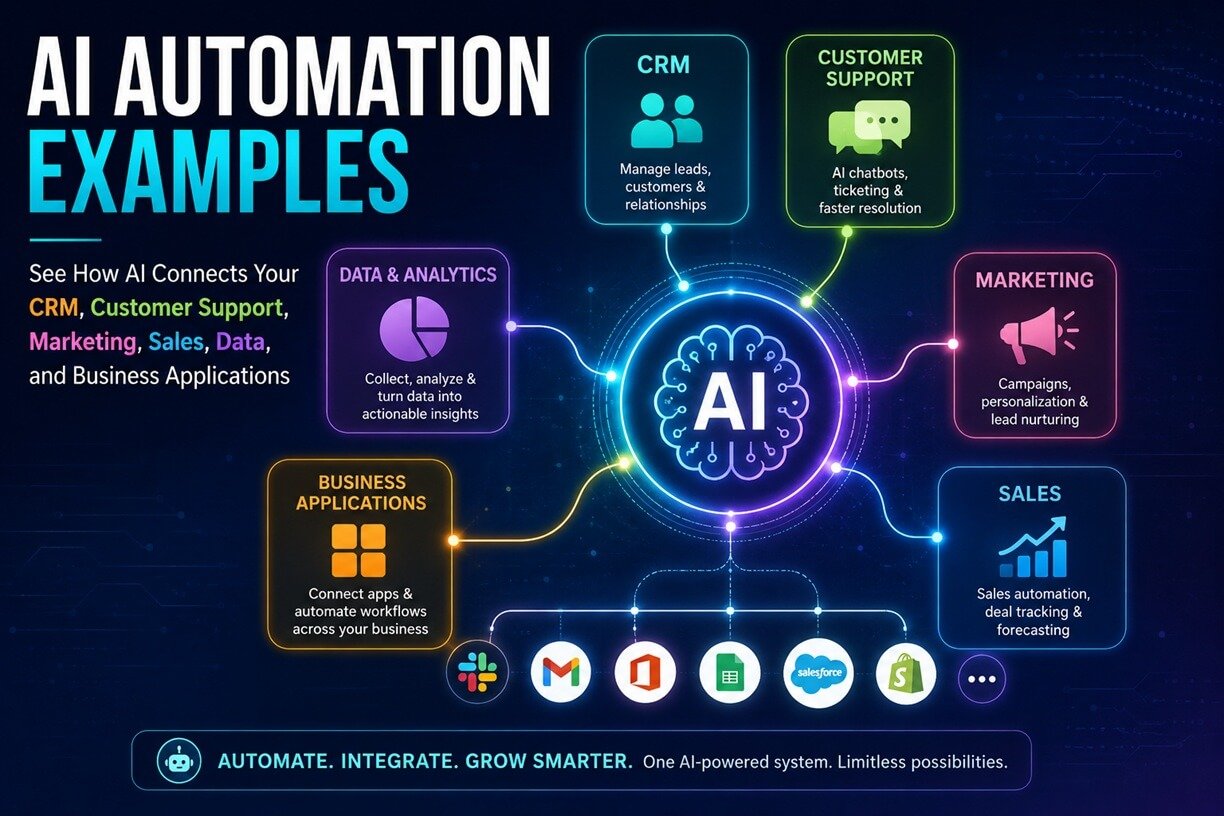
AI automation has moved far beyond chatbots and AI-generated content. Modern businesses are connecting artificial intelligence to CRMs, help desks, email, databases, calendars, analytics platforms, document systems, and other business applications.
The result is a new type of workflow in which AI can interpret information, make decisions within predefined boundaries, trigger actions, and escalate complex situations to people. That distinction matters.
Traditional automation generally follows predictable rules:
If X happens → do Y.
AI automation can handle workflows where the input is less structured:
If X happens → understand it → decide what it means → select the appropriate action → execute the workflow → escalate when necessary.
For example, a new sales inquiry could arrive through email. An AI system can read the message, identify the customer’s needs, extract company information, evaluate the lead against predefined criteria, update the CRM, draft a personalized response, and notify the appropriate salesperson.
This article explores real-world AI automation examples, including documented implementations from companies such as Intercom, ServiceNow, KPN, Schneider Electric, BankUnited, Lawpath, TNB, Cashfree Payments, and others.
More importantly, we’ll break down the underlying workflows so you can understand how similar AI automation systems can be built for your own business.
Table of Contents
What Is AI Automation?
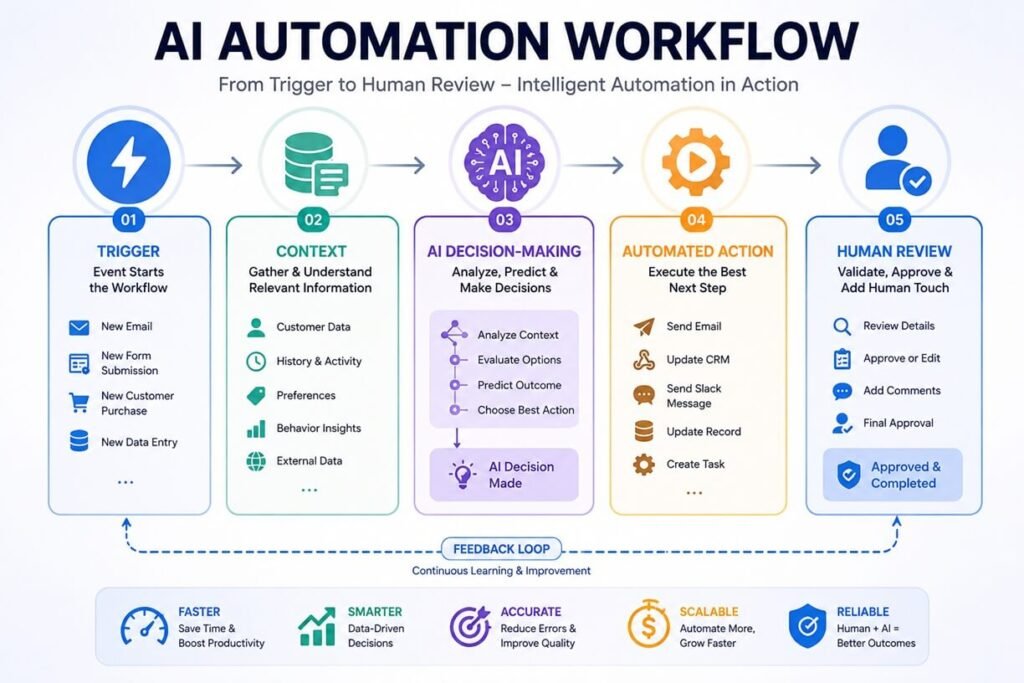
AI automation combines artificial intelligence with workflow automation to perform tasks that traditionally require human interpretation or decision-making. A general AI automation system contains five components:
- Trigger — something starts the workflow.
- Context — the system gathers relevant information.
- AI reasoning — an AI model interprets, classifies, summarizes, generates, or evaluates information.
- Action — the workflow performs one or more predefined actions.
- Human escalation — a person takes over when the task is uncertain, sensitive, or outside the system’s permissions.
For example:
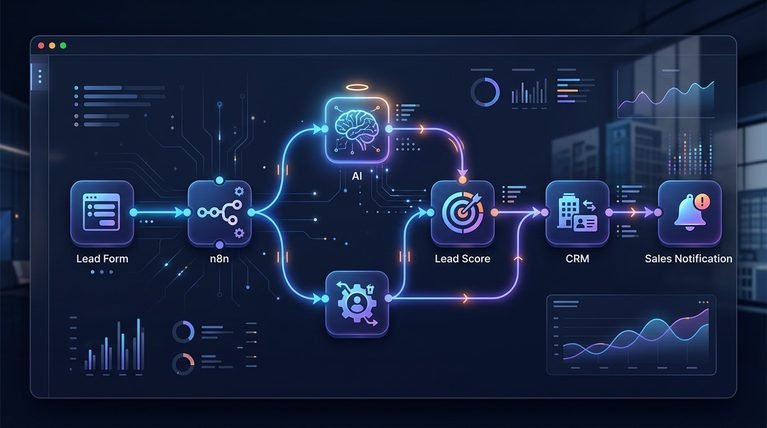
New lead → CRM → AI analyzes lead → Enrichment → Lead scoring → Personalized email → Sales notification
The AI isn’t simply generating text. It is participating in a larger business process. That’s what makes AI automation different from simply asking ChatGPT a question.
AI tools vs. AI automation
Using an AI assistant manually might look like this:
“Write a response to this customer.”
AI automation changes the process to:
New customer email → detect intent → retrieve account information → generate response → check against policy → send or request human approval → update CRM.
The second approach connects AI to the business workflow.
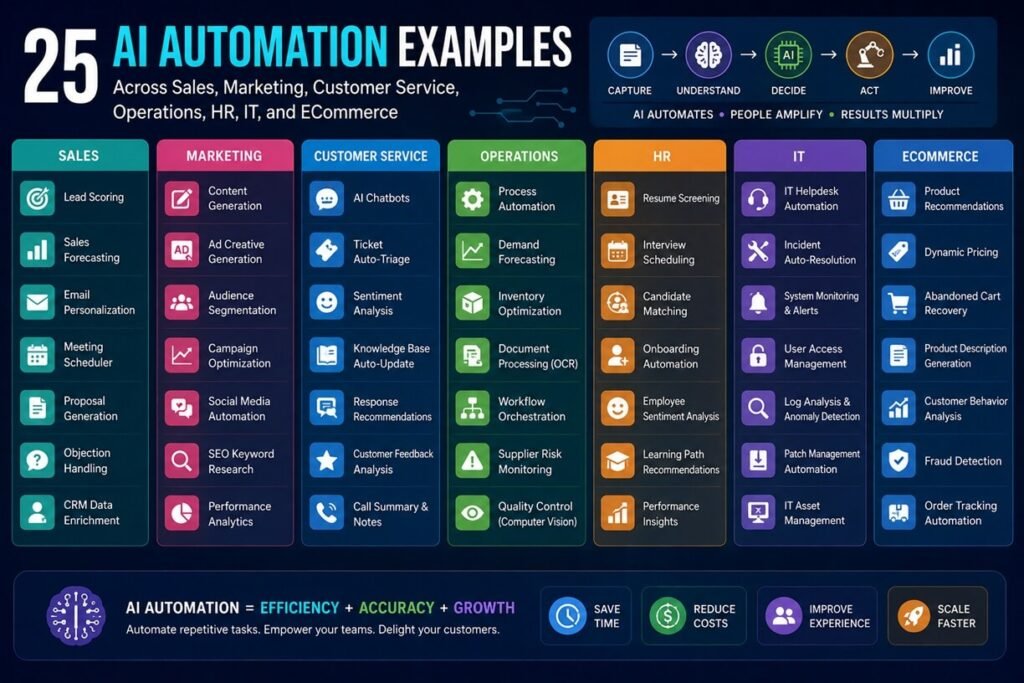
25 AI Automation Examples for Modern Businesses
1. AI Lead Qualification
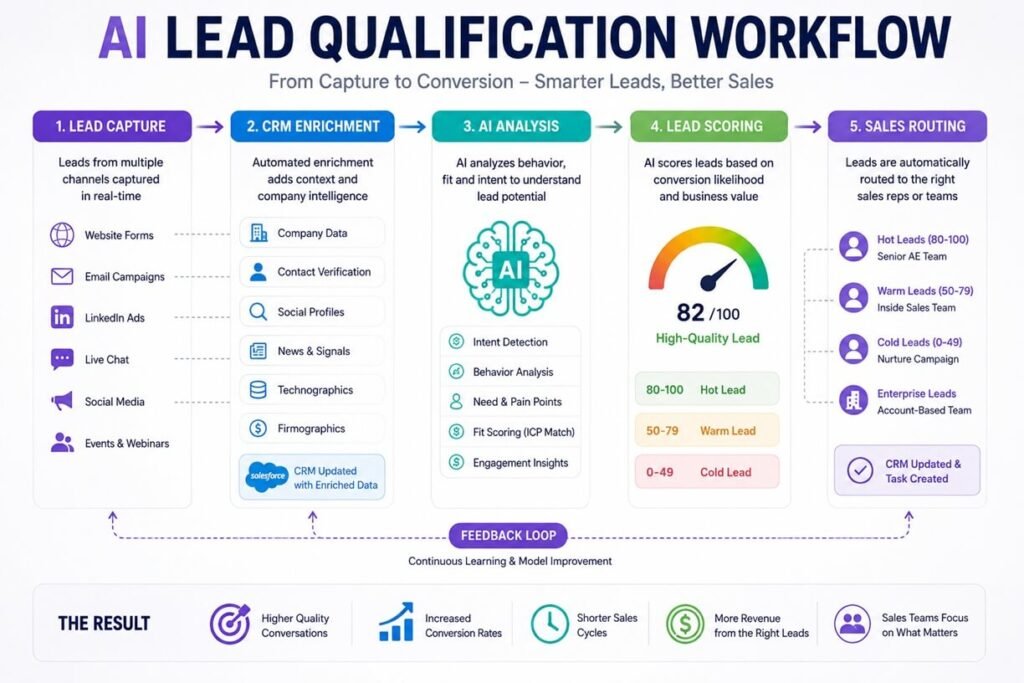
Sales teams often receive more leads than representatives can manually evaluate. An AI lead qualification workflow can analyze incoming leads and determine which prospects deserve immediate attention.
Example workflow
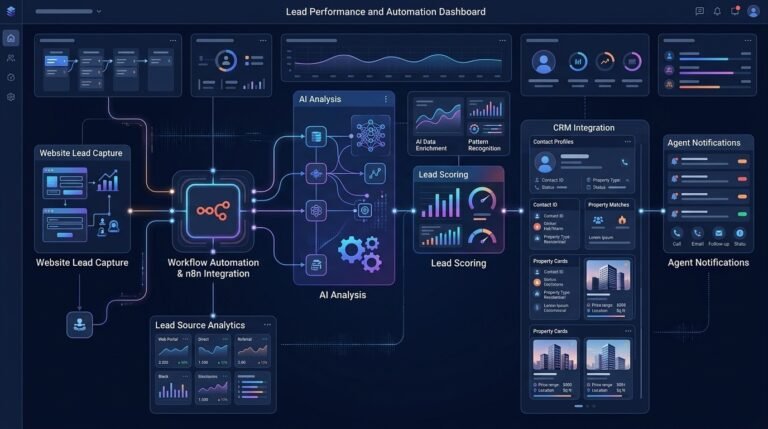
New lead → CRM → AI analyzes company and inquiry → Lead enrichment → Qualification → Score → CRM update → Sales notification
The system can evaluate factors such as:
- Company size
- Industry
- Geographic location
- Job title
- Product interest
- Buying intent
- Budget indicators
- Previous interactions
- Website activity
- Lead source
Instead of treating every lead equally, sales teams receive a prioritized pipeline.
Where this works best
AI lead qualification is particularly useful when a business receives large numbers of inbound inquiries and has clear criteria for identifying high-value prospects. For your own implementation, this could become an AI lead generation automation workflow that combines CRM data, enrichment tools, an LLM, and notification systems.
2. AI-Powered Customer Support
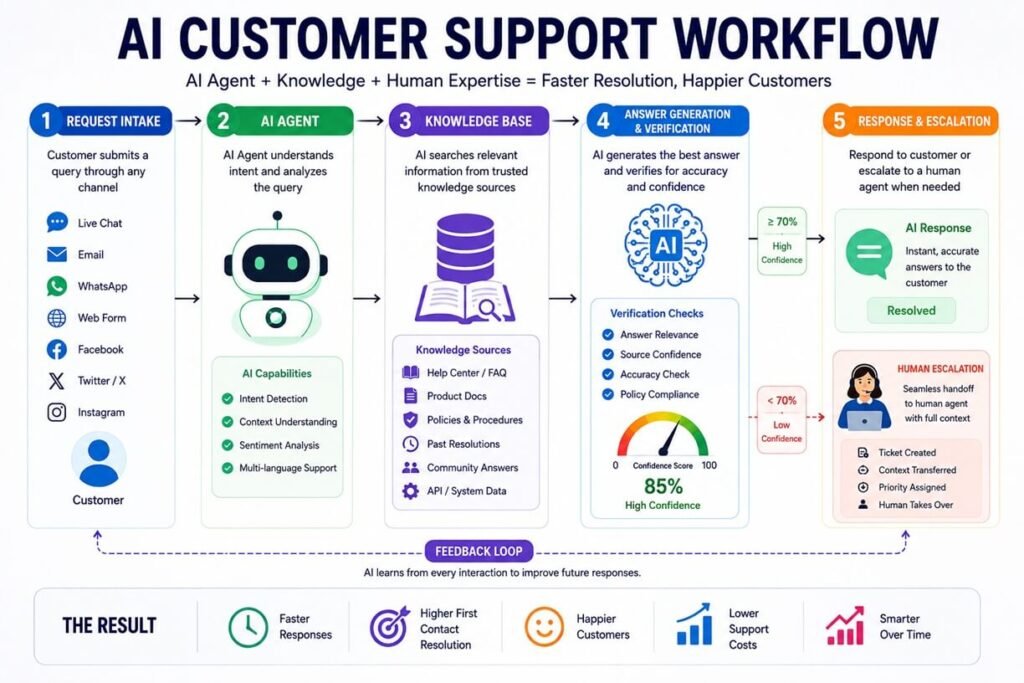
Customer support is one of the most established AI automation use cases. An AI support system can answer routine questions, retrieve information from a knowledge base, classify customer intent, and escalate complex cases.
Intercom’s Fin is a strong real-world example. AWS reports that Fin achieved an average resolution rate of 56% within 30 days of deployment for customers in the cited case study, with some customers reaching 80–90%. The system uses multiple components for tasks including knowledge retrieval, answer verification, policy checking, and response generation. (Amazon Web Services, Inc.)
Example workflow
Customer question → Intent detection → Knowledge retrieval → AI response → Policy verification → Resolution or human escalation
The important lesson is that reliable AI customer service isn’t simply an LLM connected to a chat box.
It needs:
- Authoritative information
- Retrieval
- Business rules
- Access controls
- Escalation logic
- Monitoring
- Evaluation
That architecture becomes increasingly important as AI systems move from answering questions to taking actions.
3. AI Ticket Triage and Routing
Customer service teams spend significant time categorizing and routing tickets. AI can automate much of this process.
Example
New ticket → AI identifies intent → Determine urgency → Detect language → Identify department → Assign agent → Set priority
A ticket might be classified as:
- Billing
- Technical support
- Refund request
- Account problem
- Sales inquiry
- Security issue
- Product question
The workflow can then automatically send it to the appropriate queue. ServiceNow says AI agents currently automate 37% of its customer-support case workflows, including activities such as retrieving troubleshooting information and generating resolution plans.
This demonstrates an important principle: AI automation doesn’t have to replace an entire process to create value. Automating the repetitive first 20–40% of a workflow can substantially change the workload for human employees.
4. AI Sales Email Automation
Sales representatives spend considerable time researching prospects and writing follow-up messages. An AI sales workflow can automate the repetitive parts while keeping humans responsible for important customer relationships.
Example workflow
CRM lead → Retrieve company information → Analyze previous interactions → AI creates draft → Salesperson reviews → Email sent → CRM updated
The AI could generate different drafts based on:
- Industry
- Previous conversations
- Customer role
- Product interest
- Sales stage
- Recent company activity
KPN, for example, implemented Microsoft 365 Copilot for Sales with Salesforce to automate tasks and integrate CRM information into the flow of work, with reported improvements in productivity, data quality, and customer interactions.
The key is to treat AI-generated communication as part of a workflow rather than as an isolated writing tool.
5. AI Meeting-to-CRM Automation
Sales and customer-success teams frequently lose valuable information between meetings and CRM systems. An AI workflow can close that gap.
Example workflow
Meeting ends → Transcript generated → AI summarizes conversation → Extract action items → Identify buying signals → Update CRM → Create follow-up tasks
The system might automatically extract:
- Customer pain points
- Budget information
- Decision-makers
- Competitors mentioned
- Product requirements
- Objections
- Next steps
- Follow-up date
A salesperson can then review the extracted information rather than manually reconstructing the conversation. This is particularly useful because CRM data often becomes outdated when updating it requires too much manual work.
6. AI CRM Data Enrichment
AI automation can also improve CRM quality. A workflow can detect incomplete records and gather additional information from approved data sources.
Example workflow
New CRM contact → Detect missing information → Retrieve approved company data → AI summarizes company → Update CRM → Notify sales
Possible fields include:
- Industry
- Company description
- Employee range
- Business model
- Technology used
- Relevant use cases
- Contact role
The AI layer can transform raw information into structured business context.
7. AI Customer Onboarding
Customer onboarding often requires multiple repetitive steps across departments. AI can coordinate those activities.
Example workflow
New customer → AI checks account information → Generate onboarding checklist → Create tasks → Send welcome message → Schedule meeting → Monitor completion
For example, an AI onboarding system could recognize that a new enterprise customer requires:
- Contract verification
- Account setup
- User provisioning
- Training
- Data import
- Integration
- Customer-success assignment
The system can automatically create the relevant tasks and identify missing information.
8. AI Document Processing
Businesses process enormous numbers of documents:
- Invoices
- Contracts
- Applications
- Forms
- Purchase orders
- Reports
- Insurance documents
- Compliance documents
Traditional automation struggles when documents have inconsistent layouts. AI can extract meaning from unstructured documents.
Example workflow
Document received → OCR/extraction → AI identifies fields → Validate information → Store structured data → Trigger next workflow
For example:
Invoice → Extract supplier, amount, date, tax → Check against purchase order → Flag mismatch → Send for approval → Update accounting system
This reduces manual data entry while keeping financial decisions within controlled approval rules.
9. AI Invoice Processing
Invoice automation is a particularly practical use case because the workflow is structured but the documents are often inconsistent.
Example
Invoice email → Download attachment → Extract invoice data → Match purchase order → Check amount → Detect anomalies → Approval → Accounting system
AI can help identify:
- Supplier
- Invoice number
- Amount
- Due date
- Tax
- Purchase order
- Line items
But businesses should be careful about giving AI unrestricted authority over payments.
A safer architecture is:
AI recommends → rules validate → human approves → system executes.
10. AI Employee Help Desk
Internal employees ask repetitive questions about:
- HR policies
- IT procedures
- Benefits
- Passwords
- Software access
- Company policies
- Equipment
- Internal processes
An AI employee assistant can provide answers using approved internal information.
Example workflow
Employee question → Identity verification → Retrieve approved knowledge → AI response → Action if authorized → Escalation if necessary
ServiceNow’s own internal deployment provides an interesting example. The company says its support operations use AI and knowledge-centered service methods to provide relevant information to agents and automate portions of issue remediation. (ServiceNow)
11. AI IT Support Automation
IT departments receive thousands of repetitive requests. AI can classify and resolve simple problems while routing more complicated incidents.
Example workflow
IT ticket → AI classification → Search knowledge base → Determine solution → Execute approved action → Confirm resolution
For example:
“I can’t access the company VPN.”
The system might:
- Verify the employee.
- Check whether the account is active.
- Identify the VPN error.
- Retrieve troubleshooting instructions.
- Guide the employee through the fix.
- Escalate if the problem remains unresolved.
The same architecture can be used for password issues, software access, device problems, and common configuration errors.
12. AI Knowledge Base Automation
Knowledge bases become outdated quickly. AI can help identify missing or outdated information.
Workflow
Support conversations → Identify recurring questions → Detect knowledge gaps → Generate suggested article → Human review → Publish
Intercom’s Fin provides an interesting example of this concept. AWS reports that the system can identify knowledge it believes should be added and APIs that could help it resolve more issues.
This creates a feedback loop:
Customer conversations → AI insights → Better knowledge base → Better automation → More useful customer conversations
13. AI Content Repurposing
Marketing teams create content in multiple formats. AI automation can transform one source asset into many outputs.
Example workflow
Long-form article → AI extraction → Key points → LinkedIn post → X post → Newsletter → Short video script → Pinterest description
The important distinction is that the workflow should not blindly publish everything.
A better process is:
Create → Transform → Brand check → Human review → Publish
This approach combines automation with editorial control.
14. AI SEO Content Workflow
AI can also automate portions of an SEO production process.
For example:
Keyword → Search intent analysis → SERP research → Content brief → Draft → Entity extraction → Internal-link suggestions → SEO checks → Human editing → Publish
AI can identify:
- Related topics
- Missing subtopics
- Frequently asked questions
- Internal linking opportunities
- Content gaps
- Search intent
- Semantic entities
However, automated publishing without editorial review can create low-quality content at scale. The stronger strategy is to use AI to accelerate research and production while maintaining human quality control.
15. AI Social Media Automation
Businesses can automate parts of their social-media workflow.
Example
New article → AI identifies key insights → Generate platform-specific posts → Create image brief → Schedule → Monitor engagement → Generate performance report
The AI should adapt the content to each platform rather than simply copying the same paragraph everywhere.
For example:
- LinkedIn → professional insight
- X → concise observation
- Pinterest → benefit-driven description
- Instagram → visual storytelling
- Newsletter → educational summary
16. AI Customer Review Monitoring
Reviews contain valuable information about customer sentiment. AI can analyze reviews across multiple channels.
Workflow
New review → Sentiment analysis → Topic extraction → Detect complaint → Categorize issue → Notify department → Update dashboard
The system might discover that customers repeatedly mention:
- Slow delivery
- Difficult onboarding
- Product quality
- Customer support
- Pricing
- Missing features
Instead of manually reading thousands of reviews, management receives structured insights.
17. AI Churn Detection
AI can analyze customer behavior to identify accounts that may be at risk.
Example
Customer activity → Usage analysis → Support history → Payment behavior → Sentiment → AI risk assessment → Customer-success alert
Potential signals include:
- Reduced product usage
- Increased complaints
- Unresolved support cases
- Declining engagement
- Failed payments
- Negative sentiment
The output shouldn’t automatically cancel or penalize customers.
Instead:
AI identifies risk → human reviews → customer-success action.
18. AI Personalized Marketing
AI can help marketers personalize campaigns using customer context.
Example
Customer segment → Purchase history → Website behavior → AI analyzes interests → Generate personalized campaign → Approval → Send → Measure
Personalization can include:
- Product recommendations
- Email content
- Offers
- Educational content
- Follow-up timing
- Customer segments
The strongest implementations connect AI to reliable first-party data rather than relying on generic assumptions.
19. AI Ecommerce Product Data Automation
Ecommerce businesses often manage thousands of product records. AI can help structure and enrich product information.
Example workflow
Product data → AI extracts attributes → Generate description → Categorize product → Create metadata → Detect missing fields → Update PIM
This is particularly useful for businesses managing complex catalogs. A product-information-management workflow could automatically identify missing:
- Product attributes
- Categories
- Descriptions
- Specifications
- SEO metadata
- Images
- Variants
For a large ecommerce operation, this can become an AI-powered product data pipeline rather than a simple content-generation task.
20. AI Product Information Management
AI can also sit directly inside a PIM workflow.
Example
Supplier data → AI normalization → Attribute mapping → Duplicate detection → Translation → Validation → PIM → Ecommerce channels
This is useful when different suppliers use different naming conventions.
For example:
Supplier A: “Cotton T-Shirt Men’s Blue”
Supplier B: “Mens Blue Cotton Tee”
AI can map both records to a standardized product structure. The result is cleaner product data across marketplaces, websites, catalogs, and sales channels.
21. AI Sales Forecasting and Reporting
Executives spend considerable time turning raw business data into reports. AI can automate parts of the reporting process.
Workflow
CRM + sales data + marketing data → Data validation → AI analysis → Detect anomalies → Generate report → Executive summary
The system could answer:
- Which pipeline changed this week?
- Which regions are underperforming?
- Which deals are at risk?
- Which salespeople have unusual changes?
- Where did conversion rates decline?
- What changed compared with last month?
The human executive still makes the decision. AI simply reduces the time required to understand the information.
22. AI Compliance and Document Review
AI can assist compliance teams by reviewing large volumes of documents against predefined requirements.
Example workflow
Document → AI extraction → Policy comparison → Identify missing clauses → Risk classification → Human review
This can be useful for:
- Contracts
- Vendor documentation
- Internal policies
- Regulatory documents
- Procurement records
Because compliance can have legal consequences, AI should normally operate as an assistant or controlled workflow component rather than an unrestricted decision-maker.
23. AI Recruiting Automation
Recruiting contains many repetitive administrative activities. AI can help organize applications and communications.
Example workflow
Application → Resume extraction → Skills identification → Job requirement comparison → Candidate categorization → Recruiter review
AI can also automate:
- Interview scheduling
- Candidate communication
- Interview summaries
- Job-description drafting
- Recruiting analytics
But candidate evaluation requires careful attention to fairness, privacy, applicable employment law, and human oversight.
24. AI Appointment Scheduling
Appointment scheduling is an excellent AI automation use case because it combines natural-language interaction with a structured action.
Example
A customer says:
“I’d like to speak with someone next Tuesday afternoon.”
The AI can:
- Understand the request.
- Identify the customer’s timezone.
- Check calendar availability.
- Offer available times.
- Confirm the appointment.
- Create the calendar event.
- Send confirmation.
Modern AI agents increasingly combine conversational understanding with access to real business systems. For example, Bluehost’s AI agent offering describes workflows that can qualify leads, update a CRM, and book appointments using connected business systems.
25. AI Executive Assistant Workflows
AI can automate administrative workflows for executives and managers.
Example
Incoming emails → AI classification → Identify priority → Summarize → Create tasks → Schedule meetings → Prepare daily briefing
A daily executive briefing could contain:
- Important emails
- Upcoming meetings
- Outstanding tasks
- Sales changes
- Customer issues
- Financial alerts
- Project risks
The goal isn’t to create another chatbot. The goal is to create a personalized information and action layer across existing systems.
Real-World AI Automation Examples From Companies
The examples above describe common workflows. Several companies have also publicly documented AI implementations that demonstrate how these concepts work in practice.
Intercom: AI Customer Support
Intercom’s Fin is one of the clearest examples of an AI system designed around a complete customer-service workflow.
AWS reports that Fin uses multiple AI components for tasks such as determining whether a question can be answered, retrieving relevant knowledge, verifying answers, checking policy compliance, and generating responses. Some customers have reported resolution rates of 80–90%, according to the AWS case study.
Lesson: Reliable AI automation requires orchestration, verification, and escalation—not just text generation.
ServiceNow: AI Customer-Service Workflows
ServiceNow says its AI agents automate 37% of its customer-support case workflows, including tasks such as retrieving troubleshooting data and generating resolution plans. The broader lesson is that AI agents can work alongside employees.
Instead of:
AI replaces support team
the workflow can become:
AI handles repetitive work → human handles complex work.
Bell: AI Case Intake and Triage
Bell, Canada’s telecommunications provider, deployed ServiceNow AI Agents for customer case and complaint management.
ServiceNow reports that Bell achieved a 25% improvement in customer response time after deploying AI agents that validate cases, populate fields, detect duplicates, and assist with processing.
This is a useful example of a less glamorous but highly valuable form of AI automation:
better data + automated intake + faster routing.
Not every successful AI workflow needs to be a customer-facing chatbot.
BankUnited: AI Policy Answers
BankUnited built a generative AI solution on AWS to help employees answer policy-related questions. AWS reports a 95% accuracy rate, response times of less than 10 seconds, and a 24/7 support model for the cited implementation.
The workflow demonstrates an important internal use case:
Employee question → AI retrieves organizational knowledge → Answer
This can reduce the time employees spend searching through internal documentation.
Lawpath: AI Legal Self-Service
Lawpath used generative AI with Amazon Bedrock to create Lawpath AI. AWS reports that the system reduced customer-service inquiries by 25%, increased document creation by 15%, and reduced quote lead time from three days to half a day.
This is an example of AI automation being used to shift routine work toward self-service.
TNB: Multilingual AI Customer Service
Malaysia’s national utility, Tenaga Nasional Berhad, developed an AI assistant called SARA. AWS reports that SARA supports more than 10.5 million customer accounts, resolves around 15,000 queries per month through AI self-service, and achieved a 91% positive customer sentiment score in the cited case study.
SARA handles tasks such as:
- Answering FAQs
- Updating customer information
- Reporting outages
- Connecting customers with human agents
This is a good example of AI + backend integrations + human escalation.
Cashfree Payments: Faster Support and Onboarding
Cashfree Payments used generative AI to improve customer support and merchant onboarding. AWS reports that the company reduced customer-support resolution time by 70%, reduced generative-AI costs by 50%, and reduced merchant onboarding time from more than 24 hours to 10 minutes.
This illustrates the value of connecting AI to a broader workflow. The AI isn’t merely answering questions; it contributes to an operational process.
KPN: AI-Assisted Sales
KPN implemented Microsoft 365 Copilot for Sales with Salesforce to automate sales-related tasks and bring CRM data into employees’ workflow. Microsoft reports improvements in productivity, data quality, and customer interactions.
This is a strong example of AI embedded inside existing business software rather than requiring employees to switch to a separate AI application.
Schneider Electric: AI + Salesforce
Schneider Electric integrated Copilot for Sales with Salesforce.
Microsoft says the system supports tasks including AI-assisted contact creation and summarizes emails and meetings, helping sales teams update CRM information within their existing workflow.
This demonstrates another important principle:
The best AI automation often happens where employees already work.
AI Automation Examples by Department
| Department | AI automation examples |
| Sales | Lead qualification, CRM updates, follow-ups, meeting summaries |
| Marketing | Content repurposing, personalization, campaign analysis |
| Customer service | Ticket triage, AI agents, knowledge retrieval |
| Operations | Document processing, workflow routing, reporting |
| Finance | Invoice extraction, anomaly detection, document review |
| HR | Employee support, onboarding, scheduling |
| IT | Ticket classification, troubleshooting, knowledge retrieval |
| Ecommerce | Product data enrichment, categorization, personalization |
| Executive | Briefings, reporting, email prioritization |
The best opportunity usually isn’t the task that looks most impressive. It’s the workflow that happens frequently, consumes significant employee time, has relatively clear boundaries, and can be measured.
Advanced AI Automation Workflow Examples
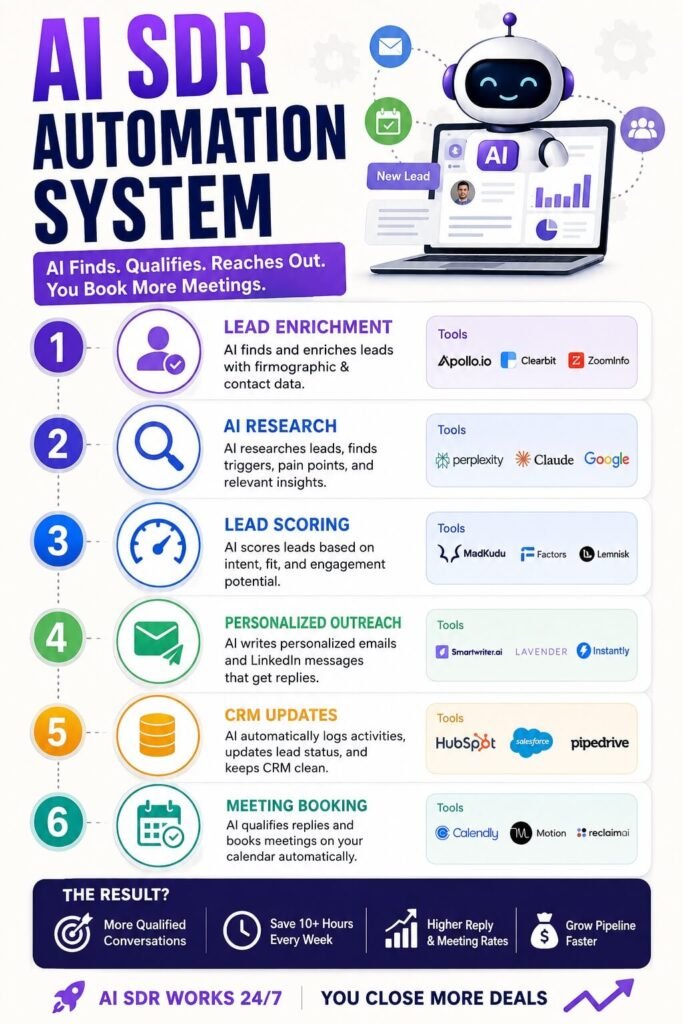
The most valuable systems combine multiple AI capabilities.
AI Sales Development System
A sophisticated AI SDR workflow could look like:
Lead arrives
↓
AI identifies company and contact
↓
Enrich CRM
↓
Analyze fit
↓
Score lead
↓
Research relevant context
↓
Generate personalized outreach
↓
Human approval
↓
Send
↓
Monitor response
↓
Update CRM
↓
Schedule meeting
The important part is that AI is not doing one task.
It is coordinating a sequence of tasks.
AI Customer Support Agent
An advanced support workflow could look like:
Customer message
↓
Identify intent
↓
Authenticate customer
↓
Retrieve account information
↓
Search knowledge base
↓
Generate answer
↓
Verify answer
↓
Determine whether action is authorized
↓
Execute action
↓
Confirm resolution
↓
Escalate if necessary
This is closer to a digital worker than a traditional chatbot.
AI Document Processing System
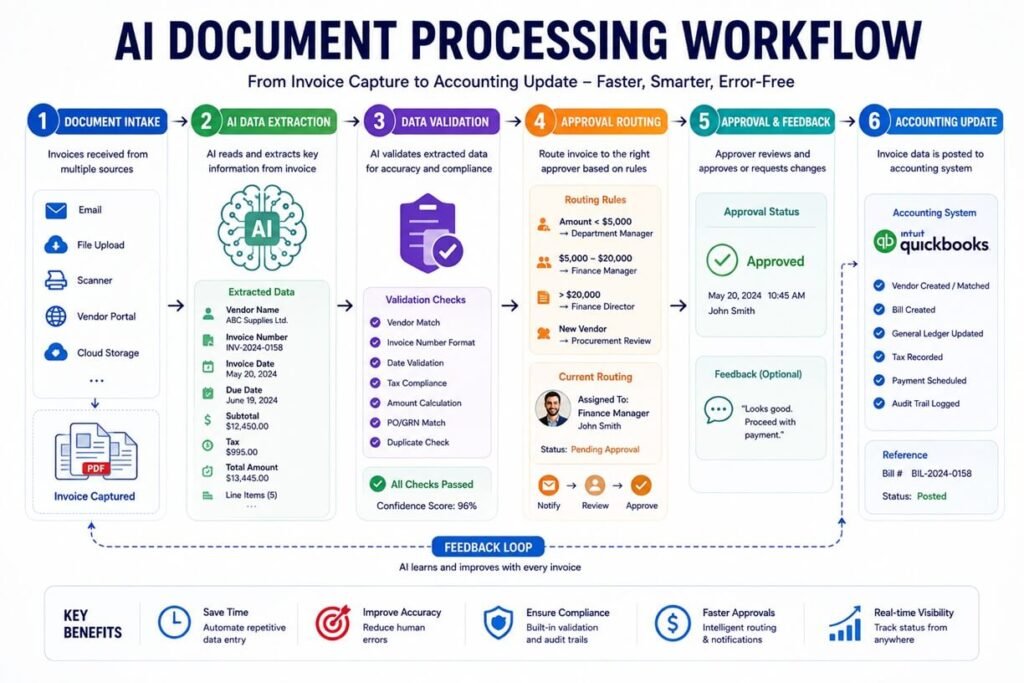
A document automation system could work like:
Document received
↓
Classify document
↓
Extract information
↓
Validate fields
↓
Compare against business rules
↓
Detect anomaly
↓
Update database
↓
Request approval
↓
Archive document
This architecture can be adapted to invoices, applications, contracts, purchase orders, and other business documents.
AI Automation With n8n
n8n is particularly useful for businesses that want to connect AI models with multiple applications and create visual workflows.
A simple AI workflow could look like:
Webhook → AI model → IF condition → CRM → Email → Slack
A more advanced workflow could be:
New lead → CRM lookup → Enrichment → AI scoring → IF score > threshold → Personalized email → Sales notification
For businesses that want greater control over their automation infrastructure, n8n can become the orchestration layer connecting AI models with business applications.
AI Automation With Zapier
Zapier is another option for businesses that want to connect applications without building an automation infrastructure from scratch.
For example:
New Typeform submission → AI analyzes lead → Add to CRM → Send Slack notification
Or:
New support email → AI classifies request → Create ticket → Assign department
The advantage of this approach is simplicity. The limitation is that more complex agentic workflows may eventually require greater control over logic, data, infrastructure, and monitoring.
AI Automation With Make
Make can be useful for visual, multi-step workflows involving multiple applications.
For example:
New form submission → AI extraction → Router → CRM → Email → Google Sheets → Notification
AI can be inserted into individual steps rather than controlling the entire workflow. This hybrid architecture is often a practical starting point:
Traditional automation handles predictable steps. AI handles ambiguous steps. That combination is more reliable than trying to make every component AI-powered.
AI Automation vs. Traditional Automation
The difference can be summarized simply.
| Traditional automation | AI automation |
| Rule-based | Context-aware |
| Structured inputs | Structured + unstructured inputs |
| Fixed decisions | AI-assisted decisions |
| Predictable conditions | Natural-language interpretation |
| “If X, do Y” | “Understand X, then determine Y” |
| Limited flexibility | Greater flexibility |
| Easier to predict | Requires evaluation and monitoring |
Neither is universally better. In fact, the strongest systems often combine them.
For example:
AI interprets the customer message → traditional automation checks permissions → API executes action → rules validate the result.
This creates a more controlled architecture.
How to Identify Good AI Automation Opportunities
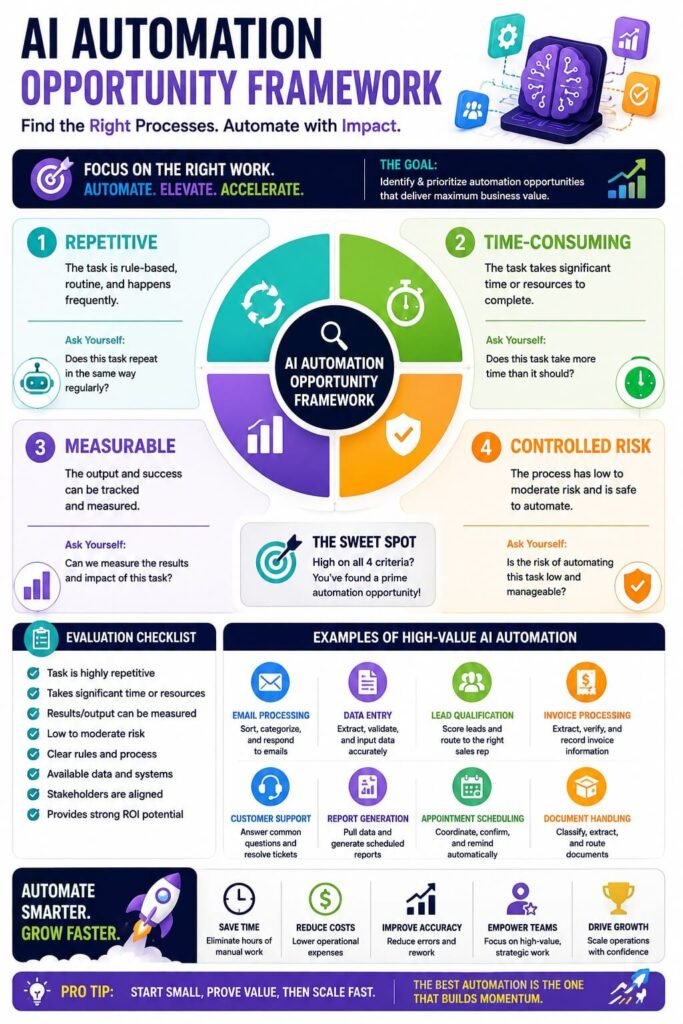
Not every business process should be automated with AI. Start by looking for processes that satisfy several of these criteria:
1. The process happens frequently
Automating a task performed 500 times per month usually creates more value than automating something performed twice a year.
2. Employees spend significant time on it
Look for repetitive administrative work.
3. The input is difficult to handle with simple rules
This is where AI becomes especially useful.
Examples include:
- Emails
- Documents
- Customer messages
- Meeting transcripts
- Product descriptions
- Reviews
4. The desired outcome is measurable
Good metrics include:
- Processing time
- Resolution time
- Cost per task
- Conversion rate
- Response time
- Error rate
- Employee hours saved
5. Errors are manageable
Avoid giving AI unrestricted authority over high-risk decisions at the beginning. Start with lower-risk processes.
A Practical AI Automation Implementation Framework
A business can use the following six-step framework.
Step 1: Map the existing workflow
Write down every step.
Don’t start with the AI.
Start with the process.
Step 2: Identify the bottleneck
Find the step consuming the most time.
Step 3: Determine whether AI is actually needed
Ask:
Can ordinary automation solve this?
If yes, use ordinary automation.
If the workflow requires interpreting language, documents, images, or context, AI may add value.
Step 4: Add human approval
For important actions, initially use:
AI recommends → Human approves → System executes.
Step 5: Measure the result
Compare:
- Before automation
- After automation
Step 6: Expand gradually
Once one workflow is reliable, connect it to the next process.
This prevents businesses from building an enormous AI system before they understand whether the underlying workflow works.
Common AI Automation Mistakes
Automating a broken process
AI doesn’t fix bad processes automatically. If the workflow is confusing before automation, automating it may simply make the confusion faster.
Giving AI too much authority
AI should not automatically execute high-risk actions simply because it can. Use permissions and approval thresholds.
Ignoring data quality
Bad CRM data produces bad AI decisions. Data quality should be treated as part of the automation project.
Building without evaluation
AI systems need testing. Create examples of:
- Correct inputs
- Difficult inputs
- Edge cases
- Incorrect information
- Adversarial inputs
Then measure the output.
Forgetting human escalation
Some requests shouldn’t be automated. A good AI system knows when to stop and ask for help.
Automating everything at once
Start with one workflow.
Prove the result.
Then expand.
How Much Can AI Automation Save?
There is no universal number. Savings depend on:
- Number of tasks
- Employee cost
- Automation rate
- Error rate
- AI/API costs
- Integration costs
- Human review requirements
A simple calculation can help:
Annual hours saved × hourly labor cost = potential labor value
For example, if an automation saves:
20 hours/week × $30/hour × 50 weeks = $30,000/year
That doesn’t automatically mean the business saves $30,000 in cash. Some of the value may instead appear as:
- Higher capacity
- Faster response
- More sales activity
- Better customer service
- Reduced hiring requirements
- Faster operations
That distinction is important when calculating AI automation ROI.
Where AI Automation Is Heading
The direction of AI automation is moving from isolated tools toward connected AI systems.
Instead of:
AI chatbot
businesses are increasingly building:
AI + data + business applications + workflows + actions + monitoring + humans
This is the foundation of agentic automation.
OpenAI’s current enterprise-agent approach similarly emphasizes connecting agents to company systems, giving them approved actions, applying policies and guardrails, and escalating work to people when necessary.
The biggest opportunity isn’t necessarily replacing entire departments. It is creating systems where employees spend less time moving information between applications and more time doing work that requires judgment, relationships, creativity, and accountability.
Frequently Asked Questions About AI Automation
What is the biggest benefit of AI automation for businesses?
The biggest benefit is reducing repetitive work while allowing employees to focus on tasks that require judgment, communication, and expertise. AI automation can connect information from systems such as CRMs, email, support platforms, and databases, then interpret that information and trigger appropriate actions.
When should a business use AI instead of traditional automation?
Traditional automation is usually better when a process follows clear, predictable rules. AI becomes more useful when the workflow involves unstructured information such as emails, documents, customer messages, transcripts, or images that require interpretation before an action can be selected.
What should businesses automate first?
Start with a process that happens frequently, consumes significant employee time, has a measurable outcome, and carries relatively low risk. Examples include customer-support triage, lead qualification, document processing, meeting summaries, and internal knowledge searches.
Does AI automation require human approval?
Not always, but human approval is recommended for important or high-risk actions, particularly during the early stages of implementation. A practical approach is to have AI analyze information and recommend an action while a person approves the action before the system executes it.
Which business processes are usually poor candidates for AI automation?
Processes with very low frequency, unclear outcomes, poor-quality data, or significant consequences from mistakes may be poor starting points. Businesses should also avoid giving AI unrestricted control over sensitive financial, legal, compliance, employment, or customer decisions without appropriate safeguards.
How can businesses measure the ROI of AI automation?
Businesses can compare the workflow before and after automation using metrics such as processing time, employee hours saved, response time, error rate, cost per task, conversion rate, or resolution time. A simple starting calculation is annual hours saved multiplied by the relevant hourly labor cost, while also accounting for AI, API, integration, and human-review costs.
Should AI automation replace an entire business process?
Usually, it is better to automate specific parts of a process first rather than replacing the entire workflow. AI can handle interpretation and repetitive tasks while traditional automation manages predictable steps and employees handle exceptions, judgment, and accountability.
How should businesses scale AI automation?
Start with one well-defined workflow, measure its performance, improve reliability, and then connect it to adjacent processes. Gradual expansion makes it easier to identify problems, control costs, establish permissions, and determine whether additional automation is actually creating business value.
Final Thoughts: The Best AI Automation Examples Start With Real Business Problems
The most impressive AI automation isn’t necessarily the most complicated. A workflow that automatically qualifies leads, routes support tickets, extracts invoice information, updates a CRM, or summarizes meetings can create significant value when it operates hundreds or thousands of times.
The future of business automation is therefore not simply about adding AI to every process. It’s about identifying where intelligence can remove friction from the process.
Start with one repetitive workflow.
Automate it.
Measure it.
Improve it.
Then connect it to the next workflow.
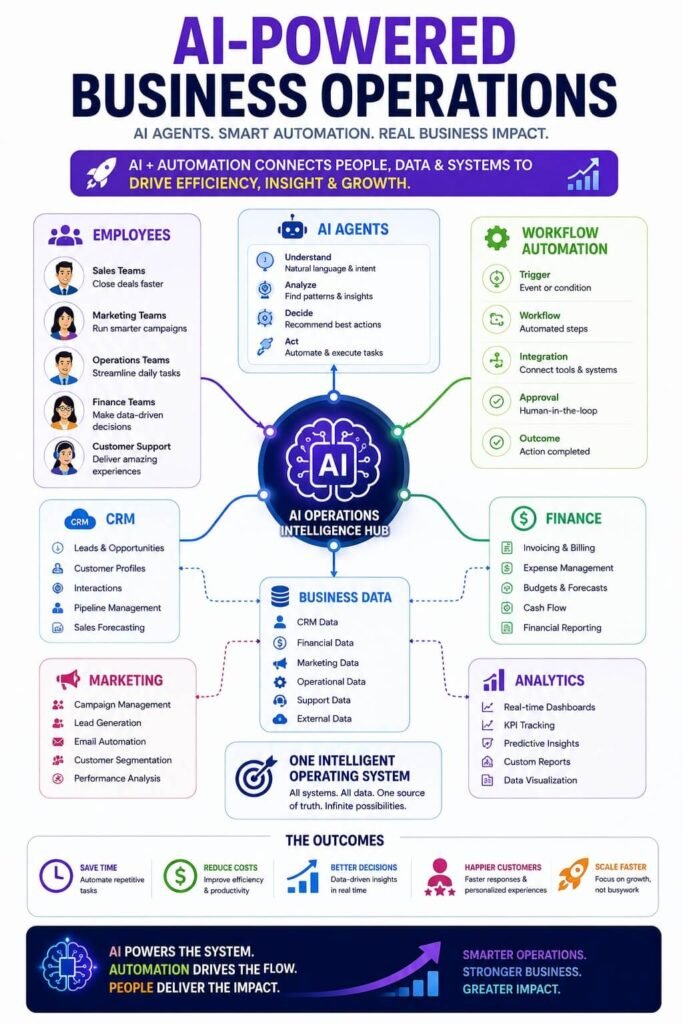
That is how a collection of individual automations can eventually become an AI-powered operating system for the business.





One Comment