Client Onboarding Workflow Templates: Automate Customer Seamlessly

Acquiring a new client is one of the most rewarding milestones for any business. However, winning the deal is only the beginning. The way you welcome, organize, and guide new customers during their first interactions often determines whether they become long-term partners or short-term clients.
Unfortunately, many businesses still rely on scattered emails, spreadsheets, sticky notes, and manual reminders to manage onboarding. Important documents get buried in inboxes, kickoff meetings are delayed, team members miss assignments, and clients are left wondering what happens next. These seemingly small issues can create a poor first impression and reduce customer confidence before the project even begins.
A structured client onboarding workflow eliminates these challenges by turning a complex series of tasks into a repeatable process. Every new client follows the same proven path—from signing the contract to scheduling the kickoff meeting—while your team spends less time on repetitive administrative work.
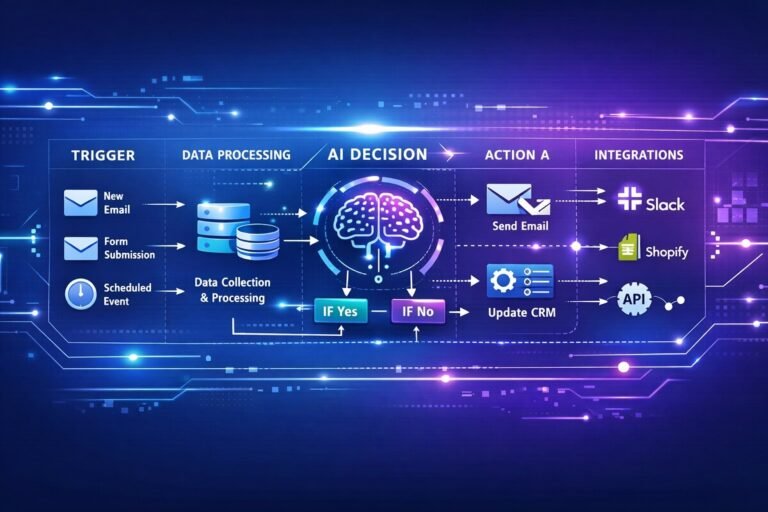
Modern workflow automation platforms take this one step further. Instead of manually creating projects, sending welcome emails, assigning tasks, or updating your CRM, intelligent automation can perform these actions automatically within seconds. When combined with artificial intelligence, onboarding becomes even more efficient through personalized communications, automated document processing, AI-generated summaries, and smart task routing.
Whether you’re running a marketing agency, consulting firm, SaaS company, IT service provider, accounting practice, or freelance business, automated onboarding helps you deliver a consistent experience while scaling operations without increasing administrative overhead.
In this comprehensive guide, you’ll learn:
- What a client onboarding workflow is and why it matters.
- The essential components of a successful onboarding process.
- How automation and AI simplify repetitive onboarding tasks.
- Practical workflow templates for different industries.
- Best practices to improve client satisfaction and operational efficiency.
After end of this this guide, you’ll have a clear framework for designing an onboarding system that saves time, reduces errors, and creates a professional experience from day one.
What Is a Client Onboarding Workflow?
A client onboarding workflow is a standardized sequence of tasks, communications, and approvals that guides a new customer from the moment they accept your proposal until they are fully prepared to begin working with your business.
Rather than relying on memory or individual team members to remember each step, a workflow defines exactly what should happen, when it should happen, and who is responsible for completing each task.
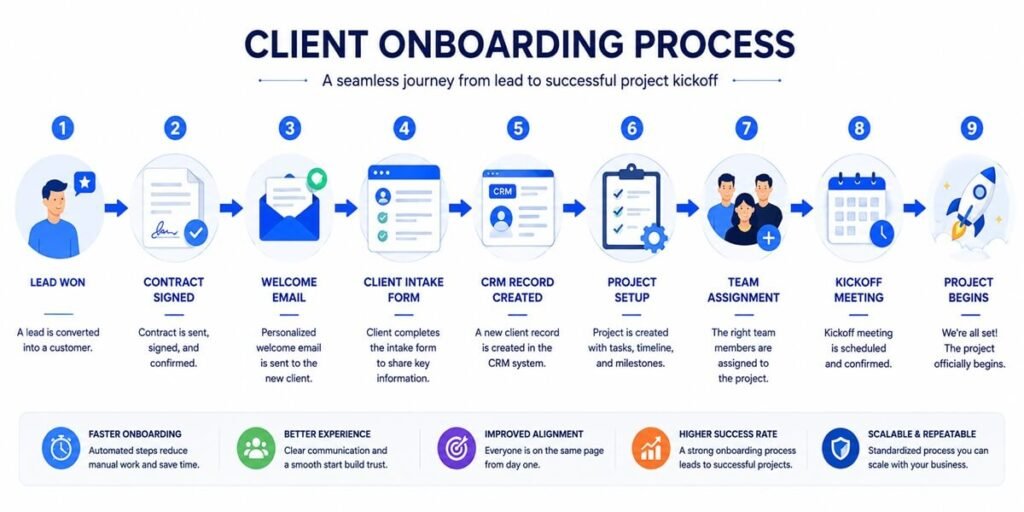
Think of it as a blueprint that ensures every client receives the same high-quality experience regardless of who manages the account. A typical onboarding workflow generally include activities such as:
- Sending a welcome email
- Collecting client information
- Creating a CRM record
- Generating internal projects
- Assigning team members
- Scheduling kickoff meetings
- Sharing documentation
- Providing access to client portals
- Collecting required assets
- Beginning project execution
Instead of completing these tasks manually for every new client, workflow automation software can trigger many of them automatically whenever a deal reaches a specific stage. For example, once a sales representative marks an opportunity as Closed Won in the CRM, the system can immediately:
- Create a new client record.
- Generate a project in your project management software.
- Send a personalized welcome email.
- Notify the assigned account manager.
- Schedule onboarding tasks.
- Create a shared folder for project documents.
- Invite the client to a customer portal.
This automation reduces delays and ensures that no critical onboarding step is overlooked.
Why Client Onboarding Matters
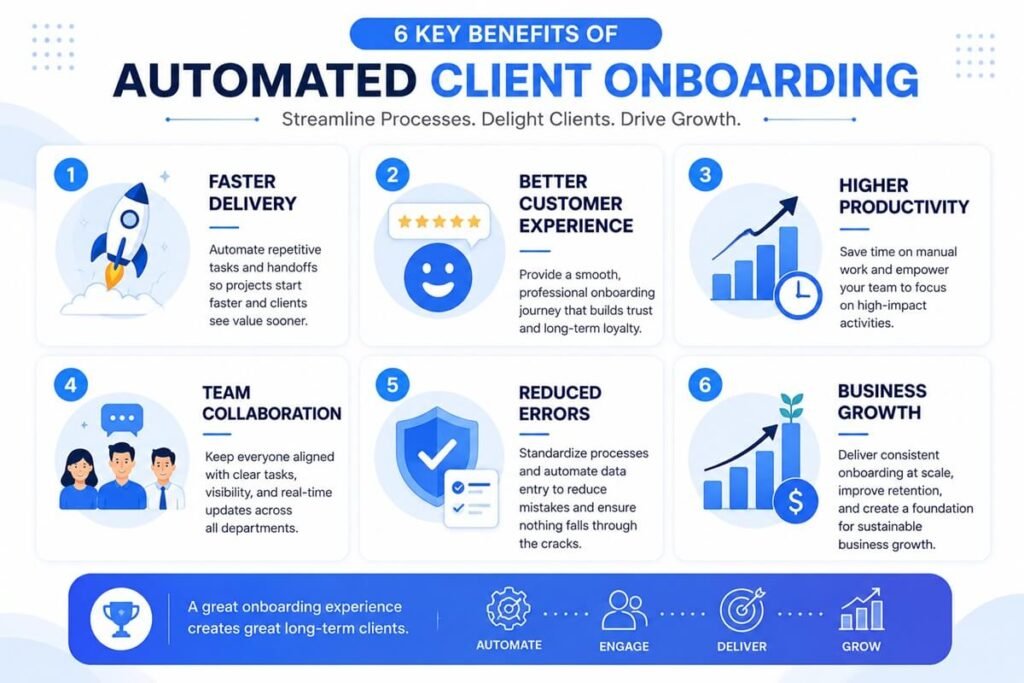
Many businesses focus heavily on sales but underestimate the importance of onboarding. Yet the onboarding experience is often the client’s first real interaction with your delivery team, making it one of the most influential stages of the customer journey.
A smooth onboarding process helps establish trust, clarify expectations, and demonstrate professionalism from the very beginning. An effective onboarding workflow delivers several key benefits:
Creates a Strong First Impression
Clients expect clear communication after signing an agreement. Prompt welcome messages, organized documentation, and defined next steps reassure them they made the right decision.
Reduces Operational Confusion
Without a documented workflow, different employees follow different processes. Standardization ensures every client receives the same quality of service while reducing internal uncertainty.
Improves Team Collaboration
Sales, customer success, project managers, finance, and technical teams often participate in onboarding. A centralized workflow keeps everyone aligned by assigning responsibilities and tracking progress in one place.
Accelerates Project Delivery
Automating repetitive setup tasks allows your team to begin meaningful work sooner, shortening the time between contract signing and project execution.
Enhances Customer Satisfaction
Clients appreciate transparency and predictable communication. Knowing what happens next reduces uncertainty and improves the overall customer experience.
Supports Business Growth
As your client base expands, manually coordinating onboarding becomes increasingly difficult. Automated workflows allow your business to scale without adding unnecessary administrative work.
Manual vs. Automated Client Onboarding
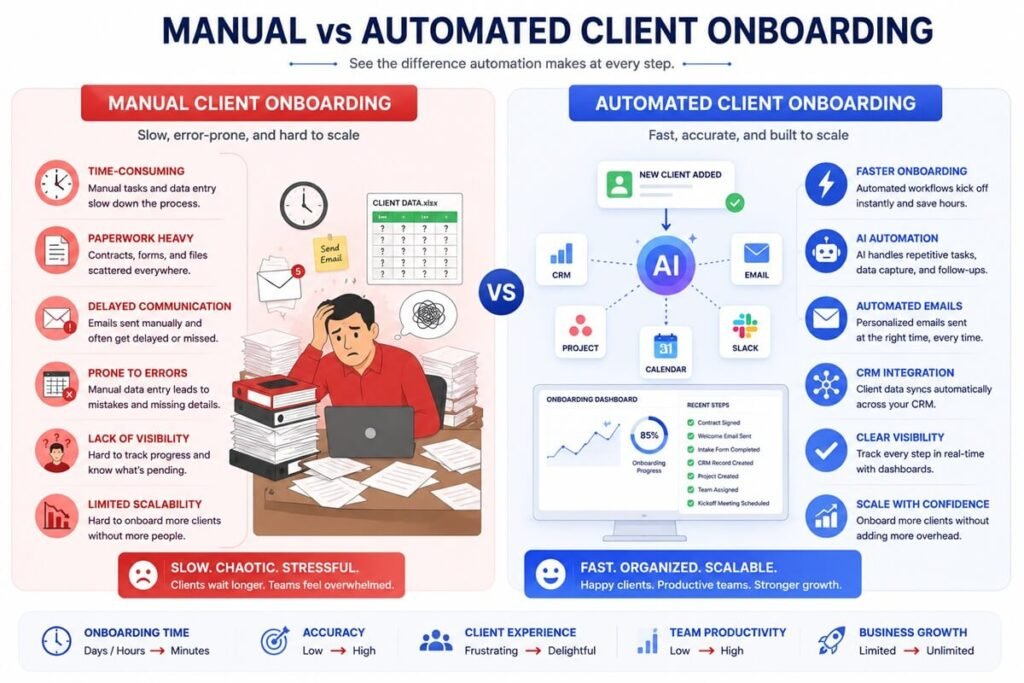
Many organizations begin with manual onboarding because it seems manageable when client volumes are low. However, as the business grows, manual processes become increasingly time-consuming and prone to mistakes.
| Manual Onboarding | Automated Onboarding |
| Tasks completed manually | Tasks triggered automatically |
| Relies on memory | Uses predefined workflows |
| Higher risk of missed steps | Consistent execution |
| Slower response times | Immediate actions |
| Difficult to scale | Easily supports growth |
| Greater administrative workload | Reduced manual effort |
| Inconsistent customer experience | Standardized experience |
Automation doesn’t eliminate the human element—it removes repetitive work so your team can focus on building stronger client relationships. For example, instead of manually creating folders, scheduling meetings, and sending reminder emails, your account manager can spend more time understanding the client’s goals and planning a successful engagement.
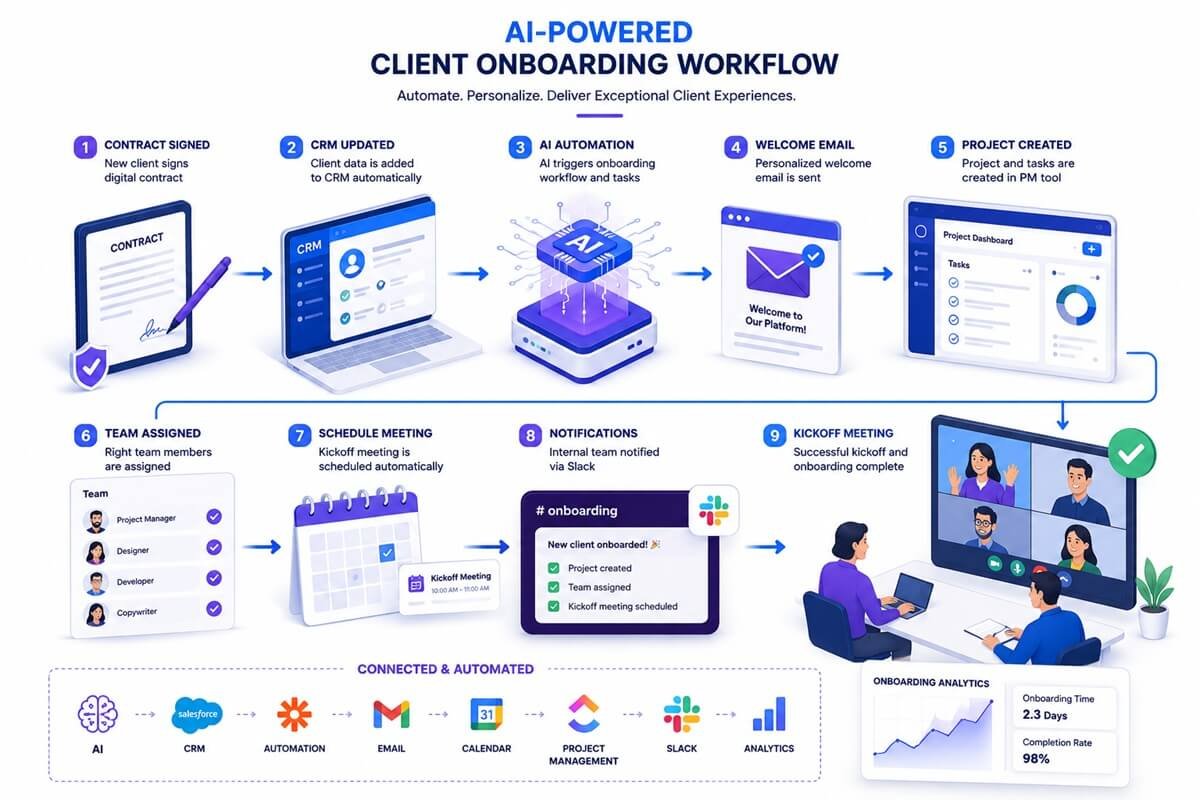
How an Automated Client Onboarding Workflow Works
Although every business has unique requirements, most automated onboarding workflows follow a similar structure.
Lead Becomes Customer
│
▼
Contract Signed
│
▼
CRM Automatically Updated
│
▼
Welcome Email Sent
│
▼
Client Intake Form Shared
│
▼
Project Created
│
▼
Internal Team Assigned
│
▼
Kickoff Meeting Scheduled
│
▼
Project Begins
Each stage acts as a trigger for the next, ensuring a seamless transition from sales to delivery. Modern automation platforms can also connect multiple business applications, eliminating duplicate data entry and reducing administrative effort.
Core Components of an Effective Client Onboarding Workflow
Successful onboarding isn’t defined by a single welcome email or kickoff meeting. Instead, it’s built on several interconnected components that work together to deliver a consistent and professional experience.
1. Welcome Communication
The onboarding journey should begin immediately after the agreement is finalized. A personalized welcome email reassures clients that their project is moving forward while outlining the next steps. It generally includes:
- A thank-you message
- Introduction to the account manager
- Timeline overview
- Important contact information
- Links to onboarding resources
Automation ensures these emails are delivered instantly, even outside business hours.
2. Client Information Collection
Before work begins, businesses need accurate information about the client, including:
- Business details
- Primary contacts
- Project objectives
- Brand guidelines
- Required assets
- Technical credentials
- Communication preferences
Online forms can automatically populate CRM records, eliminating manual data entry while improving accuracy.
3. Contract and Payment Verification
Many onboarding workflows pause until contractual requirements have been completed. Automation can verify:
- Signed agreements
- Initial invoices
- Deposit payments
- Subscription activation
- Service agreements
Once confirmed, the workflow automatically advances to the next stage.
4. CRM Record Creation
A centralized CRM becomes the single source of truth for client information. Automated workflows create or update records with:
- Company details
- Contact information
- Service package
- Assigned team
- Sales history
- Important dates
- Communication records
This ensures every department works from the same accurate information.
5. Internal Team Assignment
Onboarding often involves multiple departments, including sales, project management, customer success, finance, and technical specialists. Instead of relying on manual notifications, workflow automation can:
- Assign project owners
- Notify department leads
- Create internal tasks
- Set deadlines
- Prioritize work based on service level agreements
This reduces delays and keeps everyone aligned from the beginning.
6. Project Setup
Once the client is fully onboarded, project infrastructure should already be in place. Common setup tasks include:
- Creating project workspaces
- Building task lists
- Assigning milestones
- Setting project timelines
- Uploading templates
- Sharing documentation
- Granting software access
Automating these repetitive activities ensures every project starts with a consistent structure.
7. Kickoff Meeting Preparation
The kickoff meeting marks the transition from onboarding to active service delivery. Rather than spending valuable meeting time gathering missing information, a structured onboarding workflow ensures all necessary documents, forms, and approvals are completed beforehand.
A successful kickoff meeting should focus on:
- Reviewing project objectives
- Confirming timelines
- Defining responsibilities
- Establishing communication channels
- Answering client questions
- Setting expectations for future collaboration
With administrative tasks already handled through automation, your team can dedicate more time to building trust and delivering value.
10 Client Onboarding Workflow Templates for Different Business Types
No two businesses onboard clients in exactly the same way. A SaaS company may focus on user activation and product adoption, while a marketing agency needs creative assets and campaign access before work can begin. However, the objective is always the same: move new clients from “deal won” to “fully onboarded” as efficiently and consistently as possible.
The templates below provide proven onboarding workflows that you can customize for your business. Each template highlights the typical onboarding stages, automation opportunities, and AI enhancements that reduce manual work while improving the customer experience.
1. Marketing Agency Client Onboarding Workflow
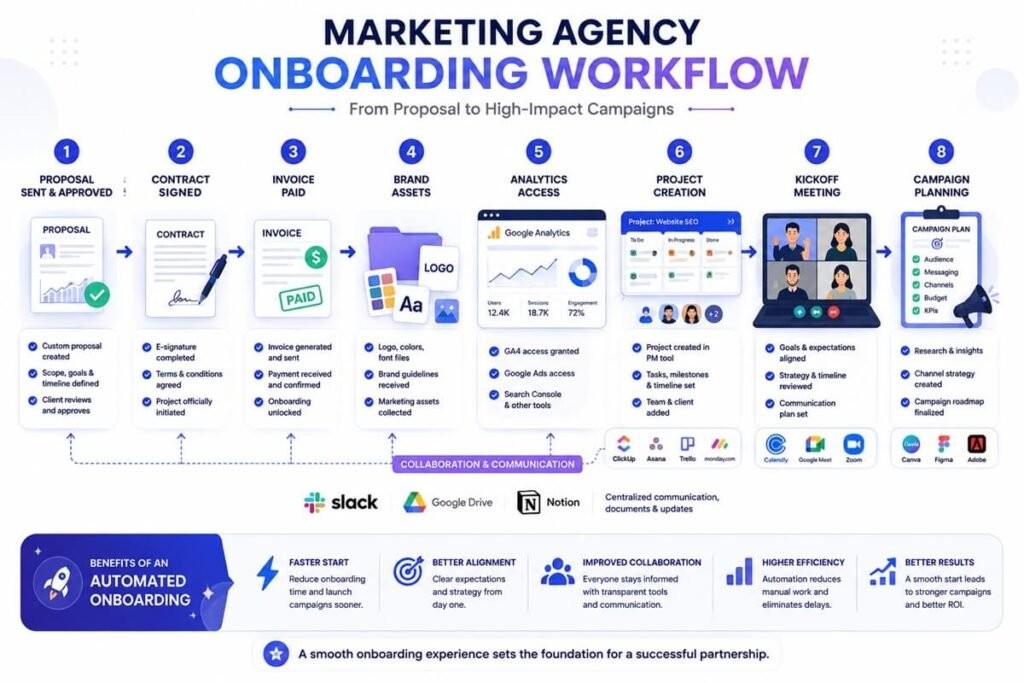
Marketing agencies require extensive information before launching campaigns. Collecting brand assets, analytics access, and campaign goals early prevents project delays.
Best For
- Digital marketing agencies
- SEO agencies
- PPC agencies
- Social media agencies
- Content marketing agencies
Workflow
Proposal Accepted
│
▼
Contract Signed
│
▼
Invoice Paid
│
▼
Welcome Email
│
▼
Client Questionnaire
│
▼
Collect Brand Assets
│
▼
Website & Analytics Access
│
▼
Create Project Workspace
│
▼
Assign Marketing Team
│
▼
Kickoff Meeting
│
▼
Campaign Planning
Information to Collect
- Brand guidelines
- Company overview
- Marketing objectives
- Competitor list
- Website credentials
- Google Analytics access
- Google Ads account
- Meta Business Manager
- Social media accounts
- Existing marketing assets
Automation Opportunities
- Generate onboarding tasks automatically.
- Create a dedicated client folder.
- Send reminders for missing assets.
- Schedule kickoff meetings.
- Notify assigned specialists.
AI Enhancements
AI can summarize onboarding questionnaires, identify missing information, draft campaign briefs, and generate personalized welcome messages.
2. SaaS Customer Onboarding Workflow
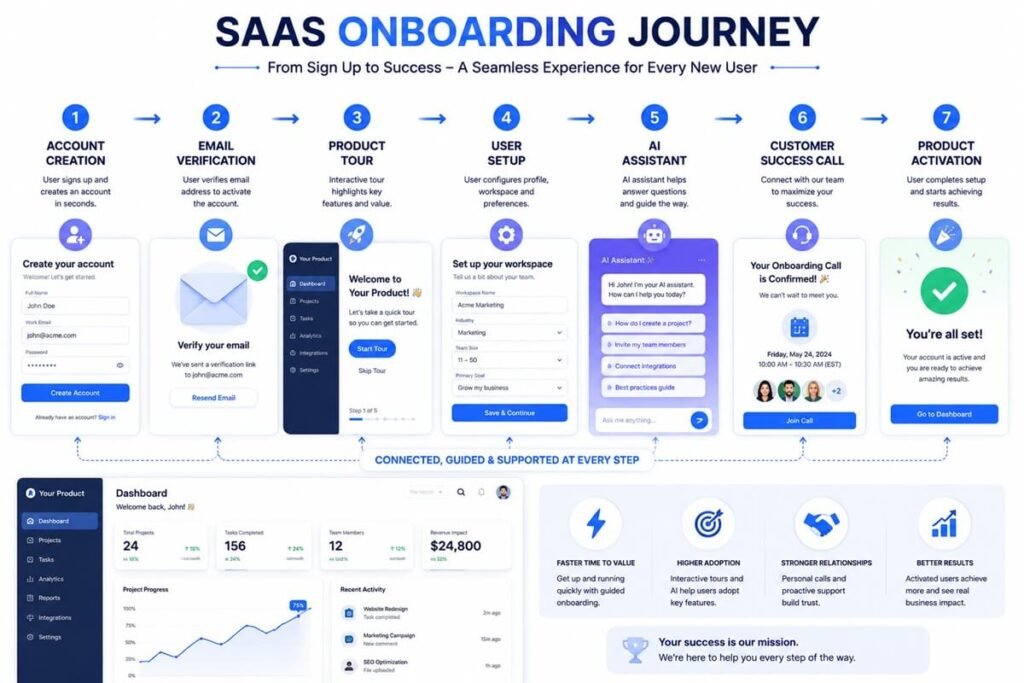
For SaaS companies, onboarding focuses on helping users experience value as quickly as possible. The shorter the time-to-value, the greater the likelihood of long-term customer retention.
Best For
- SaaS platforms
- Subscription software
- Cloud applications
- AI software providers
Workflow
Account Created
│
▼
Email Verification
│
▼
Welcome Email
│
▼
Interactive Product Tour
│
▼
Profile Setup
│
▼
Import Customer Data
│
▼
Complete Setup Checklist
│
▼
Book Customer Success Call
│
▼
First Successful Use
Automation Opportunities
- Send onboarding email sequences.
- Trigger in-app tutorials.
- Monitor activation milestones.
- Assign customer success managers.
- Send progress reminders.
AI Enhancements
AI assistants can answer onboarding questions, recommend next actions, summarize support conversations, and detect users who may need additional guidance.
3. Consulting Business Client Onboarding Workflow
Consultants rely on gathering accurate business information before delivering strategic recommendations.
Best For
- Business consultants
- Financial consultants
- HR consultants
- Operations consultants
Workflow
Agreement Signed
│
▼
Invoice Processed
│
▼
Welcome Package
│
▼
Business Assessment Form
│
▼
Upload Supporting Documents
│
▼
Create Client Workspace
│
▼
Schedule Discovery Session
│
▼
Develop Initial Strategy
Information to Collect
- Business objectives
- Organizational structure
- Existing challenges
- Financial reports
- Key stakeholders
- Success metrics
Automation Opportunities
- Automatically request required documents.
- Schedule discovery meetings.
- Generate consulting workspaces.
- Assign consultants.
4. Web Design Agency Workflow
Web design projects often require multiple technical assets before work can begin.
Workflow
Project Approved
│
▼
Contract Signed
│
▼
Deposit Received
│
▼
Client Questionnaire
│
▼
Receive Logo & Brand Files
│
▼
Hosting & Domain Access
│
▼
Create Design Project
│
▼
Kickoff Meeting
│
▼
Wireframe Planning
Required Assets
- Logo files
- Brand colors
- Fonts
- Existing website
- Hosting credentials
- Domain registrar access
- Sitemap
- Design inspiration
AI Enhancements
AI can analyze existing websites, generate sitemap recommendations, summarize design requirements, and draft project briefs.
5. Freelancer Client Onboarding Workflow
Freelancers need a lightweight process that minimizes administration while maintaining professionalism.
Best For
- Copywriters
- Designers
- Developers
- Virtual assistants
- Video editors
Workflow
Client Accepts Proposal
│
▼
Contract Signed
│
▼
Deposit Paid
│
▼
Welcome Email
│
▼
Project Questionnaire
│
▼
Timeline Shared
│
▼
Project Folder Created
│
▼
Work Begins
Automation Opportunities
- Send invoices automatically.
- Create project folders.
- Generate contracts.
- Schedule reminders.
- Share project timelines.
6. Managed IT Services (MSP) Onboarding Workflow
Managed service providers must securely collect technical information before providing ongoing support.
Workflow
Service Agreement
│
▼
Security Review
│
▼
Network Assessment
│
▼
Collect Credentials
│
▼
Deploy Monitoring Tools
│
▼
Configure Help Desk
│
▼
Assign Support Team
│
▼
Begin Managed Services
Information to Collect
- Network inventory
- Device information
- Administrator accounts
- Cloud services
- Backup systems
- Security policies
AI Opportunities
AI can classify support environments, identify missing documentation, summarize infrastructure reports, and recommend onboarding priorities.
7. Accounting Firm Client Onboarding Workflow
Accounting firms handle confidential financial information, making document collection and compliance critical.
Workflow
Engagement Letter
│
▼
Identity Verification
│
▼
Collect Financial Records
│
▼
Accounting Software Access
│
▼
Create Client Profile
│
▼
Assign Accountant
│
▼
Initial Consultation
Documents Required
- Tax records
- Bank statements
- Payroll reports
- Previous financial statements
- Business registration
- Accounting software access
Automation ensures clients receive secure upload links and reminders for missing documents.
8. Legal Firm Client Onboarding Workflow
Legal onboarding emphasizes compliance, confidentiality, and document management. The right AI workflow tools for law firms can help streamline these processes while keeping sensitive client information organized and secure.
Workflow
Consultation Completed
│
▼
Conflict Check
│
▼
Engagement Agreement
│
▼
Identity Verification
│
▼
Secure Document Upload
│
▼
Case Created
│
▼
Attorney Assigned
│
▼
Case Strategy Meeting
Automation Opportunities
- Generate engagement letters.
- Verify document completion.
- Schedule consultations.
- Organize case files.
- Notify legal teams.
9. Real Estate Agency Client Onboarding Workflow
Real estate professionals coordinate multiple parties, making timely communication essential. AI automation for real estate can streamline client onboarding by coordinating communication, documents, scheduling, and CRM updates across the entire process.
Workflow
Client Agreement
│
▼
Buyer/Seller Questionnaire
│
▼
Identity Verification
│
▼
Property Preferences
│
▼
Assign Agent
│
▼
Create Client Portal
│
▼
Schedule Consultation
Automation Opportunities
- Share listings automatically.
- Schedule property viewings.
- Send document reminders.
- Update CRM records.
10. Healthcare Practice Patient Onboarding Workflow
Healthcare organizations require secure onboarding that complies with privacy regulations while minimizing administrative burden.
Workflow
Appointment Scheduled
│
▼
Patient Registration
│
▼
Insurance Verification
│
▼
Medical History Form
│
▼
Consent Documents
│
▼
Patient Portal Access
│
▼
Appointment Reminder
│
▼
First Visit
Automation Opportunities
- Send appointment reminders.
- Verify insurance information.
- Collect digital forms.
- Deliver patient instructions.
- Update electronic health records.
Universal Client Onboarding Workflow Template
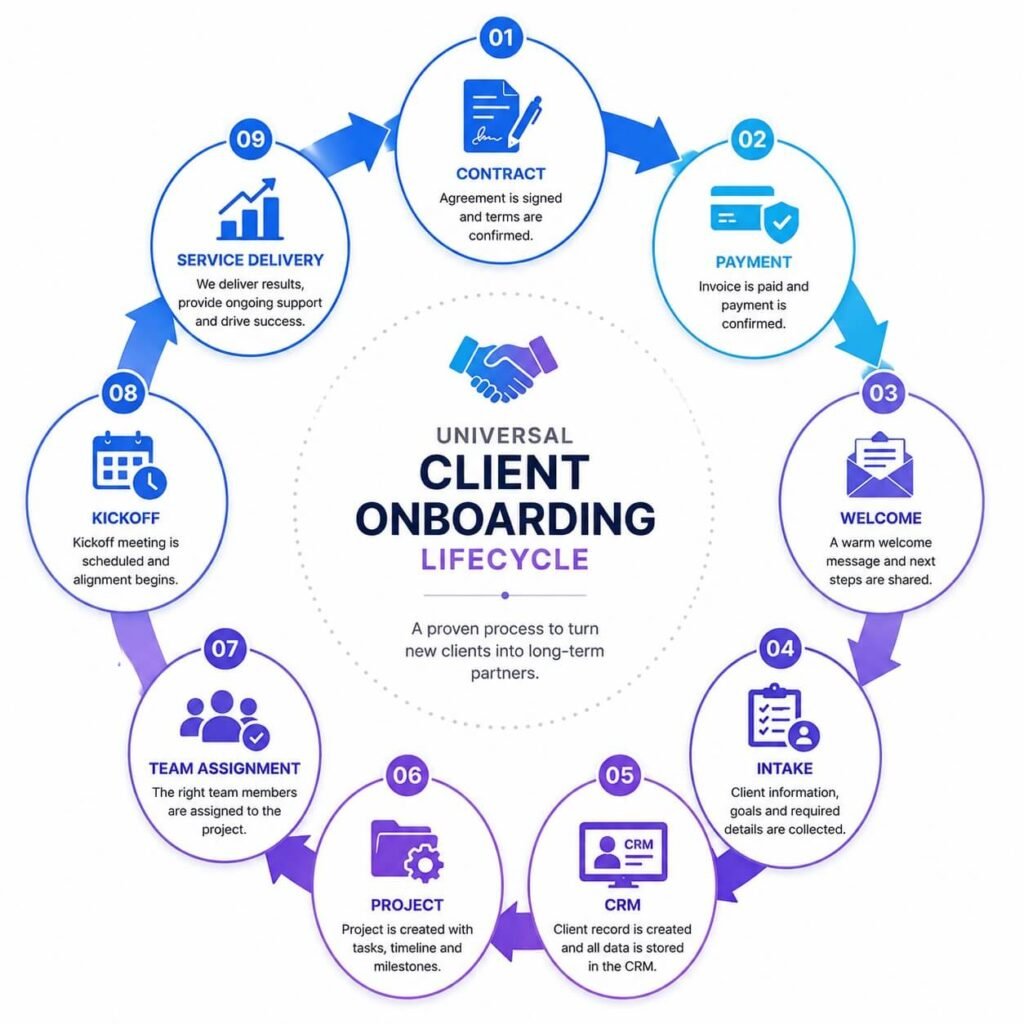
Although industries vary, most onboarding processes follow a common framework that can be adapted to almost any service business.
| Stage | Goal | Typical Automation |
| Deal Closed | Confirm new customer | CRM trigger |
| Contract | Finalize agreement | E-signature workflow |
| Payment | Verify invoice or deposit | Payment confirmation |
| Welcome | Introduce next steps | Automated email |
| Information Collection | Gather client details | Online forms |
| CRM Update | Centralize customer data | CRM automation |
| Project Creation | Prepare delivery | Project management integration |
| Team Assignment | Allocate responsibilities | Workflow rules |
| Kickoff Scheduling | Plan first meeting | Calendar integration |
| Active Delivery | Begin service | Internal notifications |
How AI Enhances Every Onboarding Template
Traditional automation follows predefined rules, but AI adds intelligence by understanding content, generating responses, and recommending actions. Here are practical ways AI can improve onboarding across different industries:
| Onboarding Stage | AI Capability | Business Value |
| Welcome Email | Draft personalized messages | Faster communication |
| Intake Forms | Summarize responses | Less manual review |
| Document Collection | Extract key information | Reduced data entry |
| CRM Updates | Categorize and enrich records | Better data quality |
| Task Assignment | Recommend owners based on workload | Improved resource allocation |
| Meeting Preparation | Generate agendas and summaries | More productive kickoff calls |
| Follow-up | Detect incomplete onboarding steps | Higher completion rates |
| Knowledge Support | Answer common client questions | Reduced support workload |
By combining workflow automation with AI-powered decision support, businesses can create onboarding experiences that are not only faster but also more personalized and scalable.
Building an AI-Powered Client Onboarding System
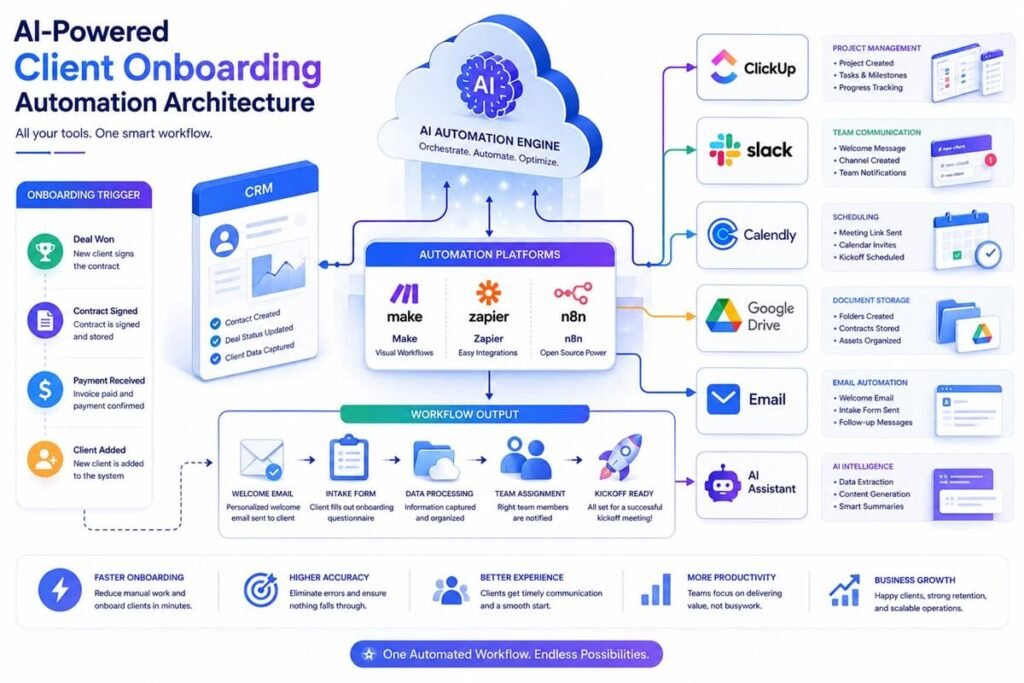
The templates in Part 2 provide the structure, but the real efficiency comes from connecting your tools into a single automated system. A modern onboarding stack usually includes:
- CRM (HubSpot, Pipedrive, Zoho)
- Automation Platform (Make, Zapier, n8n)
- Project Management (ClickUp, Asana, Monday.com)
- Email Platform (Gmail, Outlook, Mailchimp)
- Scheduling Tool (Calendly)
- Document Storage (Google Drive, OneDrive)
- Team Communication (Slack, Microsoft Teams)
- AI Assistant (ChatGPT, Claude, Gemini)
When these tools communicate with each other, onboarding becomes a largely hands-off process.
Example AI Onboarding Workflow
Deal Marked Closed-Won in CRM
│
▼
Automation Creates Client Record
│
▼
AI Generates Personalized Welcome Email
│
▼
Intake Form Sent Automatically
│
▼
AI Summarizes Form Responses
│
▼
Project Created in ClickUp
│
▼
Team Assigned Based on Workload
│
▼
Calendly Link Sent
│
▼
Kickoff Meeting Scheduled
│
▼
Slack Notification Sent to Delivery Team
This workflow can execute within seconds after a deal is closed, dramatically reducing onboarding delays.
Best Tools for Client Onboarding Automation
| Tool | Best For |
| HubSpot | CRM + onboarding automation |
| Make | Advanced multi-step workflows |
| n8n | Open-source automation |
| Zapier | Easy no-code integrations |
| Wokrflow AI Suite | Project and task management |
| Asana | Team collaboration |
| Calendly | Meeting scheduling |
| Slack | Internal notifications |
| Google Workspace | Documents and storage |
| ChatGPT | AI-generated onboarding content |
Recommended Stack by Business Size
- Solo freelancer: Zapier + Google Workspace + Calendly
- Small agency: HubSpot + Workflow AI Suite+ Make
- Growing SaaS company: HubSpot + Customer.io + Make + Slack
- Enterprise: Salesforce + Workato + Asana + Teams + AI layer
Client Onboarding Checklist
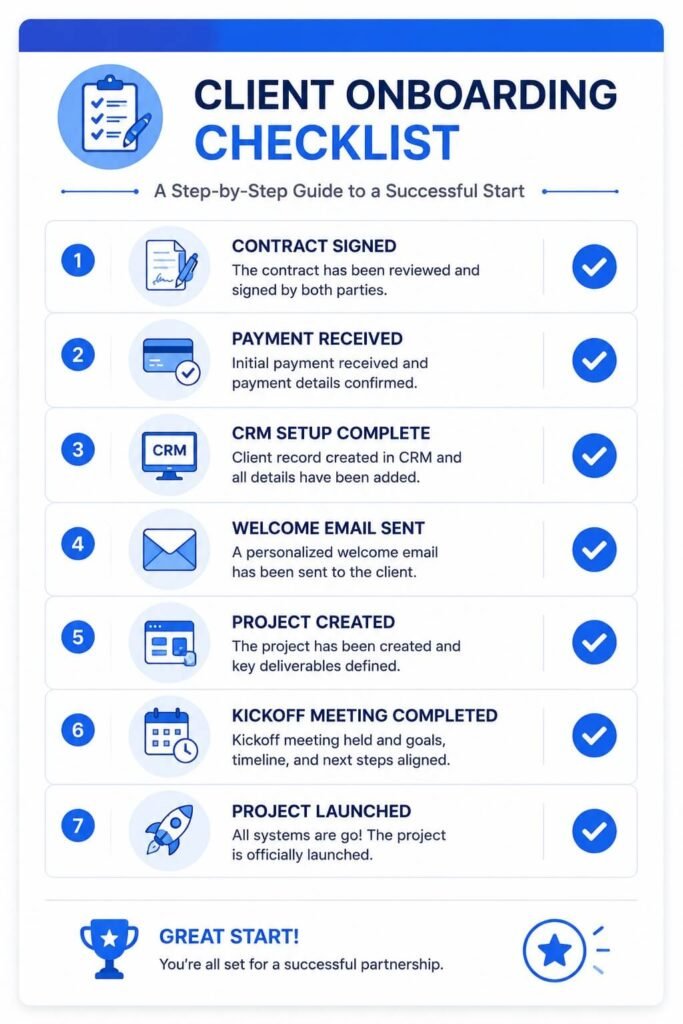
Use this checklist to ensure no onboarding step is missed.
Checklist
Client Onboarding Checklist
Continue in a new chat
- Signed contract received
- Initial invoice paid
- Client record created in CRM
- Welcome email sent
- Intake questionnaire completed
- Brand or technical assets received
- Project workspace created
- Internal team assigned
- Kickoff meeting scheduled
- Communication channels established
- Timeline shared with client
- Client portal access provided
- First milestone confirmed
- Onboarding completion recorded
Consider turning this checklist into a reusable template inside your project management tool.
Common Client Onboarding Mistakes
Even with automation, businesses often make avoidable mistakes that hurt the customer experience.
- Asking for Too Much Information Upfront
- Delayed Communication
- No Clear Owner
- Manual Data Entry
- Inconsistent Processes
- Ignoring Security
- Failing to Measure Results
Best Practices for Seamless Customer Onboarding
- Keep the First 24 Hours Fast
- Use Branded Templates
- Automate Repetitive Tasks
- Personalize the Human Touchpoints
- Create a Single Source of Truth
- Review Your Workflow Quarterly
KPIs to Measure Onboarding Success
Tracking the right metrics helps you improve onboarding continuously.
| KPI | Why It Matters |
| Time to Onboard | Measures operational efficiency |
| Time to First Value | Shows how quickly clients see results |
| Onboarding Completion Rate | Indicates process health |
| Client Satisfaction Score | Measures customer experience |
| Support Tickets During Onboarding | Reveals friction points |
| Project Start Delay | Identifies operational bottlenecks |
| 30-Day Retention | Shows long-term onboarding effectiveness |
Example Targets
- Time to onboard: < 2 business days
- Onboarding completion rate: > 90%
- Kickoff meeting scheduled: within 48 hours
- Client satisfaction: 4.5/5 or higher
AI Prompts You Can Use Today
Welcome Email Prompt
Write a professional welcome email for a new [industry] client. Mention their company name, thank them for choosing us, explain the next onboarding steps, and include a friendly tone.
Intake Summary Prompt
Summarize the following client onboarding form into key goals, deliverables, risks, and missing information.
Kickoff Agenda Prompt
Create a 30-minute kickoff meeting agenda for a new [service type] client. Include introductions, goals, timeline, communication process, and next actions.
Using prompts like these can save hours of manual writing every week.
Frequently Asked Questions
What is the difference between client onboarding and customer onboarding?
The terms are often used interchangeably. “Client onboarding” is more common in service businesses, while “customer onboarding” is frequently used in SaaS and product companies.
Can small businesses automate onboarding?
Yes. Even a solo freelancer can automate contracts, invoices, welcome emails, and meeting scheduling using affordable no-code tools.
How long should onboarding take?
Simple service businesses can complete onboarding within a few hours, while complex enterprise projects require several days. The goal is to minimize unnecessary waiting time.
Is AI replacing account managers?
No. AI handles repetitive administrative tasks and content generation, while account managers focus on strategy, relationships, and customer success.
Which tasks should never be fully automated during client onboarding?
Relationship-building activities such as kickoff meetings, goal discussions, expectation setting, and strategic planning are usually best handled by people. Automation should support these interactions rather than replace them.
What software integrations are most important for onboarding automation?
Most businesses benefit from integrating five core systems:
CRM
Project management platform
Email platform
Scheduling software
Document storage
Connecting these tools eliminates duplicate data entry and creates a smoother experience for both clients and internal teams.
How often should an onboarding workflow be reviewed?
Review your onboarding workflow at least once every quarter or whenever your services, pricing, or internal processes change. Regular reviews help eliminate bottlenecks and keep automation aligned with your current business operations.
Final Thoughts
A well-designed client onboarding workflow is one of the highest-leverage systems a business can build. It improves customer experience, reduces operational chaos, accelerates project delivery, and creates a scalable foundation for growth.
The most successful companies treat onboarding as a product, not an afterthought. They document every step, automate repetitive tasks, measure performance, and continuously refine the experience.
Start with a simple template that matches your business type. Then connect your CRM, project management software, email platform, and scheduling tool into a single automated workflow. Finally, add AI capabilities to personalize communication, summarize information, and support your team.
The result is a seamless onboarding experience that makes clients feel confident from day one—and gives your business more time to focus on delivering exceptional results.