
CRM Implementation Guide (2026): How to Deploy a CRM That Drives Business Growth

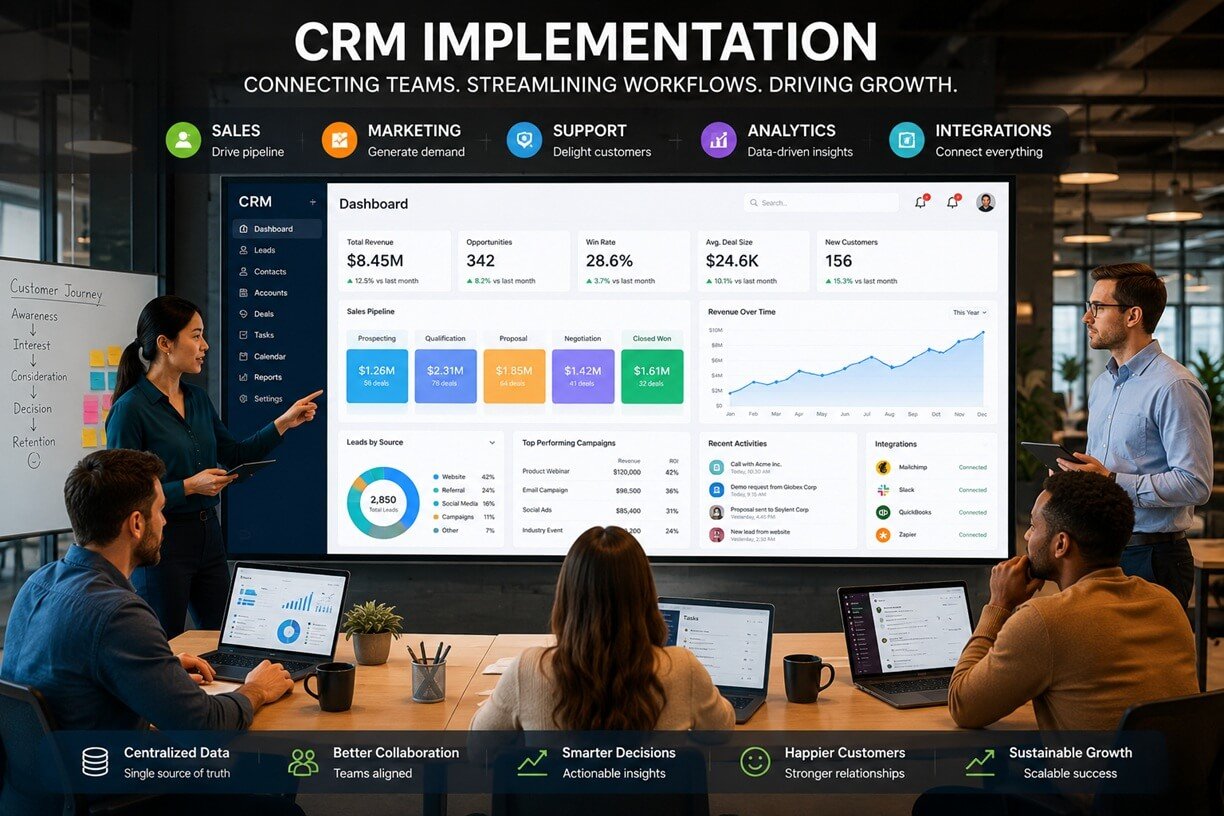
“This guide CRM implementation guide explains how to plan, deploy, and optimize a CRM implementation from the ground up. Rather than focusing on workflow automation or platform-specific tutorials, we’ll examine the strategic framework that helps organizations achieve long-term success with their CRM investment.“
Implementing a customer relationship management (CRM) platform is one of the most impactful investments a business can make—but it’s also one of the easiest to get wrong. Many organizations purchase a powerful CRM expecting immediate improvements in sales performance, customer service, and reporting, only to discover months later that adoption is low, data is inconsistent, and teams have returned to spreadsheets or manual processes.
The problem rarely lies with the software itself. Most modern CRM platforms offer robust capabilities for managing customer interactions, tracking opportunities, automating routine tasks, and generating business insights. The real challenge is implementation. Without a structured rollout plan, clearly defined business objectives, clean data, and employee buy-in, even the most advanced CRM can become an expensive database that delivers little business value.
Successful CRM implementation is about far more than installing software. It requires aligning people, processes, and technology around a shared vision for managing customer relationships. Sales, marketing, customer support, finance, and leadership teams all interact with customer data in different ways, making implementation a company-wide initiative rather than an IT project.
When done correctly, a CRM becomes the operational backbone of the organization. Sales teams gain a complete view of every opportunity, marketers understand which campaigns generate qualified leads, support agents resolve issues with full customer context, and executives can make decisions using accurate, real-time data.
Business growth also introduces new operational challenges. More leads, larger sales teams, additional communication channels, and expanding customer databases quickly make manual processes unsustainable. A well-implemented CRM creates standardized processes that scale with the business while reducing administrative work and improving collaboration across departments.
Whether you’re implementing your first CRM, replacing a legacy system, or expanding an existing deployment, this guide provides a roadmap for building a CRM that supports measurable business growth.
Table of Contents
What Is CRM Implementation?
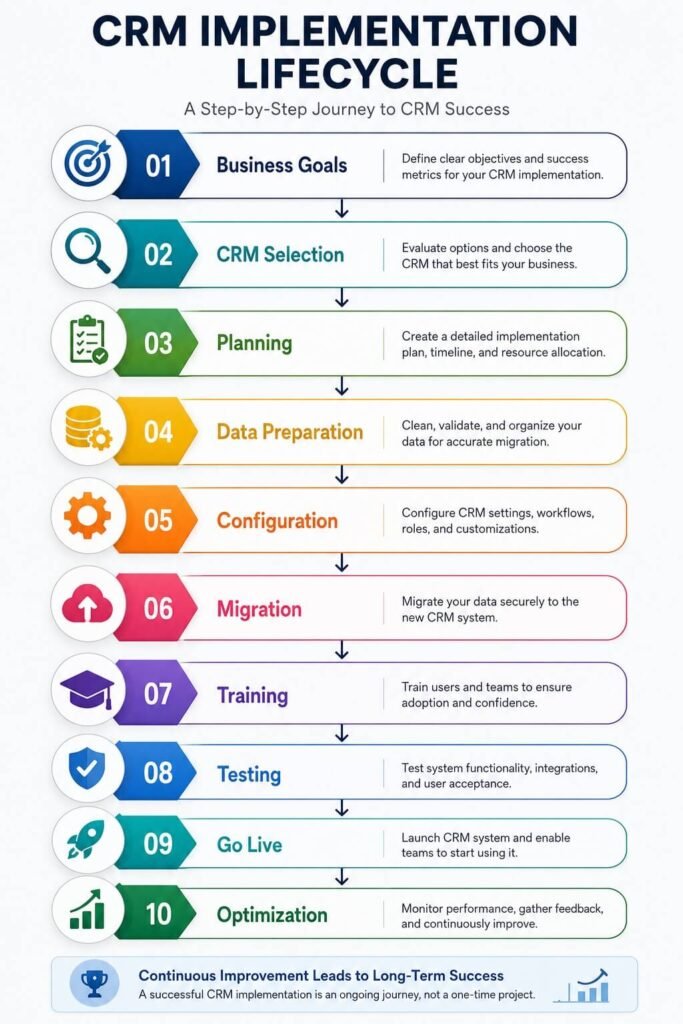
CRM implementation is the end-to-end process of planning, configuring, deploying, and adopting a customer relationship management system within an organization.
Businesses that are new to customer relationship management can also review the Salesforce CRM guide for an overview of CRM concepts and core capabilities. It encompasses everything required to transform a CRM from a newly purchased application into a fully integrated business platform that employees rely on every day.
A successful implementation includes much more than installing software or importing customer contacts. It involves evaluating business objectives, designing standardized sales processes, preparing customer data, configuring user permissions, integrating other business systems, training employees, testing functionality, and continuously improving the platform after launch.
Unlike a one-time software installation, CRM implementation is an organizational change initiative. It affects how teams capture leads, manage customer interactions, forecast revenue, collaborate across departments, and measure business performance.
The implementation lifecycle typically follows a structured sequence:
Business Assessment
↓
Goal Definition
↓
CRM Platform Selection
↓
Implementation Planning
↓
Data Preparation
↓
System Configuration
↓
Business Integrations
↓
Data Migration
↓
User Training
↓
Testing & Validation
↓
Go-Live
↓
Continuous Improvement
Each phase builds upon the previous one. Skipping or rushing any stage often results in lower adoption, inconsistent data, or inefficient business processes later.
One of the biggest misconceptions is that implementation ends once the CRM goes live. In reality, launch marks the beginning of continuous optimization. As customer expectations evolve and business processes change, organizations should regularly review their CRM configuration, reports, permissions, and integrations to ensure the platform continues supporting business goals.
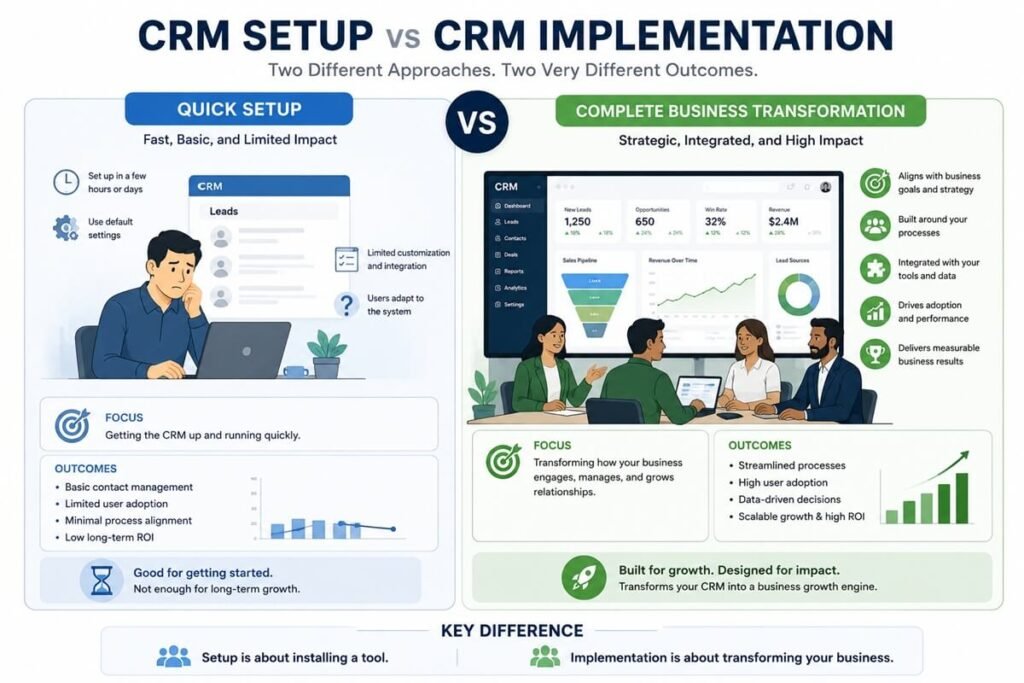
CRM Implementation vs. CRM Setup
These terms are often used interchangeably, but they represent different scopes of work.
| CRM Setup | CRM Implementation |
| Creates an account | Delivers an organization-wide CRM strategy |
| Adds users | Defines roles, permissions, and governance |
| Imports contacts | Cleans, structures, and validates business data |
| Configures basic settings | Aligns the CRM with business processes |
| Focuses on software | Focuses on people, processes, and technology |
| Usually completed in hours or days | Often spans weeks or months depending on complexity |
A small business with a handful of employees may complete a basic CRM setup in a day, while a multi-department organization often requires a structured implementation project involving multiple stakeholders and phased deployment.
Why CRM Implementation Matters
Businesses generate more customer data today than ever before. Website inquiries, email campaigns, live chat conversations, social media interactions, phone calls, support tickets, online purchases, and meetings all contribute valuable information about prospects and customers. Without a centralized system, this data quickly becomes fragmented across spreadsheets, inboxes, and disconnected applications.
A CRM implementation provides the structure needed to unify this information and make it accessible across the organization. Instead of each department maintaining separate customer records, a CRM creates a single source of truth that supports consistent communication, more accurate reporting, and better decision-making.
Improved Customer Visibility
Sales representatives no longer need to search through emails or ask colleagues for updates before speaking with a prospect. Marketing teams can identify which campaigns generated qualified leads, while customer support agents gain immediate access to previous purchases, open opportunities, and historical interactions.
This shared visibility reduces duplicated work and improves the customer experience.
Standardized Business Processes
Growing organizations often struggle with inconsistent processes. Different sales representatives may qualify leads differently, customer success managers may follow unique onboarding procedures, and support teams may categorize requests inconsistently.
CRM implementation establishes standardized processes that everyone follows, improving both efficiency and reporting accuracy.
Better Decision-Making
Reliable business decisions depend on reliable data.
When customer information is incomplete or outdated, sales forecasts become inaccurate, marketing budgets are harder to justify, and leadership loses confidence in performance metrics.
A properly implemented CRM ensures that critical customer information is captured consistently, making dashboards and reports far more dependable.
Increased Team Productivity
Many organizations underestimate the amount of time employees spend searching for information, updating spreadsheets, or switching between disconnected applications.
A centralized CRM reduces this administrative burden by keeping customer information in one location, allowing employees to focus on higher-value activities such as selling, serving customers, and building relationships.
Improved Scalability
Business growth often exposes weaknesses in manual processes. What works for a team of five employees rarely works for fifty.
A CRM implementation creates standardized systems that can accommodate additional employees, customers, products, and business units without requiring entirely new processes every time the company expands.
Signs Your Business Is Ready for CRM Implementation
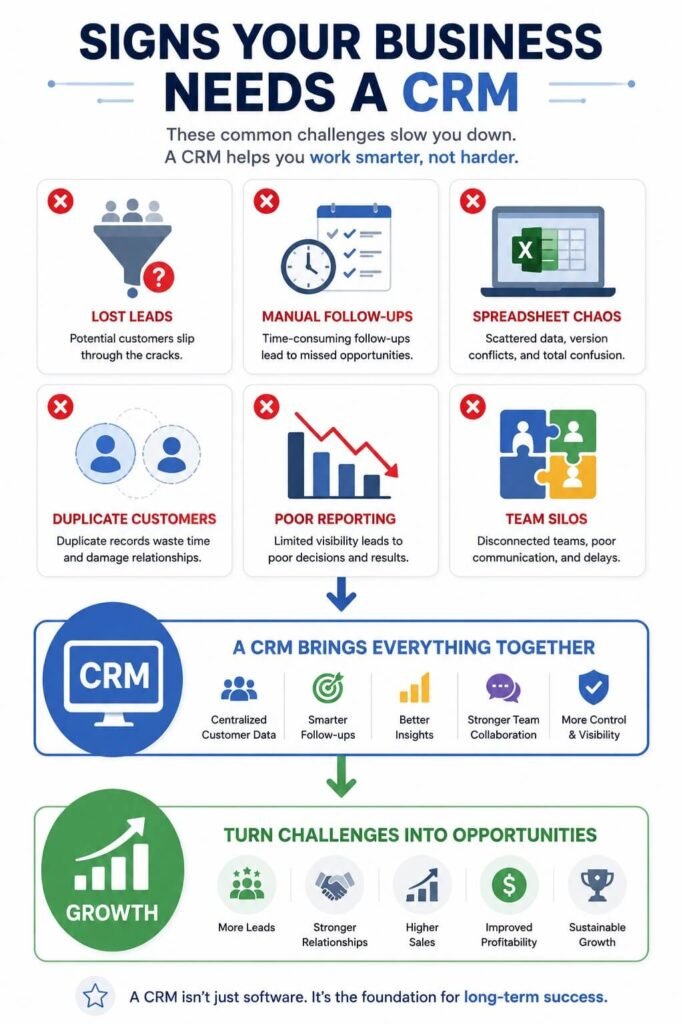
Not every organization needs a CRM immediately, but there are clear indicators that manual systems are becoming a barrier to growth. If several of the following situations sound familiar, it may be time to implement a CRM.
Customer Information Is Scattered
Important customer details exist in spreadsheets, email inboxes, notebooks, messaging apps, and individual employee files.
As a result:
- Team members struggle to find accurate information.
- Customer history becomes fragmented.
- Employees duplicate work.
- Valuable knowledge is lost when staff leave the organization.
A CRM centralizes this information into a shared, searchable platform.
Sales Opportunities Are Falling Through the Cracks
Prospects submit inquiries but don’t receive timely responses.
Follow-up reminders depend on individual memory.
Deals stall because no one knows who owns the next action.
A CRM creates accountability by organizing opportunities within a structured sales pipeline.
Reporting Takes Too Long
Managers spend hours compiling spreadsheets before meetings.
Sales forecasts require manual calculations.
Marketing performance is difficult to measure accurately.
A CRM consolidates customer activity into dashboards that update automatically, reducing time spent preparing reports and improving visibility into business performance.
Teams Use Too Many Disconnected Tools
Your business may rely on separate systems for:
- Email marketing
- Customer support
- Accounting
- Project management
- Scheduling
- Sales tracking
Without integration, employees repeatedly enter the same information into multiple systems.
A CRM provides a centralized foundation that can connect these business applications and improve data consistency.
Business Growth Is Outpacing Existing Processes
Rapid growth often creates operational complexity that spreadsheets and manual tracking cannot support.
Signs include:
- Increasing lead volume
- Larger sales teams
- Multiple office locations
- More products or services
- Longer sales cycles
- Higher customer expectations
Implementing a CRM early helps establish scalable, standardized processes before inefficiencies become deeply embedded in daily operations. Organizations can accelerate this process by using proven CRM workflow templates, which provide structured sales, marketing, and customer service workflows that improve consistency, reduce implementation time, and increase user adoption.
As organizations grow, many also introduce AI workflow automation tools to reduce repetitive work across sales, marketing, and customer support.
Why CRM Implementations Fail (And How to Avoid the Same Mistakes)
One of the biggest misconceptions about CRM projects is that selecting the right software guarantees success. In reality, implementation failures are usually caused by poor planning, weak leadership, inconsistent processes, and low employee adoption—not by the CRM platform itself.
Organizations often rush into deployment, hoping technology will solve existing business problems. However, a CRM simply digitizes the processes already in place. If those processes are inefficient or poorly documented, implementation can amplify those issues rather than eliminate them.
Understanding why CRM projects struggle helps organizations build a stronger implementation strategy from the beginning.
1. Unclear Business Objectives
Many businesses start implementation with goals that are too broad, such as:
- Improve sales
- Increase productivity
- Organize customer data
While these are worthwhile outcomes, they don’t provide enough direction for an implementation team.
Instead, define measurable objectives.
Examples include:
| Weak Goal | Better Goal |
| Improve follow-ups | Reduce average lead response time from 12 hours to under 2 hours |
| Increase sales | Increase opportunity win rate by 15% within 12 months |
| Improve reporting | Generate executive dashboards automatically every morning |
| Organize customer data | Consolidate all customer records into one CRM with less than 2% duplicate contacts |
Clear objectives make implementation decisions much easier because every configuration should support a defined business outcome.
2. Treating CRM as an IT Project
Many organizations assign CRM implementation entirely to the IT department.
While IT plays an important role, CRM impacts almost every customer-facing team.
Successful implementations involve collaboration between:
- Executive leadership
- Sales
- Marketing
- Customer Success
- Customer Support
- Finance
- Operations
- IT
Every department should contribute to designing processes that reflect how they interact with customers.
3. Poor Data Quality
One of the fastest ways to undermine confidence in a CRM is importing inaccurate or incomplete customer data.
Common issues include:
- Duplicate contacts
- Missing email addresses
- Inconsistent company names
- Outdated phone numbers
- Inactive customers
- Incorrect ownership
- Old opportunities
Before importing data, conduct a complete audit.
Questions to ask include:
- Which fields are mandatory?
- Which records should be archived?
- Are duplicate companies merged?
- Are naming conventions standardized?
- Does every customer have an assigned owner?
Clean data improves reporting, segmentation, forecasting, and user trust.
4. Low User Adoption
Even the most advanced CRM provides little value if employees don’t use it consistently.
Low adoption usually occurs because:
- Employees weren’t involved during planning.
- Training was insufficient.
- Processes became overly complicated.
- Data entry feels like extra work.
- Leadership doesn’t actively use CRM reports.
Successful organizations treat adoption as an ongoing initiative rather than a one-time training event.
5. Trying to Build Everything at Once
Large implementation projects often fail because businesses attempt to launch every feature simultaneously.
Examples include:
- Sales
- Marketing
- Customer service
- Inventory
- Accounting
- Project management
- AI
- Advanced analytics
- Mobile apps
- Customer portals
Launching everything together increases complexity and delays adoption. Instead, prioritize essential business functions first before expanding capabilities in future phases.
6. Ignoring Change Management
Employees naturally resist unfamiliar systems.
Implementation succeeds when organizations explain:
- Why the CRM is being introduced.
- How it benefits employees.
- What changes to expect.
- Where to receive support.
- How success will be measured.
Good communication reduces uncertainty and encourages long-term adoption.
Benefits of a Successful CRM Implementation
When implementation is approached strategically, a CRM becomes much more than a customer database. It transforms how the entire organization manages relationships, collaborates across teams, and makes business decisions.
A Single Source of Truth
Customer information is no longer spread across multiple systems.
Instead, every department works from the same customer record.
Benefits include:
- Fewer duplicate records
- Better collaboration
- Consistent customer communication
- Improved reporting accuracy
Greater Sales Efficiency
Sales representatives spend less time searching for information and more time engaging with prospects.
Managers gain visibility into:
- Pipeline health
- Opportunity progress
- Forecast accuracy
- Individual performance
- Team workload
This allows leaders to identify bottlenecks earlier and allocate resources more effectively.
Stronger Customer Relationships
Every interaction contributes to a complete customer history.
Teams can quickly view:
- Previous conversations
- Purchase history
- Support requests
- Renewal dates
- Meeting notes
- Contract details
Customers benefit from faster, more personalized service because employees have immediate access to relevant context.
Better Collaboration Between Departments
Marketing generates leads.
Sales converts opportunities.
Customer success supports onboarding.
Support resolves issues.
Finance manages contracts.
Without a CRM, these teams often operate independently. Implementation creates shared visibility that reduces communication gaps and improves coordination throughout the customer lifecycle.
CRM systems become even more valuable when integrated into an AI-driven B2B marketing system, where lead generation, nurturing, sales, and customer engagement work together through connected workflows and shared customer data.
More Reliable Reporting
Executives need accurate information to make strategic decisions. A properly implemented CRM provides dashboards for:
- Revenue forecasts
- Sales performance
- Lead sources
- Customer acquisition
- Retention trends
- Service performance
Rather than collecting data manually from multiple systems, leadership gains access to real-time business insights.
Improved Scalability
Processes that work for a small team often become inefficient as the business grows.mCRM implementation establishes standardized operating procedures that scale alongside:
- New employees
- Additional offices
- Expanded product lines
- International markets
- Higher customer volumes
Instead of reinventing processes every year, businesses can refine an existing framework.
Choosing the Right CRM Implementation Strategy
Not every organization should implement a CRM in the same way.
The best strategy depends on business size, available resources, organizational complexity, and long-term growth plans.
Generally, organizations follow one of four implementation approaches.
| Strategy | Best For | Advantages | Considerations |
| Phased Rollout | Growing businesses | Lower risk and easier adoption | Longer overall timeline |
| Department-by-Department | Medium and large organizations | Teams receive focused training | Requires strong coordination |
| Company-Wide Launch | Smaller businesses | Faster deployment | Higher short-term workload |
| Pilot Implementation | Enterprise organizations | Validates processes before scaling | Requires additional planning |
For most businesses, a phased rollout delivers the best balance between speed and stability. Launching core CRM functionality first allows teams to become comfortable before introducing additional capabilities.
Building Your CRM Implementation Team
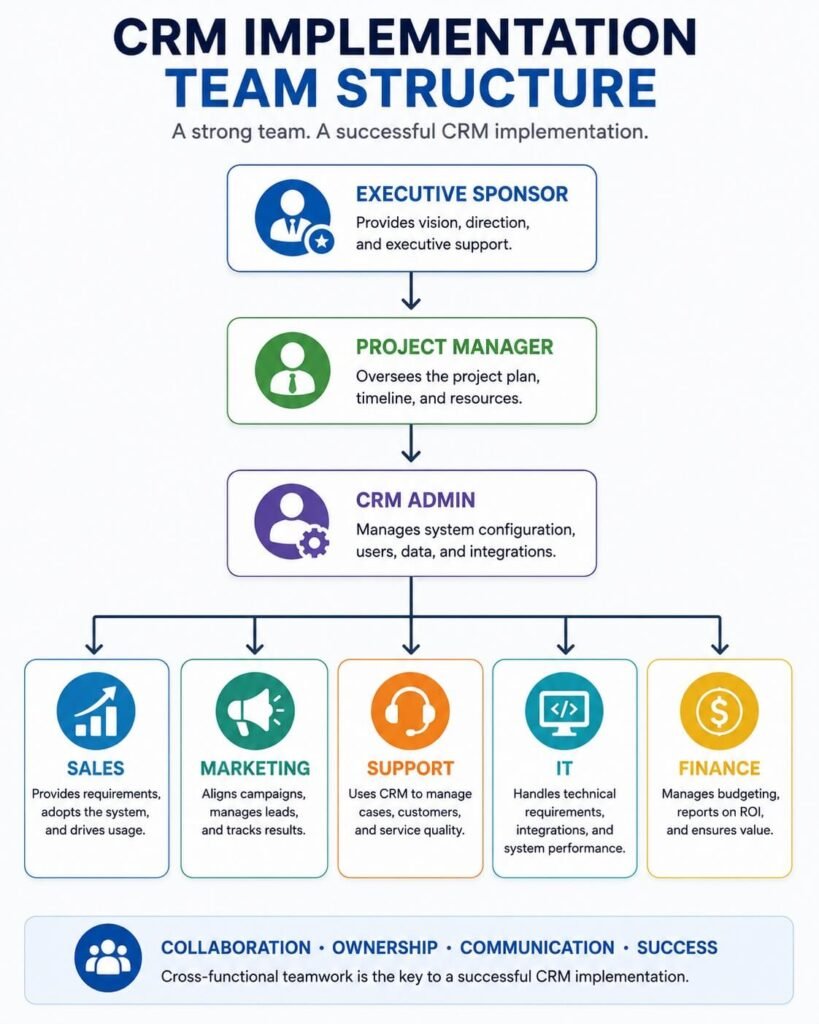
Successful CRM projects require clear ownership.
Instead of assigning responsibility to one person, establish a cross-functional implementation team.
Executive Sponsor
The executive sponsor ensures the CRM aligns with business strategy.
Responsibilities include:
- Approving budgets
- Removing organizational roadblocks
- Communicating priorities
- Measuring business outcomes
Visible executive support encourages organization-wide adoption.
Project Manager
The project manager coordinates daily implementation activities.
Typical responsibilities include:
- Managing timelines
- Assigning tasks
- Scheduling meetings
- Tracking risks
- Coordinating vendors
- Monitoring project milestones
A dedicated project manager keeps implementation on schedule.
CRM Administrator
The CRM administrator manages the platform itself.
Responsibilities often include:
- User management
- Permissions
- Configuration
- Data validation
- Report creation
- Ongoing maintenance
After launch, this role becomes central to continuous optimization.
Department Representatives
Each major department should nominate at least one representative.
Examples include:
- Sales
- Marketing
- Customer Support
- Customer Success
- Finance
- Operations
These representatives ensure the CRM reflects real business requirements rather than assumptions.
IT and Security Specialists
Technical specialists assist with:
- Integrations
- Authentication
- Data security
- Compliance
- Infrastructure
- Backup strategies
Their involvement helps ensure the CRM meets organizational security and governance requirements. Organizations should also align their security practices with the NIST Cybersecurity Framework to strengthen risk management and protect sensitive customer information.
As CRM platforms increasingly integrate with AI tools and third-party applications, organizations should also follow AI workflow security best practices to protect customer data, manage access controls, and maintain regulatory compliance.
Defining Business Goals Before Implementation
Technology should never be implemented without first identifying the business outcomes it is expected to support. A practical framework is to group objectives into strategic categories.
| Business Area | Example Goal |
| Sales | Increase win rate by 10% |
| Marketing | Improve lead qualification accuracy |
| Customer Success | Reduce onboarding time by 30% |
| Support | Improve first-response time |
| Leadership | Generate real-time executive dashboards |
| Operations | Eliminate duplicate customer records |
Once goals are established, define measurable KPIs and assign ownership. This creates accountability throughout the implementation process and provides a benchmark for evaluating success after launch.
Choosing the Right CRM Platform
If you’re evaluating platforms that require minimal technical expertise, our guide to the best no-code CRM software compares several leading options.
Preparing Customer Data
Selecting a CRM is one of the most influential decisions in the implementation process. While most leading platforms provide similar core functionality—such as contact management, sales pipelines, reporting, and integrations—the right choice depends on your organization’s size, sales model, technical resources, and long-term objectives.
Rather than selecting the platform with the longest feature list, evaluate how well it supports your existing business processes and future growth plans. A CRM should simplify work, not force teams to adopt unnecessary complexity.
Key Factors to Evaluate
Business Requirements
Start by documenting how your teams currently manage customer relationships.
Consider questions such as:
- How many employees will use the CRM?
- Do multiple departments need access?
- Is your sales process simple or highly customized?
- Will you manage multiple pipelines?
- Do you require international support?
- Are there industry-specific compliance requirements?
- Will customers interact through multiple communication channels?
Understanding these requirements helps narrow the list of suitable platforms before comparing pricing or features.
Ease of Adoption
A CRM delivers value only when employees use it consistently.
Look for a platform that offers:
- Intuitive navigation
- Simple contact management
- Flexible dashboards
- Mobile accessibility
- Minimal training requirements
- Clear documentation
An overly complex system often discourages daily usage, especially for organizations transitioning from spreadsheets or basic contact databases.
Scalability
Your CRM should continue supporting your business as it grows.
Evaluate whether the platform can accommodate:
- Additional users
- Multiple sales teams
- New business units
- International operations
- Increased customer volumes
- Expanded reporting requirements
Changing CRM platforms every few years is expensive and disruptive, making scalability an important long-term consideration.
Integration Capabilities
Most businesses rely on multiple software applications to manage daily operations.
Your CRM should integrate with systems such as:
- Email platforms
- Marketing software
- Accounting systems
- Customer support tools
- Calendar applications
- Video conferencing software
- Project management platforms
- E-commerce platforms
Strong integration capabilities reduce duplicate data entry and improve operational efficiency.
Reporting and Analytics
Leadership teams depend on reliable reporting to make informed decisions.
Choose a CRM that allows you to monitor:
- Revenue forecasts
- Pipeline performance
- Customer acquisition
- Lead sources
- Sales activities
- Customer retention
- Team productivity
Reporting flexibility becomes increasingly valuable as organizations grow.
CRM Evaluation Checklist
Before selecting a platform, compare each option against the same evaluation criteria.
| Evaluation Area | Questions to Consider |
| Business Fit | Does it support your sales process? |
| Ease of Use | Can employees learn it quickly? |
| Customization | Can fields, pipelines, and reports be tailored? |
| Integrations | Does it connect with your existing software? |
| Security | Does it meet compliance and access requirements? |
| Scalability | Will it support future business growth? |
| Reporting | Are dashboards flexible enough for leadership? |
| Vendor Support | Is onboarding, documentation, and technical support available? |
Rather than selecting software based solely on popularity, evaluate which platform aligns most closely with your implementation goals.
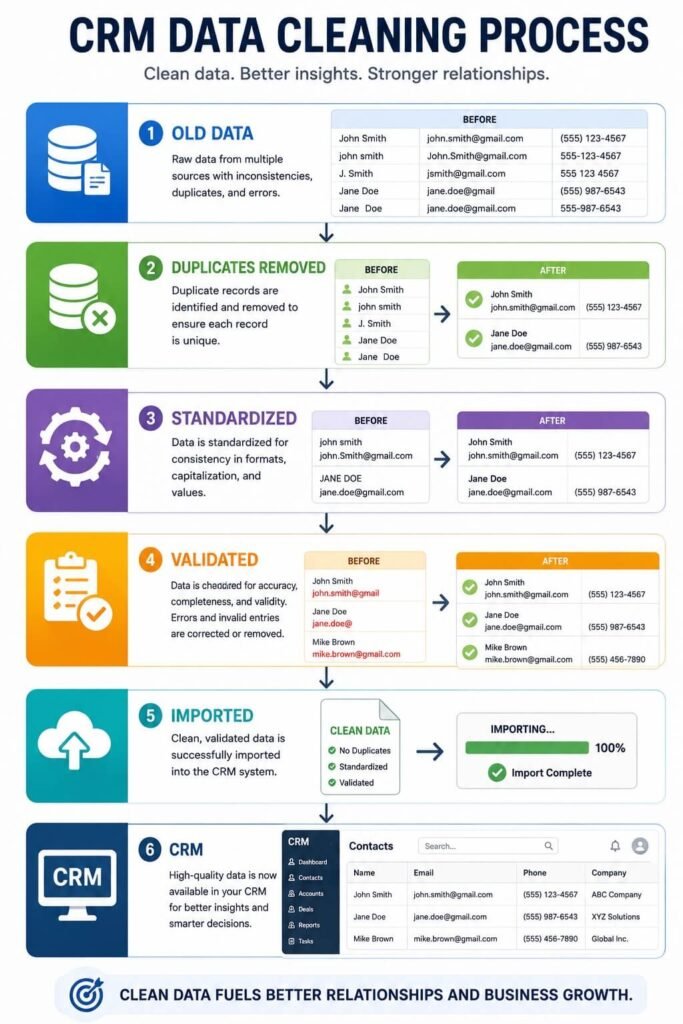
Preparing Your Customer Data
Many CRM projects succeed or fail before implementation begins.
The reason is simple:
Poor data creates poor results. Migrating outdated, inconsistent, or duplicated information into a new CRM transfers existing problems into a new system.
Before importing customer records, perform a complete data audit.
Identify Every Data Source
Customer information often exists across multiple locations.
Common sources include:
- Excel spreadsheets
- Google Sheets
- Accounting software
- Email contact lists
- Marketing platforms
- Customer support systems
- Legacy CRM software
- Website form databases
- Sales representatives’ personal files
Create a complete inventory before migration begins.
Remove Duplicate Records
Duplicate contacts create confusion and reduce confidence in CRM reports.
Examples include:
ABC Company
ABC Co.
A.B.C. Company
ABC Incorporated
Although these records represent the same customer, inconsistent naming prevents accurate reporting.
Standardize company names before importing data.
Remove Outdated Information
Not every record belongs in the new CRM.
Archive or delete:
- Inactive prospects
- Invalid email addresses
- Former employees
- Closed businesses
- Test records
- Incomplete contacts
Migrating only relevant information improves CRM performance and reporting accuracy.
Standardize Customer Fields
Every contact should follow consistent formatting.
Examples include:
| Field | Standard Format |
| Company Name | Official legal or preferred business name |
| Phone Number | International format |
| Country | Standardized country names |
| Industry | Predefined categories |
| Job Title | Consistent capitalization |
| Lifecycle Stage | Controlled values only |
Standardization improves filtering, segmentation, and reporting.
Define Required Fields
Not every field should be optional.
Consider making the following mandatory:
- Company
- Contact Name
- Email Address
- Account Owner
- Industry
- Customer Status
- Lead Source
Required fields improve long-term data quality.
Designing Your CRM Data Structure
Before configuring the system, determine how customer information should be organized.
Think of your CRM as a digital filing system.
A well-designed structure makes information easy to locate, report on, and maintain.
Core CRM Objects
Most organizations manage several categories of information.
Typical objects include:
Accounts
↓
Contacts
↓
Leads
↓
Opportunities
↓
Quotes
↓
Products
↓
Activities
↓
Support Cases
Each object stores different information while remaining connected to related records.
Custom Fields
Avoid creating unnecessary fields.
Every custom field should answer one question:
Will this information help employees make better decisions?
Examples include:
- Customer Tier
- Annual Revenue
- Preferred Communication Channel
- Renewal Date
- Contract Type
- Partner Status
Keep naming conventions consistent across departments.
Standardize Naming Conventions
Inconsistent naming creates reporting problems.
For example:
Incorrect:
North America
N.A.
NA
North America Region
Better:
North America
Simple standards improve reporting accuracy significantly.
Configuring Your CRM
Configuration transforms the CRM from generic software into a system that reflects your organization’s processes.
The objective is not to customize everything, but to create a platform that employees can understand and use consistently.
User Roles
Different employees require different levels of access.
Typical roles include:
- Sales Representatives
- Sales Managers
- Marketing Specialists
- Customer Success Managers
- Support Agents
- Executives
- CRM Administrator
Clearly defined roles improve both usability and security.
Permission Levels
Access should follow the principle of least privilege.
Examples include:
| Role | Access |
| Sales Rep | Own accounts only |
| Sales Manager | Entire sales team |
| Marketing | Marketing data only |
| Customer Success | Customer records |
| Executive | Organization-wide dashboards |
| CRM Administrator | Full system access |
Limiting unnecessary access reduces accidental data changes.
Sales Pipeline Configuration
Rather than copying another company’s pipeline, build one that reflects your own sales process. To accelerate implementation, many businesses use proven Sales Workflow Templates to standardize lead qualification, follow-ups, proposal management, and closing stages before configuring their CRM.
Typical stages include:
Lead
↓
Qualified
↓
Discovery
↓
Proposal
↓
Negotiation
↓
Closed Won
↓
Closed Lost
Keep stages simple.
Too many stages reduce reporting accuracy and make the pipeline harder to manage.
Activity Types
Standardize how employees record interactions.
Examples include:
- Call
- Meeting
- Demo
- Proposal
- Follow-up
- Customer Visit
- Support Conversation
Consistent activity tracking produces more meaningful reports.
Integrating Business Applications
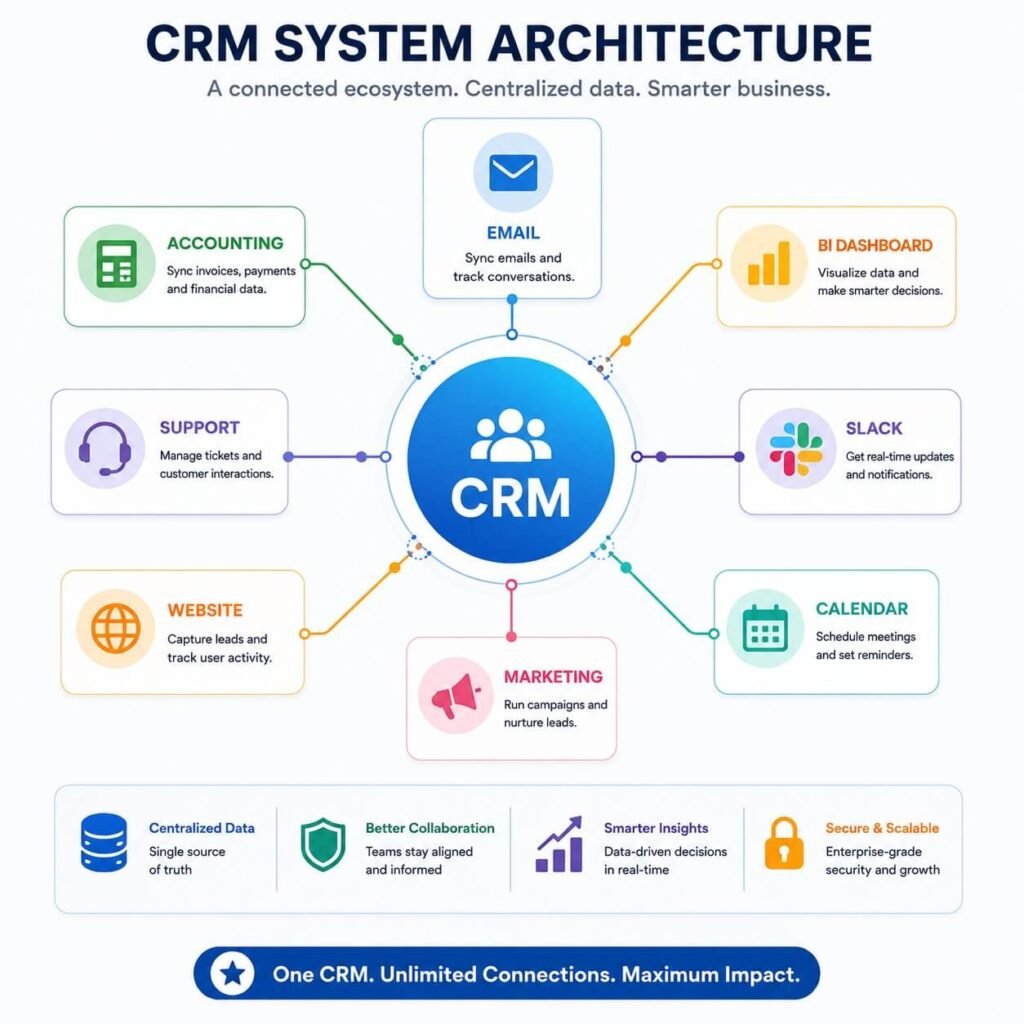
A CRM should become the central hub for customer information rather than another isolated application.
Integrations reduce manual work and ensure teams operate from consistent data.
Common CRM Integrations
Most organizations connect their CRM with:
- Email platforms
- Marketing automation software
- Accounting systems
- Customer support software
- Calendar applications
- Video meeting platforms
- Electronic signature tools
- Business intelligence platforms
- Communication platforms
- Project management software
Instead of replacing existing tools, a CRM should coordinate information across them. Many CRM implementations rely on workflow automation platforms to connect customer data with email, marketing, accounting, and support applications.
Integration platforms such as Zapier can help connect CRM systems with hundreds of business applications without extensive custom development. If you’re evaluating automation solutions, our comparison of Zapier vs Make vs n8n explains which platform is best suited for CRM integrations and business workflows.
Integration Priorities
Start with systems employees use every day.
Recommended order:
↓
Calendar
↓
Marketing Platform
↓
Customer Support
↓
Accounting
↓
Project Management
↓
Business Intelligence
↓
Additional Applications
Beginning with high-impact integrations accelerates adoption while minimizing project complexity.
Planning Your Data Migration
Moving customer information into a new CRM requires careful planning.
Avoid importing everything at once.
Instead, follow a structured migration process.
Audit Existing Data
↓
Clean Data
↓
Map Fields
↓
Backup Original Records
↓
Test Migration
↓
Validate Results
↓
Final Migration
↓
User Verification
Testing before full migration helps identify mapping errors and missing information without affecting live business operations.
Data Migration Checklist
Before launching your CRM, confirm that:
- Customer records are complete.
- Duplicate contacts have been removed.
- Required fields are populated.
- Historical activities are preserved where needed.
- Record ownership is correct.
- Custom fields map accurately.
- Reports display expected results.
- Backup files are securely stored.
- Test users have validated the imported data.
Skipping validation often leads to reporting issues and user frustration after launch.
Employee Training and Change Management
One of the most overlooked aspects of CRM implementation is preparing employees for the new system. Even the most carefully configured CRM will struggle to deliver value if users don’t understand how it supports their daily work.
Successful implementation isn’t just about teaching employees where to click. It’s about helping them understand why the CRM matters and how it contributes to individual performance and business success.
Start Training Before Go-Live
Training should begin before launch rather than afterward.
Introducing the CRM early gives employees time to become familiar with the interface, ask questions, and build confidence before the system becomes part of their daily routine.
A typical training timeline might look like this:
| Timeline | Activity |
| 6–8 weeks before launch | Announce the CRM project and business objectives |
| 4 weeks before launch | Department-specific demonstrations |
| 2 weeks before launch | Hands-on workshops using sample data |
| Launch week | Live support sessions and office hours |
| First 90 days | Ongoing coaching, refresher training, and feedback reviews |
Gradual exposure reduces resistance and increases adoption.
Tailor Training by Role
Different employees use the CRM differently.
A salesperson, marketing specialist, customer success manager, and executive all require different training experiences.
Sales Representatives
Focus on:
- Managing leads and contacts
- Updating opportunities
- Recording customer activities
- Scheduling follow-ups
- Using dashboards
Marketing Teams
Training should emphasize:
- Lead sources
- Campaign attribution
- Customer segmentation
- Reporting
- Data quality
Customer Success & Support
Topics include:
- Customer timelines
- Case management
- Notes
- Service history
- Customer health indicators
Executives
Leadership generally requires training on:
- Dashboards
- Revenue forecasting
- Team performance
- Pipeline visibility
- KPI reporting
Role-specific training helps employees focus on features they actually use.
Encouraging CRM Adoption
Many CRM implementations technically succeed but fail operationally because employees continue relying on spreadsheets, notebooks, or personal tracking systems.
Increasing adoption requires ongoing leadership support.
Communicate Benefits Clearly
Employees often ask:
“How does this help me?”
Answering that question is essential.
For example:
| Role | Primary Benefit |
| Sales | Less administration and better pipeline visibility |
| Marketing | Better campaign attribution |
| Customer Support | Complete customer history |
| Customer Success | Improved renewal tracking |
| Managers | Real-time reporting |
| Executives | Better forecasting and strategic visibility |
When employees understand personal benefits, resistance decreases.
Celebrate Early Wins
Recognize improvements such as:
- Faster lead response
- Cleaner customer records
- Higher user adoption
- Better reporting accuracy
- Improved collaboration
Sharing measurable progress reinforces positive behaviors.
Testing Before Go-Live
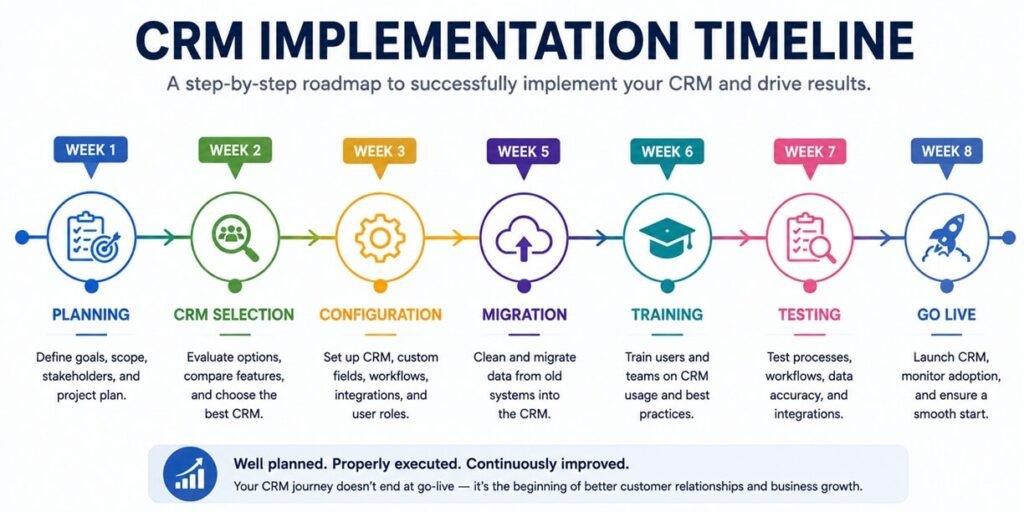
Launching without testing creates unnecessary risk.
Every major CRM implementation should include structured validation before employees begin daily use.
Testing should verify:
- User permissions
- Imported customer records
- Reports
- Dashboards
- Integrations
- Mobile access
- Search functionality
- Notifications
- Forms
- Security settings
User Acceptance Testing (UAT)
User Acceptance Testing allows employees to validate real-world scenarios before launch.
Example test cases include:
| Department | Example Scenario |
| Sales | Create and update an opportunity |
| Marketing | Track a campaign lead |
| Customer Support | Resolve a service request |
| Finance | View customer billing information |
| Leadership | Review executive dashboards |
If users cannot complete their normal work efficiently, additional configuration may be necessary before launch.
Launch Day Best Practices
Go-live should feel controlled rather than chaotic.
Avoid introducing major configuration changes during launch week.
Instead, focus on stability.
Launch Checklist
✔ User accounts activated
✔ Permissions verified
✔ Customer data validated
✔ Integrations operational
✔ Dashboards tested
✔ Backup completed
✔ Support team available
✔ Training materials published
✔ Internal communication distributed
✔ Escalation procedures documented
A structured launch minimizes disruption while giving employees confidence in the new system.
Measuring CRM Success
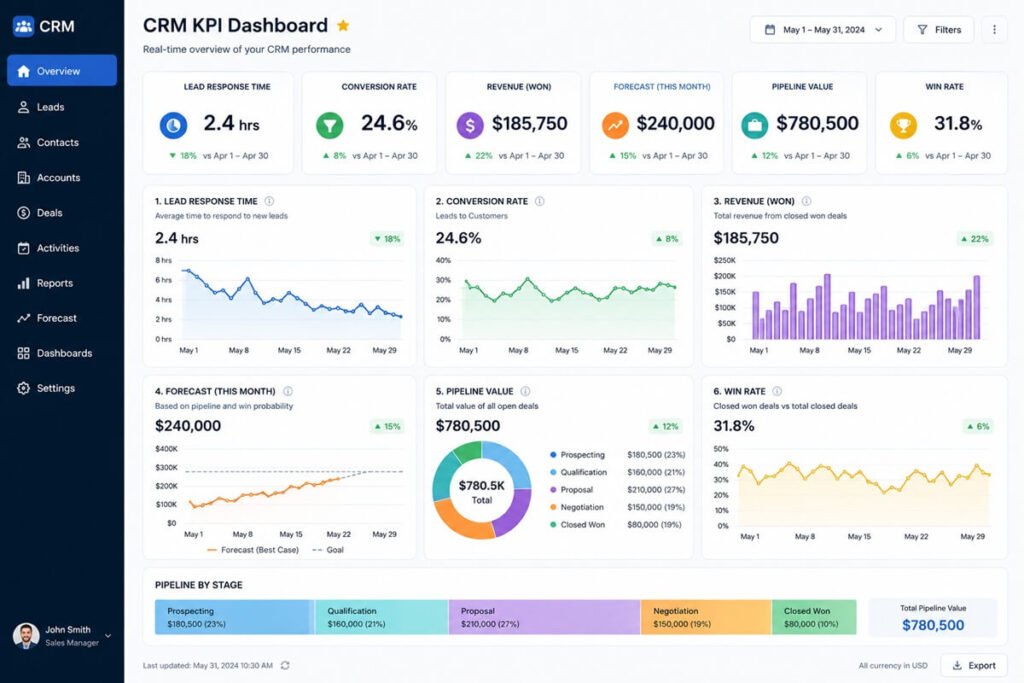
Implementation isn’t complete when the CRM goes live.
Long-term success depends on continuous measurement.
Adoption Metrics
Measure:
- Active users
- Login frequency
- Records updated
- Opportunities created
- Activities logged
Low usage often indicates additional training is required.
Sales Performance Metrics
Track improvements such as:
| KPI | Why It Matters |
| Lead response time | Indicates responsiveness |
| Opportunity conversion rate | Measures sales effectiveness |
| Average sales cycle | Shows efficiency |
| Win rate | Evaluates sales performance |
| Average deal value | Measures revenue growth |
| Forecast accuracy | Supports strategic planning |
Compare results before and after implementation to understand business impact.
Customer Experience Metrics
Examples include:
- Customer satisfaction (CSAT)
- Net Promoter Score (NPS)
- Customer retention
- Renewal rate
- Support response time
- First-contact resolution
A CRM should improve the customer experience—not simply organize data.
Operational Metrics
Monitor:
- Duplicate records
- Data completeness
- Integration errors
- Report accuracy
- User support requests
Operational metrics help identify areas requiring continuous improvement.
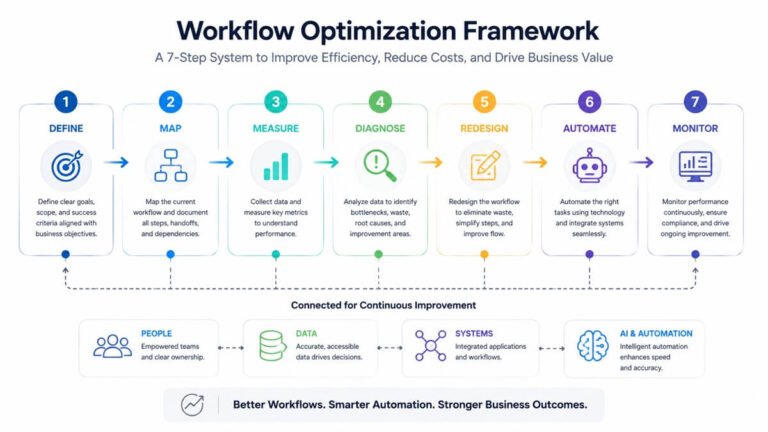
Continuous CRM Optimization
Business requirements evolve over time.
Your CRM should evolve as well.
Rather than treating implementation as a one-time project, establish a regular review process.
Quarterly Review Topics
- User feedback
- Dashboard improvements
- Pipeline updates
- Security review
- Data quality audit
- Integration performance
- New business requirements
Continuous optimization keeps the CRM aligned with changing organizational needs.
Common CRM Implementation Mistakes
Even experienced organizations encounter implementation challenges.
Understanding common mistakes makes them easier to avoid.
Mistake #1: Choosing Software Before Defining Requirements
Many businesses compare features before understanding their own processes.
Start with business needs—not software demonstrations.
Mistake #2: Migrating Poor-Quality Data
A new CRM won’t improve inaccurate information.
Clean customer records before migration.
Mistake #3: Over-Customization
Every custom field, report, or process increases maintenance requirements.
Customize only where clear business value exists.
Mistake #4: Ignoring User Feedback
Employees identify usability issues quickly.
Collect feedback regularly during implementation.
Mistake #5: Weak Executive Sponsorship
Leadership involvement strongly influences adoption.
Visible executive support communicates that CRM usage is a business priority rather than an optional tool.
Mistake #6: No Long-Term Governance
Assign responsibility for:
- User management
- Data quality
- Reporting
- Security
- Integrations
- Continuous improvement
Without governance, CRM quality gradually declines.
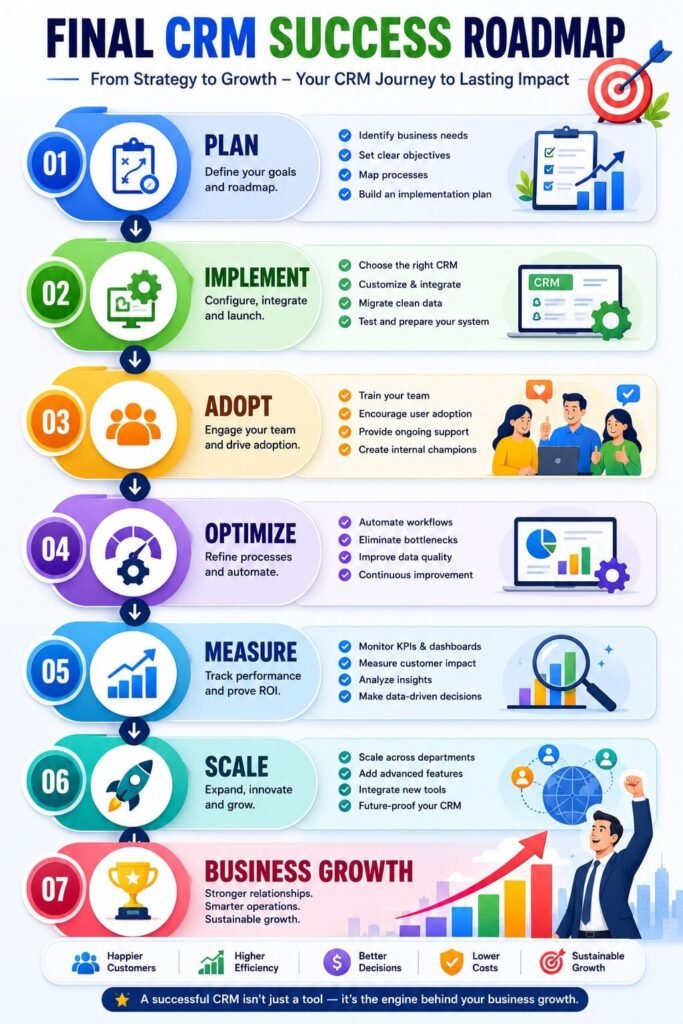
CRM Implementation Checklist
Use this checklist to monitor implementation progress.
Planning
- Define business objectives
- Identify stakeholders
- Build implementation team
- Establish project timeline
- Define success metrics
Platform Selection
- Evaluate business requirements
- Compare CRM platforms
- Review integrations
- Assess security
- Confirm scalability
Data Preparation
- Audit existing data
- Remove duplicates
- Standardize fields
- Archive obsolete records
- Validate customer information
Configuration
- Create user roles
- Configure permissions
- Build sales pipelines
- Customize fields
- Create dashboards
Migration
- Map data fields
- Test migration
- Validate imported records
- Backup original systems
- Verify reports
Training
- Develop training materials
- Conduct workshops
- Assign CRM champions
- Collect user feedback
- Publish documentation
Go-Live
- Activate users
- Test integrations
- Confirm dashboards
- Monitor performance
- Provide support
Optimization
- Review KPIs monthly
- Conduct quarterly audits
- Improve reports
- Update processes
- Continue employee training
Frequently Asked Questions
How long does CRM implementation take?
The timeline depends on business size, data complexity, integrations, and customization requirements. Small businesses may complete implementation within a few weeks, while larger organizations often require several months for planning, migration, training, and phased deployment.
Who should lead a CRM implementation project?
Successful projects typically involve an executive sponsor, project manager, CRM administrator, IT specialists, and representatives from sales, marketing, customer support, and operations. Cross-functional collaboration helps ensure the CRM reflects real business needs.
How much does CRM implementation cost?
Costs vary based on software licensing, consulting services, customization, integrations, data migration, and employee training. Businesses should evaluate the total cost of ownership rather than software subscription fees alone.
Should we migrate every customer record?
Not necessarily.
Before migration, review existing records to remove duplicates, archive outdated information, and standardize customer data. Migrating only relevant, high-quality records improves reporting and user confidence.
What is the biggest reason CRM implementations fail?
Technology is rarely the primary issue.
Most implementation challenges result from unclear business objectives, poor data quality, insufficient training, limited executive support, and low user adoption.
How do you measure CRM implementation success?
Success should be evaluated using measurable business outcomes, including user adoption, lead response time, opportunity conversion rate, sales cycle length, customer retention, forecast accuracy, and overall productivity improvements.
Final Thoughts
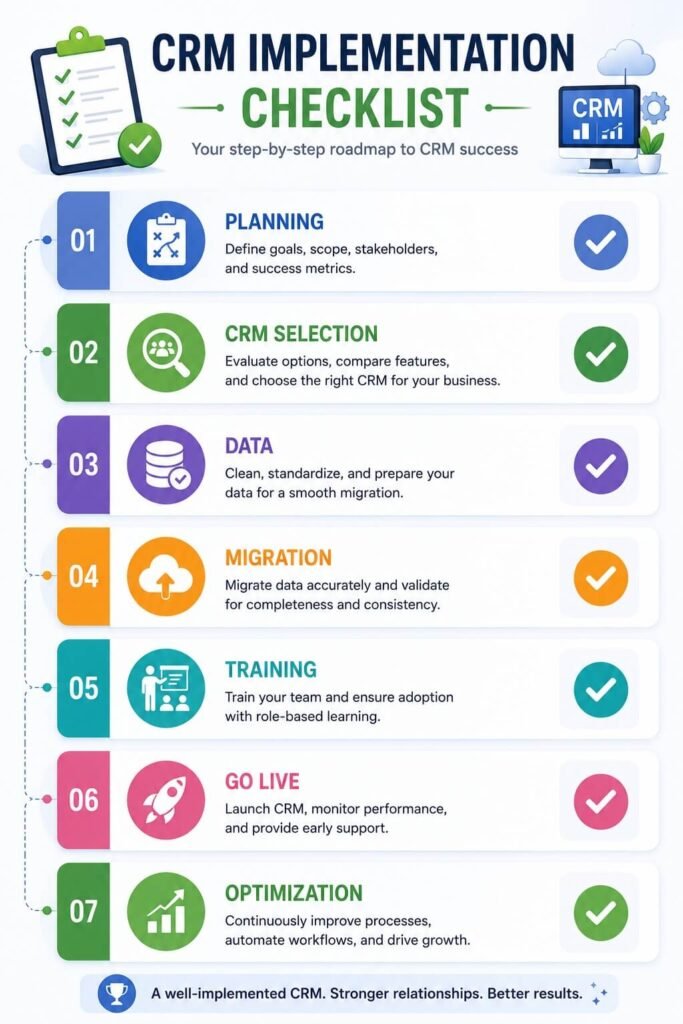
A CRM implementation is much more than deploying software—it’s an opportunity to transform how your organization manages customer relationships, shares information, and supports long-term growth.
The most successful implementations begin with clear business objectives, strong executive sponsorship, and a commitment to continuous improvement. Organizations that lack in-house implementation expertise often partner with providers offering AI automation agency services to accelerate CRM deployment, integrations, employee training, and long-term optimization.
By investing time in planning, preparing clean data, involving employees throughout the process, and measuring results after launch, businesses create a CRM that becomes a trusted operational platform rather than another underused application.
Remember that implementation is only the beginning. As your business grows, customer expectations evolve, and new technologies emerge, your CRM should continue adapting to support changing requirements.
Expanding your processes with proven AI workflow templates can help standardize automation across sales, marketing, customer support, and other business functions as your organization scales. Regular reviews, ongoing training, and data governance ensure the system remains accurate, secure, and valuable for years to come.
Whether you’re deploying your first CRM or modernizing an existing environment, a structured implementation strategy provides the foundation for stronger customer relationships, more informed decision-making, and sustainable business growth.





One Comment