Monday.com vs ClickUp vs Asana: Which Is Best in 2026?

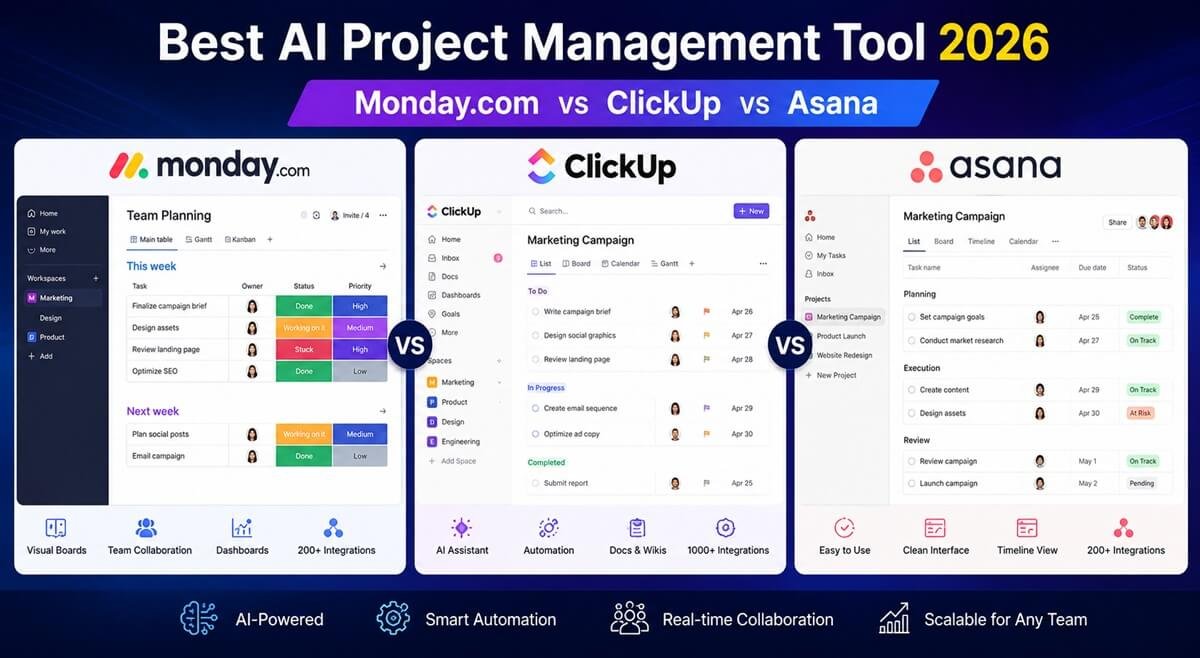
Monday.com, ClickUp, and Asana are three of the most popular project management platforms, but they are built around different strengths. Monday.com is particularly strong for flexible team workflows and visual project management, ClickUp stands out for customization and automation, while Asana emphasizes structured project planning and team collaboration.
If you’re choosing between them in 2026, the right option depends less on the number of features and more on how your team manages projects, automation, reporting, dependencies, and recurring work.
Quick answer: Choose Monday.com for flexible visual workflows, ClickUp for advanced customization and automation, and Asana for structured project planning and collaboration. If automation is a major factor in your decision, you may also want to explore our guide to the Best AI Workflow Automation Tools for Small Businesses (2026).
Table of Contents
🔥 Quick Verdict (Fast Answer)
- Best Overall AI Tool: ClickUp
- Best for Teams & Agencies: Monday.com
- Best for Simplicity & Clean UI: Asana
👉 If AI automation and customization matter most, ClickUp wins.
👉 If you want structure + scalability, go with Monday.com.
👉 If you prefer ease of use, Asana is the cleanest choice.
Quick Comparison: Monday.com vs ClickUp vs Asana
| Feature | Monday.com | ClickUp | Asana |
| Best For | Teams & agencies | All-in-one productivity | Simplicity |
| AI Features | Strong | Most advanced | Moderate |
| Ease of Use | Medium | Medium-Low | High |
| Automation | Advanced | Very advanced | Moderate |
| Customization | High | Extremely high | Limited |
| Integrations | 200+ | 1,000+ | 200+ |
| Free Plan | Yes | Yes (best) | Yes |
| Pricing Value | Medium | High | Medium |
Our quick verdict: Monday.com is the strongest choice for teams that want flexible, visual workflows; ClickUp is the better fit for teams that need deep customization and complex workflows; and Asana is ideal for teams that prioritize structured project planning and straightforward collaboration.
Which Platform Wins Each Category?
The best choice between Monday.com, ClickUp, and Asana depends on what you want your project management system to accomplish. Rather than choosing the platform with the longest feature list, consider where each tool provides the most practical advantage for your team’s workflow.
🏆 Best for Flexible Workflows: Monday.com
Monday.com is the strongest choice when your team needs a project management system that can adapt to different workflows without forcing everyone into the same structure. Its visual approach makes it particularly useful for teams that manage projects through customizable boards, statuses, views, dashboards, and workflow stages.
This makes Monday.com a good fit for teams whose processes change frequently or who need different workflows for different types of work. Marketing teams, operations teams, creative departments, and growing businesses can structure their work around their own processes rather than adopting a rigid project template.
Choose Monday.com if: flexibility and visual workflow management are more important to you than having the deepest possible customization.
🏆 Best for Customization: ClickUp
ClickUp is the better choice for teams that want to build a highly customized workspace around their existing processes. Its broad range of configuration options makes it well suited to organizations that want to control how tasks, projects, documentation, goals, views, and workflows fit together.
The advantage becomes more noticeable as your team’s processes become more specialized. Instead of using the platform primarily as a straightforward task manager, you can configure it around more detailed operational requirements.
Choose ClickUp if: you want extensive control over how your workspace is structured and configured.
🏆 Best for Structured Project Management: Asana
Asana is the strongest choice for teams that value clarity and structured project planning. Its approach works particularly well when projects involve defined responsibilities, deadlines, dependencies, milestones, and multiple contributors.
Rather than maximizing customization, Asana focuses on helping teams understand what needs to happen, who is responsible, and how individual tasks fit into a larger project. That makes it especially attractive to teams that want a clear project-management experience without excessive configuration.
Choose Asana if: your priority is organized project planning and straightforward team coordination.
🏆 Best for Complex Workflows: ClickUp
For teams managing complicated processes with multiple stages, dependencies, recurring work, and customized task structures, ClickUp is the strongest overall fit of the three.
Its flexibility becomes particularly valuable when a workflow extends beyond basic task assignment. Teams can build more detailed processes around their operational requirements instead of relying on a simple project-and-task structure.
Choose ClickUp if: your projects involve complex processes that require extensive configuration and workflow control.
🏆 Best for Agencies: ClickUp
For agencies managing multiple clients, projects, deadlines, deliverables, and internal workflows, ClickUp is a strong overall choice because of its customization and ability to organize different types of work within one workspace.
An agency can structure work around clients, campaigns, teams, projects, or service lines while maintaining different workflows for different types of deliverables. This can be particularly useful when client work involves recurring processes and several handoffs between team members.
Monday.com can be a better fit for agencies that prioritize highly visual workflows, while Asana remains attractive for agencies that prefer a more structured and straightforward project-management experience.
Choose ClickUp if: your agency manages diverse client workflows and needs extensive flexibility. Choose Monday.com if visual workflow management is the priority, or Asana if simplicity and structured collaboration matter most.
🏆 Best for Workflow Automation: Monday.com
Monday.com is a strong choice for teams that want automation to be closely connected to their visual workflows. Automated actions can reduce repetitive administrative work and help teams move items through established processes with less manual intervention.
The key advantage is usability: teams can connect automation to the workflows they already understand rather than treating automation as a completely separate system. This makes it appealing for businesses looking to automate recurring operational tasks without creating unnecessarily complicated processes.
Choose Monday.com if: you want practical workflow automation that fits naturally into a visual project-management environment.
🧠 AI Capabilities Comparison (2026 Game-Changer)
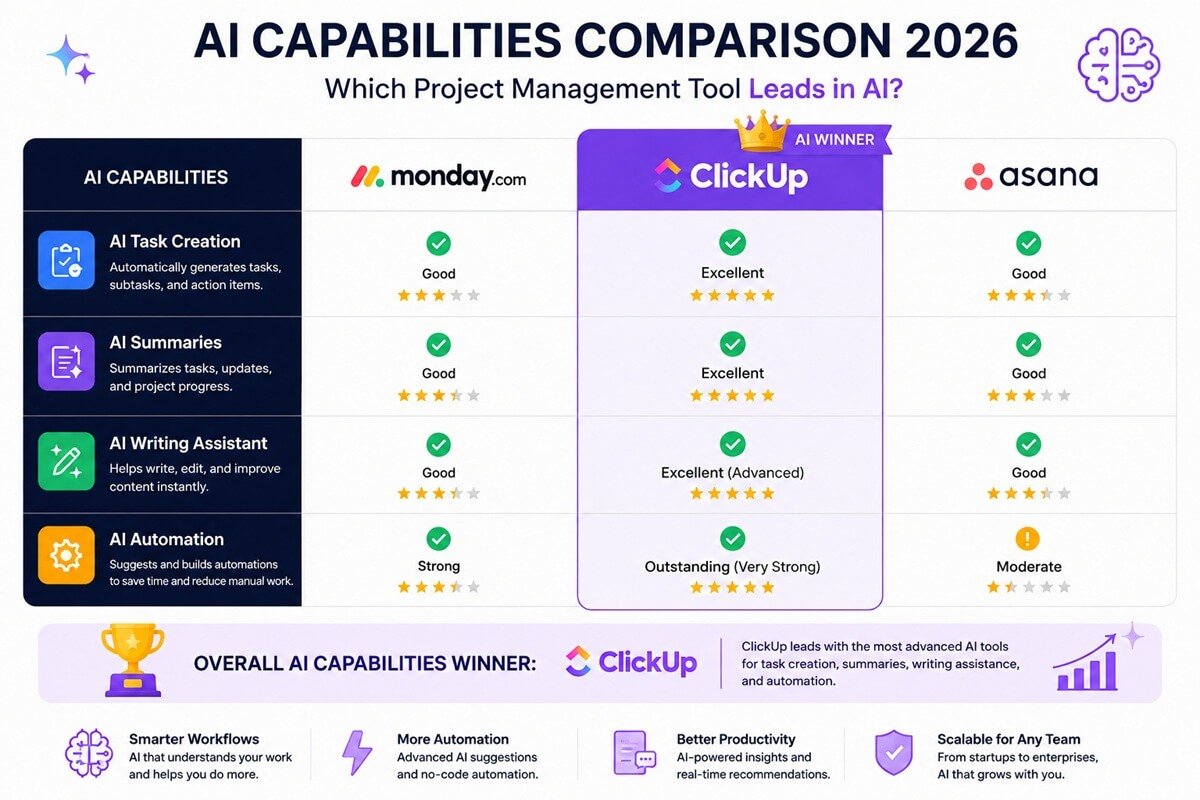
AI is where the real battle happens. For a deeper breakdown of how AI systems are transforming productivity layers, see our guide on AI Workflows Explained: The Complete Strategic Guide for Businesses and Teams.
| AI Feature | Monday.com | ClickUp | Asana |
| AI Task Creation | ✅ | ✅ (best) | ✅ |
| AI Writing Assistant | ✅ | ✅ (advanced) | ✅ |
| Workflow Automation AI | ✅ | ✅ (very strong) | ⚠️ Limited |
| Predictive Suggestions | ⚠️ Basic | ✅ Advanced | ⚠️ Limited |
| AI Summaries | ✅ | ✅ | ✅ |
🏆 AI Winner: ClickUp
ClickUp leads with:
- Smart task generation
- AI-powered docs & summaries
- Advanced automation suggestions
👉 If your goal is AI workflow automation, ClickUp is the strongest choice. This aligns with our hands-on testing in After Testing 20+ AI Workflow Tools, This Is the Only One We Recommend in 2026, where ClickUp consistently ranked highest for automation depth.
⚙️ Feature Comparison Breakdown
1. Task & Workflow Management
- Monday.com: Visual boards + structured workflows
- ClickUp: Highly customizable (lists, boards, docs, goals)
- Asana: Clean and intuitive task tracking
👉 Winner: ClickUp (flexibility)
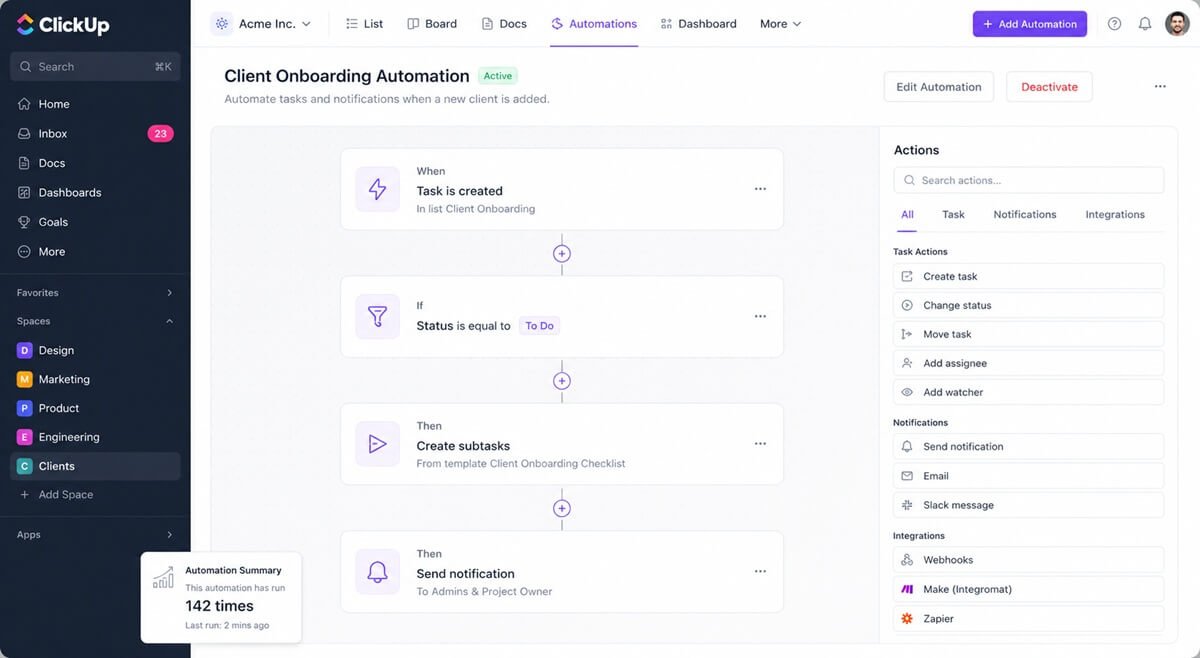
2. Automation Power
| Tool | Automation Strength |
| Monday.com | Advanced |
| ClickUp | Very advanced |
| Asana | Moderate |
- ClickUp offers deeper automation logic
- Monday.com is powerful but more structured
- Asana is simpler but less flexible
👉 Winner: ClickUp
For teams building advanced automation stacks beyond project management tools, platforms like Zapier, Make, and n8n (see Zapier vs Make vs n8n (2026)) often complement ClickUp workflows.
However, automation works best when the underlying process is already efficient. Before deciding what to automate, it’s worth mapping the current process, identifying bottlenecks, and simplifying unnecessary steps. Our Workflow Optimization Framework explains a practical approach for improving a workflow before introducing automation.
3. Ease of Use
| Tool | Ease Score |
| Asana | ⭐⭐⭐⭐⭐ |
| Monday.com | ⭐⭐⭐⭐ |
| ClickUp | ⭐⭐⭐ |
- Asana is beginner-friendly
- ClickUp has a learning curve
👉 Winner: Asana
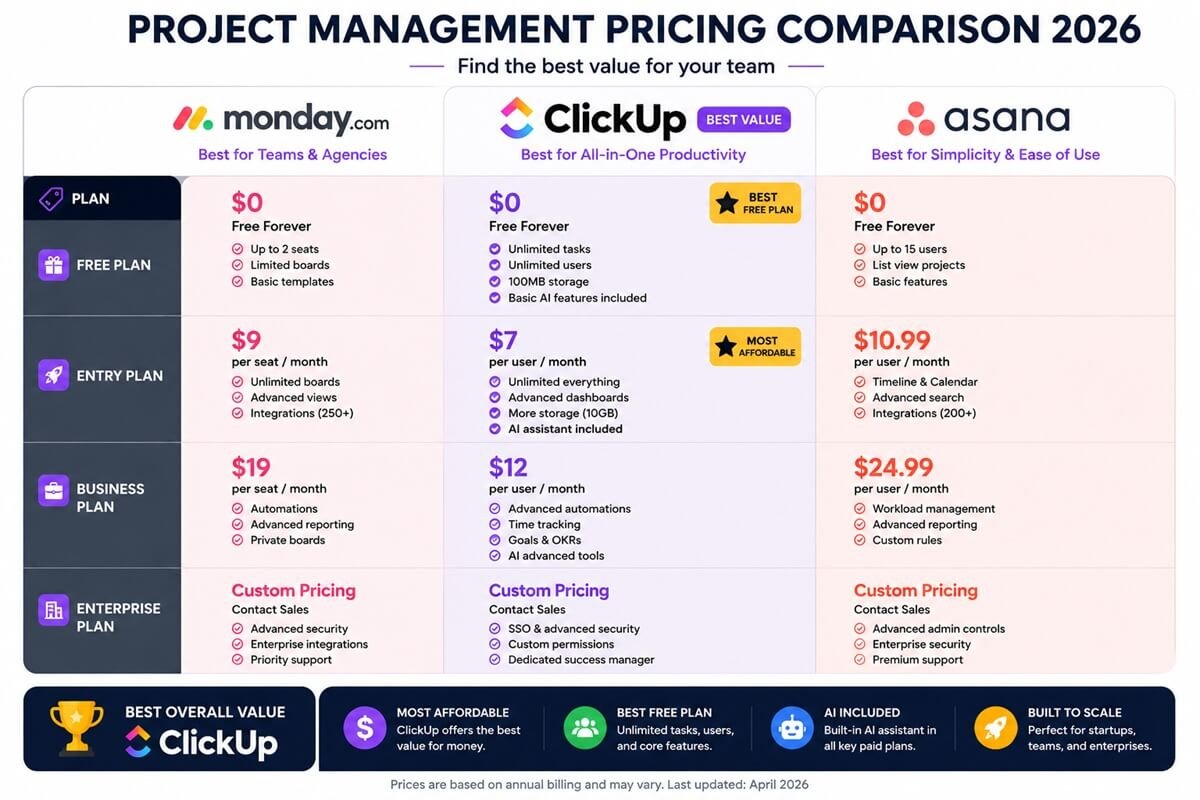
💰 Pricing Comparison (2026)
| Plan | Monday.com | ClickUp | Asana |
| Free Plan | Limited | Best free plan | Good |
| Entry Plan | Medium | Affordable | Medium |
| Advanced Features | Paid | More included | Paid |
👉 Best Value: ClickUp
👉 Best Free Plan: ClickUp
🎯 Best Project Management Tool by Use Case (2026 Guide)
For Agencies & Teams
👉 Monday.com
Best for structured collaboration and client-facing workflows. Many agencies also integrate lightweight CRM systems such as Best No-Code CRM for 2026 to extend Monday.com or ClickUp workflows.
- Advanced dashboards for reporting and performance tracking
- Strong team collaboration features (timelines, boards, workload views)
- Scalable workflows ideal for growing agencies
💡 Why choose it?: If you manage multiple clients and need clear visibility + team coordination, Monday.com is the most reliable option.
If your team also needs a dedicated CRM for lead management, marketing automation, pipelines, and client management, see our GoHighLevel vs HubSpot comparison before deciding which CRM should sit alongside your project management platform.
For Startups & Power Users
👉 ClickUp
Best all-in-one productivity system with maximum flexibility.
- Combines tasks, docs, goals, and chat in one platform
- Deep customization for complex workflows
- Built-in AI assistant and powerful automation engine
💡 Why choose it? Perfect if you want to replace multiple tools and build a fully customized productivity system. When paired with scheduling systems like Reclaim.ai vs Motion, ClickUp becomes part of a full AI productivity stack.
For Beginners & Simplicity
👉 Asana
Best for ease of use and fast onboarding.
- Clean, intuitive interface
- Minimal learning curve for new users
- Simple task and project tracking
💡 Why choose it?: If you want to get started quickly without overwhelm, Asana is the easiest tool to adopt.
For AI Workflow Automation
👉 ClickUp (Clear Winner)
Best for AI-powered productivity and automation at scale.
- Automates repetitive workflows with advanced triggers
- AI-powered task creation, summaries, and content generation
- Ideal for building scalable business systems
💡 Why it wins: Compared to Monday.com and Asana, ClickUp offers the most advanced and flexible AI automation capabilities. For content-heavy teams, tools like Notion AI vs Jasper often complement ClickUp’s built-in AI writing capabilities.
🔥 Quick Recommendation Summary
- Choose Monday.com → for teams, dashboards, and collaboration
- Choose ClickUp → for power, automation, and AI workflows
- Choose Asana → for simplicity and ease of use
If you’re building a process that moves prospects from capture and qualification through routing, follow-up, and sales, our guide to Lead Generation Workflow Templates provides practical workflow examples you can adapt to your existing tools.
👍 Pros and Cons
Monday.com
Pros:
- Great UI
- Strong team features
- Scalable
Cons:
- Pricing adds up
- Less flexible than ClickUp
ClickUp
Pros:
- Most powerful AI tools
- Highly customizable
- Best value pricing
Cons:
- Steep learning curve
- Can feel overwhelming
For enterprise teams handling sensitive automation, security frameworks like AI Workflow Security Best Practices become essential alongside ClickUp deployments.
Asana
Pros:
- Simple and clean
- Easy to use
- Reliable
Cons:
- Limited AI depth
- Fewer automation features
Final Verdict: Monday.com vs ClickUp vs Asana
- Choose Monday.com if your priority is visual, flexible workflows and easy customization.
- Choose ClickUp if your team needs a highly customizable platform for complex projects, automation, and advanced workflows.
- Choose Asana if you want structured project planning, clear dependencies, and an intuitive collaboration experience.
For teams managing complex, automation-heavy workflows, ClickUp is our overall choice, while Monday.com is particularly compelling for visual workflow management and Asana remains a strong choice for structured project planning.
FAQs: Best AI Project Management Tool?
Which has the best AI features: Monday.com, ClickUp, or Asana?
All three platforms offer AI-related capabilities, but their approaches differ. ClickUp is particularly strong for teams looking to combine AI assistance with customizable workflows, while Monday.com emphasizes AI within its broader work-management environment and Asana focuses on AI-supported project and work management.
If AI is a major factor in your decision, compare the specific capabilities you need rather than choosing based solely on which platform advertises the most AI features.
Is Monday.com better than ClickUp?
It depends on what your team needs. Monday.com is generally a better fit for teams that prioritize visual workflows, straightforward collaboration, and easier onboarding, while ClickUp is better suited to teams that need deeper customization, complex workflows, and extensive automation.
- Choose Monday.com if simplicity and visual workflow management are your priorities.
- Choose ClickUp if customization, automation, and more complex project structures matter more.
Is Asana good for beginners?
Yes. Asana is generally a strong choice for beginners because its interface and project-management structure are relatively straightforward to understand. It’s particularly suitable for teams that want clear tasks, projects, deadlines, and collaboration without extensive configuration.
Teams that need highly customized workflows or more extensive automation may prefer ClickUp or Monday.com.
Which project management tool has the best free plan?
👉 ClickUp offers the most generous free plan among major tools.
With ClickUp, you get:
- unlimited tasks and users
- basic AI features
- dashboards and integrations
In comparison:
- Monday.com has a more limited free tier
- Asana offers a solid free plan but fewer advanced features
👉 For startups and budget-conscious teams, ClickUp delivers the most value for free.
Which is best for agencies: Monday.com, ClickUp, or Asana?
For agencies, ClickUp is a strong overall choice for complex client workflows, customization, and automation. Monday.com can be a better fit for agencies that prioritize visual project tracking and client-facing dashboards, while Asana is attractive for teams that prefer straightforward campaign planning and collaboration.
The best option depends on how your agency manages clients, approvals, recurring work, reporting, and internal handoffs.
Which is best for workflow automation: Monday.com, ClickUp, or Asana?
👉 Yes — all three tools now support AI, but at different levels:
- ClickUp: advanced AI + workflow automation (best overall)
- Monday.com: strong AI for dashboards and insights
- Asana: basic AI for task suggestions and summaries
👉 If AI automation is your priority, ClickUp leads by a clear margin.
Which is best for complex workflows: Monday.com, ClickUp, or Asana?
For complex workflows, ClickUp is the strongest overall choice because it offers extensive customization and workflow-management options. Monday.com is a strong alternative for teams that prefer highly visual processes, while Asana is well suited to structured projects with clear dependencies and responsibilities.
If your workflows involve multiple stages, recurring processes, custom task structures, and extensive automation, ClickUp is likely to be the better fit.