
n8n AI Lead Qualification Workflow: Automate Lead Scoring & Routing


When a business starts receiving more leads, manually reviewing every prospect can quickly become a bottleneck. Sales teams spend hours checking form submissions, researching companies, deciding whether a prospect fits the ideal customer profile, assigning lead scores, and routing qualified opportunities to the right person.
An n8n AI lead qualification workflow can automate much of this repetitive process. Instead of simply collecting leads, the workflow can analyze incoming lead data, evaluate predefined qualification criteria, assign a score, determine priority, update your CRM, and route qualified prospects to the appropriate sales process.
The important distinction is that AI should support a defined qualification system, not make unsupported decisions about prospects. In this guide, you’ll learn how to design an n8n AI lead qualification workflow, structure the AI analysis, create a practical scoring model, route leads based on their scores, and improve the workflow over time.
Quick answer: An n8n AI lead qualification workflow connects a lead source to n8n, enriches or validates the lead data, uses an AI model to evaluate the prospect against predefined criteria, assigns a qualification score, and then routes the lead to the appropriate CRM, sales, or nurture process
What Is an n8n AI Lead Qualification Workflow?
An n8n AI lead qualification workflow is an automated process that uses n8n as the workflow orchestration layer and an AI model to help evaluate incoming prospects.
A basic workflow might look like this:
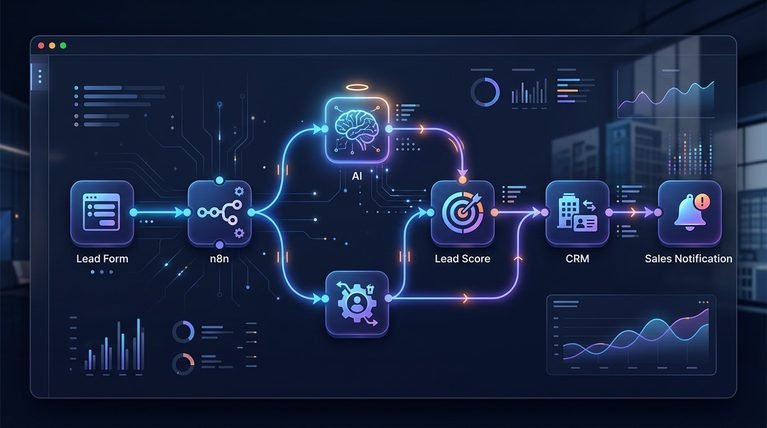
New Lead → Data Validation → Enrichment → AI Analysis → Qualification → Lead Score → Routing → CRM Update → Notification
Instead of asking a salesperson to manually perform every step, n8n can connect the different systems and move information between them automatically. For example, when someone submits a lead form, n8n could:
- Receive the lead information.
- Check that required fields are present.
- Retrieve additional information when appropriate.
- Send relevant lead data to an AI model.
- Evaluate the lead against predefined criteria.
- Generate a qualification status and score.
- Route the lead based on the result.
- Update the CRM.
- Notify the sales team when appropriate.
The exact workflow will depend on the company’s sales process, qualification rules, CRM, lead source, and AI tools. If you’re new to building AI-powered automations with n8n, our n8n AI automation workflows tutorial explains the broader concepts behind designing and connecting these workflows.
Why Automate Lead Qualification With n8n and AI?
Traditional lead qualification involves repetitive manual work. A salesperson or SDR may need to open a lead record, review the company, examine the person’s job title, determine whether the business matches the target market, read the prospect’s message, assign a score, and decide what should happen next.
That process can become difficult to maintain as lead volume increases. An automated workflow can help standardize the process.
1. Faster initial evaluation
New leads can be evaluated as soon as they enter the workflow instead of waiting for someone to manually review them.
2. Consistent qualification criteria
Every lead can be evaluated against the same predefined criteria.
3. Less repetitive work
Salespeople can spend less time on administrative lead review and more time on qualified opportunities.
4. Automated routing
The workflow can send leads to different paths depending on their score or qualification status.
5. Better workflow visibility
Because the process is automated, businesses can log qualification results and analyze how the system performs over time.
However, automation doesn’t eliminate the need for good qualification logic. Poor criteria can produce poor results even when the workflow itself works perfectly.
How an AI Lead Qualification Workflow Works

A useful way to understand the system is to break it into individual stages.
New Lead
   ↓
n8n Trigger
   ↓
Validate Lead Data
   ↓
Enrich Lead Information
   ↓
AI Analysis
   ↓
Qualification Decision
   ↓
Lead Score
   ↓
 ┌───────────────┐
 │               │
High Score    Lower Score
 │               │
 ↓               ↓
Sales Route    Nurture/Review
 │
 ↓
CRM Update
 │
 ↓
Sales Notification
Each stage has a specific job.
Step 1: Capture a New Lead
The workflow starts when a new prospect enters your system. Possible sources include:
- Website forms
- Landing pages
- CRM records
- Webhooks
- Lead-generation platforms
- Applications
- Chat or conversational forms
The trigger doesn’t need to be complicated. The important point is that n8n needs a reliable event that tells the workflow:
A new lead is ready to be evaluated.
For example:
Website form submission → n8n webhook → qualification workflow
Step 2: Validate the Lead Data
Before sending information to an AI model, check whether the required data exists.
A lead might contain:
- Name
- Company
- Job title
- Website
- Industry
- Company size
- Message
- Product interest
Not every lead will provide every field. Your workflow can check for missing or invalid information before continuing.
For example:
IF company exists
      ↓
Continue
      ↓
If missing
      ↓
Send for manual review
This prevents the AI model from making assumptions based on information that isn’t available.
Step 3: Enrich the Lead Data
Lead enrichment can provide additional information that helps qualification. Depending on your tools and data sources, enrichment might include:
- Company industry
- Company size
- Website information
- Business location
- Job role
- Other publicly available business attributes
The purpose isn’t to collect as much information as possible. Instead, collect the information that actually matters to your qualification criteria. For example, if your ideal customers are companies with more than 50 employees, company size may be important.
If your product is designed for marketing teams, job function may be more useful. A good workflow therefore starts with the qualification requirements and works backward to determine what information is necessary.
Step 4: Analyze the Lead With AI

This is where the AI component becomes useful. Instead of simply asking:
“Is this a good lead?”
give the AI structured criteria. For example, the workflow could tell the model:
- Target industries
- Target company size
- Target job roles
- Relevant business problems
- Product/service requirements
- Buying-intent indicators
The AI can then evaluate the available information against those criteria. A structured output might look like:
{
  "qualification": "qualified",
  "score": 87,
  "priority": "high",
  "reason": "Strong company fit and clear need for the service."
}
Structured output is particularly useful in automation because later n8n nodes can use individual fields such as score, qualification, and priority. If you’re using an OpenAI model in the workflow, the OpenAI API documentation provides the current technical reference for integrating its API.
Step 5: Assign a Lead Qualification Score
A score provides a simple way to determine what happens next. There isn’t one universal scoring system that works for every business. Instead, create a model based on your own customer profile.
For example:
| Qualification Factor | Example Weight |
|---|---|
| Ideal customer profile fit | 30% |
| Job-role relevance | 20% |
| Business need | 20% |
| Buying intent | 20% |
| Engagement/context | 10% |
The percentages above are simply an example framework.
A business selling enterprise software might put more weight on company size and purchasing authority, while an agency serving small businesses might use completely different criteria. The important thing is to make the scoring system specific to the business.
Step 6: Route the Lead Based on the Score

Once the workflow has a score, n8n can use conditional logic to determine what happens next.
For example:
| Score | Example Action |
|---|---|
| 80–100 | Route to sales immediately |
| 50–79 | Add to nurture or manual review |
| 0–49 | Lower-priority workflow |
These thresholds should be customized rather than treated as universal rules.
The routing logic might look like:
Lead Score
    ↓
80+
    → Sales Team
    ↓
50–79
    → Nurture / Review
    ↓
Below 50
    → Lower-Priority Path
This is one of the most useful parts of the automation because qualification doesn’t end with the score. The score should trigger an appropriate next action.
Step 7: Update the CRM
After qualification, the workflow can update the appropriate CRM record.
Potential fields include:
- Lead score
- Qualification status
- Priority
- Qualification reason
- AI analysis
- Lead source
- Qualification date
This keeps the qualification information attached to the lead rather than leaving the AI result inside an automation log. Your CRM should remain the central source of truth for customer and sales information.
Once qualification is complete, the result can become part of a broader CRM automation process. Our CRM workflow templates provide additional examples of how CRM-related processes can be automated.
Step 8: Notify the Sales Team
High-priority leads can trigger a notification.
For example:
New Qualified Lead

Company: Example Company
Role: Marketing Director
Score: 91
Priority: High
Reason: Strong ICP fit and clear buying intent.

CRM: Updated
The sales team can then focus on leads that meet the defined criteria. For lower-priority leads, the workflow might avoid generating an immediate notification and instead place them into a nurture or review process. This reduces unnecessary interruptions for sales representatives.
A Practical n8n AI Lead Qualification Workflow
Let’s put the pieces together. Imagine a B2B company receives leads through a website form. The workflow could be:
Trigger
Webhook
A new form submission arrives.
↓
Node 1: Data Validation
Check:
- Company
- Job title
- Lead message
↓
Node 2: Enrichment
Retrieve relevant company information.
↓
Node 3: AI Analysis
Evaluate:
- ICP fit
- Role relevance
- Business need
- Buying intent
↓
Node 4: Structured Output
Return:
- Qualification
- Score
- Priority
- Reason
↓
Node 5: Conditional Routing
If score ≥ 80:
Qualified → Sales
If score = 50–79:
Review/Nurture
If score < 50:
Lower priority
↓
Node 6: CRM
Update the lead record.
↓
Node 7: Notification
Notify sales when the lead meets the high-priority criteria. This workflow is relatively simple, but it can eliminate a significant amount of repetitive manual qualification work.
n8n provides the workflow orchestration layer that connects triggers, data processing, AI services, and downstream applications; see the official n8n documentation for the platform’s current capabilities.
Example AI Prompt for Lead Qualification
The quality of the qualification depends partly on how you instruct the AI. Instead of using a vague prompt such as:
“Is this lead good?”
give the model a clear evaluation framework.
For example:
Evaluate the lead using the qualification criteria provided below.

Qualification criteria:
- Target customer type: [define customer type]
- Target industries: [define industries]
- Target company size: [define range]
- Relevant job roles: [define roles]
- Important business needs: [define needs]
- Buying-intent indicators: [define indicators]

Lead information:
Company: {{company}}
Job title: {{job_title}}
Industry: {{industry}}
Company size: {{company_size}}
Website: {{website}}
Message: {{message}}

Return:
1. qualification
2. score from 0–100
3. priority
4. concise reasoning

Do not assume information that is not present in the supplied data.
The final workflow can then pass the response to downstream n8n nodes.
Use Structured AI Output
For automation, structured responses are generally more useful than long paragraphs.
For example:
{
  "qualification": "qualified",
  "score": 88,
  "priority": "high",
  "reason": "The company matches the target market and the lead's message indicates a relevant business need."
}
n8n can then use these values in conditional logic.
For example:
qualification = qualified
        +
score >= 80
        ↓
High-Priority Sales Route
This makes the workflow easier to maintain than trying to interpret an AI-generated paragraph at every stage.
How to Prevent Poor AI Qualification Decisions
AI should not be treated as an infallible decision-maker. There are several ways to make the workflow more reliable.
Define the criteria first
Don’t ask AI to invent your ideal customer profile. Define the criteria yourself and ask AI to evaluate the available information against those criteria.
Don’t make assumptions
If company size isn’t known, the workflow shouldn’t automatically assume that the company is large or small. Instead, return something such as:
insufficient_data → manual_review
Validate important outputs
For high-impact decisions, consider adding deterministic rules alongside AI evaluation.
For example:
AI Score
   +
Required company field
   +
Required business criteria
   ↓
Final Routing
AI can provide interpretation while normal n8n logic controls important workflow decisions.
Keep humans in the loop
Some leads deserve manual review, especially when the available information is incomplete or ambiguous. A good automation doesn’t necessarily mean:
AI decides everything.
It can mean:
AI handles the repetitive evaluation and sends uncertain cases to humans.
AI Lead Qualification vs. Manual Qualification
The difference becomes clearer when you compare the two approaches.
| Manual Qualification | n8n + AI Qualification |
|---|---|
| Salesperson reviews each lead | Workflow evaluates incoming data |
| Manual research | Automated data retrieval where appropriate |
| Manual scoring | Automated scoring against defined criteria |
| Manual routing | Conditional routing |
| Manual CRM updates | Automated CRM updates |
| Manual notifications | Triggered notifications |
| More repetitive work | Less repetitive work |
| Potentially inconsistent criteria | Standardized evaluation framework |
The goal isn’t necessarily to replace salespeople.
The goal is to remove repetitive qualification tasks so salespeople can spend more time on qualified opportunities and conversations.
Common Mistakes When Building an AI Lead Qualification Workflow
1. Making the qualification criteria too vague
“Find good leads” isn’t a useful qualification framework.
Define what makes a lead valuable.
2. Giving the AI incomplete information
AI cannot reliably evaluate information it doesn’t have.
If a critical field is missing, route the lead for review rather than forcing a decision.
3. Using one score for every business
A scoring model should reflect your specific customers and sales process.
4. Automatically rejecting uncertain leads
An incomplete lead isn’t necessarily a bad lead.
Create a manual review or needs more information path.
5. Forgetting to store the reason
A score without context can be difficult for a salesperson to understand.
Store a short explanation alongside the score.
6. Overcomplicating the workflow
Start with the essential process:
Capture → Analyze → Score → Route → Update
Then add enrichment, notifications, additional checks, and other functionality as needed.
7. Never reviewing the results
An AI qualification workflow should improve based on actual sales outcomes.
How to Improve Your AI Lead Qualification Workflow Over Time

Launching the workflow is only the beginning. You should periodically compare automated qualification results with actual sales outcomes.
For example:
AI Qualification
       ↓
Sales Follow-Up
       ↓
Opportunity Created?
       ↓
Proposal?
       ↓
Customer?
Then compare those outcomes against the original scores. Suppose your workflow repeatedly gives leads a score above 80, but many of those leads never become sales opportunities. That could indicate that your criteria are too broad.
On the other hand, if many leads scored 50–60 eventually become valuable customers, your threshold may be too strict. This creates a continuous improvement cycle:
Qualification → Sales Outcome → Analysis → Criteria Adjustment → Improved Workflow
That’s much more valuable than simply launching an automation and never measuring it.
Where This Workflow Fits Into a Larger Sales Automation System
Lead qualification is only one part of the overall sales process. You don’t need to turn this article into a complete guide to sales automation. Instead, think of the workflow as a specific component:
Lead Capture
      ↓
Lead Qualification
      ↓
Lead Scoring
      ↓
Lead Routing
      ↓
Sales Process
      ↓
Follow-Up
      ↓
Opportunity
The qualification workflow’s job is to determine what should happen to the lead next. For broader workflow automation concepts, you can also explore our n8n AI Automation vs Zapier AI automation Workflows.
n8n AI Lead Qualification Workflow Templates
Building an AI qualification workflow from scratch can take time, particularly when you need to connect lead sources, AI models, CRM systems, conditional logic, notifications, and data validation.
A prebuilt workflow template can provide a starting point that businesses can customize around their own qualification criteria. For businesses looking for ready-made workflow resources, our lead generation workflow templates provide a natural next step.
The important distinction is that a template should be treated as a starting framework, not a universal qualification system. Your ideal customer profile, scoring criteria, CRM structure, and sales process should determine how the workflow is configured.
Best Practices for an n8n AI Lead Qualification Workflow
Before putting the workflow into production, review these points:
Define your ICP
Clearly document who qualifies as an ideal customer.
Define scoring criteria
Decide which characteristics influence the score.
Use structured AI output
Return predictable fields that n8n can process.
Add validation
Don’t let incomplete or invalid data move through the entire workflow.
Create a manual-review path
Give uncertain leads somewhere to go.
Store qualification reasons
Make the result understandable to the sales team.
Log important workflow events
Keep enough information to troubleshoot and improve the system.
Review real outcomes
Compare scores with actual sales results.
Start simple
Build the core workflow first, then expand it.
Frequently Asked Questions n8n AI Lead Generation
What is an n8n AI lead qualification workflow?
An n8n AI lead qualification workflow uses n8n to automate the process of evaluating incoming leads. It can validate and enrich lead data, send relevant information to an AI model, generate a qualification result and score, and route the lead according to predefined rules.
Can n8n automatically score leads?
Yes. n8n can receive lead information, pass it to an AI model or scoring system, and then use the resulting score in conditional workflow logic. The scoring criteria should be defined according to the business’s ideal customer profile and sales process.
How can AI qualify leads?
AI can evaluate available lead information against predefined criteria such as industry, company size, job role, business need, and buying-intent signals. It should not be expected to reliably infer information that isn’t available.
Can AI lead qualification connect to a CRM?
Yes. An n8n workflow can connect qualification results to a CRM so that fields such as lead score, qualification status, priority, and reasoning can be stored with the lead record.
Should AI automatically reject unqualified leads?
Not necessarily. When information is incomplete or the result is uncertain, a manual-review or nurture path may be safer than automatically rejecting the prospect. Once a lead passes qualification, the next stage can feed into an inbound marketing pipeline and SDR workflow for sales follow-up and opportunity management.
What is the best lead score for qualified leads?
There is no universal score threshold. A business might initially use thresholds such as 80+ for high-priority leads, but those thresholds should be tested against actual sales outcomes and adjusted over time.
Final Thoughts
An n8n AI lead qualification workflow can turn a repetitive manual process into a structured automated system. The core process is straightforward:
Capture → Validate → Enrich → Analyze → Qualify → Score → Route → Update CRM
The real value comes from designing the qualification criteria carefully and connecting the AI analysis to practical business actions.
Start with a simple workflow, use structured outputs, maintain a manual-review path for uncertain cases, and continuously compare AI qualification results with real sales outcomes. When those pieces are combined, n8n can become the orchestration layer connecting your lead data, AI analysis, CRM, and sales processes into one repeatable qualification workflow.






4 Comments