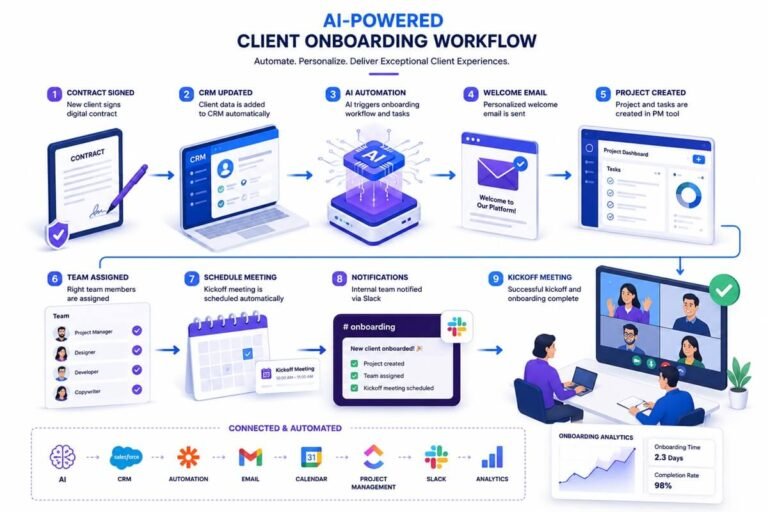
AI Workflow Diagrams: How to Visualize AI Processes & Automation Workflows

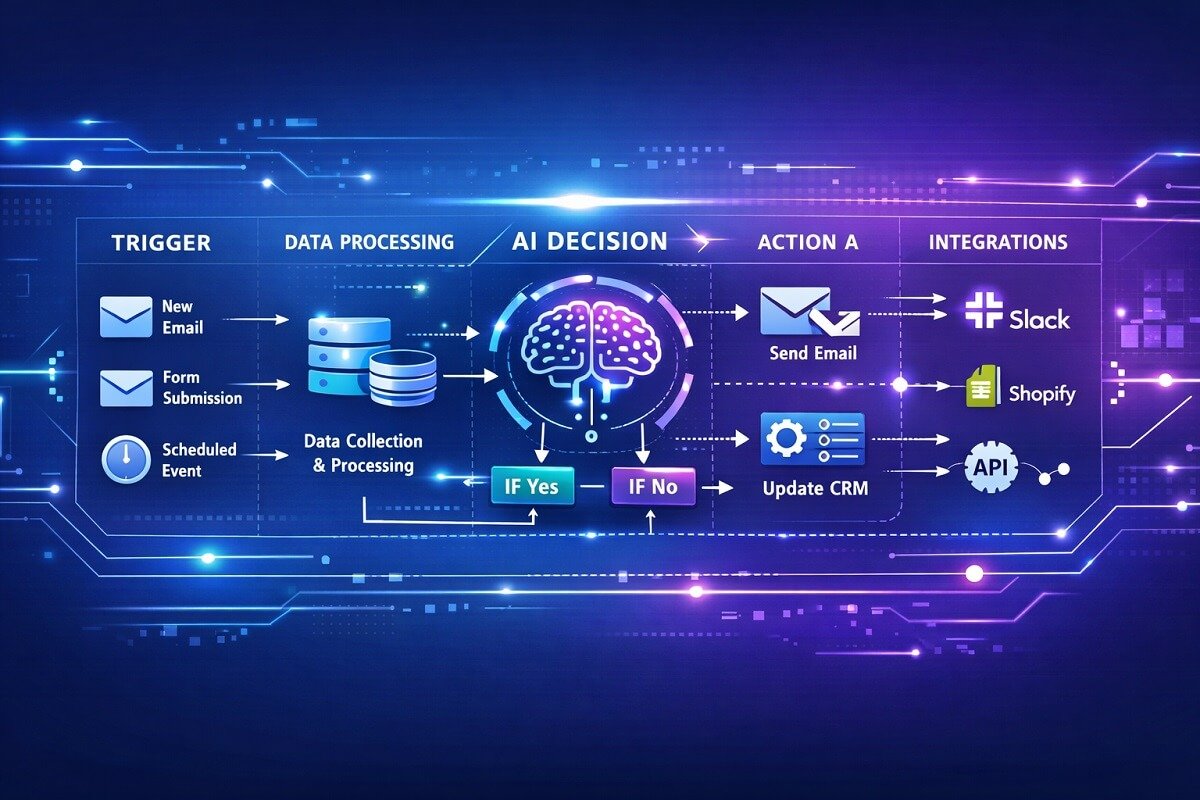
AI automation is transforming how businesses handle repetitive tasks, analyze data, and manage operations. But complex automation systems can quickly become difficult to understand without a clear visual structure. That is where AI workflow diagrams become extremely useful.
Visual workflow diagrams help people understand complex AI automation processes more easily. They make it simpler for teams to design, analyze, and improve automated systems. An AI workflow diagram shows the sequence of tasks, triggers, and decision points that drive an automation process. It visually explains how each step connects to the next.
These diagrams help teams understand how data flows, where AI models make decisions, and how different tools interact within an automation pipeline.
Clear workflow visualization improves collaboration between developers, marketers, and operations teams. It also reduces errors and makes automation easier to scale. Many modern automation platforms, such as n8n, Zapier, and Make, rely heavily on visual workflow diagrams to design automation processes.
This guide explains AI workflow diagrams, their components, how to build them, and the best tools to visualize automation processes effectively.
Table of Contents
What Is an AI Workflow Diagram?
An AI workflow diagram is a visual representation of a process that includes automated tasks, data flow, and artificial intelligence decision points. It shows how different systems, triggers, and actions interact in a structured automation pipeline.
Traditional workflow diagrams usually represent simple business processes. AI workflow diagrams go further by including elements such as:
- Machine learning predictions
- AI decision nodes
- automated data processing
- external API integrations
These diagrams help teams clearly understand how AI systems operate inside automation workflows. For example, an AI-powered customer support workflow might include:
- Incoming customer message
- AI intent detection
- automated ticket categorization
- routing to the correct department
A workflow diagram visually connects these steps so that the automation logic becomes easy to understand.
How to Visualize Processes with AI
AI workflow visualization transforms complex automation systems into clear, easy-to-understand diagrams. Instead of relying on lengthy documentation or scattered automation rules, a workflow diagram shows how information moves through each stage of an AI-powered process—from the initial trigger to the final output.
Whether you’re building a customer support chatbot, an AI content publishing system, or a marketing automation pipeline, visualizing the workflow helps everyone understand how triggers, actions, AI models, and integrations work together.
What a Good AI Workflow Diagram Should Show
An effective AI workflow diagram should clearly communicate how an automation process operates. Regardless of the platform, most diagrams should visualize the essential building blocks of the workflow so that both technical and non-technical users can follow the automation logic.
A well-designed AI workflow diagram typically includes:
- Workflow trigger
- Data inputs and outputs
- AI decision points
- Automation actions
- Connected applications and APIs
- Human approval steps (when required)
- Final output or notification
- Monitoring and logging
Including these elements ensures the workflow accurately represents how information moves through the automation system from start to finish.
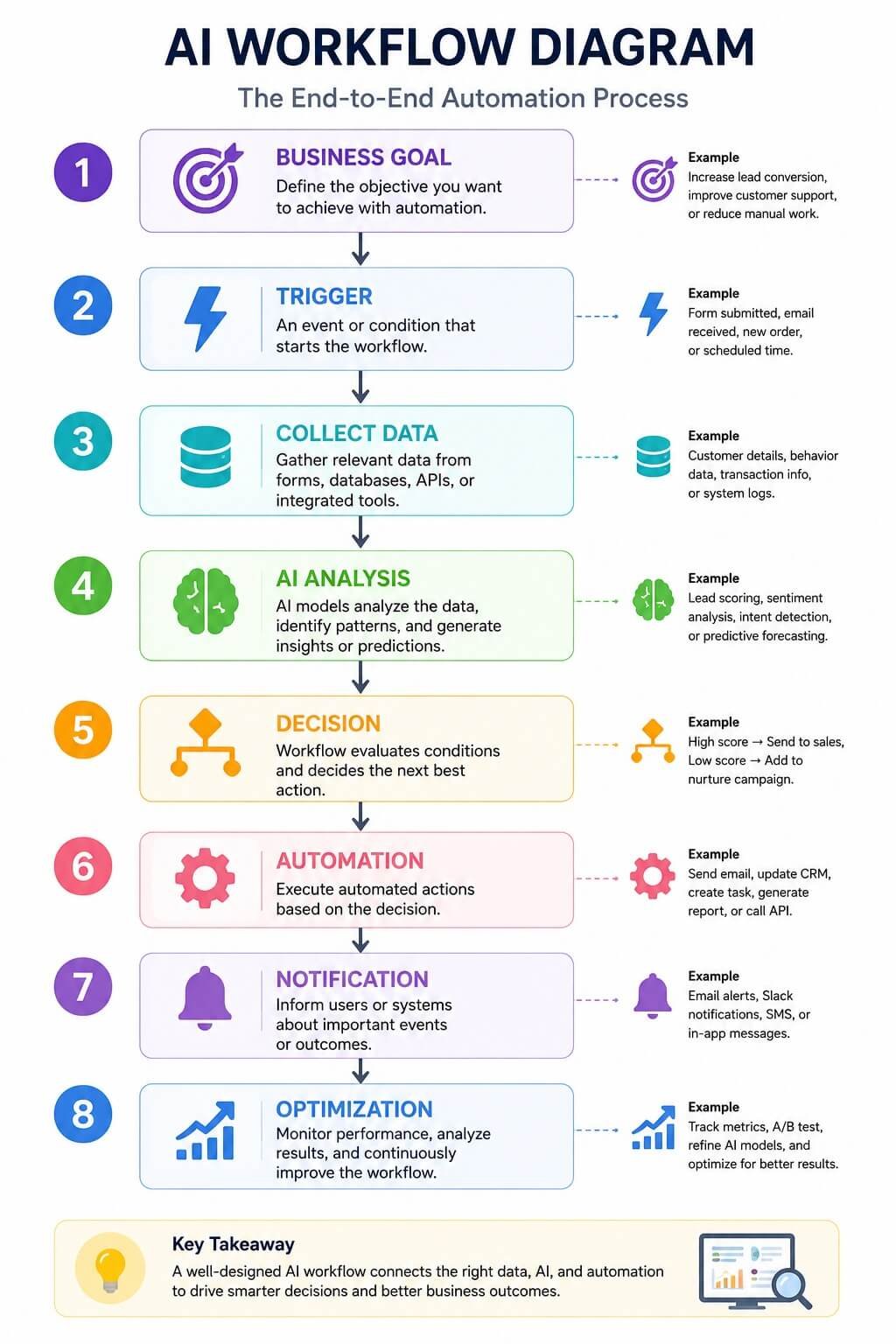
Basic AI Workflow Structure
Most AI workflow diagrams follow a similar sequence:
Business Goal
↓
Workflow Trigger
↓
Collect Data
↓
AI Analysis
↓
Decision Point
↓
Automated Action
↓
Output or Notification
↓
Monitoring & Optimization
Although individual workflows vary depending on the business process, this structure forms the foundation of most AI-powered automation systems.
Example: AI Workflow Visualization
The following simplified example illustrates how an AI-powered lead management workflow can be visualized.
Website Visitor
↓
Lead Form Submission
↓
CRM Stores Contact
↓
AI Lead Scoring
↓
Qualified Lead?
↙ ↘
Yes No
↓ ↓
Notify Sales Email Nurture
This type of diagram makes it easy to follow the sequence of events, identify where AI makes decisions, and understand how data moves between connected systems.
Tip: Keep each workflow diagram focused on a single business process. Large automation systems are easier to understand when divided into several smaller diagrams instead of one highly complex workflow.
Workflow Visualization Is an Ongoing Process
Workflow diagrams should evolve alongside your automation systems. Whenever new AI models, integrations, business rules, or automation steps are added, update the corresponding workflow diagram to reflect those changes.
Maintaining accurate diagrams helps ensure the workflow remains easy to understand, document, and maintain over time.
Why AI Workflow Diagrams Matter in Automation
AI automation systems often involve multiple triggers, applications, APIs, databases, and AI models working together. As workflows become more sophisticated, understanding how each component interacts becomes increasingly difficult without a visual representation.
AI workflow diagrams provide that visibility by presenting the entire automation process in a structured format. This helps organizations design, maintain, and optimize automation more efficiently while reducing confusion across teams.
Better Process Visibility
Workflow diagrams provide a complete view of an automation process, allowing teams to understand how data moves, where AI makes decisions, and how each step contributes to the final outcome without relying solely on technical documentation.
Improved Collaboration
Visual workflows create a shared understanding between developers, marketers, operations teams, and business stakeholders. This improves communication, reduces misunderstandings, and makes automation projects easier to manage across departments.
Faster Troubleshooting
When an automation fails or produces unexpected results, a workflow diagram helps identify the exact stage where the issue occurs. Teams can quickly locate failed integrations, incorrect decision logic, or broken automation steps, reducing downtime.
Easier Workflow Optimization
Visualizing the complete automation process makes it easier to identify bottlenecks, duplicate actions, and unnecessary steps. Organizations can simplify workflows, improve performance, and reduce operational costs by optimizing the process.
Better Scalability
As businesses introduce new AI models, applications, and integrations, workflow diagrams serve as reliable documentation for expanding automation systems. Well-documented workflows reduce onboarding time, simplify maintenance, and support long-term scalability.
Stronger Documentation and Governance
Workflow diagrams provide a standardized record of how automation systems operate. They simplify knowledge transfer, support compliance requirements, and ensure future updates can be implemented without disrupting existing processes.
Together, these benefits explain why AI workflow diagrams have become an essential part of designing, documenting, and managing modern automation systems. They not only help teams understand how workflows operate but also make automation easier to maintain, optimize, and scale as business requirements evolve.
Key Components of an AI Workflow Diagram
Most AI workflow diagrams share several core elements.
Trigger
A trigger starts the automation process.
Examples include:
- new email received
- form submission
- new database entry
- scheduled automation task
Actions
Actions represent the tasks executed during automation.
Examples:
- send an email
- update a CRM record
- post content to social media
- store data in a database
AI Decision Nodes
These nodes represent steps where AI analyzes data and makes decisions.
Examples include:
- text classification
- sentiment analysis
- recommendation systems
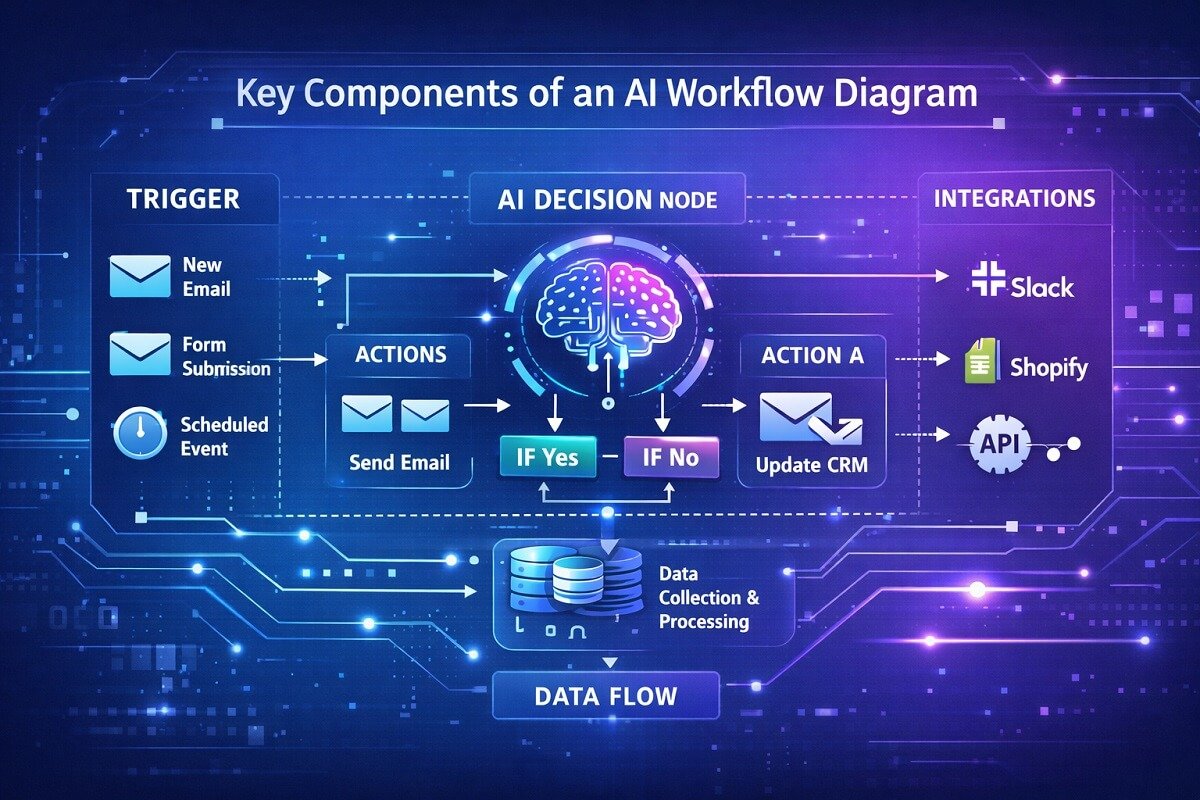
Data Flow
Data moves between different steps in the workflow. This could involve:
- API responses
- database queries
- AI model outputs
Integrations
Modern automation workflows often connect multiple software tools together, including CRMs that help manage customer data and automate sales pipelines. However, most common and popular integrations include:
- CRM systems
- marketing platforms
- analytics tools
Types of AI Workflow Diagrams
Not every AI automation project uses the same type of workflow diagram. The right visualization depends on the complexity of the automation, the audience, and the purpose of the documentation. Some diagrams are designed to explain business processes, while others focus on data movement, AI decision-making, or collaboration between multiple departments.
Understanding these diagram types helps you choose the best format for planning, communicating, and improving AI-powered automation systems.
Workflow Diagrams
Workflow diagrams are the most common way to visualize AI automation processes. They illustrate the sequence of activities from the initial trigger to the final outcome, making it easy to understand how tasks, AI models, and software integrations work together.
Workflow diagrams are commonly used for:
- AI marketing automation
- Customer support automation
- CRM workflows
- AI content publishing
- Business process automation
Because they provide a clear overview of an automation process, workflow diagrams are ideal for both technical teams and business stakeholders.
Flowcharts
Flowcharts use standardized symbols to represent actions, decisions, inputs, and outputs. They are one of the simplest ways to explain how an AI workflow operates.
A typical AI flowchart might include:
Start
│
▼
Receive Customer Request
│
▼
AI Analyzes Request
│
┌─┴────────┐
▼ ▼
Urgent Standard
│ │
▼ ▼
Human AI Reply
Agent
Flowcharts are especially useful when explaining automation logic to non-technical users because they focus on the order of decisions rather than technical implementation.
Process Maps
Process maps provide a high-level overview of an entire business process rather than individual automation tasks. Instead of showing every API call or AI model, a process map illustrates how major business activities connect.
For example, an AI-powered sales process map may include:
- Lead generation
- Customer qualification
- Sales engagement
- Proposal creation
- Closing the sale
- Customer onboarding
Process maps help organizations identify inefficiencies and optimize workflows before implementing automation.
BPMN Diagrams (Business Process Model and Notation)
BPMN diagrams are widely used by enterprises to document complex business processes using internationally recognized symbols. Compared to standard workflow diagrams, BPMN diagrams support advanced features such as:
- Parallel workflows
- Multiple decision paths
- Timers and events
- Human approval steps
- System interactions
Organizations often use BPMN when documenting large automation projects involving multiple departments or enterprise applications. Although BPMN diagrams are more detailed, they provide a standardized way to communicate automation requirements across technical and business teams.
Swimlane Diagrams
Swimlane diagrams divide a workflow into horizontal or vertical lanes, with each lane representing a person, department, or software application.
For example:
Marketing
│ Lead Form
│
Sales
│ AI Lead Score
│
CRM
│ Update Contact
│
Support
│ Customer Follow-up
This format clearly shows which team or system is responsible for each task within the automation process. Swimlane diagrams are particularly useful for organizations where multiple departments collaborate on AI-powered workflows.
Data Flow Diagrams
Data flow diagrams focus on how information moves between systems instead of showing task sequences. They answer questions such as:
- Where does the data originate?
- Which systems process the data?
- How does AI transform the information?
- Where is the final output stored?
Typical components include:
- Data sources
- Databases
- AI models
- APIs
- External applications
- Reports
Data flow diagrams are widely used when designing machine learning pipelines, analytics platforms, and enterprise integrations.
AI Decision Trees
AI decision trees visualize how artificial intelligence chooses different outcomes based on conditions or predictions. Compared to traditional workflow diagrams, decision trees emphasize the logic behind AI recommendations rather than the sequence of workflow steps.
For example:
Customer Message
│
▼
Positive Sentiment?
┌──┴──┐
Yes No
│ │
▼ ▼
Auto Human
Reply Support
Decision trees are commonly used for:
- Fraud detection
- Medical diagnosis
- Product recommendations
- Customer support routing
- Lead qualification
- Risk assessment
They help explain AI behavior in a way that is easy for both developers and business users to understand.
Which Diagram Type Should You Choose?
The best diagram depends on your goals and the complexity of your automation.
Diagram Type | Best For |
Workflow Diagram | End-to-end AI automation |
Flowchart | Simple automation logic |
Process Map | Business process improvement |
BPMN Diagram | Enterprise automation |
Swimlane Diagram | Cross-team collaboration |
Data Flow Diagram | Data movement and AI pipelines |
AI Decision Tree | AI decision-making and predictions |
For many organizations, combining multiple diagram types provides the clearest picture of how AI systems operate. A workflow diagram may show the overall automation process, while a data flow diagram explains how information moves between systems and an AI decision tree illustrates how the model selects different outcomes.
Why Understanding Different Diagram Types Matters
Selecting the right visualization method makes AI workflows easier to design, communicate, and optimize. Whether you’re documenting a simple automation or a large enterprise system, using the appropriate diagram helps teams reduce complexity, improve collaboration, and maintain scalable automation as business needs evolve.
How AI Workflow Automation Works
AI workflow automation combines traditional automation with artificial intelligence capabilities, and platforms like n8n make it easy to build these systems visually through drag-and-drop logic. Many organizations build advanced systems using AI agent workflow automation to manage complex processes across multiple platforms.
The process typically follows this structure:
- A trigger activates the workflow.
- Data is collected from a source.
- AI models analyze the data.
- The system decides the next action.
- Automated tasks execute based on the decision.
“Automation tools like n8n and Zapier allow users to design these workflows visually, connecting triggers and actions through diagram-based interfaces. If you’re deciding which platform fits your automation needs, see our detailed comparison of Zapier vs Make vs n8n. This approach makes complex automation accessible even to users without deep programming knowledge.”
Common AI Workflow Patterns
Although every AI automation project is unique, most workflows follow a handful of common design patterns. Understanding these patterns helps businesses choose the right automation approach before creating detailed workflow diagrams.
The examples below introduce the most widely used AI workflow patterns. Later in this guide, you’ll see complete workflow diagram examples that illustrate how these patterns work in real-world automation scenarios.
Customer Support Automation
AI customer support workflows automate repetitive service tasks such as classifying customer requests, detecting intent, analyzing sentiment, and routing conversations to the appropriate team. These workflows reduce response times while allowing human agents to focus on more complex issues.
Common AI capabilities include:
- Intent recognition
- Sentiment analysis
- Ticket routing
- AI-generated replies
- Knowledge base search
The detailed customer support workflow diagram later in this guide shows how these components connect within a complete automation process.
Marketing Automation
AI marketing workflows automate lead generation, audience segmentation, campaign personalization, and follow-up activities. Instead of manually reviewing every lead, AI predicts which prospects are most likely to convert and automatically triggers the next marketing action.
Common AI capabilities include:
- Lead scoring
- Audience segmentation
- Personalized email campaigns
- Campaign optimization
- Predictive analytics
A complete marketing lead scoring workflow diagram appears later in this guide. Many companies combine these automations into a complete AI-driven B2B marketing system that manages lead generation, qualification, nurturing, and customer engagement from a single workflow.
AI Content Publishing
AI content publishing workflows streamline the content creation process by combining AI-assisted writing with human editing and automated publishing. These workflows help marketing teams produce content more efficiently while maintaining editorial quality.
Common AI capabilities include:
- Topic generation
- Draft creation
- Content summarization
- SEO recommendations
- Internal linking suggestions
A detailed AI content creation workflow example is provided later in this article.
Sales Automation
AI sales workflows help teams qualify prospects, prioritize opportunities, automate follow-ups, and enrich CRM records. By reducing manual work, sales representatives can spend more time engaging with high-value leads.
Common AI capabilities include:
- Lead qualification
- Opportunity scoring
- Sales forecasting
- CRM enrichment
- Follow-up recommendations
Organizations looking to standardize their sales process can also adapt proven sales workflow templates before adding AI-powered automation.
Data Processing Automation
AI data processing workflows automate tasks such as validating, cleaning, classifying, and analyzing large volumes of information. These workflows improve data accuracy while generating faster business insights.
Common AI capabilities include:
- Data classification
- Anomaly detection
- Predictive analysis
- Trend forecasting
- Automated reporting
Document Processing Automation
AI document processing workflows extract and organize information from invoices, contracts, forms, and other business documents. By combining OCR with AI models, organizations reduce manual data entry and improve processing accuracy.
Common AI capabilities include:
- OCR text extraction
- Document classification
- Entity recognition
- Data validation
- Automated filing
These patterns provide a foundation for understanding how AI automation is commonly implemented across industries. In the following sections, you’ll explore complete AI workflow diagram examples that demonstrate how these patterns translate into real-world automation processes.
Which AI Workflow Pattern Is Right for You?
The best workflow pattern depends on your business objectives and the processes you want to automate.
Workflow Pattern | Primary Goal | Common Industries |
Customer Support | Faster response times | SaaS, Retail, Banking |
Marketing Automation | Lead generation and nurturing | Marketing, E-commerce |
Content Publishing | Faster content production | Media, Agencies |
Sales Automation | Improve conversions | B2B Sales, CRM |
Data Processing | Analyze large datasets | Finance, Healthcare |
Document Processing | Extract structured information | Legal, Insurance, Accounting |
Many organizations combine several of these workflow patterns into a single AI automation system. For example, a marketing workflow may automatically generate leads, qualify them with AI, update a CRM, and trigger a sales automation workflow. Visualizing these connected processes with AI workflow diagrams helps teams build scalable, efficient automation systems that are easier to understand, maintain, and optimize.
How to Create an AI Workflow Diagram (Step-by-Step)
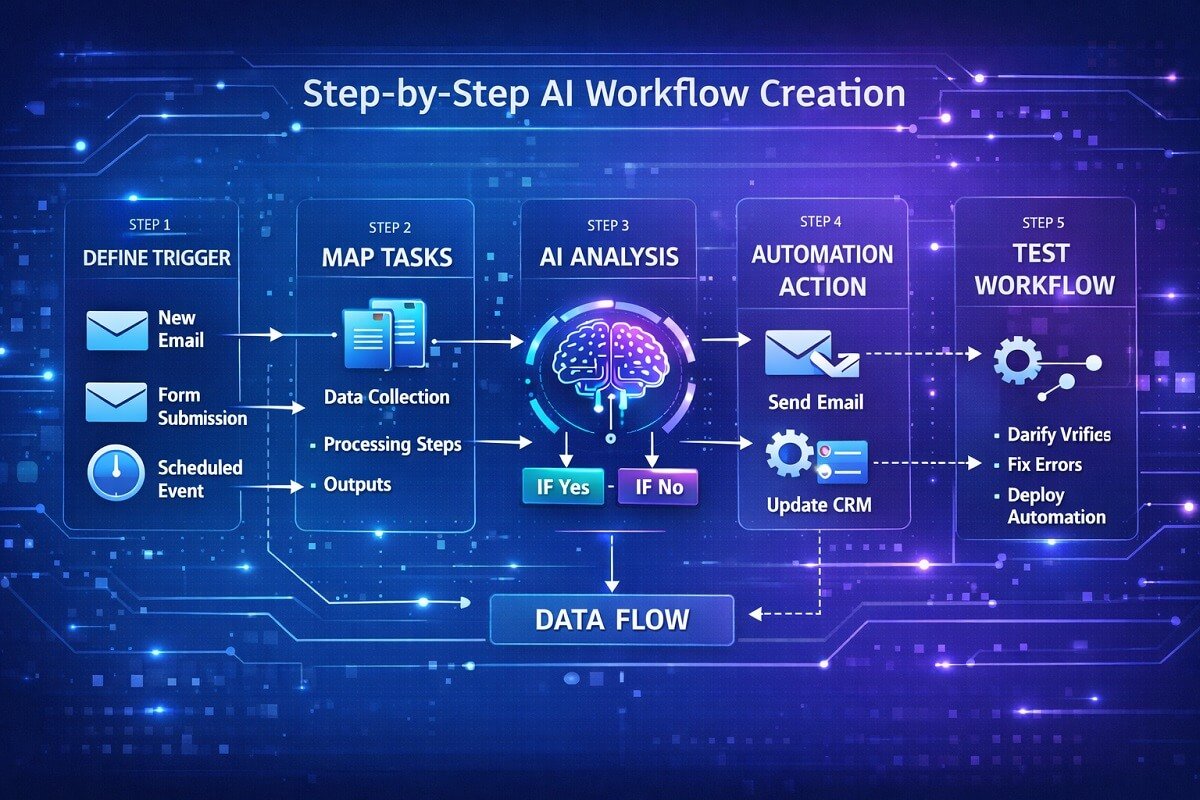
Understanding automation systems and AI workflows helps teams design diagrams that reflect real operational processes. However, creating an effective AI workflow diagram requires careful planning.
Step 1: Define the Process
Start by identifying the process you want to automate. Examples include:
- email marketing automation
- customer support routing
- content publishing pipelines
Clearly define the goal of the automation.
Step 2: Identify Triggers
Determine which event will start the workflow. Common triggers include:
- form submissions
- scheduled automation
- new customer signups
Step 3: Map the Workflow Tasks
List all the tasks involved in the automation process. These may include:
- data collection
- AI analysis
- automated responses
Step 4: Add AI Decision Points
Identify steps where AI analyzes information.
Examples include:
- natural language processing
- predictive scoring
- recommendation engines
Step 5: Connect Integrations
Link the software tools used in the workflow. For example:
- CRM systems
- email platforms
- analytics tools
Step 6: Test the Workflow
Before deploying the automation, test the workflow to ensure every step works correctly. If you prefer starting from proven designs instead of building from scratch, these AI workflow templates can significantly speed up workflow planning and implementation.
AI Workflow Diagram Checklist
Before finalizing your AI workflow diagram, review this checklist to ensure it includes all the essential components of a well-designed automation process. A complete workflow diagram is easier to understand, maintain, troubleshoot, and scale as your automation grows.
Essential Workflow Components
Use this checklist when creating or reviewing an AI workflow diagram:
| ✓ Checklist Item | Why It Matters |
|---|---|
| ✅ Clearly defined workflow objective | Keeps the automation focused on a specific business goal. |
| ✅ Trigger event | Identifies what starts the workflow, such as a form submission or scheduled task. |
| ✅ Input data | Shows where the workflow receives information from users, APIs, databases, or other systems. |
| ✅ AI model or decision node | Indicates where artificial intelligence analyzes data or makes predictions. |
| ✅ Decision logic | Explains how the workflow branches based on AI outputs or predefined conditions. |
| ✅ Automated actions | Lists tasks performed automatically, such as sending emails or updating records. |
| ✅ API integrations | Documents connections with external services and applications. |
| ✅ CRM or business systems | Identifies where customer or operational data is stored and updated. |
| ✅ Database or cloud storage | Shows where information is saved during the workflow. |
| ✅ Error handling | Defines what happens if an automation step fails or produces an unexpected result. |
| ✅ Logging and monitoring | Records workflow activity to simplify troubleshooting and performance analysis. |
| ✅ Notifications | Alerts users or teams when important workflow events occur. |
| ✅ Human approval (if required) | Includes manual review steps for sensitive decisions or compliance requirements. |
| ✅ Final output | Clearly identifies the expected result of the workflow. |
Pro Tip
The best AI workflow diagrams are simple enough for non-technical stakeholders to understand while still providing the detail developers need to build and maintain the automation. If your diagram feels cluttered, consider splitting it into smaller workflows that focus on a single business process.
Best Tools for Creating AI Workflow Diagrams
Several tools help visualize automation workflows effectively. If you’re comparing software before building automation, our guide to AI workflow tools explains which platforms are best suited for workflow design, automation, and AI-powered business processes.
1. Lucidchart
Lucidchart is a popular diagramming platform used to create process maps, automation workflows, and system diagrams.
Key features:
- drag-and-drop diagram builder
- collaboration tools
- automation templates
2. Miro
Miro is widely used for brainstorming and visual workflow mapping. It is useful for teams designing complex automation pipelines together.
3. Microsoft Visio
Microsoft Visio provides professional diagramming capabilities for enterprise process modeling. Many organizations use it to create advanced workflow diagrams.
“Workflow diagrams are often paired with project management software for planning and collaboration. If you’re evaluating platforms for organizing automation projects, our comparison of Monday.com vs ClickUp vs Asana can help you choose the right solution.”
AI Workflow Diagram Example: Customer Support Automation
Customer support teams often automate ticket management using AI workflows. Example workflow:
- Customer sends a support message.
- AI analyzes the message content.
- The system categorizes the request.
- The ticket is routed to the appropriate department.
- Automated replies are sent when possible.
“Visualizing this process with a workflow diagram helps support teams improve response time and reduce manual workload.”

AI Workflow Diagram Example: AI Content Creation Automation
Many marketing teams use AI content automation workflows to streamline publishing pipelines. Our research showed that content marketing teams frequently use different approaches AI automation for publishing workflows.
Example process:
- Keyword research tools generate topic ideas.
- AI writing software creates a draft.
- Content editors review the article.
- The CMS schedules publication.
- Social media posts are automatically generated.
“Mapping this process using workflow diagrams helps teams coordinate tasks across multiple tools.”
AI Workflow Diagram Example: Marketing Lead Scoring
AI can help marketing teams identify high-value leads automatically. Example workflow:
- A visitor submits a lead form.
- Data is stored in the CRM system.
- AI analyzes behavior patterns.
- Leads receive a predictive score.
- High-scoring leads are sent to sales teams.
Many organizations integrate this process with AI SDR services to automate outreach, follow-ups, and lead qualification. This automation improves marketing efficiency and sales conversion rates.
Common Mistakes to Avoid in AI Workflow Diagrams
Poorly designed workflow diagrams can create confusion rather than clarity. Avoid these mistakes.
Overcomplicated diagrams
Too many steps make workflows difficult to understand.
Missing decision nodes
AI processes often include decision points that must be clearly represented.
Poor labeling
Every step in the workflow should have a clear and descriptive label.
Lack of documentation
Automation workflows should include notes explaining how each step works.
Best Practices for AI Workflow Visualization
Clear workflow diagrams follow several best practices.
Keep diagrams simple
Avoid unnecessary complexity.
Use consistent symbols
Standard workflow symbols improve readability.
Group related tasks
Organize workflow steps into logical sections.
Document AI decisions
Explain how AI models influence workflow outcomes.
“These practices make automation workflows easier to maintain and improve over time.”
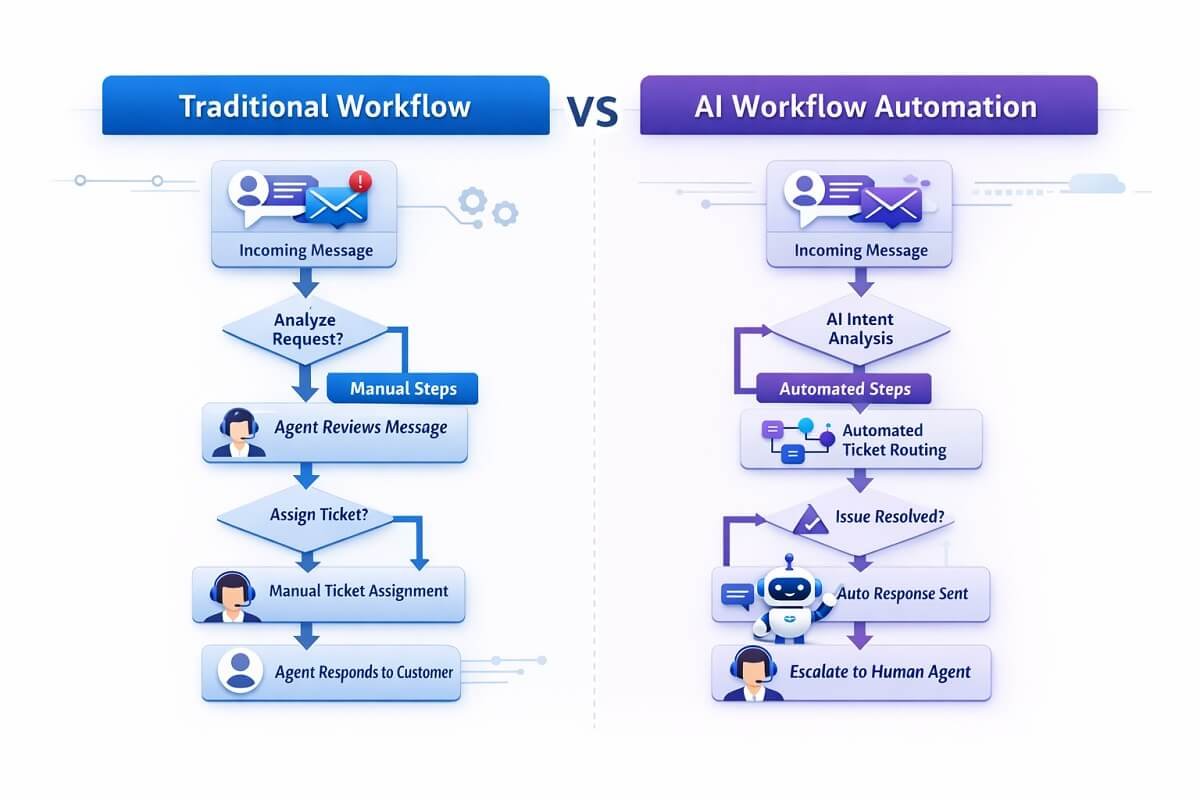
AI Workflow Diagrams vs Traditional Workflow Diagrams
Although they look similar, AI workflow diagrams differ from traditional diagrams in several ways.
| Feature | Traditional Workflow | AI Workflow |
| Decision logic | Manual rules | AI-driven decisions |
| Data analysis | Limited | Advanced machine learning |
| Automation level | Partial | Highly automated |
| Complexity | Moderate | Often complex |
AI workflows require more detailed visualization because of their advanced decision-making capabilities.
The Future of AI Workflow Automation
AI workflow automation continues to evolve rapidly. Emerging trends include:
- AI agents that run autonomous workflows
- predictive automation systems
- real-time decision-making pipelines
- self-improving automation models
“As automation tools continue to improve, visual workflow diagrams will remain an essential part of designing efficient AI systems.”
Conclusion
AI workflow diagrams provide a clear visual representation of how automated systems operate. They help teams understand complex automation pipelines, improve collaboration, and identify opportunities for optimization.
By mapping triggers, actions, AI decision points, and integrations, organizations can build efficient automation workflows that reduce manual effort and improve productivity.
Whether you are designing marketing automation, AI-powered customer support systems, or data processing pipelines, visual workflow diagrams make it easier to plan and manage automation processes effectively. As AI adoption continues to grow, mastering workflow visualization will become an increasingly valuable skill for developers, marketers, and business teams alike.
Frequently Asked Questions
What is the difference between an AI workflow diagram and an automation workflow?
An AI workflow diagram includes intelligent decision-making steps where algorithms analyze data and determine outcomes. A standard automation workflow follows fixed rules without learning or adapting. AI workflows are more dynamic and can improve over time based on data patterns.
How do AI workflow diagrams improve business efficiency?
AI workflow diagrams help teams identify inefficiencies such as redundant tasks, delays, or unnecessary integrations. By visualizing the full process, businesses can streamline operations, reduce manual intervention, and ensure faster execution of automated tasks.
Can beginners create AI workflow diagrams without coding skills?
Yes, many modern tools offer visual drag-and-drop interfaces that allow beginners to build workflows without writing code. Platforms like Zapier, n8n, and Make help it easy to design and manage workflows visually.
What industries benefit most from AI workflow diagrams?
AI workflow diagrams are widely used across industries such as:
- Marketing automation
- Customer support operations
- E-commerce and sales funnels
- Healthcare data processing
- Finance and fraud detection
“Any industry that relies on repetitive processes and data-driven decisions can benefit from workflow visualization.”
How detailed should an AI workflow diagram be?
An effective workflow diagram should balance clarity and detail. It should include all critical steps such as triggers, actions, and AI decision points, but avoid unnecessary complexity. Overloading a diagram with too many elements can make it harder to understand and maintain.
Are AI workflow diagrams useful for team collaboration?
Yes, they play a major role in cross-team collaboration. Visual workflows allow developers, marketers, and operations teams to align on processes without needing deep technical knowledge. This shared understanding reduces miscommunication and speeds up project execution.
What are the best formats to export or share workflow diagrams?
Most diagram tools allow exporting workflows in formats such as:
- PNG or JPEG for presentations
- PDF for documentation
- Interactive links for team collaboration
- Embedded diagrams for websites
“Choosing the right format depends on whether the diagram is used for internal collaboration or external documentation.”
How often should AI workflows be updated or reviewed?
AI workflows should be reviewed regularly, especially when:
- Business processes change
- New tools or integrations are added
- AI models are updated or retrained
- Performance issues are detected
“Regular updates ensure the workflow remains efficient and aligned with current goals.”
Do AI workflow diagrams help with scaling automation systems?
Yes, they are essential for scaling. A well-structured diagram acts as a blueprint that allows teams to expand workflows, add new integrations, and handle higher data volumes without breaking the system.
What are common tools used alongside AI workflow diagrams?
Besides diagramming tools, teams often use:
- CRM platforms for customer data
- Analytics tools for performance tracking
- AI APIs for decision-making
- Cloud storage systems for data handling
“Workflow diagrams help visualize how all these tools interact within a single automation ecosystem.”